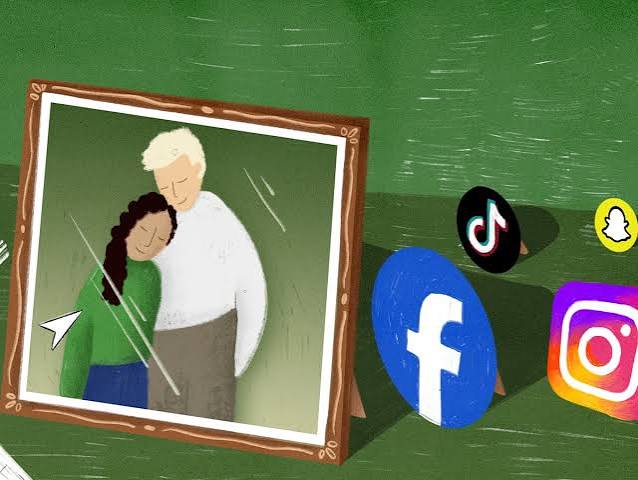
You probably have over 100 digital accounts. Email, social media, banking, streaming, cloud storage — most people never think about what happens to them after death. The platforms have policies, but they’re inconsistent and often buried in terms of service. If you haven’t planned, your heirs may face months of bureaucracy or lose access forever.
This isn’t a niche problem. By 2030, Facebook alone could host hundreds of millions of deceased users. The average person has no plan. Surveys show fewer than 1 in 5 have documented their accounts or passwords. And the legal and technical realities are more complicated than most people expect.
The Gateway Problem: Email
Email is often the key to everything else. Password resets for banking, social media, and subscriptions all route through your inbox. For Google accounts, the Inactive Account Manager lets you choose a trusted contact who gets access after a period of inactivity — 3, 6, 12, or 18 months. Without that setting, your family may need a court order.
Apple’s Digital Legacy program allows up to 5 Legacy Contacts to access data after death, but they need a death certificate and an access key. Microsoft has a next-of-kin process, but it’s not guaranteed. The reality: if you haven’t set up a legacy tool, your email could become a brick wall.
Social Media: Memorialization vs. Deletion
Facebook and Instagram offer memorialization. A legacy contact can pin posts, update profile pictures, and download data — but they can’t read private messages. Verified family members can request deletion. X (formerly Twitter) has no memorialization; family can request removal, but content is deleted, not preserved. LinkedIn and TikTok also remove accounts on request, with no legacy options.
Each platform has different rules, and none of them are designed for convenience. A grieving family may need to provide death certificates, court orders, and proof of relationship just to close an account.
The Financial Minefield: Crypto and Subscriptions
Financial accounts go through probate, but cryptocurrency is a special disaster. If no one has the private keys or seed phrase, the assets are permanently lost. An estimated 20% of all Bitcoin — worth billions — is already inaccessible due to lost keys, including from deceased owners.
Subscriptions are another hidden issue. Streaming services, cloud storage, and other auto-renewals may keep billing the estate until someone cancels them. Without a list of accounts, families may pay for months or years after a death.
The Legal Tangle: RUFADAA and Platform Rules
Most U.S. states have adopted the Revised Uniform Fiduciary Access to Digital Assets Act (RUFADAA). It gives executors authority over digital assets, but respects the deceased’s privacy choices. If the deceased never consented to sharing content, the executor may not be able to access it.
Terms of Service agreements often override state law. Platforms argue that accounts are licensed, not owned, and that users agreed to non-transferability. Federal laws like the Stored Communications Act can make unauthorized access a crime, even with a password.
What You Can Do Now
- List your accounts. Use a password manager or a simple spreadsheet. Include email, social media, banking, crypto, subscriptions, and cloud storage.
- Use platform tools. Set up Google’s Inactive Account Manager, Apple’s Digital Legacy, and Facebook’s legacy contact.
- Document your wishes. Specify whether you want accounts memorialized or deleted. Include this in your will or a separate digital estate plan.
- Store passwords securely. Share them with a trusted person via a password manager’s emergency access feature, not in a note on your phone.
- Tell someone. Your executor needs to know where your digital plan is and how to access it.
Your digital life doesn’t have to be a burden for your family. With a little planning, you can ensure your photos, messages, and assets are handled the way you want. The tools exist — you just have to use them.
Summary
- The average user has over 100 digital accounts, but fewer than 1 in 5 have documented them for heirs.
- Email is the gateway account: Google, Apple, and Microsoft offer legacy tools, but without them, families face court orders.
- Social media platforms have inconsistent policies: Facebook and Instagram memorialize, Twitter deletes, LinkedIn just removes.
- Cryptocurrency is a major risk: if keys are lost, assets are gone forever. Subscriptions may keep billing the estate.
- RUFADAA gives executors authority but respects privacy choices; Terms of Service can override state law.
- Plan now: list accounts, use platform tools, document wishes, and store passwords securely.
FAQ
Q: Can my family access my email after I die?
A: It depends. Google, Apple, and Microsoft offer legacy tools that let you designate a trusted contact. Without them, families may need a court order or may be denied access entirely.
Q: What happens to my Facebook account when I die?
A: It can be memorialized (locked with a “Remembering” tag) or deleted. A legacy contact can manage the memorialized account, but cannot read private messages.
Q: Will my family inherit my cryptocurrency?
A: Only if they have the private keys or seed phrase. Without them, the assets are permanently lost, regardless of legal ownership.
Q: Do I need a lawyer to plan for digital assets?
A: Not necessarily. You can start with free tools from platforms and a simple document listing accounts and wishes. But for complex estates, a lawyer familiar with RUFADAA can help.
Q: Can my executor access all my digital accounts?
A: Not automatically. RUFADAA gives executors authority, but platforms may require proof of consent from the deceased. If you haven’t given permission in a will or via platform tools, access may be denied.
Leave a Reply