Tag: productivity

  • 12 Small Daily Habits of Highly Successful People (and the Science Behind Them)

    12 Small Daily Habits of Highly Successful People (and the Science Behind Them)

    Success rarely comes from one dramatic breakthrough. More often, it’s the quiet accumulation of small, daily actions that compound over time. Think of the CEO who reads 20 pages every night, or the athlete who visualizes success for ten minutes each morning. These micro-routines—each taking less than half an hour—are the building blocks of high achievement.

    But do these habits actually work, or are they just survivor stories? While many lists rely on celebrity anecdotes, the core behaviors are backed by psychology and productivity research. This article breaks down 12 of the most common small habits, explains why they matter, and offers practical ways to adopt them—without needing a 4 AM wake-up call.

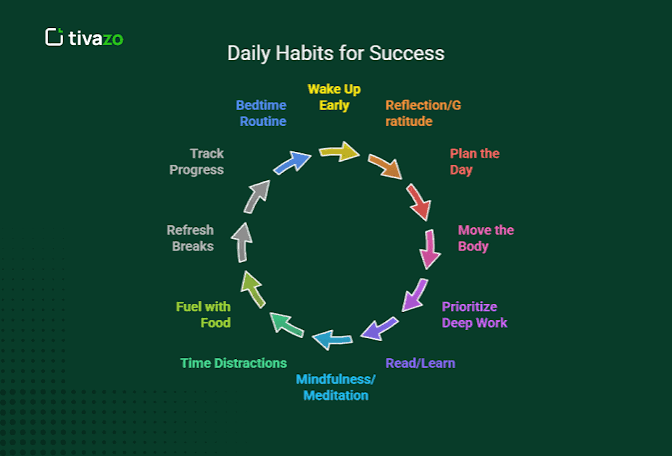
    1. Wake Up Early (But Not Necessarily at 3:45 AM)

    Apple CEO Tim Cook rises at 3:45 AM. That’s extreme, but many high achievers are early risers. The key isn’t the specific hour—it’s carving out quiet, distraction-free time before the world demands your attention. A 2010 study in the Journal of Applied Social Psychology found that early risers are more proactive and better at anticipating problems.

    Try it: Move your wake-up time 15 minutes earlier each week until you find a sustainable window. Use that time for something meaningful, not just checking email.

    2. Move Your Body for 10–20 Minutes

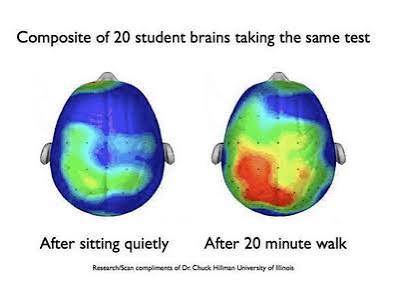
    Richard Branson says his daily exercise doubles his productivity. The science agrees: even short bursts of physical activity boost cognitive function, memory, and mood by increasing blood flow to the brain. A 2019 study in Frontiers in Psychology found that just 10 minutes of moderate exercise improves focus.

    Try it: Don’t aim for a 2-hour gym session. A brisk walk, a few yoga sun salutations, or a quick bodyweight circuit before your morning shower is enough.

    3. Read 20 Pages a Day

    Warren Buffett reads 5–6 hours a day—but the average person can’t replicate that. The “small” version is 20 pages. That’s roughly 15–20 minutes of reading. A 2014 study from the Journal of Applied Psychology showed that reading for pleasure reduces stress by 68%, and a 2013 study in Brain Connectivity found it improves brain connectivity in regions related to empathy and attention.

    Try it: Keep a book on your nightstand and commit to 20 pages before bed. If you prefer e-books, set a goal of 30 minutes of reading instead of scrolling.

    4. Write Down Your Top 3 Tasks for the Day

    Planning isn’t just about organization—it reduces decision fatigue. Psychologist Roy Baumeister’s research shows that making too many decisions depletes willpower. By choosing your top 3 priorities each morning, you start the day with intention, not reactivity.

    Try it: Every morning, before checking your phone, write down the three tasks that will have the most impact. Do the hardest one first (eat the frog).

    5. Journal for 5 Minutes

    Gratitude journaling has been shown to increase happiness and resilience. A 2003 study by Emmons and McCullough found that participants who wrote about gratitude for 10 minutes a week felt more optimistic and exercised more. Reflection journaling—reviewing what went well and what you learned—also boosts self-awareness.

    Try it: Each night, jot down one thing you’re grateful for and one thing you’d do differently. Keep it short—no pressure to write an essay.

    6. Meditate for 10 Minutes

    Salesforce CEO Marc Benioff credits meditation for his success. A 2011 study from Harvard found that mindfulness meditation can change brain structure in 8 weeks, increasing gray matter in regions linked to memory and emotion regulation. Even 10 minutes a day can lower stress and improve focus.

    Try it: Use an app like Headspace or Calm, or simply sit quietly and focus on your breath. If 10 minutes feels long, start with 5.

    7. Drink Water Before Coffee

    This habit is more about hydration than magic. After 7–8 hours of sleep, you’re mildly dehydrated, which can cause fatigue and brain fog. A 2012 study in the Journal of Nutrition found that even mild dehydration impairs mood and concentration.

    Try it: Keep a glass or bottle of water on your nightstand and drink it before you brew your morning coffee.

    8. Make Your Bed

    Admiral William McRaven’s 2014 commencement speech made this famous: “If you make your bed every morning, you will have accomplished the first task of the day.” It’s a small win that sets a tone of discipline. A 2017 study from the University of California, Davis, linked making your bed to better sleep quality.

    Try it: It takes 2 minutes. Do it right after you get up—no snooze button.

    9. Single-Task (Time-Block) for 25-Minute Chunks

    Multitasking is a myth. Stanford researcher Clifford Nass found that heavy multitaskers are worse at filtering out irrelevant information. Instead, high achievers time-block—focusing on one task for a set period. The Pomodoro Technique (25 minutes of work, 5-minute break) is a simple way to build this habit.

    Try it: Pick one task, set a timer for 25 minutes, and turn off notifications. You’ll be amazed at what you can accomplish.

    10. Learn Something New During Your Commute

    Successful people are lifelong learners. Instead of scrolling social media on the train, they listen to a podcast, an audiobook, or a language app. A 2015 study in the Journal of Applied Psychology found that continuous learning increases job performance and career satisfaction.

    Try it: Download a podcast or audiobook that interests you. Even 15 minutes a day adds up to over 90 hours a year.

    11. Make One Small Connection Per Day

    Networking doesn’t have to mean schmoozing at events. A simple “touch base”—a quick email, a LinkedIn message, or a comment on someone’s post—keeps your network warm. A 2019 study in the Academy of Management Journal found that maintaining weak ties (acquaintances) leads to more job opportunities and innovation.

    Try it: Each day, reach out to one person you haven’t spoken to in a while. Ask how they’re doing, not for a favor.

    12. Unplug for the First and Last Hour of the Day

    Digital detox is a buzzword, but it has real benefits. A 2018 study in the Journal of Experimental Psychology found that taking a break from screens reduces stress and improves sleep. Checking your phone first thing triggers a cortisol spike, putting you in a reactive state.

    Try it: Leave your phone outside the bedroom or use a physical alarm clock. For the first hour after waking, avoid email and social media. Do the same for the hour before bed.

    But Wait—Do These Really Work?

    It’s easy to fall into the “successful people do X” trap. The truth is, these habits are not magic bullets. They work because they align with basic psychology: they reduce friction, build momentum, and create a sense of control. However, correlation is not causation. Successful people may also develop these habits because they have more autonomy and resources.

    That’s why the “small” qualifier is so important. You don’t need to adopt all 12. Pick one or two that resonate and stack them onto existing routines. For example, drink water right after you make your bed (habit stacking). Research suggests it takes an average of 66 days for a habit to become automatic, but smaller behaviors are more likely to stick.

    And if a habit doesn’t work for you, that’s okay. Not everyone thrives on a rigid 5 AM routine. Some people are night owls; some neurodivergent brains need novelty. The goal isn’t to copy Tim Cook—it’s to find small actions that improve your day.

    The habits of highly successful people are not about grand gestures. They’re about the small, daily choices that compound into extraordinary results. Whether it’s making your bed, reading 20 pages, or taking a 10-minute walk, the key is consistency. Start with one habit, be patient, and remember: success is not a single decision—it’s a thousand small ones repeated daily.

    Summary

    • Small habits compound: 5–30 minute daily actions lead to significant long-term results.
    • Science supports many habits: Exercise, planning, gratitude journaling, and reading have measurable cognitive and emotional benefits.
    • You don’t need all 12: Pick 1–3 habits that fit your lifestyle and stack them onto existing routines.
    • Beware of survivorship bias: Celebrity examples are anecdotal; focus on the behavioral psychology, not the famous names.
    • Adapt to your needs: Not every habit works for everyone—sleep, neurodiversity, and personal preferences matter.

    FAQ

    Q: How long does it take to form a habit?
    A: Research by Lally et al. (2010) found it takes an average of 66 days for a behavior to become automatic, but the range is 18 to 254 days. Smaller, simpler habits tend to stick faster.

    Q: Can I really become successful just by making my bed?
    A: No single habit guarantees success. But making your bed builds a sense of order and accomplishment that can trigger a chain of positive behaviors. It’s a starting point, not a magic wand.

    Q: I’m not a morning person. Can I still be successful?
    A: Absolutely. The habit is about finding a quiet, focused time—not necessarily morning. Some people are more productive at night. Adjust the routines to your chronotype.

    Q: How do I avoid feeling overwhelmed by these habits?
    A: Start small. Choose one habit you’re excited about and practice it for a week. Then add another. Use habit stacking: link a new habit to an existing one (e.g., “After I brush my teeth, I will journal for 5 minutes”).

    Q: Are these habits supported by science or just anecdotes?
    A: Many are supported by psychology research (e.g., exercise, planning, meditation). However, the specific claim that “successful people do X” is largely anecdotal. Use the science as a guide, not a prescription.
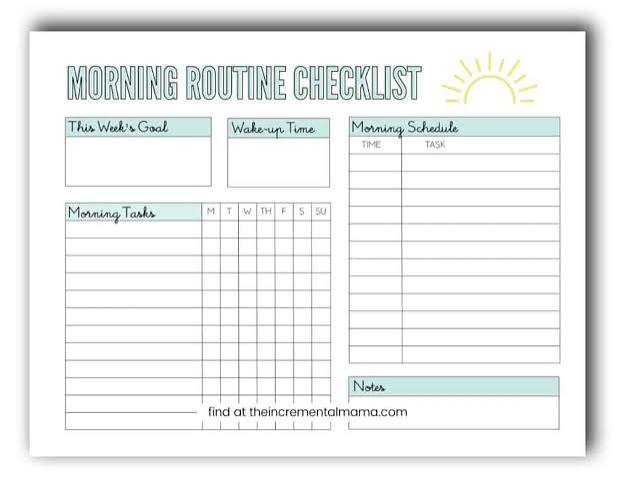
  • The Ultimate Morning Routine Checklist: Science-Backed Steps to Start Your Day Right

    The Ultimate Morning Routine Checklist: Science-Backed Steps to Start Your Day Right

    We’ve all seen the #morningroutine videos: influencers waking at 5 AM, meditating, journaling, and sipping lemon water before the sun rises. It’s inspiring—and overwhelming. But the truth is, there’s no single ‘perfect’ morning routine. What works for a CEO might fail for a night-owl artist or a parent of three.

    This guide cuts through the hype. We’ll walk through the core components of a morning routine, backed by science and expert consensus, and show you how to build a checklist that fits your life. Whether you have 15 minutes or two hours, these steps can help you feel more energized, focused, and in control—without the guilt.

    Why Morning Routines Matter (and What They Can’t Do)

    A morning routine is a consistent sequence of actions you take upon waking, usually within the first 30–90 minutes. It’s not the same as a schedule—it’s a habitual, repeatable pattern that signals to your brain and body that it’s time to start the day.

    The appeal is obvious: in a world of remote work, constant notifications, and burnout, a routine offers a sense of agency. It can reduce decision fatigue, lower anxiety, and boost productivity. But it’s not a magic bullet. Most research on morning routines is anecdotal, not clinical. The placebo effect and self-selection bias (people who thrive on routines are more likely to adopt them) are real. So, take any ‘miracle’ claims with a grain of salt.

    That said, certain components have solid scientific backing. Let’s break them down.

    The Core Components: What to Include

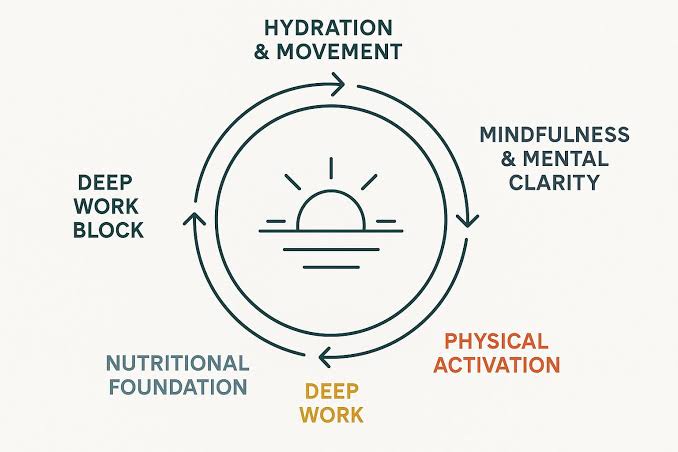
    1. Hydration: Reboot Your Body

    After 7–9 hours of sleep, you’re mildly dehydrated. Drinking 8–16 ounces of water upon waking helps kickstart your metabolism, improve cognitive function, and flush out toxins. It’s simple, cheap, and effective.

    How to do it: Keep a glass or bottle on your nightstand. Drink it before you reach for your phone.

    2. Light Exposure: Set Your Circadian Clock

    This is arguably the most powerful morning habit. Getting natural sunlight within the first hour of waking (10–30 minutes) regulates your circadian rhythm and triggers the cortisol awakening response, which helps you feel alert. It also improves sleep quality at night.

    How to do it: Step outside, open your curtains, or sit by a window. If it’s dark (winter months), consider a light therapy lamp.

    3. Movement: Wake Up Your Body

    Light stretching, yoga, walking, or a full workout—any movement helps increase blood flow, reduce stiffness, and boost mood. The duration can range from 5 to 45 minutes, depending on your fitness level and schedule.

    How to do it: Start small. A 5-minute stretch or a short walk around the block is better than nothing. Gradually increase as it becomes a habit.

    4. Mindfulness or Meditation: Center Your Mind

    Spending 5–20 minutes in meditation, journaling, or breathwork can reduce stress, improve focus, and enhance emotional regulation. It’s a chance to set an intention for the day.

    How to do it: Try a guided meditation app, write three things you’re grateful for, or simply sit quietly and focus on your breath.

    5. Planning and Goal-Setting: Prioritize Your Day

    Reviewing your to-do list and identifying 1–3 top priorities helps you start the day with clarity. It prevents the ‘shiny object’ syndrome and ensures you’re working on what matters most.

    How to do it: Spend 5 minutes writing down your top three tasks for the day. Keep it simple—don’t overplan.

    6. Nutrition: Fuel Your Brain

    A balanced breakfast with protein, fiber, and healthy fats within 1–2 hours of waking stabilizes blood sugar and sustains energy. Skipping breakfast can lead to mid-morning crashes.

    How to do it: Think eggs, Greek yogurt, oatmeal, or a smoothie. Avoid sugary cereals or pastries.

    7. Avoidance Behaviors: What to Delay

    • Phone and social media: Wait 30–60 minutes before checking your phone. This prevents dopamine spikes and allows your brain to wake up naturally.
    • Snooze button: It’s often demonized, but a brief, planned 10–15 minute snooze may not be harmful for everyone. The key is to avoid repeatedly hitting snooze, which fragments sleep.
    • Caffeine: Some sleep experts recommend waiting 60–90 minutes after waking before your first coffee. This is based on adenosine receptor dynamics, but it’s a heuristic, not a hard rule. If you’re not sensitive, a morning coffee is fine.

    How to Build Your Own Checklist

    There’s no one-size-fits-all routine. Your chronotype (whether you’re a morning lark or night owl) matters. Forcing a 5 AM wake-up on a night owl can backfire. The best routine is the one you can actually stick to.

    Start Small

    Begin with just two or three components. For example:
    – Drink water
    – Get sunlight
    – Do a 5-minute stretch

    Once that feels automatic, add another element, like journaling or planning.

    Consider Your Context

    • Parents: Your routine must adapt to children’s needs. Flexibility is key. Maybe you do a 10-minute version before the kids wake up.
    • Night owls: Don’t force an early wake-up. Focus on the components you can do at your natural wake time.
    • Minimalists: A ‘slow morning’ with just coffee and reading is valid. You don’t need a 10-step routine to be productive.

    Avoid the ‘More is Better’ Trap

    Adding 10 steps doesn’t increase effectiveness. Cognitive load and time pressure can negate the benefits. Keep it manageable.

    The Skeptical View: What the Research Really Says

    Most morning routine advice is anecdotal. The strongest evidence supports light exposure, hydration, and consistent sleep/wake times. Meditation and exercise have broad health benefits, but their specific timing in the morning is less rigorously studied.

    Also, beware of the ‘morning routine industry’—apps, journals, supplements, and smart alarms are a multi-million-dollar market. They have an incentive to exaggerate claims. Use them if they help, but don’t believe the hype.

    A Sample Checklist to Get You Started

    Here’s a flexible template you can adapt:

    • Wake up (same time every day, even weekends)
    • Drink 8–16 oz of water
    • Get 10–30 minutes of natural light (or use a light lamp)
    • Move your body (5–15 minutes of stretching, yoga, or a walk)
    • Meditate or journal (5–10 minutes)
    • Review your top 3 priorities (2 minutes)
    • Eat a balanced breakfast (within 1–2 hours)
    • Delay phone and caffeine (if possible, for 30–60 minutes)

    Remember, this is a starting point, not a rigid rule. Tweak it to fit your life.

    The ultimate morning routine isn’t about perfection—it’s about consistency and self-awareness. Start with the science-backed basics: hydrate, get light, move, and plan. Then, add what feels right for you. The goal is to feel more grounded and ready for the day, not to check off a list. So, take what works, leave what doesn’t, and build a routine that’s truly yours.

    Summary

    • A morning routine is a habitual sequence of actions within the first 30–90 minutes of waking; it’s not a rigid schedule.
    • Strongest scientific support: light exposure, hydration, and consistent sleep/wake times.
    • Core components: water, sunlight, movement, mindfulness, planning, and a balanced breakfast.
    • Avoid the ‘more is better’ trap; start small and adapt to your chronotype and lifestyle.
    • Be skeptical of exaggerated claims; most advice is anecdotal, not clinically proven.

    FAQ

    Q: How long should a morning routine be?
    A: There’s no universal length. Most routines fall between 15 minutes (minimalist) and 2 hours (extensive). The key is consistency, not duration. Start with 15 minutes and adjust based on what feels sustainable.

    Q: Is it bad to check my phone first thing in the morning?
    A: Many experts recommend delaying phone use for 30–60 minutes to avoid dopamine spikes and allow your brain to wake naturally. However, if you need your phone for an alarm or a quick weather check, that’s fine—just avoid social media and email.

    Q: Should I really wait 90 minutes before drinking coffee?
    A: The ‘wait 90 minutes’ rule is based on adenosine receptor dynamics, but it’s not universally supported by clinical trials. It’s a reasonable heuristic for some, but if you’re not sensitive to caffeine, a morning coffee is fine. Listen to your body.

    Q: What if I’m a night owl? Can I still have a morning routine?
    A: Absolutely. Don’t force a 5 AM wake-up. Focus on the components you can do at your natural wake time. Light exposure and hydration are still beneficial, even if it’s later in the morning.

    Q: Are cold showers a necessary part of a morning routine?
    A: No. Cold showers are popular among some influencers, but they’re not essential. If you enjoy them, great—they may boost alertness. But you can get the same benefits from a regular shower or a splash of cold water on your face.

  • 7 Science-Backed Shortcuts to Learn Any New Skill in 30 Days

    7 Science-Backed Shortcuts to Learn Any New Skill in 30 Days

    We’ve all been there: staring at a guitar, a blank page, or a language app, dreaming of being fluent in a month. The idea of mastering a new skill in 30 days sounds like a fantasy, but it’s actually a realistic goal—if you know the right shortcuts. Research from cognitive science, habit formation, and expert performance reveals that the key isn’t raw hours, but smart, strategic practice. In this guide, we’ll break down seven evidence-based shortcuts that can take you from novice to noticeable progress in just one month, without burning out.

    1. Define Your ‘Minimum Viable Skill’

    Before you dive in, ask yourself: What does ‘good enough’ look like? This is the core of the ‘minimum viable skill’ concept popularized by Tim Ferriss. Instead of vaguely wanting to ‘learn Spanish’ or ‘play guitar,’ define a specific, achievable goal. For example, ‘I want to hold a 5-minute conversation in Spanish about travel’ or ‘I want to play three chords smoothly and switch between them.’ This clarity prevents you from getting lost in the vast sea of information and focuses your practice on what matters most.

    Why it works: The Pareto Principle (80/20 rule) suggests that 80% of results come from 20% of effort. By identifying the vital 20% of sub-skills that will get you to your goal, you avoid wasting time on less important aspects. This is the difference between aimless practice and deliberate practice.

    2. Deconstruct the Skill into Sub-Skills

    Once you have a clear goal, break it down into its component parts. If you want to cook a gourmet meal, the sub-skills might be knife skills, sauce-making, and timing. If you’re learning to code, it might be variables, loops, and functions. Write these down and rank them by importance and difficulty.

    Why it works: This approach, championed by Josh Kaufman in ‘The First 20 Hours,’ helps you create a roadmap. It also makes the skill less intimidating. Instead of ‘learn to code,’ you’re tackling ‘write a loop in Python.’ Each sub-skill is a small, manageable chunk that you can practice in focused sessions.

    3. Use the 80/20 Rule to Prioritize Practice

    Now that you have your sub-skills, apply the 80/20 rule again. Which 20% of these sub-skills will give you 80% of the results? For example, in language learning, the most common 1,000 words cover about 80% of everyday conversation. In photography, understanding exposure (aperture, shutter speed, ISO) is more critical than mastering every menu setting. Focus your practice time on these high-impact areas first.

    Why it works: This is a form of strategic laziness—being efficient with your effort. It ensures that your 30 days are spent on the things that actually move the needle, rather than getting bogged down in details that can wait.

    4. Practice in Short, Focused Bursts (Deliberate Practice)

    Anders Ericsson’s research on expert performers shows that the key to improvement is not just practice, but deliberate practice: focused, goal-oriented, and with immediate feedback. This means setting specific objectives for each session (e.g., ‘I will play this scale at 80 BPM without mistakes’) and actively working on weaknesses, rather than mindlessly repeating what you already know.

    Why it works: Deliberate practice is mentally taxing, so it’s best done in short, intense bursts. The Pomodoro Technique (25 minutes of focus, 5-minute break) is a great framework. This approach prevents the ‘fluency illusion’—where you think you’re improving because you’re familiar with the material, but you can’t actually perform it.

    5. Leverage Spaced Repetition and Retrieval Practice

    Cognitive science has consistently shown that spaced repetition—reviewing material at increasing intervals—dramatically improves retention compared to cramming. Tools like Anki or Quizlet are built on this principle. Similarly, retrieval practice (testing yourself) is far more effective than re-reading or highlighting.

    Why it works: When you force your brain to recall information, you strengthen the neural pathways. Spacing out your reviews ensures that the information moves from short-term to long-term memory. For motor skills, this means practicing a technique, then taking a break, then coming back to it—your brain consolidates the learning during the rest.

    6. Use the Feynman Technique to Identify Gaps

    Named after physicist Richard Feynman, this technique is simple: explain the concept you’re learning in plain, simple language, as if teaching a child. If you stumble or find yourself using jargon, that’s a gap in your understanding. Go back to the material, fill the gap, and simplify again.

    Why it works: This forces you to actively engage with the material and exposes what you don’t know. It’s a powerful feedback loop that accelerates learning. You can do this alone or with a friend—just explain what you’ve learned and see if they understand.

    7. Prioritize Sleep and Rest Days

    It might seem counterintuitive, but one of the best shortcuts to learning is to stop practicing. Research shows that memory consolidation and motor skill improvement happen during sleep. A 30-day plan that sacrifices sleep for practice is counterproductive. Similarly, taking rest days allows your brain and body to recover, preventing burnout and injury.

    Why it works: Your brain processes and strengthens new connections while you sleep. This is especially important for motor skills, like playing an instrument or a sport. So, aim for 7-9 hours of sleep per night and schedule at least one rest day per week. This isn’t laziness—it’s part of the learning process.

    Putting It All Together: A 30-Day Framework

    Here’s a simple way to structure your 30 days:

    • Week 1: Deconstruct the skill, define your minimum viable skill, and identify the vital 20%. Spend this week in the ‘cognitive stage’—understanding what to do, watching tutorials, and getting a feel for the skill.
    • Week 2: Start deliberate practice on the top sub-skills. Use the Pomodoro Technique and focus on quality over quantity. Begin using spaced repetition for any factual knowledge.
    • Week 3: Increase intensity and start mixing sub-skills (interleaving). Use the Feynman Technique to check your understanding. This is the ‘associative stage’—refining your technique.
    • Week 4: Simulate real-world use. If you’re learning a language, have a conversation. If you’re learning to code, build a small project. This is where you move toward the ‘autonomous stage.’

    Remember, the goal isn’t perfection—it’s noticeable progress. By the end of 30 days, you’ll have built a foundation that you can continue to grow.

    Learning a new skill in 30 days isn’t about magic—it’s about being strategic. By defining a clear goal, deconstructing the skill, focusing on the vital few, and using evidence-based techniques like deliberate practice and spaced repetition, you can make rapid progress. The key is to work smarter, not harder, and to remember that rest and sleep are just as important as practice. So pick a skill, apply these shortcuts, and see what you can achieve in a month.

    Summary

    • Define a ‘minimum viable skill’ to focus your efforts and avoid overwhelm.
    • Deconstruct the skill into sub-skills and prioritize using the 80/20 rule.
    • Use deliberate practice in short, focused bursts with clear goals and feedback.
    • Leverage spaced repetition and retrieval practice to boost retention.
    • Apply the Feynman Technique to expose gaps in your understanding.
    • Prioritize sleep and rest days—they’re essential for memory consolidation and motor learning.

    FAQ

    Q: Can I really learn any skill in 30 days?
    A: You can learn the fundamentals and reach a beginner-intermediate level in many skills, but complex professional-level skills (like surgery or concert-level piano) require much more time. The 30-day goal is to build a solid foundation and see measurable progress.

    Q: How many hours per day should I practice?
    A: Quality over quantity. 1-2 hours of deliberate practice per day is more effective than 4 hours of mindless repetition. Use techniques like the Pomodoro method to stay focused.

    Q: What if I miss a day?
    A: Don’t panic. Consistency is important, but one missed day won’t derail your progress. Just get back on track the next day. The key is to maintain the habit over the long term.

    Q: Do I need expensive tools or courses?
    A: No. Many skills can be learned with free resources like YouTube tutorials, open-source software, or library books. The most important investment is your time and focus.

    Q: How do I stay motivated for 30 days?
    A: Tap into intrinsic motivation by choosing a skill you’re genuinely interested in. Set small, achievable goals and track your progress. Also, consider finding a learning partner or community for accountability.

  • The 5-Minute Morning Routine: Science-Backed Habits to Boost Your Energy Fast

    The 5-Minute Morning Routine: Science-Backed Habits to Boost Your Energy Fast

    Mornings can be brutal. The alarm blares, your body feels heavy, and the thought of tackling the day seems overwhelming. But what if a mere five minutes could set the tone for sustained energy and focus? The rise of micro-habits—small, easy actions that become automatic—has made the 5-minute morning routine a popular solution for time-poor individuals seeking a quick energy boost.

    This isn’t about adding more to your plate; it’s about strategically leveraging biology. By understanding how your body responds to light, hydration, movement, and breathing, you can design a brief ritual that works with your physiology, not against it. In this article, we’ll break down the core components of an effective 5-minute routine, backed by science, and show you how to customize it to your needs—without falling for common myths.

    Why 5 Minutes? The Power of Tiny Habits

    Behavioral psychologist BJ Fogg, creator of the ‘Tiny Habits’ method, argues that the smaller the behavior, the more likely it is to stick. A 5-minute routine is a gateway habit—it’s easy to start, requires minimal willpower, and can snowball into a more comprehensive wellness practice. Consistency trumps duration: a short routine done daily outperforms a lengthy one done sporadically. This aligns with research on habit formation, which shows that repetition and ease are key to automation.

    Moreover, a 5-minute routine addresses the immediate physiological needs of your waking body. After hours of sleep, you’re dehydrated, your blood sugar is low, and your circadian rhythm is waiting for cues to shift from sleep mode to alertness. A targeted sequence can jumpstart these processes efficiently.

    The Core Components: What Actually Works

    1. Hydration: Reboot Your System

    Your body loses water overnight through breathing and sweating, leaving you mildly dehydrated. Drinking a glass of water (about 8-12 ounces) within the first few minutes of waking helps rehydrate cells, improve blood flow, and kickstart metabolism. Adding a squeeze of lemon adds vitamin C and flavor, but the ‘detox’ claims are overstated—your liver and kidneys handle detoxification naturally. Electrolyte powders can be beneficial if you sweat heavily, but plain water is sufficient for most.

    2. Light Exposure: Set Your Circadian Clock

    Natural light is the strongest cue for your suprachiasmatic nucleus—the brain’s master clock. Getting sunlight within the first hour of waking helps regulate your circadian rhythm, increasing cortisol (the ‘wake-up’ hormone) and suppressing melatonin. A 2019 study in the Journal of Clinical Endocrinology & Metabolism found that morning light exposure improves alertness and mood. Even 5-10 minutes of outdoor light (or a lightbox in darker months) can make a difference. If you’re indoors, open curtains or step outside briefly.

    3. Movement: Get Blood Flowing

    Light stretching, yoga, or a burst of high-intensity exercise (like jumping jacks or squats) increases blood flow, delivering oxygen and nutrients to your brain and muscles. A 2019 study in the Journal of Physiology showed that brief morning exercise improves cognitive performance and metabolic health. You don’t need a full workout—just 2-3 minutes of movement can elevate your heart rate and boost energy. Even a brisk walk around the room counts.

    4. Breathing or Mindfulness: Calm the Chaos

    Deep breathing techniques, such as box breathing (inhale 4 seconds, hold 4, exhale 4, hold 4) or the 4-7-8 method, activate the parasympathetic nervous system, reducing stress and increasing alertness. A 2017 review in Frontiers in Psychology found that mindfulness practices improve attention and emotional regulation. Even 1-2 minutes of focused breathing can lower cortisol and set a calm, focused tone for the day.

    5. Cold Exposure: Optional but Potent

    A cold shower or a splash of cold water on your face can increase norepinephrine and dopamine, neurotransmitters linked to alertness and mood. Research by Dr. Rhonda Patrick and others suggests cold exposure may also improve resilience to stress. However, it’s not essential—and it’s not safe for everyone. If you have cardiovascular conditions, consult a doctor first. Start with a 30-second cold rinse at the end of your shower and gradually increase.

    Putting It Together: A Sample 5-Minute Sequence

    Here’s a practical sequence that incorporates all core elements:

    • 0:00-0:30 – Drink a glass of water (keep it by your bed).
    • 0:30-1:30 – Step outside or near a window for natural light. Do a few deep breaths.
    • 1:30-3:30 – Do 2 minutes of movement: jumping jacks, squats, or sun salutations.
    • 3:30-4:30 – Practice box breathing: 4 seconds in, 4 hold, 4 out, 4 hold.
    • 4:30-5:00 – Optional: splash cold water on your face or end your shower with a cold rinse.

    This sequence is flexible—you can swap order or omit components based on your preferences and schedule.

    Common Misconceptions: What to Avoid

    • ‘More is better’: Overcomplicating your routine defeats the purpose. Stick to 5 minutes; you can always add more later.
    • ‘Cold showers are essential’: They’re optional and can be risky for some. Listen to your body.
    • ‘Caffeine is part of the routine’: Many experts, including Dr. Andrew Huberman, recommend delaying caffeine 60-90 minutes after waking to avoid an afternoon crash. If you need coffee, wait until after your routine.
    • ‘It will fix poor sleep’: A morning routine cannot compensate for chronic sleep deprivation. Prioritize sleep hygiene first.
    • ‘Immediate energy’: Some benefits, like circadian alignment, take days to weeks. Instant energy is often just adrenaline from movement or cold water—still useful, but not a long-term fix.
    • ‘One-size-fits-all’: Your chronotype matters. Night owls may find a 5 a.m. wake-up counterproductive. Tailor your routine to your natural rhythm.

    Personalization: Adapt to Your Chronotype

    Your body’s internal clock influences when you feel most alert. If you’re a morning lark, you might naturally wake early and benefit from a vigorous routine. If you’re a night owl, forcing an early start can backfire. Instead, focus on the sequence that works for your wake time, and consider using a lightbox if you wake in darkness. Dr. Andrew Huberman suggests that light exposure is especially critical for night owls to shift their clocks earlier gradually.

    The Skeptical View: Is It All Hype?

    Some sleep researchers, like Dr. Matthew Walker, caution against over-structuring mornings. They argue that respecting natural waking patterns and sleep inertia—the grogginess you feel after waking—is more important than forcing a routine. A 5-minute routine can be beneficial, but it’s not a magic bullet. Energy management also depends on sleep quality, diet, and stress levels. Use the routine as a tool, not a cure-all.

    A 5-minute morning routine is a powerful, evidence-based way to boost energy and set a positive tone for the day. By focusing on hydration, light, movement, and breathing, you can address your body’s immediate needs without a significant time investment. Remember, consistency beats intensity—start small, personalize to your chronotype, and avoid the hype. Over time, these tiny habits can yield significant benefits for your physical and mental well-being.

    Summary

    • A 5-minute routine is effective because it’s a tiny habit that’s easy to maintain; consistency matters more than duration.
    • Key components: hydration, light exposure, movement, breathing/mindfulness, and optional cold exposure.
    • Science supports morning light for circadian rhythm, brief exercise for cognitive and metabolic benefits, and deep breathing for stress reduction.
    • Avoid common myths: cold showers aren’t essential, caffeine should be delayed, and a routine can’t fix poor sleep.
    • Personalize your routine based on your chronotype and health conditions; start small and adapt.

    FAQ

    Q: Can I do a 5-minute routine if I’m not a morning person?
    A: Yes, but tailor it to your wake time. If you’re a night owl, don’t force a 5 a.m. wake-up. Instead, do the routine when you naturally wake, and consider using a lightbox if it’s dark outside.

    Q: Is it better to do cardio or stretching in the morning?
    A: Both are beneficial. Cardio (like jumping jacks) boosts heart rate and energy quickly, while stretching improves flexibility and reduces stiffness. You can alternate days or combine both in a 2-minute block.

    Q: How long before I see benefits from a morning routine?
    A: Some effects, like increased alertness from movement or cold water, are immediate. Others, like circadian alignment, may take days to weeks. Consistency is key.

    Q: Can I drink coffee as part of my routine?
    A: Many experts recommend waiting 60-90 minutes after waking to drink caffeine to avoid an afternoon crash. If you need coffee, have it after your routine, not during.

    Q: What if I don’t have access to natural light?
    A: Use a lightbox that emits 10,000 lux for 10-20 minutes, or simply turn on bright indoor lights. Even artificial light can help, though natural light is most effective.

  • The Ultimate Free Social Media Content Calendar Template: Plan, Organize, and Track Your Posts Without Spending a Dime

    The Ultimate Free Social Media Content Calendar Template: Plan, Organize, and Track Your Posts Without Spending a Dime

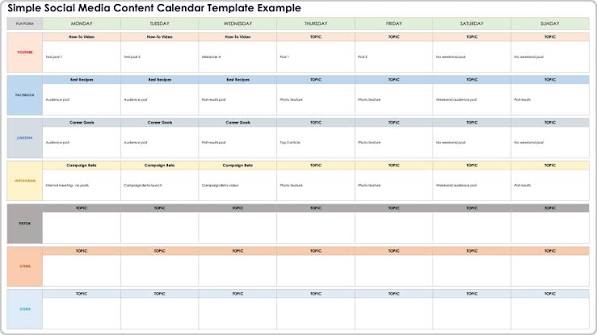
    If you’re juggling multiple social media accounts, you know the chaos: last-minute posts, missed dates, and a constant scramble for content ideas. A social media content calendar is your antidote—a simple planning tool that brings order to the madness. And the best part? You don’t need expensive software to get started. Free templates—available in Google Sheets, Excel, Notion, and more—can give you all the structure you need.

    But not all templates are created equal. Some are bloated with unnecessary columns, while others are too bare-bones to be useful. In this guide, we’ll break down what makes a great free content calendar, where to find them, and how to customize one that actually works for your goals. Whether you’re a solo entrepreneur, a social media manager, or a marketing team of one, you’ll walk away with a clear plan to tame your content chaos.

    Why You Need a Social Media Content Calendar

    A content calendar is more than just a schedule—it’s your strategic roadmap. It helps you:

    • Stay consistent: Posting regularly is key to growing an audience, and a calendar ensures you never miss a slot.
    • Align with business goals: By planning ahead, you can tie your posts to product launches, campaigns, or seasonal events.
    • Reduce stress: No more scrambling for a post at 9 AM. Your content is ready and scheduled in advance.
    • Improve quality: When you plan ahead, you have time to craft better captions, design visuals, and research hashtags.

    Without a calendar, you’re essentially flying blind. You might post sporadically, miss opportunities, and burn out trying to keep up. A simple template can change all that.

    What to Look for in a Free Template

    Not all free templates are worth your time. Here’s what the best ones include:

    • Date and time: The core of any calendar. Make sure it’s easy to sort or filter by date.
    • Platform: Columns for Instagram, Facebook, X, LinkedIn, TikTok, etc., so you can see your cross-platform strategy at a glance.
    • Content type: Photo, video, carousel, story, reel, live—knowing the format helps you balance your content mix.
    • Topic/caption draft: Space to jot down your idea or full caption.
    • Visual asset link: A place to link your image or video file (e.g., a Google Drive link or thumbnail).
    • Hashtags and keywords: Keep your hashtag sets organized.
    • Target audience/persona: Who is this post for? This keeps your content relevant.
    • Campaign or pillar category: Tag posts as educational, promotional, entertaining, etc., to ensure a healthy mix.
    • Status: Track whether a post is in draft, scheduled, published, or approved.
    • Performance metrics: Ideally in a separate tab, so you can track likes, shares, comments, and clicks over time.

    Avoid templates that are overly complex. If you spend more time filling out columns than actually creating content, it’s not the right fit. The best template is one you’ll actually use.

    Where to Find Free Templates

    You don’t have to look far. Here are the most popular sources:

    • Marketing blogs: HubSpot, Buffer, Hootsuite, and Later all offer free templates as lead magnets. They’re usually well-designed and come with instructions.
    • Template marketplaces: Sites like Template.net, Smartsheet, and the Monday.com gallery have a wide variety.
    • Notion community: Notion’s template gallery is full of community-created calendars, often with database views (calendar, board, table).
    • Google Sheets template gallery: A quick search will reveal dozens of free options.
    • Canva: If you prefer a visual, presentation-style calendar, Canva has beautiful, printable templates.

    Many of these require an email sign-up, so be prepared to share your address. That’s how the companies fund their free resources—by building their email list.

    How to Customize a Free Template for Your Needs

    Once you’ve downloaded a template, don’t just start using it. Customize it to fit your workflow:

    1. Remove what you don’t need. If you’re not using Pinterest, delete that column. If you don’t track personas, drop it.
    2. Add your content pillars. Create a dropdown list for your categories (e.g., educational, promotional, entertaining) so you can easily filter.
    3. Set up a status workflow. Use data validation to create a dropdown for status: Draft, Scheduled, Published, Approved.
    4. Create a metrics tab. If your template doesn’t have one, add a simple table to track performance by post.
    5. Color-code by platform or campaign. This makes your calendar visually scannable.

    Remember, the goal is to make the template work for you, not the other way around.

    Free vs. Paid: What’s the Catch?

    Free templates are often a marketing funnel. The company gives you a useful resource, then upsells you on their paid scheduling tool or advanced features. That’s not necessarily a bad thing—you get a great template for free, and if you need more, you know where to go.

    But be aware of limitations. Some “free” templates are intentionally stripped down. For example, they might lack a metrics tab or advanced filtering, nudging you toward a paid plan. Others are generic and require heavy customization to be useful.

    That said, for most small businesses and solo creators, a well-structured Google Sheet is more than enough. You don’t need a $50/month tool to post consistently. Start free, and upgrade only if you hit a real limitation.

    Common Mistakes to Avoid

    • Treating the calendar as a to-do list. A calendar should reflect your strategy, not just random posts. Plan around campaigns and goals.
    • Overcomplicating it. If you spend hours updating your calendar, you’ll abandon it. Keep it simple.
    • Forgetting to review performance. A calendar isn’t just for planning—it’s for learning. Review what worked and adjust.
    • Ignoring the platform specifics. Each platform has its own best practices. A template that treats them all the same won’t serve you well.

    Real-World Example: How a Solo Entrepreneur Uses a Free Template

    Meet Sarah, a freelance graphic designer. She uses a free Google Sheets template she found on HubSpot. She has columns for date, platform, content type, topic, caption, image link, and status. Every Sunday, she plans her week: two Instagram posts, one LinkedIn post, and three stories. She color-codes by platform and uses the status column to track drafts. She also has a second tab for metrics, where she logs engagement each month. This simple system has cut her social media time in half and doubled her consistency.

    Final Thoughts

    A free social media content calendar is one of the highest-ROI tools you can add to your marketing stack. It costs nothing but a little time to set up, and it pays off in consistency, clarity, and reduced stress. Start with a simple template, customize it to fit your workflow, and watch your social media game transform.

    Don’t let the chaos of social media overwhelm you. A free content calendar template is your ticket to organized, strategic posting. Whether you choose a Google Sheet, Notion, or a printable PDF, the key is to start simple and adapt as you go. Download a template today, spend 30 minutes customizing it, and you’ll wonder how you ever managed without one.

    Summary

    • A social media content calendar is a planning tool that schedules, organizes, and tracks posts across platforms.
    • Free templates are available in Google Sheets, Excel, Notion, Airtable, and Canva, often as lead magnets from marketing companies.
    • Key components include date, platform, content type, caption, visual link, hashtags, status, and performance metrics.
    • Customize your template to fit your workflow—remove what you don’t need, add content pillars, and set up a status dropdown.
    • Avoid overcomplicating your calendar; the best one is simple enough that you’ll actually use it consistently.

    FAQ

    Q: What is the best free social media content calendar template?
    A: The best template depends on your needs. For most people, a Google Sheets template from HubSpot or Buffer is a great start—it’s flexible, collaborative, and free. If you prefer a visual database, try Notion’s community templates. Canva offers printable options for analog planners.

    Q: Do I need a paid tool to schedule posts?
    A: No. A content calendar is for planning, not publishing. You can manually post at the scheduled times, or use free scheduling tools like Buffer’s free tier or Meta Business Suite to automate posting.

    Q: How often should I update my content calendar?
    A: Ideally, you should plan at least a week ahead, and review performance monthly. Some people plan a month at a time. The key is to make it a habit—set aside time each week to fill in and update your calendar.

    Q: Can I use a free template for a team?
    A: Yes, but with limitations. Google Sheets and Notion allow real-time collaboration, but free versions may lack advanced permissions. For larger teams, you might need a paid tool like Airtable or Monday.com for better access control.

    Q: Are free templates really free?
    A: Yes, but many require an email sign-up. Some are watermarked or have limited features. Always check the terms—some templates are free for personal use but require a license for commercial use.

  • The Ultimate Guide to Free Daily Planner PDFs: What They Are, Where to Find Them, and How to Use Them

    The Ultimate Guide to Free Daily Planner PDFs: What They Are, Where to Find Them, and How to Use Them

    In our fast-paced world, staying organized can feel like a superpower. Yet, with countless apps and digital tools vying for our attention, sometimes the simplest solution is the most effective: a daily planner. And thanks to the internet, you can get one for free, in a format that works on any device: the PDF.

    But what exactly is a free daily planner PDF? Is it just a piece of paper you print, or can you type on it? And are there hidden costs or strings attached? This guide will walk you through everything you need to know about free daily planner PDFs, from their humble origins to modern digital uses, and help you find the perfect one for your needs.

    What Is a Daily Planner PDF?

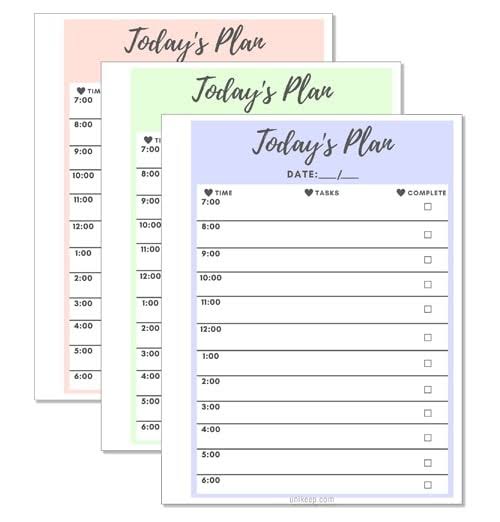
    A daily planner PDF is a pre-designed document that helps you organize your day. It typically includes sections for your top priorities, a schedule broken into hourly slots, a to-do list, and space for notes or reflections. The PDF format ensures that the layout stays exactly the same on any device or printer, so what you see is what you get.

    There are two main types: print-and-write and fillable. Print-and-write PDFs are static—you print them out and fill them in with a pen. Fillable PDFs have interactive form fields (like text boxes and checkboxes) that let you type directly into the document using free software like Adobe Acrobat Reader. This makes them perfect for digital planning on your computer or tablet.

    Why Use a Daily Planner PDF?

    You might wonder: why not just use a digital app? Well, there are several reasons why a PDF planner might be your best bet:

    • Cost: It’s free. No subscriptions, no in-app purchases.
    • Simplicity: No learning curve. Open, print or type, and you’re done.
    • Flexibility: You can use it on paper, on your tablet, or on your computer—whichever suits your mood.
    • Focus: Writing things down by hand has been shown to improve memory and commitment. A printed planner gives you that tactile experience without the cost of a fancy paper planner.
    • Privacy: Your data stays with you. No cloud sync, no tracking.

    Common Elements of a Daily Planner PDF

    While designs vary, most daily planners include these core sections:

    • Date: To note the day.
    • Top 3 Priorities: A focused list of the most important tasks.
    • Hourly Schedule: Time slots, often from 6 AM to 9 PM, for time-blocking.
    • To-Do List: A simple checklist for tasks.
    • Habit Tracker: Small boxes to check off habits like drinking water, exercising, or reading.
    • Meals/Water Tracker: For those who like to monitor nutrition.
    • Notes: Space for jotting down ideas or reminders.
    • Gratitude/Reflection: A prompt to end the day on a positive note.

    Some planners also include a weekly overview or a meal planning section, so it’s worth checking the layout before you download.

    Where to Find Free Daily Planner PDFs

    You can find free daily planner PDFs in many places online:

    • Productivity blogs: Many bloggers offer free templates as a way to build their email list. A quick search like “free daily planner PDF” will bring up countless options.
    • Template sites: Websites like TemplateLab, Vertex42, and OnPlanners have extensive collections.
    • Design platforms: Canva offers free templates that you can customize and download as PDFs.
    • Pinterest: A visual search engine where you can discover planners linked to blogs or Etsy shops.
    • Etsy: Many sellers offer free low-resolution versions as samples, with paid upgrades for high-resolution or editable files.

    How to Use a Daily Planner PDF

    Printing Your Planner

    If you prefer pen and paper, simply download the PDF and print it. Here are a few tips:

    • Check the paper size: Templates are often designed for A4 or US Letter. Make sure your printer settings match, or use “Fit to Page” to avoid cut-offs.
    • Adjust margins: If content is getting cut off, try reducing margins in your printer settings.
    • Print a test page: Before printing a whole month, print one page to check the layout.

    Filling It Digitally

    If you want to type on your planner, you’ll need a fillable PDF. Here’s how:

    1. Download a fillable PDF (look for “fillable” or “interactive” in the description).
    2. Open it in a free PDF editor like Adobe Acrobat Reader, Foxit Reader, or a browser-based editor like Smallpdf.
    3. Click on the form fields and type your text. Checkboxes can be ticked with a click.
    4. Save your file and you’re done.

    Using on a Tablet

    Many people now use PDF planners on tablets like the iPad with apps like GoodNotes, Notability, or Xodo. You can import the PDF and write on it with a stylus, combining the benefits of digital storage with the feel of handwriting.

    Common Pitfalls and Misconceptions

    “Free” Doesn’t Always Mean No Strings

    Some free templates require you to sign up for an email list before downloading. That’s often the price of “free.” Others may be watermarked or low-resolution previews of a paid product. Always read the fine print.

    PDFs Aren’t Editable by Default

    A standard PDF is like a printed page—you can’t type on it unless it has form fields. If you try to type on a static PDF and fail, it’s not broken; it’s just not fillable. Look for “fillable” or “interactive” in the description.

    Print Scaling Issues

    If a template designed for A4 paper is printed on US Letter (or vice versa), it may be cut off or have weird margins. Use “Fit to Page” in your printer settings to fix this.

    Fillable PDFs Need the Right Software

    Not all PDF viewers support form fields. Mobile browsers often struggle. For the best experience, use Adobe Acrobat Reader (free) on your computer or a dedicated PDF editor app.

    “Daily” vs. “Weekly” Confusion

    Some templates labeled “daily” actually contain weekly overviews or multiple days per page. Always check the layout before downloading to make sure it matches your needs.

    Copyright Restrictions

    Most free templates are for personal use only. Redistributing or selling them, even if you modify them, may violate the creator’s license. Respect the creator’s terms.

    How to Choose the Right Planner for You

    With so many options, how do you pick? Consider your needs:

    • If you’re a student: Look for planners with space for class schedules and assignment deadlines.
    • If you’re a busy professional: You might want a fillable PDF that you can type into quickly, with sections for meetings and appointments.
    • If you’re a parent: Meal planning and habit trackers could be useful.
    • If you’re aesthetic-driven: Search for designs that match your style—boho, minimal, floral, etc.
    • If you’re a digital planner user: Look for hyperlinked PDFs with ample writing space and dark-mode-friendly designs.

    Conclusion

    Free daily planner PDFs are a versatile, cost-effective tool for boosting productivity and staying organized. Whether you prefer the tactile feel of paper or the convenience of digital typing, there’s a template out there for you. By understanding the different types, where to find them, and how to use them effectively, you can harness the power of a daily planner without spending a dime. So why not give it a try? Your future self will thank you.

    A free daily planner PDF is more than just a piece of paper—it’s a simple, flexible, and powerful way to take control of your day. With the tips in this guide, you can find the perfect template, avoid common pitfalls, and start planning like a pro. So go ahead, download one today, and experience the difference a little structure can make.

    Summary

    • What: A daily planner PDF is a pre-designed document for organizing your day, available in print-and-write or fillable formats.
    • Why: They are free, simple, flexible, and can improve focus and memory through handwriting.
    • Where: Find them on productivity blogs, template sites, Canva, Pinterest, and Etsy.
    • How: Print them for pen-and-paper use, or fill them digitally with free software like Adobe Acrobat Reader.
    • Watch out: “Free” may require email sign-up, not all PDFs are editable, and print scaling can be an issue—check before you commit.

    FAQ

    Q: Are free daily planner PDFs really free?
    A: Yes, they are free to download and use, but some sites may require you to sign up for an email list or provide attribution. Always check the terms.

    Q: Can I type on a daily planner PDF?
    A: Only if it’s a fillable PDF with form fields. Look for “fillable” or “interactive” in the description. You’ll need software like Adobe Acrobat Reader to type.

    Q: Why is my printed planner cut off?
    A: This is likely a paper size mismatch. If the template is A4 and you’re printing on US Letter (or vice versa), use “Fit to Page” in your printer settings.

    Q: Can I use a daily planner PDF on my tablet?
    A: Yes, you can import it into apps like GoodNotes, Notability, or Xodo and write on it with a stylus.

    Q: Can I sell or share a free planner PDF I downloaded?
    A: Most free templates are for personal use only. Redistributing or selling them, even modified, may violate the creator’s license. Always read the terms.

  • The 4-Day Work Week: A Deep Dive into the Pros, Cons, and What the Data Really Shows

    The 4-Day Work Week: A Deep Dive into the Pros, Cons, and What the Data Really Shows

    Imagine having a three-day weekend every single week. For many, this isn’t just a daydream—it’s a growing movement reshaping how we think about work. The 4-day work week has moved from fringe experiment to mainstream conversation, with countries like Belgium and Spain launching national trials and companies like Microsoft Japan reporting dramatic productivity gains. But is it all upside? Or are there hidden costs that could make this shift more complicated than it seems?

    This article breaks down the two main models of the 4-day week, examines the real-world evidence from pilots in Iceland, the UK, and beyond, and weighs the benefits against the challenges for employers, employees, and the economy. Whether you’re a business leader considering the switch or an employee wondering if it’s too good to be true, here’s what you need to know.

    What Exactly Is a 4-Day Work Week?

    At its core, a 4-day work week means working one fewer day than the traditional Monday-to-Friday grind. But not all 4-day weeks are created equal. There are two primary models:

    • Compressed schedule (4/10): Employees work four 10-hour days, totaling the same 40 hours per week. Pay remains the same, but the extra hours each day can be exhausting.
    • Reduced hours (32/4): Employees work four 8-hour days, cutting the workweek to 32 hours while maintaining full pay. This is often called the “100-80-100” model—100% pay, 80% time, 100% productivity.

    The reduced-hours model is the one generating the most buzz, as it challenges the assumption that more hours equal more output. But it also poses bigger logistical and financial questions for businesses.

    The Case for: What the Data Shows

    The most compelling evidence comes from large-scale trials. Iceland’s 2015–2019 pilot involved over 2,500 workers (more than 1% of the country’s workforce) testing a 35–36 hour week with no pay cut. The results were striking: productivity stayed the same or improved across most workplaces, while worker wellbeing skyrocketed. Stress and burnout dropped, and employees reported better work-life balance.

    The UK’s 2022 pilot was even larger—61 companies and nearly 2,900 workers participated in a six-month trial. Of those, 56 companies continued the policy afterward. Revenue stayed flat or grew, and employee turnover and burnout decreased significantly. Microsoft Japan’s one-month experiment in 2019 reported a 40% productivity boost, though that figure was partly attributed to other efficiency measures.

    Surveys echo these findings. Gallup found that 77% of U.S. workers believe a 4-day, 32-hour week would positively impact their wellbeing, and 65% said it would make them less likely to leave their current job. For employers, that’s a powerful retention tool in a post-pandemic labor market where burnout and “quiet quitting” are top concerns.

    The Case Against: Challenges and Risks

    Despite the enthusiasm, the 4-day week isn’t a one-size-fits-all solution. For businesses, scheduling becomes more complex. If your company operates five days a week, who covers the fifth day? Customer service, healthcare, manufacturing, and retail all face coverage gaps. The compressed 4/10 model can also lead to burnout—working 10-hour days is physically and mentally draining, and it doesn’t actually reduce total hours.

    For employees, there’s the risk of “intensification.” In a reduced-hours model, managers might expect the same output in fewer hours, leading to stress and overwork. And if pay is reduced (which happens in some implementations), it can create part-time stigma and financial strain.

    From an economic perspective, the macro effects are uncertain. Would a nationwide shift to 32 hours hurt GDP or competitiveness? The data is limited, and economists are divided. Some argue that redistributing work could lower unemployment and boost per-hour productivity, while others worry about the impact on international trade and the bottom line.

    Who Benefits Most (and Least)?

    The 4-day week works best for knowledge work—office jobs, tech, finance, and creative industries where output is measured by results, not hours logged. It’s much harder for shift-based roles like nursing, manufacturing, or retail, where continuous coverage is essential. That’s why many unions support the reduced-hours model but oppose the compressed 4/10, which they see as a false solution that doesn’t address overwork.

    Geographically, adoption is uneven. Belgium (2022) granted workers the right to request a compressed 4-day week, but it’s not a reduction in hours. Spain (2023) launched a government-funded pilot for a true 32-hour week for about 200 small and medium enterprises. In the U.S., California and Maryland have introduced bills for 32-hour weeks with overtime pay beyond that threshold, but none have passed. The Fair Labor Standards Act, which sets overtime at 40 hours, remains a legal barrier for reduced-hour models.

    The Bigger Picture: Why Now?

    The 4-day week isn’t a new idea. Henry Ford adopted the 5-day, 40-hour week in 1926, and economist John Maynard Keynes predicted in 1930 that technology would bring a 15-hour work week by 2030. That prediction hasn’t materialized, but the pandemic changed the conversation. Remote work normalized flexibility, and workers began questioning why they were tied to a 9-to-5, five-day grind.

    Today, AI and automation are reducing the need for human hours in many sectors, raising the question: should we work less, or just have fewer workers? The 4-day week offers a way to distribute remaining work more evenly, while also cutting commuting emissions and traffic congestion—a win for the environment.

    Making It Work: Practical Considerations

    If you’re considering a 4-day week, start with a pilot. The UK trial showed that companies that succeeded had clear metrics, open communication, and a willingness to adapt. Focus on output, not hours. Automate or eliminate low-value tasks. And be prepared for challenges—some roles may need to stay on a 5-day schedule, and you’ll need to manage customer expectations.

    For employees, the key is to ensure the model truly reduces your workload, not just your days. If you’re working 10-hour days or feeling pressured to cram 40 hours into 32, the benefits evaporate. The best outcomes come from a genuine commitment to efficiency, not just a change in the calendar.

    The 4-day work week is more than a trend—it’s a response to a changing world where work-life balance, productivity, and employee wellbeing are increasingly intertwined. The evidence from Iceland, the UK, and beyond shows that, when done right, it can boost productivity, reduce burnout, and improve lives. But it’s not a magic bullet. It requires careful planning, a focus on outcomes over hours, and a willingness to adapt to the realities of different industries. As more countries and companies experiment, the data will only get richer. For now, the question isn’t whether the 4-day week is possible—it’s whether we’re ready to embrace it.

    Summary

    • The 4-day work week comes in two main models: compressed (4/10) and reduced hours (32/4), with the latter gaining more attention.
    • Large-scale trials in Iceland and the UK show productivity stays flat or improves, while employee wellbeing and retention rise.
    • Challenges include scheduling complexity, potential for burnout in compressed schedules, and difficulty in shift-based industries.
    • The model works best for knowledge work; it’s harder for healthcare, retail, and manufacturing.
    • Legal barriers in the U.S. (FLSA overtime at 40 hours) and macroeconomic uncertainties remain hurdles to widespread adoption.

    FAQ

    Q: What is the difference between a compressed 4-day week and a reduced-hours 4-day week?
    A: A compressed schedule (4/10) involves working four 10-hour days, totaling 40 hours per week with no reduction in pay. A reduced-hours schedule (32/4) involves working four 8-hour days, totaling 32 hours per week, often with pay maintained at 100% (the “100-80-100” model). The reduced-hours model is more radical because it cuts total work time.

    Q: Does a 4-day work week actually increase productivity?
    A: Evidence from trials suggests yes, or at least that productivity doesn’t decline. Iceland’s trials found productivity stayed the same or improved, and the UK pilot saw revenue stay flat or grow. Microsoft Japan reported a 40% productivity boost, though that was partly due to other efficiency measures.

    Q: What are the main drawbacks of a 4-day work week?
    A: Drawbacks include scheduling complexity, potential for burnout from compressed 10-hour days, risk of work intensification (doing the same work in fewer hours), and difficulty in industries that require continuous coverage. There’s also uncertainty about macroeconomic effects on GDP and competitiveness.

    Q: Which countries have adopted or tested a 4-day work week?
    A: Iceland ran large-scale trials from 2015–2019. The UK had a major pilot in 2022. Belgium granted the right to request a compressed 4-day week in 2022. Spain launched a government-funded pilot for a 32-hour week in 2023. Japan and South Africa have also launched trials.

    Q: Is a 4-day work week legal in the U.S.?
    A: Yes, but the Fair Labor Standards Act (FLSA) requires overtime pay for hours worked beyond 40 per week, which creates a barrier for reduced-hours models unless legislation changes. Some states like California and Maryland have introduced bills to lower the overtime threshold to 32 hours, but none have passed yet.

  • The Best ADHD Tools: A Practical Guide to Tech That Actually Helps

    The Best ADHD Tools: A Practical Guide to Tech That Actually Helps

    Living with ADHD often feels like trying to juggle with your hands tied behind your back. The core challenges aren’t just about focus—they involve working memory, time perception, and the ability to start tasks. For years, the tech world offered generic productivity apps that assumed a neurotypical brain, leaving many ADHD users frustrated and overwhelmed. But a new wave of tools has emerged, designed specifically to work with the ADHD brain, not against it.

    This guide cuts through the noise to explore the best tools across categories—from task management to focus timers to body doubling—and offers practical advice on how to choose and stick with them. Whether you’re an adult navigating work and life, a student juggling deadlines, or a parent supporting a child, you’ll find actionable insights grounded in real-world needs.

    Understanding ADHD and Why Tools Matter

    ADHD is not just about being easily distracted. It’s a neurological condition that affects executive functions—the brain’s management system. This includes working memory (holding information in mind), time perception (feeling like time moves differently), task initiation (starting things is hard), and emotional regulation. Tools can’t cure ADHD, but they can scaffold these weaknesses, acting like a prosthetic for the brain.

    For example, if you struggle with time blindness, a visual timer like the Time Timer shows time as a shrinking red disk, making the abstract concept of time concrete. If you forget what you were doing, a low-friction capture tool like Drafts lets you jot a note in under three seconds. The right tool compensates for a specific deficit, reducing daily friction.

    Categories of Tools: What’s Out There

    The market is vast, but tools generally fall into six categories:

    1. Task/Project Management: Apps like Todoist, TickTick, Sunsama, and Amazing Marvin help organize tasks and projects.
    2. Time Management & Focus Timers: Forest, Focusmate, Pomofocus, and Flow help structure work sessions.
    3. Distraction Blockers: Freedom, Cold Turkey, Opal, and One Sec limit access to distracting apps and websites.
    4. Note-Taking & Idea Capture: Obsidian, Notion, Evernote, Drafts, and Otter.ai help capture thoughts and information.
    5. Habit Trackers & Body Doubling: Habitica gamifies habits, while Focusmate and Flow Club provide virtual co-working.
    6. Wearables & Neurotech: Muse headband, TouchPoints, and EndeavorRx (an FDA-approved video game for kids) offer biofeedback or cognitive training.

    Top Picks in Each Category

    Task Management: From Lists to Time-Blocking

    Traditional to-do lists often fail because they don’t account for time or priority. Modern ADHD-friendly apps emphasize visual time-blocking and low friction.

    • Todoist: Great for simple task capture with natural language input (e.g., “Call dentist tomorrow 9am”). It’s cross-platform and has a clean interface. The free tier is robust.
    • TickTick: Combines tasks with a built-in Pomodoro timer and habit tracker. It’s like a Swiss Army knife for ADHD—everything in one place.
    • Sunsama: A daily planner that forces you to schedule tasks into your calendar. It’s praised for unifying work and personal life, and it has a “shutdown” ritual to end the day. A bit pricey but worth it for structure.
    • Amazing Marvin: Highly customizable, with features like “procrastination busters” and “sprints.” It’s powerful but can be overwhelming to set up—best for tech-savvy users.

    Focus Timers: The Pomodoro Technique and Beyond

    The Pomodoro technique (25 minutes work, 5 minutes break) is popular, but ADHD brains often need longer or shorter intervals. These tools add a visual or social element.

    • Forest: You plant a virtual tree that grows while you focus. If you leave the app, the tree dies. It’s gamified and satisfying, with a real-world tree-planting partnership.
    • Focusmate: Body doubling meets Pomodoro. You book a session with a stranger, and you both work on camera for 50 minutes. The accountability is powerful—you don’t want to let your partner down.
    • Pomofocus: A simple, free web-based Pomodoro timer with customizable intervals. No frills, but it works.

    Distraction Blockers: Digital Fences

    These tools block distracting websites and apps, but the best ones also add a moment of reflection.

    • Freedom: Blocks websites and apps across all devices, with scheduled sessions. You can set “blocklists” for social media or news.
    • Cold Turkey: A more aggressive blocker that’s hard to bypass. You can set strict deadlines and even block the entire internet except for whitelisted sites.
    • One Sec: When you try to open a distracting app, it forces you to take a deep breath for a few seconds. This interruption helps you make a conscious choice.

    Note-Taking & Idea Capture: Catch It Before It’s Gone

    ADHD brains generate ideas constantly, but they vanish quickly. The key is to capture with minimal friction.

    • Drafts: Opens directly to a blank page—you can type or dictate instantly. It’s the fastest way to capture a thought.
    • Otter.ai: Records and transcribes meetings or voice memos. Great for those who think out loud.
    • Notion: A flexible workspace for notes, databases, and projects. It can be overwhelming, but with templates, it becomes a second brain.
    • Obsidian: A powerful knowledge base that links notes like a web. It’s excellent for deep thinking but has a learning curve.

    Habit Trackers & Body Doubling: The Social and Gameful

    Habits are hard to form with ADHD, but gamification and social accountability help.

    • Habitica: Turns your habits and tasks into a role-playing game. You earn XP and rewards for completing tasks, and you can join parties with friends.
    • Focusmate: Already mentioned, but it’s also a form of body doubling that can be used for any task, not just work.
    • Flow Club: Virtual co-working sessions with a facilitator. You share goals and check in—it’s like a study group for adults.

    Wearables and Neurotech: The Cutting Edge

    These are more expensive and less proven, but they offer a different approach.

    • Muse Headband: A meditation headband that gives real-time feedback on brain activity. It’s not ADHD-specific but can help with mindfulness and calming the mind.
    • TouchPoints: Wearable devices that vibrate alternately on each wrist, claimed to reduce stress. Some users find them helpful, but evidence is limited.
    • EndeavorRx: The only FDA-approved digital therapeutic for ADHD, for children 8-12. It’s a video game that improves attention through adaptive challenges. It’s prescribed by doctors and often used alongside medication.

    The ‘Less is More’ Argument and Tool Fatigue

    A common problem is “tool fatigue”—downloading dozens of apps and abandoning them within weeks. ADHD brains crave novelty, so static apps lose appeal. Experts suggest starting with one tool and mastering it before adding another. Some coaches even argue that a simple paper notebook and a visible clock can be more effective than any app. The key is to avoid “productivity porn”—endlessly researching tools instead of using them.

    Clinical and Skeptical Perspectives

    Psychiatrists emphasize that tools are not a substitute for medication or therapy. They are scaffolds, not cures. Many apps claim to be “scientifically proven,” but only EndeavorRx has FDA approval. Cognitive training apps like Lumosity have shown limited transfer to real-world ADHD symptoms. Be wary of overhyped claims and focus on evidence-based approaches.

    Choosing the Right Tool for You

    Consider your specific challenges:

    • If you forget tasks: Use a capture tool like Drafts or a task app with natural language input.
    • If you struggle with time: Use a visual timer or time-blocking app like Sunsama.
    • If you get distracted by your phone: Use a blocker like Freedom or One Sec.
    • If you procrastinate on starting tasks: Use body doubling with Focusmate or a gamified app like Habitica.

    Also, consider your ecosystem. If you’re an Apple user, apps like Things and Fantastical integrate well. If you’re on Android, TickTick and Todoist are solid. The best tool is the one you’ll actually use.

    Practical Tips for Sticking With Tools

    • Start small: Pick one tool and use it for a week.
    • Set up forgiveness: Choose apps that allow rescheduling without guilt.
    • Make it visual: Use calendars and color coding.
    • Involve others: Body doubling or sharing progress with a friend increases accountability.
    • Review and adjust: Every month, evaluate what’s working and what’s not. Don’t be afraid to switch.

    Conclusion

    The right ADHD tool can be life-changing, but it’s not about finding a magic app. It’s about understanding your unique brain and choosing tools that compensate for your specific challenges. Start with one tool, use it consistently, and remember that the goal is to reduce friction, not add more. With the right support, you can harness your ADHD strengths and thrive.

    Summary

    • ADHD tools are designed to compensate for executive function deficits, not cure the condition.
    • Categories include task management, focus timers, distraction blockers, note-taking, habit trackers, and wearables.
    • Top picks: Todoist/TickTick for tasks, Forest/Focusmate for focus, Freedom/One Sec for blocking, Drafts/Otter for capture, Habitica for habits.
    • Only EndeavorRx is FDA-approved as a digital therapeutic for ADHD.
    • Avoid tool fatigue by starting with one tool and focusing on low-friction, visual, and forgiving features.

    FAQ

    Q: Are ADHD apps scientifically proven?
    A: Most are not. Only EndeavorRx has FDA approval. Many apps use gamification and behavioral techniques, but evidence is limited. Look for apps that cite peer-reviewed studies, but be skeptical of grand claims.

    Q: Can apps replace medication or therapy?
    A: No. Apps are tools to help manage symptoms, but they don’t treat the underlying neurobiology. They work best alongside medication, therapy, or coaching.

    Q: What’s the best free ADHD app?
    A: It depends on your needs. Todoist and TickTick have free tiers, Forest has a free version, and Pomofocus is free. Start with a free app to see what works before paying.

    Q: How do I avoid getting overwhelmed by too many tools?
    A: Start with one tool and use it for at least a week. Add another only if needed. Avoid the temptation to try everything at once—this leads to tool fatigue.

    Q: Are wearables like Muse or TouchPoints worth the money?
    A: They can be helpful for some, but they’re expensive and not specifically ADHD treatments. Try cheaper alternatives first, and consult a healthcare provider before investing.

  • The 2026 Productivity Stack: How AI Agents, Local-First Tools, and Consolidation Are Rewriting the Rules

    The 2026 Productivity Stack: How AI Agents, Local-First Tools, and Consolidation Are Rewriting the Rules

    If you feel like your productivity toolkit is bursting at the seams, you’re not alone. The average knowledge worker juggles seven to ten different apps daily, and the cost of switching between them eats up as much as 30% of your focused time. But 2026 is shaping up to be the year we finally stop collecting tools and start delegating to them.

    The big shift? AI is no longer a shiny add-on bolted onto your favorite app. It’s now the engine underneath, with ‘agents’ that can draft your emails, reschedule your meetings, and even plan your entire week. At the same time, a quiet rebellion against cloud-everything is gaining steam, pushing local-first tools that keep your data on your device. The result is a productivity landscape that’s more powerful, more personal, and more fragmented than ever—but also more promising for those who know what to look for.

    The 2026 Productivity Landscape: What’s Changed

    The global productivity software market has ballooned to roughly $60–70 billion, growing at a double-digit clip. But the real story isn’t the money—it’s how the tools themselves have evolved. Remote and hybrid work is now the default for over 70% of knowledge workers, which has made async-first tools the norm. And AI, once a differentiator, is now table stakes: if a tool doesn’t have native AI, it’s already behind.

    But here’s the catch: with so many options, the question isn’t ‘Which tool is best?’ anymore. It’s ‘Which tool can replace three others?’ Consolidation is the name of the game, driven by subscription fatigue and the sheer cognitive load of hopping between apps.

    The Best-in-Class Tools of 2026

    Let’s break down the consensus leaders across categories, based on what’s actually shipping and winning users this year.

    All-in-One Workspaces: Notion, Coda, ClickUp

    These are the Swiss Army knives of productivity. In 2026, they’ve all integrated AI agents that don’t just suggest—they execute. Need a weekly report drafted from your project data? Your workspace agent can do it. Want to automate a recurring workflow? Set it once, and the agent handles the rest. Offline mode has also improved dramatically, addressing one of the biggest complaints from users who don’t live on Wi-Fi.

    Task and Project Management: Linear, Asana, Todoist

    Linear remains the darling of dev teams for its speed and keyboard-first design. Asana has doubled down on AI prioritization, using natural-language input to create tasks and auto-schedule them based on your workload. Todoist, meanwhile, has become a surprisingly powerful AI assistant for individuals, learning your habits and suggesting the right tasks at the right time.

    Calendar and Time Management: Reclaim.ai, Motion, Cron/Notion Calendar

    This is where agentic AI shines. Reclaim.ai and Motion act as autonomous scheduling agents—they can negotiate meeting times with colleagues, protect your deep work blocks, and even reschedule conflicts automatically. Cron, now part of Notion, offers a sleek, keyboard-friendly interface that syncs seamlessly with your workspace.

    Note-Taking and Knowledge: Obsidian, Logseq, Mem

    The local-first movement is strongest here. Obsidian and Logseq keep your notes as plain text files on your device, with graph-based retrieval that makes connections you didn’t even know existed. Mem takes a different approach, using AI to surface relevant notes contextually—perfect for those who want the power of AI without giving up control.

    Communication: Slack, Microsoft Teams, Twist

    Slack and Teams have both baked in AI meeting summaries and channel summarization, so you can catch up on what you missed in seconds. Twist, the async-first option, remains a favorite for teams that want to escape the tyranny of real-time chat.

    Deep Work and Focus: Sunsama, Akiflow, Forest

    Sunsama and Akiflow are time-blocking tools that now use AI to reschedule your day when things slip. Forest, the gamified focus app, has added distraction analytics—showing you exactly where your attention goes and helping you build better habits.

    Email: Superhuman, Shortwave, Gmail with Gemini

    Superhuman still leads for speed, with AI triage that sorts your inbox by importance. Shortwave, built on Gmail, offers AI auto-reply drafting that sounds like you. And Gmail’s Gemini integration brings AI summarization and action items straight to your inbox.

    The Trends That Matter

    Agentic AI: From Suggestion to Execution

    The biggest shift is that AI now does, not just suggests. Instead of telling you ‘You have a conflict on Tuesday,’ your calendar agent reschedules the meeting and notifies everyone. This is a fundamental change in how we interact with tools—from ‘tool you use’ to ‘agent you delegate to.’

    Local-First: The Privacy Backlash

    Not everyone is thrilled about AI processing their data in the cloud. The local-first movement, led by Obsidian and Anytype, offers offline-first, privacy-preserving alternatives. For privacy advocates, ‘best’ means the tool that respects your data—AI features are a liability, not a benefit.

    Interoperability: The Glue That Holds It Together

    No single tool does everything. The best tools are the ones that play well with others via APIs and platforms like Zapier and Make. If your project manager can’t talk to your calendar, you’re back to manual copying and pasting.

    Price Sensitivity: The Great Consolidation

    Subscription fatigue is real. Users are cutting back from five tools to two or three, and they’re choosing the ones that offer the most integrated experience. This is why all-in-one workspaces like Notion and ClickUp are thriving—they’re becoming the hub that everything else plugs into.

    Different Users, Different ‘Best’

    There’s no one-size-fits-all answer. Here’s how different personas approach the 2026 tool landscape:

    The Power User

    You live in your tools. You want maximum control, keyboard shortcuts, and the ability to customize everything. Your stack might be Obsidian for notes, Linear for tasks, Superhuman for email, and Raycast as your launcher. The learning curve is steep, but the payoff is minimal friction.

    The Team Lead

    You need visibility and reporting. You want a dashboard you trust and less time in status meetings. Asana, ClickUp, or Monday.com give you workload balancing and cross-team coordination at a glance.

    The Solo Founder

    You wear every hat. You need one or two tools that do it all without breaking the bank. Notion (or Coda) as your command center, plus Reclaim.ai to manage your calendar, can eliminate most administrative work.

    The Privacy Advocate

    You’re not comfortable with cloud AI. You choose Obsidian for notes, Anytype for docs, Standard Notes for secure notes, and Proton Calendar for privacy-first scheduling. Your data stays yours, period.

    The Enterprise IT Decision-Maker

    You care about security, compliance, and not retraining 5,000 employees. Microsoft 365 Copilot, Salesforce, and ServiceNow are your safe bets—they integrate with your existing stack and meet SOC 2 and GDPR requirements.

    The Skeptic

    You’re not convinced AI is the answer. You’ve seen too many tools promise magic and deliver mediocrity. You’re right to be cautious—about 40% of workers distrust AI-generated task prioritization. The tools that win your trust are the ones that show their work, explaining why they made a decision.

    How to Choose Your 2026 Stack

    Start by auditing your current tools. List every app you use in a week and ask: ‘What does this do that my other tools can’t?’ Then, look for consolidation opportunities. Can your project management tool replace your note-taking app? Can your calendar agent handle your scheduling conflicts?

    Next, consider your data. Are you comfortable with cloud AI, or do you need local-first? There’s no right answer—just what fits your workflow and values.

    Finally, embrace the agentic shift. The tools that will save you the most time are the ones that can act on your behalf. But don’t trust them blindly—look for transparency features that show you the ‘why’ behind their decisions.

    The Future Is Fewer, Smarter Tools

    The 2026 productivity landscape is about quality over quantity. You don’t need ten tools; you need three that work together seamlessly. AI agents are the new power users, handling the busywork so you can focus on the work that matters. And whether you choose cloud or local, all-in-one or best-of-breed, the goal is the same: reclaim your time.

    The best productivity tool in 2026 isn’t the one with the most features—it’s the one that fits your workflow, respects your data, and saves you the most time. With AI agents now native to the tools we use daily, the opportunity to cut through the noise has never been greater. Take a hard look at your stack, consolidate where you can, and choose tools that work for you—not the other way around.

    Summary

    • The productivity software market is now $60–70 billion, with AI as a native feature, not an add-on.
    • Top tools in 2026: Notion/ClickUp for all-in-one, Linear/Asana for tasks, Reclaim.ai/Motion for calendars, Obsidian for notes, and Superhuman for email.
    • Key trends: agentic AI (tools that execute tasks), local-first privacy, API interoperability, and consolidation due to subscription fatigue.
    • Different users need different stacks: power users favor control, team leads need dashboards, solo founders want cost-effective all-in-ones, and privacy advocates choose local-first.
    • Choose tools that replace three others, and look for transparency in AI decisions to build trust.

    FAQ

    Q: What is the biggest change in productivity tools for 2026?
    A: AI has shifted from being a suggestion engine to an agent that can execute multi-step tasks, like rescheduling meetings or drafting reports, without your constant input.

    Q: Are local-first tools like Obsidian really better than cloud-based ones?
    A: It depends on your priorities. Local-first tools offer privacy and offline access, but cloud tools often have better collaboration and AI features. Choose based on whether you value data ownership or convenience.

    Q: How do I decide between an all-in-one workspace like Notion and a stack of specialized tools?
    A: If you’re tired of context-switching and want a single hub, go all-in-one. If you need specialized features (like Linear’s dev-focused workflow), a best-of-breed stack with strong integrations might be better.

    Q: Can AI really prioritize my tasks better than I can?
    A: AI can analyze your workload and deadlines to suggest priorities, but it’s not perfect. Look for tools that explain their reasoning, and use AI as a starting point, not the final word.

    Q: What’s the best way to reduce subscription costs?
    A: Audit your tools and cut duplicates. Many users find they can replace three or four apps with one powerful tool like Notion or ClickUp, saving money and reducing cognitive load.

  • The Complete Guide to Remote Work: Facts, Myths, and Best Practices

    The Complete Guide to Remote Work: Facts, Myths, and Best Practices

    Remote work has transformed from a niche perk to a mainstream reality. The COVID-19 pandemic forced a global experiment that reshaped how and where we work, and the results have stuck. Today, roughly a quarter to a third of U.S. knowledge workers operate in hybrid or fully remote setups, and the trend is global. But remote work isn’t just about working from home—it’s a complex ecosystem involving technology, management, law, and culture.

    This guide cuts through the noise to give you a clear, evidence-based overview of remote work. We’ll explore its history, the key statistics that define its current state, the benefits and challenges from multiple perspectives, and the legal and technological considerations that matter. Whether you’re an employer navigating return-to-office mandates or an employee seeking flexibility, this guide provides the essential facts and insights you need.

    The Evolution of Remote Work

    Remote work isn’t new. In the 1970s, companies like NASA and IBM experimented with telecommuting to save energy and boost productivity. The rise of broadband and cloud computing in the 2000s made it more feasible, but office-centric culture persisted. Then came 2020. When the pandemic hit, nearly 70% of U.S. white-collar workers went remote almost overnight. It was the largest remote work experiment in history, and it worked—at least for many.

    By 2023, the dust settled. Gallup data shows that about 25–30% of U.S. knowledge workers now work hybrid or fully remote. That’s a massive shift from the pre-pandemic baseline of just 5–7%. The trend is global, with Northern Europe and North America leading, and Asia and Latin America catching up. Remote work is here to stay, but it’s still evolving.

    The Numbers: Productivity, Real Estate, and More

    One of the most debated questions is productivity. Meta-analyses of remote work studies find neutral-to-positive effects, with gains ranging from 2% to 13%. But it’s not uniform—it depends on the role, the level of autonomy, and the quality of management. For routine tasks, remote work can boost output; for collaborative, creative work, it can be challenging.

    The real estate impact is stark. U.S. office vacancy rates hit about 20% in major cities by 2024, with San Francisco and New York seeing even higher numbers. This has ripple effects on local economies, from coffee shops to transit systems. On the flip side, remote workers save an average of $3,000–$5,000 per year on commuting costs, and employers save on office space.

    The Employer’s View: Pros and Cons

    For employers, remote work offers significant advantages. Reduced overhead is a big one—no need for massive office footprints. Access to global talent means you can hire the best person for the job, regardless of location. Retention improves too; some studies show 25–50% lower attrition for remote-friendly firms. And with teams spread across time zones, you can offer 24/7 customer support.

    But there are downsides. Management becomes harder when you can’t see your team. Trust and visibility are constant challenges. Company culture can dilute, and onboarding new hires remotely is notoriously difficult. Cybersecurity risks increase, and there’s the potential for wage pressure as you compete globally. It’s a trade-off that requires new skills and strategies.

    The Employee’s View: Flexibility vs. Isolation

    Employees love the flexibility. No commute means more time for family, hobbies, and sleep. You can live anywhere, which is a game-changer for many. Autonomy over your schedule can boost job satisfaction and work-life balance. But it’s not all rosy. Isolation is a real issue—humans are social creatures, and the water cooler conversations are gone. Boundaries blur, leading to burnout. And there’s the ‘out of sight, out of mind’ problem: remote workers often get passed over for promotions because they’re less visible to leadership.

    Home office costs are another factor. Not everyone has a dedicated workspace, and ergonomic setups can be expensive. Plus, the difficulty of disconnecting from work when your home is your office is a constant struggle.

    Society and the Economy: Winners and Losers

    Remote work has broader societal impacts. On the plus side, it reduces traffic congestion and emissions, which is good for the environment. It can revitalize rural areas as workers move away from expensive cities. And it opens up employment opportunities for people with disabilities, caregivers, and others who might struggle with a traditional office commute.

    But there are losers too. City centers are hollowing out, and local businesses that relied on office foot traffic are suffering. Inequality is a concern—remote work primarily benefits knowledge workers, while service and manual labor jobs still require physical presence. The shift is not uniform, and its effects are complex.

    Management and Leadership: A New Paradigm

    Remote work demands a shift from ‘presence-based’ to ‘outcome-based’ management. You can’t just look at who’s at their desk; you have to measure results. This requires new skills: async communication, trust-building, and performance measurement without surveillance. The debate over monitoring software is a flashpoint. Some companies use productivity tracking tools, but they can erode trust and autonomy. The best managers focus on clear goals, regular check-ins, and fostering a culture of accountability.

    Legal and HR Considerations

    Remote work creates a legal minefield. In the U.S., there’s no federal remote work law; it’s governed by state laws, tax rules, and company policy. If employees work across state lines, you run into tax withholding and nexus issues. The ‘convenience of the employer’ rule, for example, can create double taxation for New York residents working remotely for a New Jersey company. In the EU, some countries have a right to request remote work, and the EU Directive on transparent working conditions supports flexibility.

    Data privacy is another concern. GDPR in Europe and CCPA in California apply to remote data handling. BYOD (bring your own device) policies need to be compliant. And workers’ compensation for home injuries is a gray area—if an employee trips over a cable at home, is it work-related? These are questions HR and legal teams must address.

    Technology and Security: The Backbone

    Remote work relies on technology. Cloud SaaS like Google Workspace and Microsoft 365, video conferencing tools like Zoom and Teams, project management platforms like Asana and Trello, and async tools like Loom and Notion are the backbone. But there’s a downside: tool fatigue. ‘Zoom fatigue’ and notification overload are real phenomena that can hurt productivity and well-being.

    Cybersecurity is a major concern. Phishing attacks, unsecured home networks, and BYOD risks are all amplified in a remote environment. Zero-trust architecture—where every access request is verified—is now standard practice. Companies need robust security policies and employee training to mitigate risks.

    Myths and Misunderstandings

    There are many myths about remote work. The biggest is that it’s less productive. The evidence is mixed, but many studies show equal or higher productivity, depending on the role and management. Another myth is that remote workers are always available. In reality, boundaries are crucial, and ‘async’ communication means you don’t expect an immediate response. Finally, some think remote work is a perk that will fade. But the data says otherwise—it’s a permanent feature of the labor market.

    Best Practices for Remote Work Success

    For employees: establish a dedicated workspace, set clear boundaries between work and personal time, and over-communicate. Use async tools to stay connected without constant meetings. For employers: focus on outcomes, not hours. Invest in onboarding and culture-building. Provide ergonomic support and cybersecurity training. And be flexible—one size doesn’t fit all.

    For both: prioritize mental health. Isolation and burnout are real risks. Regular check-ins, virtual social events, and encouraging breaks can help. And remember, remote work is a skill that improves with practice.

    Remote work is not a passing trend—it’s a fundamental shift in how we think about work. It offers incredible benefits in flexibility, productivity, and access to talent, but it also brings challenges in management, culture, and legality. The key is to approach it with intention, using evidence-based strategies and a human-centered mindset. Whether you’re fully remote, hybrid, or back in the office, understanding the dynamics of remote work will help you thrive in the new world of work.

    Summary

    • Remote work has grown from 5–7% of U.S. workers pre-pandemic to 25–30% today, and it’s here to stay.
    • Productivity effects are neutral-to-positive (2–13% gains) but vary by role and management quality.
    • Employers benefit from reduced overhead and global talent access, but face management and culture challenges.
    • Employees enjoy flexibility but risk isolation, burnout, and career advancement gaps.
    • Legal, tax, and cybersecurity considerations are complex and require careful attention.

    FAQ

    Q: Is remote work less productive than office work?
    A: No. Most meta-analyses find neutral-to-positive productivity effects, with gains of 2–13%. It depends on the role, autonomy, and management quality.

    Q: What are the biggest challenges of remote work for employees?
    A: Isolation, blurred work-life boundaries leading to burnout, and reduced visibility for career advancement.

    Q: How can employers manage remote teams effectively?
    A: Shift to outcome-based management, invest in async communication tools, build trust, and provide clear goals and regular check-ins.

    Q: What are the legal issues with remote work across states or countries?
    A: Tax withholding, nexus, and compliance with local employment laws. The ‘convenience of the employer’ rule can cause double taxation in some cases.

    Q: How can I avoid burnout while working remotely?
    A: Set clear boundaries, create a dedicated workspace, take regular breaks, and communicate your availability. Employers should encourage disconnecting after work hours.

  • How to Do Great Work: A Practical Guide from Paul Graham

    How to Do Great Work: A Practical Guide from Paul Graham

    In July 2023, Paul Graham—co-founder of Y Combinator and one of the most influential voices in tech—published an essay simply titled ‘How to Do Great Work.’ It quickly became a touchstone for anyone striving to create something meaningful, whether in science, art, or entrepreneurship. But what does ‘great work’ actually mean, and how can you achieve it? Graham’s answer is not a secret formula or a stroke of genius; it’s a deliberate, iterative process that anyone can adopt.

    This article unpacks Graham’s core ideas, translating them into actionable steps. You’ll learn how to choose the right problems, develop a ‘taste’ for quality, and cultivate the resilience needed to see long projects through. Whether you’re a student, a founder, or a creative, these principles offer a roadmap for turning curiosity into impact.

    The Core Idea: Great Work Is a Process, Not a Gift

    Paul Graham’s central thesis is that great work—work that is novel, useful, and impactful—is not the result of raw talent alone. Instead, it emerges from a deliberate, iterative process. He emphasizes that you can’t just wait for inspiration; you have to actively seek out problems, learn the landscape, and then chip away at them with relentless effort.

    Think of it like a sculptor. A block of marble doesn’t become a statue by itself; the sculptor must study the stone, find the shape within, and then work with tools to reveal it. Similarly, great work is revealed through a process of exploration and refinement. Graham’s essay is essentially a guide to becoming that sculptor of your own ideas.

    Step 1: Decide What to Work On

    The first and most crucial step is choosing your problem. Graham advises that you should work on something that interests you deeply and seems important. He calls this ‘ambitious curiosity’—a combination of genuine fascination and a desire to make a difference.

    But how do you find such a problem? Graham suggests you start by asking yourself what you’re curious about, what puzzles you, and what you find yourself thinking about when you’re not forced to. It’s not about picking the ‘hot’ topic or the one that will make you famous; it’s about following your own intellectual passions.

    For example, if you’re a computer science student, don’t just pick a thesis topic because it’s trendy. Instead, think about the problems that make you lose track of time. Maybe it’s how to make algorithms more efficient, or how to build software that’s easier for people to use. That genuine interest will sustain you through the hard work ahead.

    Step 2: Learn Enough to Get to the Frontier

    Once you’ve chosen your area, you need to master what’s already known. Graham calls this ‘getting to the frontier’—the edge of human knowledge in your field. This means reading papers, studying the work of others, and understanding the current state of the art.

    But don’t stop there. The frontier is where you’ll find the ‘interesting anomalies’—the things that don’t quite fit, the contradictions, the unexplored niches. These are the cracks where great work often emerges.

    Imagine you’re a historian studying a well-documented period. You read all the major texts, but you notice a minor event that doesn’t align with the standard narrative. That anomaly is your crack. It’s a chance to ask a new question and potentially uncover something significant.

    Step 3: Look for ‘Cracks’ or ‘Seams’

    Graham uses the metaphor of ‘cracks’ or ‘seams’ to describe the opportunities for great work. These are the overlooked details, the contradictions, and the unexplored areas that others have missed. Finding them requires a combination of deep knowledge and a fresh perspective.

    One way to spot cracks is to question assumptions. Ask yourself: Why is this the accepted view? What if it’s wrong? What if we looked at it from a different angle? This kind of thinking can lead to breakthroughs.

    For instance, in the early days of the internet, many people assumed that online commerce would never work because people wouldn’t trust it. But a few entrepreneurs saw a crack: the possibility of building trust through reviews and secure payments. That insight led to companies like Amazon and eBay.

    Step 4: Work on Projects, Not Just Skills

    It’s tempting to focus on building skills—learning a programming language, mastering a technique, or reading more books. But Graham argues that skills are only useful when applied to projects. Projects force you to produce tangible output, which is where the real learning and iteration happen.

    A project is a specific, finite goal: write a paper, build a prototype, compose a piece of music. It has a beginning and an end, and it produces something you can show to others. This is different from just ‘practicing’ or ‘studying’.

    For example, if you want to become a better writer, you could read books on writing (skill-building), but you’ll improve much faster by writing a blog post or a short story (project). The project gives you a concrete outcome to evaluate and refine.

    Step 5: Iterate and Refine

    Graham is clear that your first attempts will likely be flawed. That’s okay. The key is to keep improving, to work on things that ‘seem like they might be good’ and then refine them based on feedback and your own judgment.

    This is the iterative process: create a rough draft, get feedback, revise, repeat. It’s how great art, great science, and great products are made. The first version of Google was not the polished search engine we know today; it was a rough prototype that was constantly refined.

    Don’t be afraid of imperfection. Instead, embrace it as a starting point. The goal is not to get it right the first time, but to get it better each time.

    Step 6: Cultivate a ‘Taste’ for Quality

    To know what ‘good’ looks like, you need to develop a sense of taste. This is an aesthetic judgment that guides your choices. In science, it’s knowing what a beautiful theory looks like; in art, it’s knowing what a powerful composition feels like; in business, it’s knowing what a compelling product is.

    How do you develop taste? By exposing yourself to the best work in your field and by constantly asking yourself what makes it good. Over time, you’ll internalize these standards and use them to evaluate your own work.

    For example, a young filmmaker might watch dozens of classic movies, analyzing why they work. That analysis builds a sense of taste that will inform their own directing choices.

    Step 7: Embrace ‘Slow Hunches’

    Great ideas often don’t come in a flash of insight. Instead, they develop over years as ‘slow hunches’—half-formed thoughts that you keep in the back of your mind and revisit over time. Graham advises keeping a notebook of these ideas, so you don’t lose them.

    This is why many great thinkers are known for carrying notebooks. They jot down observations, questions, and snippets of ideas, and then later, they connect the dots. The hunch that seemed trivial at first might become the seed of a major project.

    For instance, Charles Darwin’s theory of natural selection didn’t emerge fully formed. It was the result of years of collecting observations and slowly developing the idea, which he finally articulated in ‘On the Origin of Species.’

    Step 8: Collaborate and Seek Feedback

    Great work is rarely done in isolation. Graham emphasizes the importance of sharing your work early and often, and of surrounding yourself with the right peers. Good collaborators are a ‘force multiplier’—they can see things you miss, offer new perspectives, and push you to be better.

    Seek feedback not just from mentors, but also from peers who are working on similar problems. They understand the context and can give you practical advice. And don’t be defensive; use feedback to improve.

    In the startup world, this is why accelerators like Y Combinator are so effective. They provide a community of founders who share their progress and get feedback from each other, which accelerates their learning.

    Step 9: Maintain Resilience

    This is perhaps the most important quality: the willingness to work on hard problems for a long time. Expect setbacks, boredom, and self-doubt. They are part of the process.

    Graham warns that you will often feel like you’re not making progress, or that your work isn’t good enough. This is normal. The key is to keep going, to maintain the discipline to show up and work even when you don’t feel like it.

    Think of it like training for a marathon. You don’t run 26.2 miles on your first day. You build up gradually, and you have days when you want to quit. But if you stick with it, you eventually cross the finish line.

    Step 10: Prioritize Work-Life Balance as a Means, Not an End

    Finally, Graham argues that rest and play are not the opposite of work; they are necessary for sustained creativity. Your brain needs time to relax and wander, which is often when the best ideas surface.

    But he’s careful to say that balance is a means to an end, not the end itself. The goal is to enable more and better work, not to avoid work. So, take breaks, pursue hobbies, and spend time with loved ones—but do it so you can return to your work with fresh energy and insight.

    For example, many writers find that taking a walk or doing a mundane task helps them solve a plot problem. The break allows their subconscious to work on the issue.

    Putting It All Together

    Graham’s advice is not a checklist but a mindset. It’s about approaching your work with curiosity, discipline, and a long-term perspective. You won’t do great work overnight, but by following these principles, you can create the conditions for it to emerge.

    The most important takeaway is to start. Choose a problem that excites you, learn everything you can, and begin working on a project. Iterate, seek feedback, and stay resilient. Over time, you’ll produce work that is uniquely yours and that contributes something new to the world.

    Paul Graham’s ‘How to Do Great Work’ is not a magic formula but a practical philosophy. It reminds us that greatness is not reserved for a lucky few; it’s available to anyone willing to work deliberately and persistently. By choosing meaningful problems, developing your taste, and embracing the iterative process, you can produce work that matters. The journey may be long, but the rewards—both personal and professional—are worth it.

    Summary

    • Great work is a process, not a gift: it requires deliberate effort and iteration.
    • Choose problems that deeply interest you and seem important; follow your ‘ambitious curiosity.’
    • Master the existing knowledge in your field to reach the ‘frontier,’ where you can spot ‘cracks’ and ‘seams.’
    • Work on projects, not just skills, and iterate based on feedback and your own taste.
    • Cultivate resilience and embrace ‘slow hunches’—great ideas often develop over years.

    FAQ

    Q: What is the main idea of Paul Graham’s essay ‘How to Do Great Work’?
    A: The main idea is that great work is not the result of raw talent alone but of a deliberate, iterative process. Graham outlines steps like choosing interesting problems, learning to the frontier, finding ‘cracks,’ working on projects, and maintaining resilience.

    Q: How do I choose what to work on?
    A: Choose something that interests you deeply and seems important. Follow your ‘ambitious curiosity’—the combination of genuine fascination and a desire to make a difference. Don’t pick a topic just because it’s trendy; pick one that you find yourself thinking about even when you don’t have to.

    Q: What does ‘getting to the frontier’ mean?
    A: It means mastering the existing knowledge in your field so you understand the current state of the art. Once you’re at the frontier, you can identify the ‘interesting anomalies’—the gaps, contradictions, or unexplored areas where great work often emerges.

    Q: Why is working on projects important?
    A: Projects force you to produce tangible output, which is where real learning and iteration happen. Skills are necessary, but they’re only useful when applied to a specific goal. Projects give you something to show, evaluate, and refine.

    Q: How can I stay motivated when working on a long-term project?
    A: Graham emphasizes resilience and the willingness to work on hard problems for a long time. Expect setbacks and self-doubt, but keep going. Also, take breaks and maintain a work-life balance as a means to sustain your creativity, not as an end in itself.