Tag: Digital Marketing

  • The Ultimate On-Page SEO Checklist: 12 Steps to Higher Rankings

    How to Rank Higher on Google in 2026: Proven SEO Strategies

    If you want to rank higher on Google, you need to master on-page SEO. It’s the one part of search optimization you fully control—no waiting for backlinks or domain authority. This checklist covers the 12 essential elements, from content quality to Core Web Vitals, that can transform your pages from invisible to unbeatable.

    On-page SEO isn’t just about sprinkling keywords; it’s about creating a seamless experience for both users and search engines. When done right, it boosts your rankings, drives more relevant traffic, and lays the foundation for all your other SEO efforts. Let’s dive into the checklist that will make your pages impossible to ignore.

    1. Content Quality and Relevance (E-E-A-T)

    Google’s algorithms are obsessed with one thing: delivering helpful, trustworthy content. That’s why E-E-A-T (Experience, Expertise, Authoritativeness, Trustworthiness) is the backbone of on-page SEO. For YMYL (Your Money or Your Life) topics like health or finance, this is non-negotiable.

    What to do:
    – Write original, in-depth content that fully answers the user’s search intent.
    – Showcase your expertise with author bios, credentials, and citations.
    – Keep content fresh—update stats, examples, and dates regularly.
    – Avoid thin content; aim for comprehensive coverage that adds value beyond what’s already out there.

    2. Title Tags: Your First Impression

    Your title tag is the clickable headline in search results. It’s your chance to grab attention and signal relevance.

    Best practices:
    – Keep it 50–60 characters to avoid truncation.
    – Include your primary keyword near the beginning.
    – Make it unique for every page—no duplicates.
    – Add a compelling reason to click, like a number or a benefit.

    Example: “12 On-Page SEO Tactics That Boost Rankings (2025 Guide)”

    3. Meta Descriptions: The Ad Copy of SEO

    Meta descriptions don’t directly affect rankings, but they heavily influence click-through rate (CTR). A well-written description can be the difference between a click and a pass.

    How to craft them:
    – Keep it 150–160 characters.
    – Include the primary keyword naturally.
    – Write a compelling summary that makes users want to click.
    – Use active language and a clear value proposition.

    4. Header Tags: Structure for Readers and Bots

    Headers (H1–H6) organize your content and help search engines understand its structure. They also improve readability for users scanning your page.

    Rules of thumb:
    – Use exactly one H1 per page, containing your main keyword.
    – Use H2s for main sections, H3s for subsections, and so on.
    – Keep headers descriptive and keyword-rich, but don’t stuff.
    – Ensure a logical hierarchy—don’t skip levels.

    5. URL Structure: Keep It Clean and Descriptive

    A well-structured URL is like a roadmap for both users and search engines. It tells them what the page is about before they even click.

    Best practices:
    – Keep URLs short and descriptive.
    – Include the primary keyword.
    – Use hyphens to separate words, not underscores.
    – Avoid unnecessary parameters and numbers.

    Good: example.com/on-page-seo-checklist
    Bad: example.com/page?id=123&ref=seo

    6. Internal Linking: Connect the Dots

    Internal links help search engines discover new pages and distribute authority across your site. They also keep users engaged by guiding them to related content.

    How to do it right:
    – Use descriptive anchor text (not “click here”).
    – Link to relevant pages naturally within the content.
    – Ensure every important page has at least a few internal links.
    – Avoid over-optimizing anchor text—mix it up.

    7. Image Optimization: More Than Alt Text

    Images make your content engaging, but they can also slow down your site if not optimized. Plus, they offer an opportunity to rank in image search.

    Key steps:
    – Use descriptive file names (e.g., on-page-seo-checklist.jpg).
    – Write alt text that describes the image and includes the keyword when relevant.
    – Compress images to reduce file size without losing quality.
    – Set proper dimensions to prevent layout shifts.

    8. Mobile-Friendliness: Non-Negotiable

    With mobile-first indexing, Google uses the mobile version of your page for ranking. If your site isn’t mobile-friendly, you’re losing ground.

    What to check:
    – Use responsive design that adapts to any screen.
    – Ensure tap targets are large enough (at least 48px).
    – Test your site on real devices and with Google’s Mobile-Friendly Test.
    – Avoid intrusive interstitials that block content.

    9. Page Speed: Core Web Vitals

    Page speed is a confirmed ranking factor, specifically through Core Web Vitals. These metrics measure loading performance, interactivity, and visual stability.

    Targets to hit:
    – LCP (Largest Contentful Paint) ≤ 2.5 seconds
    – INP (Interaction to Next Paint) ≤ 200 milliseconds
    – CLS (Cumulative Layout Shift) ≤ 0.1

    How to improve:
    – Optimize images and videos.
    – Minify CSS, JavaScript, and HTML.
    – Use a content delivery network (CDN).
    – Leverage browser caching.

    10. Structured Data: Speak the Language of Search Engines

    Schema markup helps search engines understand your content and display rich snippets—like star ratings, FAQs, or product prices—that boost CTR.

    Common types:
    – Article
    – FAQ
    – Product
    – Review
    – Breadcrumb

    Implementation: Use JSON-LD format and test with Google’s Rich Results Test.

    11. Canonical Tags: Prevent Duplicate Content

    Duplicate content confuses search engines and dilutes your ranking power. Canonical tags tell Google which version of a page is the original.

    When to use:
    – When you have similar pages (e.g., with tracking parameters).
    – When content is syndicated on other sites.
    – When you have both HTTP and HTTPS versions.

    12. Readability: Write for Humans First

    Google wants to rank content that people actually enjoy reading. That means clear, scannable, and easy to understand.

    Tips:
    – Use short paragraphs (2–3 sentences).
    – Break up text with subheadings, bullet points, and images.
    – Use simple language—avoid jargon unless necessary.
    – Aim for a reading level appropriate for your audience.

    Keyword Placement: Where to Put Your Keywords

    While keyword density is a myth, strategic placement still matters. Use your primary keyword in:

    • Title tag
    • First 100 words of content
    • At least one header (preferably H1)
    • Body text naturally
    • URL
    • Alt text of an image

    But never force it—if it doesn’t flow naturally, skip it. Google’s semantic understanding is sophisticated enough to grasp context.

    On-page SEO is not a one-time task but an ongoing commitment to quality and user experience. By following this checklist, you’ll create pages that are not only search-engine friendly but also genuinely helpful to your audience. Start with the basics, measure your results, and refine as you go. The payoff is worth it: higher rankings, more traffic, and a solid foundation for all your SEO efforts.

    Summary

    • Content is king: Prioritize E-E-A-T and user intent over keyword tricks.
    • Technical basics matter: Title tags, meta descriptions, headers, and URLs are your first line of defense.
    • User experience is SEO: Mobile-friendliness, page speed, and readability directly impact rankings.
    • Structured data gives you an edge: Schema markup can earn you rich snippets and higher CTR.
    • Avoid common myths: Keyword density is dead; focus on semantic relevance and natural language.

    FAQ

    Q: Is keyword density still important for SEO?
    A: No. Google uses semantic understanding, not keyword frequency. Focus on covering the topic comprehensively and naturally.

    Q: How often should I update my on-page SEO?
    A: Regularly. Review your pages at least quarterly, and update content when stats, facts, or best practices change. Also, monitor Core Web Vitals and fix any issues promptly.

    Q: Does meta description affect rankings?
    A: Not directly, but it influences click-through rate, which can indirectly impact rankings. A compelling meta description can improve your CTR and drive more traffic.

    Q: What is the ideal length for a title tag?
    A: Keep it between 50–60 characters to avoid truncation in search results. But the exact length can vary—just make sure it’s concise and includes your keyword.

    Q: Can I use the same H1 on multiple pages?
    A: No. Each page should have a unique H1 that describes its specific content. Duplicate H1s can confuse search engines and dilute relevance.

  • SEO in 2026: 7 Critical Mistakes That Will Tank Your Rankings

    New Ways to Do SEO in 2026 | Black Marlin Technologies

    The world of search engine optimization (SEO) is changing faster than ever. By 2026, the rules that worked a few years ago are no longer enough. Google’s AI-powered search results, the rise of zero-click searches, and a greater focus on user experience have transformed the game. If you’re still relying on old tactics, you’re likely falling behind.

    This article breaks down the most common SEO mistakes to avoid in 2026. Whether you’re a seasoned marketer or a small business owner, understanding these pitfalls will help you adapt and thrive in the new search landscape. Let’s dive in.

    1. Ignoring AI Overviews and Generative Engine Optimization (GEO)

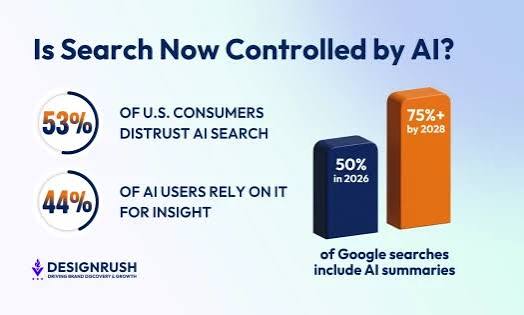
    Google’s AI Overviews are now a permanent part of search results. When users search for something, they often see a summary generated by AI at the top of the page, which means they may never click through to a website. This is called a “zero-click search.” To stay visible, your content must be optimized not just for traditional rankings, but for being extracted and cited by AI models. This is known as Generative Engine Optimization (GEO).

    What to do instead:
    – Use structured data (schema markup) to help AI understand your content.
    – Provide clear, concise answers to common questions.
    – Ensure your content is authoritative and well-sourced, as AI models favor reliable information.

    2. Over-Reliance on Organic Clicks as a KPI

    With the majority of searches now ending without a click, measuring success solely by organic traffic is a mistake. If you’re only tracking clicks, you’re missing the bigger picture. Your brand might be visible and influencing users, even if they don’t click through immediately.

    What to do instead:
    – Track impressions, brand searches, and engagement metrics.
    – Focus on building brand awareness and direct traffic.
    – Use tools that measure visibility across AI platforms like ChatGPT and Perplexity.

    3. Creating Thin or Aggregated Content

    Google’s Helpful Content System is now fully integrated into its core algorithm. This means that thin, low-value content—whether written by humans or AI—is systematically devalued. The old strategy of publishing lots of mediocre articles to rank for many keywords is dead.

    What to do instead:
    – Focus on creating in-depth, original content that provides real value.
    – Ensure every piece of content has a clear purpose and answers the user’s intent.
    – Avoid content that simply aggregates other sources without adding new insights.

    4. Neglecting Core Web Vitals and Real User Metrics

    Core Web Vitals have evolved. The metrics now rely on real-world data (field data) rather than lab tests. The Interaction to Next Paint (INP) metric has fully replaced First Input Delay (FID) as the primary measure of responsiveness. If your site is slow or unresponsive, you’ll lose rankings.

    What to do instead:
    – Monitor your Core Web Vitals in Google Search Console.
    – Optimize for mobile and ensure fast loading times.
    – Use real user monitoring (RUM) tools to get accurate performance data.

    5. Overlooking E-E-A-T and First-Hand Experience

    E-E-A-T stands for Experience, Expertise, Authoritativeness, and Trustworthiness. In 2026, “Experience” is no longer optional—it’s mandatory. Content that lacks first-hand experience or clear author credentials is at a significant disadvantage, especially in YMYL (Your Money or Your Life) topics like health, finance, and legal advice.

    What to do instead:
    – Add author bios with credentials and links to their profiles.
    – Include personal experiences, case studies, and original research.
    – Build trust through transparent sourcing and citations.

    6. Using JavaScript That Blocks Indexing

    Google’s rendering queue is slower and more selective than ever. If your site relies heavily on client-side JavaScript without proper server-side rendering (SSR) or static site generation (SSG), your content may be delayed or not indexed at all.

    What to do instead:
    – Use SSR or SSG for critical content.
    – Test your site with Google’s URL Inspection tool to ensure it’s being rendered correctly.
    – Minimize the use of JavaScript for above-the-fold content.

    7. Chasing Keywords Instead of Topics and Entities

    Keywords are not dead, but exact-match keyword stuffing is. Search engines now use natural language processing (NLP) to understand the meaning behind queries. They focus on entities (people, places, things) and topics, not just strings of words.

    What to do instead:
    – Optimize for topic clusters and semantic relevance.
    – Use related terms and synonyms naturally in your content.
    – Build topical authority by covering a subject comprehensively.

    8. Buying Backlinks or Using PBNs

    Backlinks remain a top ranking factor, but the quality bar is higher than ever. Buying links or using Private Blog Networks (PBNs) is easily detected by Google’s SpamBrain. The risk of a penalty is high, and recovery can take months.

    What to do instead:
    – Earn backlinks through high-quality content and outreach.
    – Focus on digital PR and building relationships with authoritative sites.
    – Monitor your backlink profile and disavow toxic links.

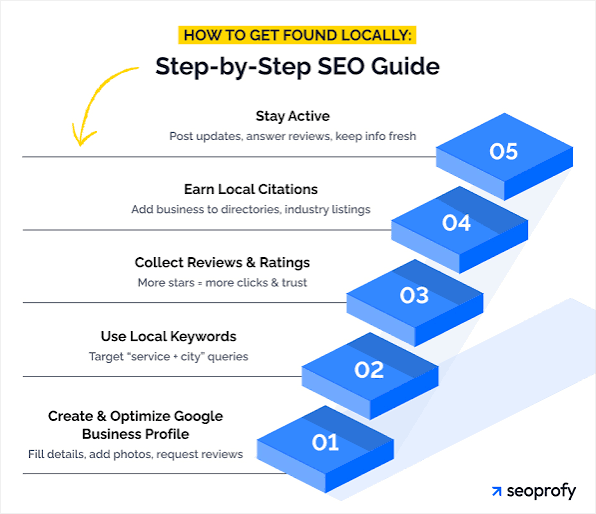
    9. Ignoring Local SEO and Google Business Profile

    For small businesses, local SEO is often more valuable than chasing national keywords. Neglecting your Google Business Profile is a huge mistake. It’s one of the easiest ways to appear in local search results and map packs.

    What to do instead:
    – Optimize your Google Business Profile with accurate information, photos, and reviews.
    – Encourage customers to leave reviews.
    – Use local keywords and create location-specific content.

    10. Not Adapting to the Post-Cookie Era

    With third-party cookies fully deprecated, SEO is no longer just about traffic—it’s about first-party data and brand search. If you’re not building your brand and collecting data directly from your audience, you’re losing ground.

    What to do instead:
    – Invest in email marketing and customer relationship management (CRM).
    – Create content that encourages direct visits and bookmarks.
    – Build a strong brand presence on social media and through PR.

    11. Publishing AI-Generated Content Without Editorial Oversight

    AI tools can help you create content faster, but publishing AI-generated content without human review is a recipe for disaster. AI can hallucinate facts, produce biased or inaccurate information, and create content that lacks the nuance of human experience.

    What to do instead:
    – Use AI as a drafting tool, not a final author.
    – Always fact-check and edit AI-generated content.
    – Add your own insights, examples, and expert opinions.

    12. Ignoring the Rise of Answer Engines

    Users are increasingly turning to AI-powered answer engines like ChatGPT, Perplexity, and Google’s Gemini for information. If your content isn’t visible in these platforms, you’re missing out on a growing source of traffic.

    What to do instead:
    – Optimize your content for natural language queries.
    – Ensure your site is crawlable by AI bots.
    – Consider creating content specifically designed to be cited by AI models.

    SEO in 2026 is about adapting to a search landscape where AI plays a central role. By avoiding these common mistakes, you can position your website for success. Focus on creating high-quality, authoritative content, optimizing for user experience, and building a strong brand. The future of SEO is not just about rankings—it’s about being the best answer to your audience’s questions.

    Summary

    • AI Overviews and GEO: Optimize content for AI extraction, not just rankings.
    • Zero-Click Searches: Track more than just clicks; measure visibility and brand impact.
    • Helpful Content: Publish in-depth, original content; avoid thin or aggregated pieces.
    • Core Web Vitals: Focus on real-user metrics like INP and mobile performance.
    • E-E-A-T: Include first-hand experience and author credentials, especially for YMYL topics.
    • JavaScript Indexing: Use SSR or SSG to ensure your content gets indexed.
    • Topics over Keywords: Optimize for entities and semantic relevance, not exact-match phrases.

    FAQ

    Q: Is AI-generated content penalized by Google?
    A: No, not automatically. Google penalizes spammy, low-quality content regardless of who wrote it. Using AI to mass-produce thin content is a mistake, but using it as a drafting tool with human oversight is fine.

    Q: Do backlinks still matter in 2026?
    A: Yes, backlinks remain a top ranking factor. However, the quality threshold is higher, and buying links or using PBNs is risky. Focus on earning links through great content and digital PR.

    Q: What is Generative Engine Optimization (GEO)?
    A: GEO is the practice of optimizing content to be easily understood and cited by AI models like Google’s AI Overviews or ChatGPT. It involves using structured data, clear definitions, and authoritative sourcing.

    Q: How can I improve my Core Web Vitals?
    A: Focus on real-user metrics like LCP, INP, and CLS. Optimize images, use lazy loading, minimize JavaScript, and ensure your server responds quickly. Use tools like PageSpeed Insights to identify issues.

    Q: What is the biggest SEO mistake in 2026?
    A: One of the biggest is ignoring the shift to AI-driven search. If you’re still optimizing only for traditional rankings without considering AI Overviews and answer engines, you’ll miss out on significant visibility.

  • The Best Keyword Research Tools : A Practical Guide for SEO, Content, and PPC

    10 Best Keyword Research Tools in 2026 (Free + Paid) — Tested & Ranked

    Keyword research is the foundation of any successful SEO or content strategy. It’s how you discover what your audience is actually searching for, and it informs everything from blog topics to product pages. But with dozens of tools on the market, each promising to be the best, it’s easy to feel overwhelmed. The truth is, there’s no single ‘best’ tool—the right choice depends on your goals, budget, and skill level.

    In this guide, we’ll break down the leading keyword research tools, what they excel at, and how to choose the right one for your needs. We’ll also clear up common misconceptions and show you how to use these tools effectively in an era of AI-driven search and zero-click results. Whether you’re a solo blogger, a PPC specialist, or an enterprise SEO team, you’ll find practical advice to level up your keyword game.

    What Is Keyword Research and Why Does It Matter?

    Keyword research is the process of discovering the exact words and phrases people type into search engines like Google, YouTube, or Amazon. It’s not just about finding words with high search volume—it’s about understanding user intent, competition, and the potential to drive traffic and conversions.

    Think of keyword research as a conversation with your audience. You’re listening to their questions, problems, and desires, then crafting content that answers them. Without this research, you’re essentially shouting into a void, hoping someone hears you.

    Today, keyword research is more nuanced than ever. With Google’s AI Overviews (formerly SGE) and the rise of zero-click searches, the focus has shifted from chasing exact-match keywords to building topical authority and semantic relevance. Tools have evolved to help you find not just keywords, but clusters of related topics that signal expertise to search engines.

    The Top Keyword Research Tools: A Detailed Look

    Ahrefs: The All-Rounder for SEO Professionals

    Ahrefs is often considered the gold standard for SEO tools. Its keyword index boasts over 14 billion keywords, making it one of the largest in the industry. The tool provides a Keyword Difficulty (KD) score on a 0-100 scale, which tells you how hard it is to rank for a term. It also offers SERP analysis, showing you the current top-ranking pages and their metrics.

    One standout feature is the Content Gap analysis, which lets you compare your domain against competitors to find keywords they rank for but you don’t. This is invaluable for spotting untapped opportunities.

    Pricing starts at $99/month, which is steep for casual users, but for agencies and serious SEOs, it’s a worthwhile investment.

    Semrush: The Swiss Army Knife for Digital Marketing

    Semrush is more than just a keyword tool—it’s a full digital marketing suite. Its Keyword Magic Tool generates thousands of keyword ideas, which you can filter by intent, volume, and difficulty. It also provides PPC data, including CPC and competition, making it a favorite for paid search specialists.

    The Position Tracking feature lets you monitor your rankings over time, and the competitor analysis tools are second to none. You can see exactly which keywords your rivals are targeting and how their traffic is trending.

    Semrush starts at $119.95/month, but it’s often worth it for the breadth of features. It’s particularly strong for agencies that need to manage multiple clients.

    Google Keyword Planner: The Free Essential for PPC

    Google Keyword Planner is the original keyword tool, and it’s still the go-to for paid search campaigns. Because it pulls data directly from Google Ads, it provides the most accurate CPC estimates and search volume ranges. However, it shows volume as a range (e.g., 1K-10K) rather than exact numbers, which can be frustrating for SEOs.

    It’s free, but you need a Google Ads account to access it. For PPC specialists, it’s non-negotiable—no third-party tool can match its accuracy for bid decisions.

    Moz Keyword Explorer: Great for Beginners and SERP Insights

    Moz’s Keyword Explorer is user-friendly and offers a unique ‘Priority’ score that combines volume, difficulty, and organic CTR. It also provides SERP analysis and a list of related keywords, making it easy to build content clusters.

    One of its best features is the organic CTR data, which shows you the expected click-through rate for different positions. This helps you understand the real traffic potential of a keyword, not just its volume.

    Pricing starts at $99/month, and there’s a free trial with limited searches.

    Ubersuggest: Budget-Friendly and Beginner-Friendly

    Ubersuggest, created by Neil Patel, is a low-cost tool that’s perfect for small businesses and solo entrepreneurs. It offers keyword ideas, content suggestions, and backlink data. The free version gives you a limited number of searches per day, while paid plans start at just $12/month.

    While it’s not as deep as Ahrefs or Semrush, it’s an excellent starting point for those on a tight budget. The interface is intuitive, and the ‘Content Ideas’ feature helps you find popular topics in your niche.

    KWFinder (Mangools): The Long-Tail Specialist

    KWFinder is part of the Mangools suite and focuses on long-tail keywords—those longer, more specific phrases that have lower competition but higher conversion rates. It provides a SERP difficulty score and local SEO data, making it great for local businesses.

    It’s affordable, starting at $29/month, and includes a free trial. If your strategy revolves around long-tail keywords, this is a solid choice.

    Google Trends: Free and Essential for Seasonal Insights

    Google Trends is a free tool that shows you the popularity of a keyword over time. You can compare multiple terms, see regional interest, and discover related queries. It’s invaluable for identifying seasonal trends and understanding what’s currently capturing people’s attention.

    It doesn’t provide exact search volumes, but it’s perfect for content ideation and spotting rising topics before they peak.

    AnswerThePublic: Uncovering Questions Your Audience Asks

    AnswerThePublic visualizes search queries in a beautiful wheel-like diagram, grouping them by question words like ‘what,’ ‘why,’ and ‘how.’ It’s a goldmine for content creators who want to address their audience’s specific questions.

    The free version gives you a limited number of searches per day, while the paid plan costs $99/month. It’s not a comprehensive keyword tool, but it’s excellent for brainstorming content ideas.

    Keyword Surfer: The Free Chrome Extension

    Keyword Surfer is a free Chrome extension that overlays search volume and related keywords directly on Google’s search results. It’s a lightweight tool that’s perfect for quick research without leaving your browser.

    It also shows you the estimated word count of top-ranking pages, which can help you gauge content length. For a free tool, it’s surprisingly useful.

    Surfer SEO: For Content Optimization

    Surfer SEO is different from the others—it focuses on content optimization rather than keyword discovery. It analyzes top-ranking pages and gives you recommendations for keywords to include, word count, and heading structure.

    It integrates with keyword data to help you create content that’s fully optimized for search. Pricing starts at $89/month, and it’s a great complement to a traditional keyword tool.

    Key Metrics Explained: Search Volume, KD, CPC, and More

    When you’re using any keyword tool, you’ll encounter several metrics. Here’s what they mean:

    • Search Volume: The average number of monthly searches for a keyword. Higher volume usually means more potential traffic, but also more competition.
    • Keyword Difficulty (KD): A score (often 0-100) that estimates how hard it is to rank for a keyword. A KD of 30 is easier than a KD of 80.
    • Cost Per Click (CPC): The average amount advertisers pay per click for a keyword. High CPC indicates commercial intent—people are ready to buy.
    • SERP Features: These are special elements on the search results page, like featured snippets, ‘People Also Ask’ boxes, or video carousels. They can steal clicks away from organic results, so it’s important to know if a keyword triggers them.
    • Click-Through Rate (CTR): The percentage of people who click on a result after seeing it. This varies by position and keyword intent.
    • Intent: The reason behind a search. It can be navigational (looking for a specific site), informational (seeking answers), commercial (researching products), or transactional (ready to buy).

    How to Choose the Right Tool for Your Needs

    For SEO Professionals

    If you’re an SEO specialist, you need a tool with accurate data, deep competitor analysis, and reliable rank tracking. Ahrefs and Semrush are the top choices. Ahrefs excels in backlink data and content gap analysis, while Semrush offers a broader suite for PPC and social media. Many professionals use both, but if you have to pick one, consider your primary focus.

    For Content Marketers

    Content marketers should prioritize tools that help with ideation and optimization. AnswerThePublic and Google Trends are great for discovering questions and trends. For optimization, Surfer SEO is a game-changer. Ubersuggest is also useful for finding content ideas on a budget.

    For PPC Specialists

    Google Keyword Planner is non-negotiable for PPC. It’s the only tool with actual Google Ads data. For additional insights, Semrush provides excellent PPC analytics and competitor ad research.

    For Small Businesses and Budget-Conscious Users

    You don’t need to spend a fortune. Start with Google Keyword Planner and Google Trends, both free. Add Ubersuggest or Keyword Surfer for more ideas. As you grow, you can invest in a premium tool like Moz or KWFinder.

    For Enterprises and Agencies

    Enterprise teams need API access, white-label reporting, and team collaboration. Semrush and Ahrefs offer enterprise tiers with these features. They also integrate with platforms like Google Search Console and Looker Studio, making it easy to build custom dashboards.

    Common Pitfalls and Misconceptions

    “High Search Volume Means High Traffic”

    Not necessarily. A keyword with 10,000 monthly searches might have a low CTR if it’s not relevant to your content or if SERP features steal clicks. Always consider intent and SERP features.

    “Keyword Difficulty Is Absolute”

    KD scores are estimates based on the tools’ algorithms. They don’t account for your domain authority, content quality, or backlink profile. Use KD as a guide, not a rule.

    “You Need to Rank #1 to Get Traffic”

    With featured snippets and other SERP features, you can get visibility without being #1. Tools like Moz and Ahrefs show you SERP features, helping you target opportunities.

    “Free Tools Are Enough”

    Free tools are great for starting, but they have limitations. They often lack accurate volume data, historical trends, and competitor analysis. If you’re serious about SEO, investing in a paid tool is worthwhile.

    “Keyword Research Is a One-Time Task”

    Search trends change, and new keywords emerge. Regularly updating your keyword research is essential to stay relevant.

    The Future of Keyword Research: AI and Beyond

    As AI continues to reshape search, keyword research is evolving. Tools are now using machine learning to cluster keywords by topic and predict search trends. The focus is shifting from individual keywords to topical authority—creating comprehensive content that covers a subject in depth.

    Zero-click searches are on the rise, meaning fewer people click on organic results. This makes it crucial to optimize for SERP features like featured snippets and ‘People Also Ask.’ Tools are adapting by providing more data on these features.

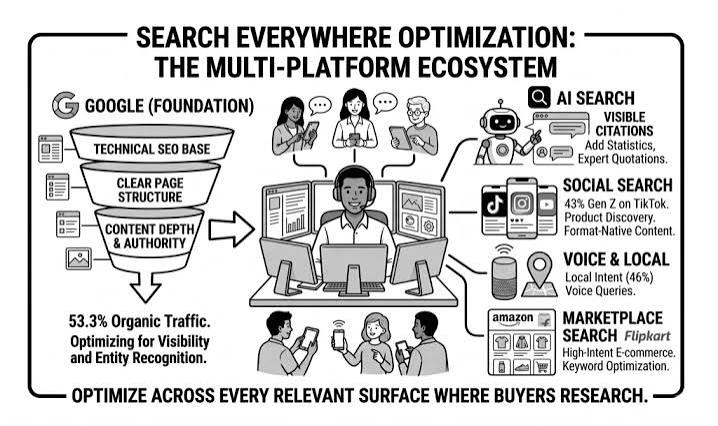
    Additionally, alternative search engines like YouTube, Amazon, and TikTok are becoming important. Tools like Semrush and Ahrefs are expanding to cover these platforms, allowing you to research keywords for video, e-commerce, and social media.

    Practical Tips for Effective Keyword Research

    1. Start with a Seed Keyword: Think of a broad term related to your niche. Use tools to expand it into hundreds of long-tail variations.
    2. Analyze the SERP: Look at what’s currently ranking for your target keywords. Are there featured snippets? What type of content is ranking? This tells you what Google considers relevant.
    3. Check Competitor Keywords: Use tools like Ahrefs’ Content Gap or Semrush’s competitor analysis to find keywords your rivals rank for but you don’t.
    4. Group Keywords by Intent: Separate keywords into informational, commercial, and transactional. Tailor your content to match the intent.
    5. Prioritize Long-Tail Keywords: They have lower volume but higher conversion rates and less competition. They’re easier to rank for and often more profitable.
    6. Use Google Trends for Seasonality: Plan your content calendar around seasonal peaks.
    7. Track Your Rankings: Use a rank tracker to monitor your progress and adjust your strategy.

    Conclusion

    Keyword research is not a one-size-fits-all endeavor. The best tool for you depends on your role, budget, and goals. For comprehensive SEO, Ahrefs and Semrush are the industry leaders. For PPC, Google Keyword Planner is essential. For content ideation, AnswerThePublic and Google Trends are invaluable. And for budget-conscious users, Ubersuggest and free tools offer a solid starting point.

    Remember, the tool is just a means to an end. The real value comes from understanding your audience and creating content that meets their needs. By using these tools effectively, you can uncover opportunities, outsmart competitors, and grow your organic traffic.

    Start with a free tool, get comfortable with the metrics, and then invest in a paid tool as your needs grow. Happy researching!

    Keyword research is the compass for your content and SEO strategy. With the right tools, you can uncover what your audience is searching for, understand the competition, and create content that ranks. Start with a free tool like Google Keyword Planner or Ubersuggest, and as you grow, invest in a premium tool like Ahrefs or Semrush. The key is to stay curious, keep learning, and adapt to the ever-changing search landscape.

    Summary

    • Keyword research is the process of finding and analyzing search terms to inform SEO, content, and PPC strategies.
    • Top tools include Ahrefs, Semrush, Google Keyword Planner, Moz, Ubersuggest, KWFinder, Google Trends, AnswerThePublic, Keyword Surfer, and Surfer SEO.
    • Key metrics to understand are search volume, keyword difficulty, CPC, SERP features, CTR, and intent.
    • Choose a tool based on your role: SEO pros prefer Ahrefs/Semrush, PPC specialists need Google Keyword Planner, content marketers benefit from AnswerThePublic and Surfer SEO, and budget users can start with free tools.
    • Avoid pitfalls like equating high volume with high traffic, relying solely on KD scores, and ignoring SERP features.

    FAQ

    Q: What is the best free keyword research tool?
    A: Google Keyword Planner is the best free tool for PPC, while Google Trends is excellent for content ideation. Keyword Surfer is a handy free Chrome extension for quick volume checks.

    Q: How do I know if a keyword is worth targeting?
    A: Look at search volume, keyword difficulty, and intent. A keyword with moderate volume, low difficulty, and commercial intent is often a good target. Also check the SERP for features like featured snippets.

    Q: Can I use one tool for both SEO and PPC?
    A: Yes, Semrush and Ahrefs both offer PPC data, but Google Keyword Planner is the most accurate for paid campaigns. Many professionals use a combination.

    Q: How often should I do keyword research?
    A: Regularly—at least quarterly. Search trends change, and new opportunities emerge. Also, revisit your keyword list whenever you create new content.

    Q: What is keyword difficulty and how is it calculated?
    A: Keyword difficulty is a score (0-100) that estimates how hard it is to rank for a keyword. Tools calculate it based on the authority of current ranking pages, backlinks, and other factors. It’s a guide, not an absolute measure.