Tag: automation

  • Agentic Browsers vs. Traditional Browsers: What Changes and Why It Matters

    Agentic Browsers vs. Traditional Browsers: What Changes and Why It Matters

    Imagine asking your browser to plan a three-day trip to Lisbon on a budget of $800, and then watching it open tabs, compare flights, check hotel reviews, and even draft an itinerary all without you touching the keyboard. That’s the promise of ‘agentic browsers,’ a new class of web software that uses AI to act on your behalf. Traditional browsers the Chrome, Safari, and Firefox you know are passive tools: they show you the web, but you do all the work. Agentic browsers aim to flip that script.

    This shift isn’t just a new feature; it’s a change in how we interact with the web. Instead of a human driving every click and keystroke, an AI agent can take the wheel for multi-step tasks. Understanding the difference between these two models helps you see where the web is heading and what it means for your online life. Here’s a clear breakdown of what sets them apart, how they work, and what to watch for.

    The Traditional Browser: Your Digital Window

    A traditional browser is a software application that retrieves and displays web pages. Chrome, Safari, Firefox, and Edge are the familiar faces. Their core jobs are straightforward: you type a URL, click a link, or enter a search query, and the browser fetches the page, renders it with HTML, CSS, and JavaScript, and shows it to you. You handle the rest—reading, deciding where to go next, filling out forms, and fixing problems when something breaks.

    The architecture is built for this human-driven interaction. A rendering engine (like Blink or WebKit) draws the page, a JavaScript engine (such as V8 or SpiderMonkey) runs code, and a networking stack fetches data. You have tabs, bookmarks, history, extensions, and password managers—all tools to help you navigate, but none that act autonomously.

    Think of a traditional browser as a powerful car: it can go fast, but you are always in the driver’s seat, steering, braking, and deciding the route.

    The Agentic Browser: Your Digital Assistant

    An agentic browser, by contrast, is designed to perform tasks on your behalf. It doesn’t just display the web; it interacts with it. Using large language models (LLMs) and other AI, it can break down a high-level goal into smaller steps, navigate websites, click buttons, fill forms, and adapt when things go wrong—all without step-by-step human input.

    For example, if you ask an agentic browser to “find a good used bike under $500,” it might search classified sites, filter results, compare prices, and even contact sellers via messaging forms, all while you supervise. It can maintain memory across sessions, remembering your preferences and past actions.

    Early examples include OpenAI’s Operator (a research preview from January 2025), Perplexity’s Comet, and startups like Dia. Even traditional browsers are dabbling: Chrome has added AI features like “Help me write,” and Microsoft is integrating Copilot into Edge. Developer frameworks like Browser-use and Playwright MCP allow programmers to build agentic control into existing browsers.

    The Core Differences: A Side-by-Side Look

    Here’s a quick comparison to highlight the key shifts:

    | Feature | Traditional Browser | Agentic Browser |
    |—|—|—|
    | Primary user | Human | Human + AI agent (or agent alone) |
    | Interaction model | Direct manipulation | Delegation + supervision |
    | Task execution | User performs steps | Agent performs steps autonomously |
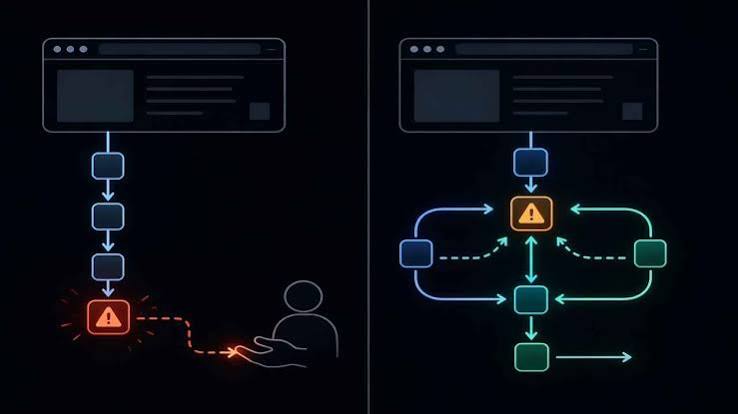
    | Error handling | User troubleshoots | Agent self-corrects (or escalates) |
    | State/memory | Session-based, local | Persistent, cross-session, cloud-synced |
    | Trust model | User sees every action | Agent acts on user’s behalf (requires new trust mechanisms) |

    The most significant change is the interaction model. With a traditional browser, you are the sole actor. With an agentic browser, you become a supervisor, setting goals and approving actions. This shift introduces new challenges around trust, privacy, and control.

    Why Now? The Tech Behind the Shift

    The jump from traditional to agentic browsers didn’t happen overnight. It’s the result of several technological advances converging in the mid-2020s.

    First, LLMs got much better at understanding and generating text, which lets them parse web page content and decide what actions to take. Models like GPT-4 can look at a page’s HTML or accessibility tree and figure out which button to click or which field to fill.

    Second, “computer-use” models emerged. OpenAI’s GPT-4o and Anthropic’s Claude 3.5 Sonnet demonstrated they could operate a computer screen by processing screenshots and sending mouse and keyboard commands. This ability is a stepping stone to full browser control.

    Third, the Model Context Protocol (MCP), an open standard from Anthropic introduced in November 2024, standardizes how agents connect to tools and data. It makes it easier for browsers to integrate with external services, so an agent can check your calendar, email, or payment systems securely.

    Finally, web accessibility improvements, like better DOM accessibility trees and ARIA roles, give agents a clearer picture of page structure, much like a screen reader does for visually impaired users.

    The Upsides: What Agentic Browsers Offer

    For power users, the appeal is productivity. Agents can handle repetitive tasks—like filling out forms, comparing prices, or compiling research—in parallel, saving hours. Imagine a browser that, while you work on one thing, is also booking your flights, reserving a table, and sending an email to confirm.

    Accessibility is another win. People with motor or visual impairments can delegate complex navigation to an agent, bypassing the need for precise mouse movements or constant visual scanning.

    “The browser as a copilot” is a common vision: the agent doesn’t replace you; it augments your abilities. You stay in control, approving critical actions, but the tedious legwork is automated.

    The Downsides and Risks: What to Watch For

    Agentic browsers aren’t without flaws. Autonomy introduces risk. An agent might misinterpret a page, click the wrong link, or share data in ways you didn’t intend. The trust model is fundamentally different—you can’t see every action, so you need new mechanisms for transparency and consent.

    Privacy is a major concern. An agent that remembers your preferences and past actions across sessions is storing a lot of personal data. Where is that stored? Who has access? Cloud-based agents like OpenAI’s Operator add another layer: your actions are processed on remote servers.

    Security is another issue. Malicious websites might exploit agents, tricking them into harmful actions, just as they trick humans with phishing. We need new safety protocols for agent-based browsing.

    Finally, there’s the question of control. Some people may feel uncomfortable ceding decision-making to an AI, even for minor tasks. The balance between autonomy and oversight is a design challenge.

    The Bottom Line: A Spectrum, Not a Binary

    It’s important to note that the line between traditional and agentic isn’t sharp. Most agentic browsers are built on top of traditional browser engines, and traditional browsers are adding agent-like features. Chrome’s AI tab organizer, for instance, is a small step toward agentic behavior. The future likely holds a spectrum, where you can choose how much autonomy to grant your browser.

    As a user, you’ll need to weigh the convenience gains against the risks. For some tasks, you’ll want full control; for others, you’ll happily delegate. The key is to understand what your browser is doing and to stay informed about the trust and safety mechanisms in place.

    In short, the shift from traditional to agentic browsers is not about replacing the browser; it’s about changing the relationship between you and the web. Whether that’s a leap forward or a step into the unknown depends on how well we manage the trade-offs.

    The arrival of agentic browsers marks a turning point in how we use the web. Traditional browsers put the human at the center of every interaction; agentic browsers introduce an AI partner that can act on your behalf. The technology is promising, but it brings real questions about trust, privacy, and control. As these tools evolve, you’ll have more choices—and more responsibility—in deciding how much autonomy to grant your browser.

    Summary

    • Traditional browsers (Chrome, Safari, Firefox) are human-driven: you type, click, and decide every step.
    • Agentic browsers (like OpenAI’s Operator, Perplexity’s Comet) use AI to perform multi-step tasks autonomously, such as planning a trip or comparing products.
    • Key differences include interaction model (direct vs. delegated), error handling (user vs. AI), and memory (session-based vs. persistent).
    • Why now? Advances in LLMs, computer-use models, MCP, and web accessibility have made autonomous browsing feasible.
    • Benefits include productivity gains and improved accessibility; risks include privacy issues, security vulnerabilities, and loss of user control.

    FAQ

    Q: What is an agentic browser?
    A: An agentic browser is a web browser that uses AI agents to perform tasks autonomously on your behalf, such as booking a trip or filling out forms, without step-by-step human input.

    Q: How is it different from a traditional browser?
    A: A traditional browser requires you to manually navigate and perform every action. An agentic browser can understand goals, break them into steps, and execute them, while you supervise.

    Q: Are agentic browsers safe?
    A: They are new, so safety is still evolving. Risks include privacy (data storage and sharing), security (malicious sites targeting agents), and errors (misinterpretation). Look for transparency and control features.

    Q: Do I need to be tech-savvy to use an agentic browser?
    A: No, the goal is to make complex tasks easier. You interact with the agent in plain language, but you should still understand what it does and how to approve actions.

    Q: Will agentic browsers replace traditional browsers?
    A: Not immediately. They will likely coexist, with traditional browsers incorporating agent-like features and agentic browsers relying on traditional engines. You’ll have options for how much autonomy to grant.
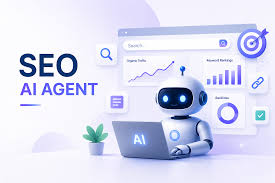
  • SEO AI Agents: The 285% Surge and What It Really Means

    SEO AI Agents: The 285% Surge and What It Really Means

    Searches for “SEO AI agents” have jumped 285% year-over-year. That’s not a typo. SEO professionals are flocking to a new breed of software that doesn’t just suggest it does. But what exactly is an SEO AI agent, and why the sudden frenzy? This article unpacks the technology, separates hype from reality, and offers a practical guide for anyone trying to decide if agents belong in their workflow.

    What Is an SEO AI Agent?

    An SEO AI agent is a software system that uses large language models (LLMs) to perform SEO tasks with minimal human intervention. Unlike traditional AI SEO tools like Surfer SEO or Clearscope—which offer recommendations you have to implement yourself—agents can take action. They might update your meta tags, generate content drafts, or submit sitemaps on their own. Think of the difference: a calculator gives you the answer; an autonomous car drives you to the destination. Traditional tools are the calculator; agents are the self-driving car.

    Why the 285% Spike?

    The surge in searches didn’t happen in a vacuum. Several forces aligned. First, the release of GPT-4 and similar models gave agents the ability to handle unstructured data—reading a webpage, understanding user intent—rather than just structured APIs. Second, SEO work is repetitive and data-heavy, making it a natural fit for automation. Third, agencies and in-house teams face pressure to do more with less, and agents promise 24/7 operation at a fraction of the cost of junior hires. Finally, Google’s own shift toward AI-generated overviews and the Search Generative Experience has made SEO professionals nervous; they’re looking for tools to keep pace with a changing landscape.

    What Can SEO AI Agents Actually Do?

    Current agents can perform a range of tasks:
    Keyword clustering and content gap analysis: They group thousands of keywords by intent and identify topics your competitors cover but you don’t.
    Content generation: They draft SEO-optimized articles, though human review is still the norm.
    Technical SEO: They crawl your site, spot broken links or missing schema markup, and even fix them automatically.
    Rank tracking: They monitor your positions in real time, including SERP features like featured snippets.
    Internal linking: They suggest or automatically add internal links to improve site structure.
    Competitor monitoring: They watch your rivals’ changes and alert you to new opportunities.

    The Human-in-the-Loop Reality

    Despite the hype, most practitioners use agents as “co-pilots,” not replacements. A 2024 survey from Ahrefs found that while 87% of SEO professionals are aware of AI agents, only 18% have fully integrated them into their workflows. The dominant model is human-in-the-loop: the agent does the grunt work, and a human reviews and approves the output. This approach mitigates the risk of generating low-quality content that could trigger Google penalties.

    Google’s Stance: Quality Over Origin

    Google’s spam policies explicitly target “scaled content abuse.” If an agent mass-produces low-value pages, you’re asking for trouble. But Google also uses AI internally (RankBrain, MUM) and says it rewards genuinely helpful AI-assisted content. The line isn’t “AI vs. human”; it’s “helpful vs. spam.” Agents that prioritize quality and adhere to E-E-A-T guidelines can thrive. Those that cut corners will get penalized.

    The Vendor Landscape and Economic Drivers

    Major platforms like Semrush, Ahrefs, and Moz are integrating agentic features. Startups are popping up daily. The economic appeal is clear: agents reduce the cost of delivering SEO services, allowing agencies to scale without hiring. For clients, that can mean lower prices and faster results. But there’s a catch: automation can lead to a race to the bottom on pricing, and some tools overpromise autonomous capabilities that fail in production.

    The Risks and Misconceptions

    • “AI agent” ≠ “AI chatbot”: A chatbot responds to prompts; an agent plans and executes multi-step tasks. Don’t confuse the two.
    • Search interest ≠ adoption: The 285% spike might reflect curiosity, not usage. Actual adoption remains under 20%.
    • Quality control: Agents can make factual errors or produce generic content. Without human oversight, you risk brand damage.
    • Transparency issues: Clients may find it hard to audit what an agent did, raising accountability concerns.

    Practical Advice for Using SEO AI Agents

    1. Start small: Use agents for low-risk tasks like keyword clustering or rank tracking before letting them touch your content.
    2. Keep a human in the loop: Always review AI-generated content for accuracy and brand voice.
    3. Monitor Google’s guidelines: Stay updated on spam policies and algorithm updates to avoid penalties.
    4. Choose tools wisely: Look for agents that offer transparency—logs of actions taken—and clear integration with your existing stack.

    The Future Outlook

    As LLMs improve, agents will become more autonomous and capable. But the core principle won’t change: SEO is about earning trust, not gaming algorithms. Agents that help you create genuinely useful content and improve user experience will be assets. Those used to spam will be liabilities. The 285% surge signals a shift, but the smartest practitioners will treat it as an opportunity to work smarter, not to replace human judgment entirely.

    SEO AI agents are not a passing fad, but they’re also not a magic bullet. The 285% spike in searches shows real interest, but adoption is still in its early stages. The key is to use agents as powerful assistants, not autonomous overlords. Keep humans in the loop, focus on quality, and stay aligned with search engine guidelines. Done right, agents can free you to focus on strategy and creativity—the parts of SEO that truly move the needle.

    Summary

    • Searches for “SEO AI agents” rose 285% year-over-year, reflecting growing interest in automating SEO workflows.
    • An SEO AI agent is an autonomous system that can execute tasks like keyword research, content generation, and technical audits, unlike assistive tools that only provide recommendations.
    • Current adoption is low (under 20%), with most practitioners using agents as co-pilots rather than full replacements.
    • Google penalizes scaled content abuse, but rewards helpful AI-assisted content—quality, not origin, is the key.
    • Practical advice: start small, keep human oversight, and choose transparent tools to avoid pitfalls.

    FAQ

    Q: What is the difference between an AI SEO tool and an AI agent?
    A: An AI SEO tool (like Surfer SEO) provides recommendations that you implement yourself. An AI agent takes action—e.g., it can update meta tags or generate content drafts autonomously. Tools are assistive; agents are executive.

    Q: Will SEO AI agents replace SEO professionals?
    A: Most practitioners use agents as co-pilots, not replacements. The human-in-the-loop model is dominant because agents still need oversight to ensure quality and avoid penalties. Full replacement is unlikely in the near term.

    Q: Are SEO AI agents safe to use with Google?
    A: Yes, if used responsibly. Google targets scaled content abuse, not AI per se. Agents that produce high-quality, helpful content align with Google’s guidelines. Low-quality mass production can lead to penalties.

    Q: How can I start using an SEO AI agent?
    A: Begin with low-risk tasks like keyword clustering or rank tracking. Choose a tool that offers transparency and integrates with your existing stack. Always review AI output before publishing.

    Q: Is the 285% increase in searches a sign that agents are widely adopted?
    A: No. Search interest doesn’t equal usage. Surveys suggest actual adoption is under 20%. The spike reflects curiosity and awareness, not necessarily mainstream implementation.

  • Can AI Plan Your Dinner Party? The Rise of Agentic Assistants

    Can AI Plan Your Dinner Party? The Rise of Agentic Assistants

    Imagine asking your AI assistant to plan a dinner party for 8 and having it handle everything from menu design to grocery ordering. This isn’t science fiction—it’s the new frontier of AI, where assistants evolve from answering questions to executing multi-step tasks. But how close are we really to this reality, and what does it mean for your wallet? This article explores the current capabilities, limitations, and financial implications of using AI as a personal logistics manager.

    From Q&A to Action: The Agentic Shift

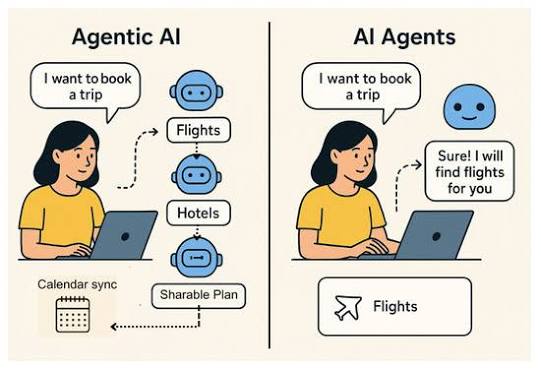
    For years, AI assistants like Siri and Alexa were limited to single commands—set a timer, play a song, check the weather. They were reactive, not proactive. Then came large language models like ChatGPT, which could hold conversations but still couldn’t do much beyond generating text. The latest evolution is “agentic AI”: systems that can plan, use tools, and execute multi-step workflows with human supervision. This shift turns AI from a passive oracle into an active coordinator.

    When you ask, “Can you help me plan a dinner party for 8?” an agentic AI doesn’t just spit out a recipe. It breaks the task into subtasks: define the menu, create a shopping list, set a budget, build a timeline, handle invitations. It remembers that your friend is vegan and that you only have $150 to spend. It can even connect to your calendar, a grocery delivery app, and a payment platform to move from planning to execution. The catch? Full autonomous execution remains limited—most systems require your approval at key steps, especially when money is involved.

    What AI Can Do Today: A Menu of Possibilities

    Let’s get concrete. As of 2025, mainstream AI assistants like ChatGPT with plugins, Google Gemini, and Claude with tools can perform several dinner-party tasks with varying degrees of autonomy:

    • Menu generation: Based on your preferences and dietary restrictions, AI can propose a three-course menu, complete with recipes and estimated costs.
    • Shopping list creation: It can generate a categorized list with quantities, and even check items off against what you already have.
    • Budget tracking: You can set a budget, and AI will tally costs as it builds the list, suggesting substitutions if you’re over (e.g., cheaper wine or seasonal vegetables).
    • Timeline building: AI can create a step-by-step schedule from days before to the event, factoring in prep times and when to buy fresh ingredients.
    • Invitation drafting: It can write polite invitation messages for you to review before sending.

    However, true execution—like actually ordering groceries or sending invites via APIs—is still in its infancy. Most tools will generate a list and ask you to click “buy,” or draft an email for you to hit “send.” The technology exists to automate these actions, but companies are cautious about letting AI spend money or contact people without explicit human confirmation.

    The Financial Angle: A Microcosm of Money Management

    Planning a dinner party is more than logistics—it’s a mini-exercise in personal finance. AI’s ability to handle this task is a gateway to broader financial planning. If you trust AI with a $150 dinner, could you trust it with your monthly budget? Let’s break down the financial capabilities:

    • Budget setting and tracking: AI can allocate funds across courses, track spending in real-time, and alert you if you’re about to overshoot.
    • Cost optimization: It might suggest buying generic brands, using in-season produce, or swapping expensive ingredients. One user reported that AI planned a dinner for 8 on a $120 budget, with a shopping list totaling $118.50—including a dessert they’d never have thought of.
    • Expense splitting: After the party, AI can calculate each guest’s share and even draft payment reminders. But it can’t actually process payments or access your bank account without your explicit authorization and oversight.

    The critical limitation is security. For AI to handle transactions, it needs access to payment platforms, which raises concerns about fraud and data breaches. Companies are implementing safeguards like spending caps and approval prompts, but the technology is not yet at a point where you’d hand over your credit card details without a second thought.

    The Skeptic’s View: When AI Gets It Wrong

    For all its promise, AI planning has real limitations that can hit your wallet or your social standing. Here are the main concerns:

    • Hallucinations and errors: AI might invent a recipe that doesn’t work, or suggest ingredients that are out of season or unavailable locally. This could lead to extra trips to the store or last-minute substitutions—costing both time and money.
    • Lack of sensory judgment: AI can’t taste food, smell a fish market, or know that your aunt hates cilantro unless you tell it. It relies entirely on the information you provide, which is often incomplete.
    • Sequential dependencies: A good plan knows you can’t buy fresh fish five days in advance. While AI can handle this in theory, it might miss nuances like the need to brine a turkey for 24 hours or that a specific cake needs to chill overnight.
    • Financial risk from miscalculation: If AI underestimates portion sizes, you’ll overspend on groceries. If it books a reservation and you can’t make it, you could face cancellation fees.

    These aren’t deal-breakers, but they mean you should always review AI’s suggestions before committing money or sending messages. The AI is a planner, not a guarantor.

    The Future: Agentic Commerce and Guardrails

    Looking ahead, dinner party planning is a stepping stone to “agentic commerce,” where AI negotiates prices, compares deals, and executes transactions on your behalf. For that to happen, we need a massive ecosystem of interconnected data—your calendar, grocery store inventory, payment methods, and guest preferences—all securely linked. That ecosystem doesn’t fully exist yet.

    When it does, we’ll need new “autonomous spending guardrails” to prevent AI from going rogue. Imagine setting a monthly spending cap, requiring approval for any purchase over $50, and having an audit trail of every transaction AI makes. These are the kinds of controls financial institutions and tech companies are exploring right now.

    Practical Takeaways: How to Use AI for Your Next Dinner Party

    If you’re curious to try AI planning today, here’s a responsible approach:

    1. Start with a budget and constraints. Tell the AI your guest count, dietary restrictions, and spending limit.
    2. Use it for drafts, not final decisions. Let AI generate a menu and shopping list, but review everything for accuracy and personal touches.
    3. Keep the human in the loop. Approve any purchases, and double-check that the AI hasn’t missed a key preference or ingredient.
    4. Track costs manually, too. Use the AI’s budget tracker as a guide, but cross-check with your own records to avoid surprises.

    By treating AI as a skilled assistant rather than an autopilot, you can save time and money while avoiding the pitfalls of blind trust.

    The ability of AI to plan a dinner party is a litmus test for its role in our daily lives. It shows how far we’ve come from simple voice commands to proactive problem-solving, and it hints at a future where AI manages complex logistics—including finances—on our behalf. But that future is not here yet. Today, AI can draft, suggest, and calculate, but it still needs you to pull the trigger. As the technology matures, the key will be finding the right balance between convenience and control, ensuring that AI amplifies your decision-making without overriding it.

    Summary

    • Agentic AI can break down complex tasks like dinner party planning into subtasks, use tools, and execute steps, but full autonomy is limited.
    • Current capabilities include menu generation, shopping lists, budget tracking, timelines, and invitations, but purchases and sends require human approval.
    • The financial angle is significant: AI can optimize costs, track budgets, and split expenses, but security concerns limit direct payment handling.
    • Skeptics worry about hallucinations, sensory limitations, and miscalculations leading to overspending or social blunders.
    • The future points to agentic commerce with guardrails like spending caps and approval workflows, but the ecosystem is not yet fully built.

    FAQ

    Q: Can AI actually order groceries for my dinner party?
    A: As of 2025, most AI assistants can generate a shopping list and link to grocery delivery services, but they typically require you to review and confirm the order before purchase. Full autonomous ordering without human approval is not yet mainstream due to security and error risks.

    Q: How does AI handle dietary restrictions?
    A: AI can incorporate dietary restrictions if you specify them (e.g., vegan, gluten-free). It will generate menus and shopping lists that exclude offending ingredients. However, it only knows what you tell it, so you must be explicit about all allergies and preferences.

    Q: Is AI budgeting for a dinner party reliable?
    A: AI can create a budget and track costs based on current prices from its training data or live web searches. It’s reliable for estimates, but prices can vary by location and time, so it’s wise to verify with actual store prices. AI can also suggest substitutions to stay within budget.

    Q: What are the risks of using AI for payment-related tasks?
    A: The main risks are data breaches and AI miscalculations. If AI has access to your payment information, a security flaw could expose it. Also, AI might make errors in amounts or timing, leading to overcharges or missed payments. Always review and approve any financial transactions.

    Q: Will AI replace the need for a human party planner?
    A: Not yet. AI can handle logistics, budgeting, and scheduling, but it lacks the personal touch and sensory judgment of a human planner. It can’t taste food or know your guests’ personalities. For now, AI is best used as a tool to assist human planners, not replace them.

  • Agentic AI Shopping: Your AI Assistant Can Now Buy Things for You

    Agentic AI Shopping: Your AI Assistant Can Now Buy Things for You

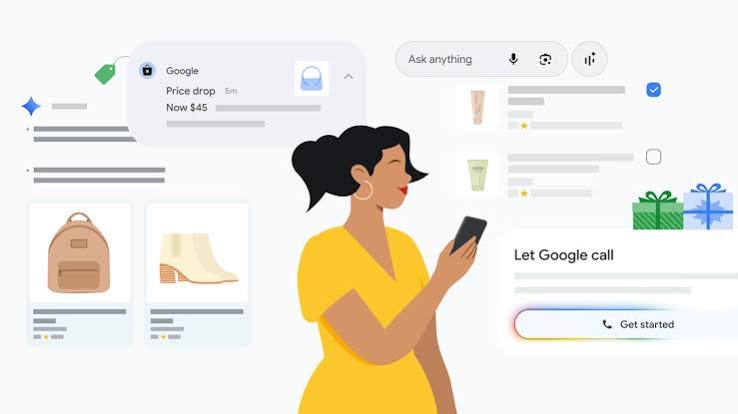
    Imagine asking your phone to find a birthday gift for under $50, compare prices across five stores, read reviews, and place the order—all while you make coffee. That’s the promise of agentic AI, a new wave of artificial intelligence that doesn’t just suggest products but actually completes purchases on your behalf. In early 2025, OpenAI launched Operator, a tool that can browse the web, fill out forms, and click ‘buy’—and Google, Amazon, and Perplexity are racing to release similar features. This isn’t a futuristic fantasy; it’s arriving in beta versions right now.

    But what exactly is agentic AI, and why does it matter for shopping? Unlike the chatbots that recommend sneakers or answer ‘What’s the best laptop?’—which only talk—agentic AI acts. It can navigate websites, compare prices, negotiate with sellers, track packages, and even initiate returns. For consumers, this could mean reclaiming hours lost to online shopping drudgery. For retailers, it’s a double-edged sword: agents might boost sales or destroy profit margins by intensifying price competition. Understanding this shift is crucial for anyone who shops online—which is nearly all of us.

    From Chatbots to Agents: The Evolution of Shopping AI

    To understand agentic AI, think of the difference between a travel agent who gives you a list of flights and one who books the ticket, reserves the hotel, and emails you the itinerary. Early shopping AI was the first kind—chatbots that answered questions and made recommendations. They were passive. You did the clicking and the buying.

    Agentic AI is the second kind. It’s built on large language models (LLMs) that can not only understand language but also use tools: browsing the web, filling out forms, and clicking buttons. This leap became possible when AI systems gained ‘tool use’ capabilities—like function calling and web browsing—and computer vision improved enough for agents to ‘see’ a webpage and interact with it just like a human would. The result is software that can perform a multi-step task with minimal human oversight.

    For example, Amazon’s Rufus AI assistant isn’t just a chatbot; it can execute ‘Buy for Me’ features, completing purchases on other websites. Klarna’s AI assistant handles two-thirds of customer service chats, resolving issues without human intervention. These are early glimpses of a broader trend: AI that doesn’t just help you shop—it shops for you.

    What Agents Can Actually Do (and What They Can’t)

    Current agentic shopping tools are impressive, but they’re not fully autonomous. They’re ‘human-in-the-loop’ by design, meaning they ask for confirmation before finalizing a purchase. Still, their capabilities are expanding rapidly:

    • Browse and compare: Agents can visit multiple retailers, check prices, and compile a comparison—like a personal shopper who checks every store in the mall.
    • Fill out forms: They can input shipping and payment details into checkout forms, saving you from typing your address for the hundredth time.
    • Negotiate: Some agents can interact with sellers on platforms like eBay or Etsy, making offers on your behalf.
    • Track and manage: After a purchase, agents can monitor shipping, remind you of delivery dates, and even initiate returns if something goes wrong.

    But there are limits. Agents still make mistakes—clicking the wrong size, misunderstanding a return policy, or falling for a phishing page. They also require access to your personal and payment data, which raises privacy concerns. And because they’re optimized by the companies that build them, there’s a risk they might subtly steer you toward products that benefit the retailer, not you.

    The Retailer’s Dilemma: Friend or Foe?

    For retailers, agentic AI is a double-edged sword. On one hand, agents could reduce cart abandonment—that notorious moment when a shopper leaves items in the cart and never returns. An agent that completes the purchase could boost conversion rates significantly. They can also handle customer service at scale, as Klarna demonstrates, cutting costs dramatically.

    On the other hand, agents that compare prices across competitors could intensify price wars. If your AI can instantly find the same product $5 cheaper elsewhere, retailers lose the loyalty edge they once had. Products become commoditized, and profit margins shrink. Retailers may need to make their websites ‘agent-friendly’—using structured data and APIs so agents can easily interact—or risk being bypassed entirely. There’s also the threat of agents scraping inventory data and creating artificial demand spikes that disrupt supply chains.

    Platforms like Amazon, Google, and Shopify are racing to become the default ‘agent layer’ between consumers and merchants. Whoever controls the agent controls the shopping journey—and the data that comes with it. A key battle is whether agents will be walled gardens (Amazon’s agent only shops on Amazon) or open ecosystems (an agent that shops anywhere). Early signs suggest a mix: Amazon’s agent is restricted, while OpenAI’s Operator and Perplexity’s ‘Buy with Pro’ aim to work across the web.

    The Consumer Trade-Off: Convenience vs. Control

    For consumers, the appeal is obvious: time savings. A 2023 survey found that the average online shopper spends hours per week comparing prices and reading reviews. An agent could collapse that into minutes. For people with disabilities or those less comfortable with technology, agents could make online shopping accessible in ways previously impossible.

    But there are real risks. Losing control over purchases can be unsettling—what if the agent misinterprets ‘gift for a friend’ and buys something inappropriate? Privacy is another concern: to shop for you, an agent needs your address, payment details, and browsing history. That’s a lot of sensitive data in the hands of an AI. And there’s the erosion of browsing as leisure. Many people enjoy the hunt of finding a deal or discovering unexpected products. If AI does all the work, that joy disappears—and you might end up with exactly what you asked for, but nothing you didn’t know you wanted.

    The ethical dimension is thorny. Are agents truly acting in your best interest, or are they subtly nudging you toward higher-margin items? Without transparency, you can’t tell. The EU AI Act and consumer protection laws like the FTC’s rules on dark patterns offer some guardrails, but no specific regulations exist yet.

    The Push for Reliability and Security

    One of the biggest challenges is reliability. Agents make mistakes, and in shopping, mistakes cost money. If an agent books a non-refundable flight for the wrong date, who’s responsible? Developers are working on benchmarks like WebArena and GAIA to measure agent performance, but these are still immature. Security is another concern: agents are vulnerable to ‘prompt injection’ attacks, where malicious websites trick the AI into doing something harmful, like revealing your credit card number.

    To address these issues, tech companies are developing standardized protocols like A2A (agent-to-agent) and MCP (Model Context Protocol) to ensure agents can communicate safely with each other and with websites. But these are early days, and widespread adoption is years away.

    The Future: What to Expect in the Next Five Years

    The AI agents market is projected to grow from about $5 billion in 2024 to over $47 billion by 2030—a tenfold increase. That growth will be driven by improvements in reliability, security, and interoperability. In the near term, expect to see agentic shopping tools become more common in beta features of major platforms. Amazon’s Rufus and OpenAI’s Operator will likely expand their capabilities, and more startups will enter the space.

    But don’t expect full autonomy anytime soon. Human oversight will remain essential for high-stakes purchases. The most likely future is a hybrid: you’ll use agents for routine purchases—groceries, household items, reordering your favorite shampoo—but you’ll still personally handle big-ticket items like a house or a car, at least for the next few years.

    Eventually, agentic AI could transform the entire shopping experience. You might have a personal AI that learns your taste, manages your budget, and negotiates with retailers on your behalf. It could even handle returns and warranty claims automatically. But that future depends on solving the trust and technical challenges first. Until then, approach agentic shopping with cautious optimism: use it for low-stakes purchases, keep an eye on what it’s doing, and always double-check the final price.

    Agentic AI is not a gimmick—it’s a fundamental shift in how we interact with online commerce. By moving from recommendation to execution, these systems promise to save time and money, but they also raise serious questions about control, privacy, and fairness. As this technology matures, the smartest approach is to stay informed, start small, and remember that you’re still the boss. The AI may do the shopping, but you make the final call.

    Summary

    • Agentic AI can autonomously perform multi-step shopping tasks: browsing, comparing, purchasing, tracking, and returning—unlike chatbots that only recommend.
    • Major players: OpenAI’s Operator, Google’s Project Mariner, Amazon’s Rufus, and Perplexity’s ‘Buy with Pro’ are early examples.
    • For consumers, the trade-off is convenience vs. control: time savings come with privacy risks and potential loss of browsing enjoyment.
    • Retailers face a dilemma: agents could boost conversion rates or intensify price competition, forcing them to adapt to ‘agent-friendly’ interfaces.
    • The market is projected to grow from $5B in 2024 to $47B by 2030, but reliability and security remain major hurdles.

    FAQ

    Q: What is agentic AI?
    A: Agentic AI refers to AI systems that can autonomously perform multi-step tasks, make decisions, and take actions on behalf of a user—like browsing, comparing prices, and completing purchases—rather than just providing recommendations.

    Q: How is agentic AI different from a regular chatbot?
    A: A chatbot responds to queries with information or suggestions, but it doesn’t act. Agentic AI goes further by executing tasks—for example, it doesn’t just say ‘here are shoes,’ it says ‘I bought you shoes.’ It has autonomy and can complete a sequence of actions.

    Q: Is agentic shopping fully autonomous today?
    A: No. Current agents are ‘human-in-the-loop’ by design—they ask for confirmation before finalizing purchases. Full autonomy for high-stakes transactions is likely years away.

    Q: What are the risks of using agentic AI for shopping?
    A: The main risks are loss of control, privacy concerns (agents need access to personal and payment data), potential manipulation (agents might be optimized for retailer profit), and technical errors that could cost money.

    Q: Will agentic AI replace human shopping entirely?
    A: Not in the near term. It will likely handle routine purchases, but big-ticket items like houses or cars may still require human judgment and oversight. The future is a hybrid approach where AI handles the mundane tasks and humans focus on complex decisions.

  • 6 AI Tools That Are Quietly Taking Over Everyday Jobs

    6 AI Tools That Are Quietly Taking Over Everyday Jobs

    In November 2022, ChatGPT went live and within days, millions of people were typing prompts that generated emails, code, and essays in seconds. For the first time, artificial intelligence wasn’t a distant concept—it was a free website that could do your job’s busywork. Since then, a wave of specialized AI tools has emerged, each targeting a specific slice of daily work. The result? Some jobs are being reshaped, and others are disappearing entirely.

    But here’s the twist: the tools themselves aren’t the story. The story is how they’re changing what it means to be a writer, a designer, a developer, or an assistant. This isn’t a doomsday list—it’s a practical look at six AI tools that are already replacing everyday tasks, and what that means for the people who used to do them.

    The Economic Pressure Behind AI Adoption

    Before we get to the tools, let’s talk money. AI tools cost anywhere from $20 to $100 per month. An entry-level employee costs $40,000 to $80,000 per year. That’s a 100x cost difference, and it’s why companies are paying attention. According to a McKinsey Global Institute report from 2023, about 30% of US work hours could be automated by 2030 using current AI technology. Goldman Sachs projected that 300 million full-time jobs worldwide could be affected by generative AI. The economic incentive is undeniable—even if the human cost is complicated.

    The 6 Tools and the Jobs They’re Replacing

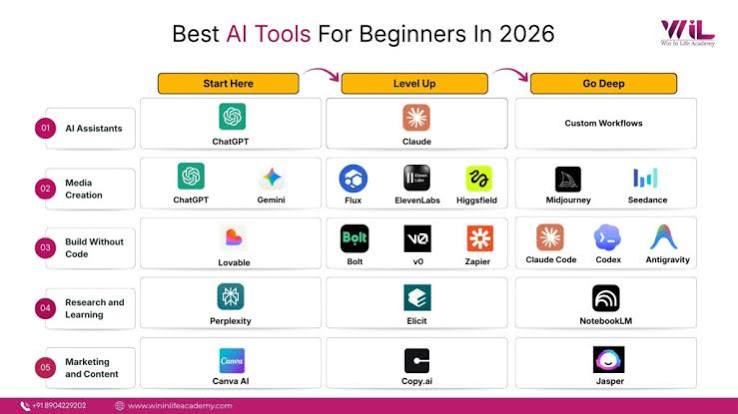
    1. ChatGPT / Claude (General Text & Analysis)

    Jobs at risk: Content writers, customer support reps, junior analysts

    When ChatGPT launched, it could write a blog post, answer a customer email, or summarize a report in seconds. Anthropic’s Claude has since caught up, offering similar capabilities with a focus on safety and longer context windows. For task-heavy roles like basic content creation or first-line customer support, these tools are already in production. Klarna, a fintech company, reported that its AI assistant handles two-thirds of customer service chats—the equivalent of 700 full-time agents. IBM paused hiring for back-office roles that AI could cover. The pattern is clear: if your job is mostly turning information into text, a large language model can do a lot of it.

    2. Midjourney / DALL-E 3 (Image Generation)

    Jobs at risk: Graphic designers (entry-level), stock photographers

    Midjourney and DALL-E 3 can generate photorealistic images from a text prompt. A designer who used to spend hours creating concept art or sourcing stock photos can now get a dozen variations in minutes. Stock photography sites are already flooded with AI-generated images, undercutting photographers who relied on licensing fees. Entry-level design roles that focus on production work—like resizing images or creating basic layouts—are increasingly done by AI, while human designers focus on art direction and strategy. The Upwork/Stanford study from 2024 found that freelancers in writing, translation, and customer service saw a 21% income decline after ChatGPT’s launch. Design is on a similar trajectory.

    3. Synthesia / HeyGen (AI Video Generation)

    Jobs at risk: Video editors, voiceover artists, some on-camera roles

    These platforms let you create videos with realistic AI avatars that speak your script in multiple languages. No camera, no microphone, no editing suite. For corporate training videos, product demos, or social media clips, Synthesia and HeyGen are dramatically cheaper and faster than hiring a video production crew. Voiceover artists are already feeling the squeeze—why pay a human $500 to narrate a 5-minute explainer when an AI voice can do it for $30? The quality isn’t perfect yet, but for many business use cases, it’s good enough. The result is that entry-level video editing and voiceover work is being automated away.

    4. GitHub Copilot / Cursor (AI Pair Programming)

    Jobs at risk: Junior developers, QA testers

    GitHub Copilot, powered by OpenAI, suggests code as you type. Cursor takes it further with an AI-native code editor that can generate entire functions. For junior developers, this is a double-edged sword: it makes them more productive, but it also means companies need fewer of them. A single senior developer can now do the work of two or three juniors by leveraging AI for boilerplate code, bug fixes, and testing. Quality assurance roles are also shrinking—AI can generate test cases and even find bugs automatically. The World Economic Forum’s ‘Future of Jobs 2025’ report predicts 83 million jobs eliminated and 69 million created by 2027, a net loss of 14 million. Coding is at the front line of that shift.

    5. ElevenLabs / Murf (Voice Synthesis & Cloning)

    Jobs at risk: Voice actors, call center agents, audiobook narrators

    ElevenLabs can clone a voice from a few minutes of audio and generate speech that sounds eerily human. Murf offers a library of natural-sounding voices for e-learning, ads, and IVR systems. Call centers are a prime target: AI voices can handle routine inquiries without breaks or sick days. Audiobook narrators, a niche but real profession, are seeing AI narrators that can produce a full book in hours. Voice actors who once earned a living doing commercials or narration are finding fewer gigs. There are also ethical concerns—AI voice cloning has been used for scams—but the technology isn’t going away. It’s already replacing jobs that were once considered uniquely human.

    6. Zapier / Make (Workflow Automation with AI)

    Jobs at risk: Administrative assistants, data entry clerks, schedulers

    Zapier and Make let you connect apps and automate repetitive tasks—like moving data between spreadsheets, sending follow-up emails, or scheduling meetings. With AI integration, these platforms can now handle more complex workflows, such as extracting data from PDFs and filling out forms. Administrative assistants who spent hours on scheduling and data entry are seeing those tasks vanish. A 2023 study by the National Bureau of Economic Research found that AI can automate up to 50% of administrative tasks. While some roles evolve into ‘AI supervisors,’ the pure data-entry or scheduling jobs are disappearing.

    The Augmentation vs. Replacement Debate

    So, are these tools replacing jobs or just changing them? The evidence points to a mix. Academic research from MIT and Stanford suggests that AI currently augments rather than fully replaces most roles—but for task-heavy, repetitive positions, the margin is thinning. The WGA writers’ strike in 2023 and SAG-AFTRA’s AI consent protections show that creative industries are fighting back. Yet, the economic logic is hard to ignore: if a tool can do 80% of a job, companies will restructure to need fewer people for the remaining 20%.

    What This Means for You

    The skill shift is real. Writing, basic coding, and design fundamentals are becoming commoditized. What remains valuable is judgment, context, and emotional intelligence. Job postings increasingly list ‘AI tool proficiency’ as a requirement. Freelancers who adopt AI tools earn more than those who don’t, according to Upwork data. The takeaway isn’t to panic—it’s to learn how to work with these tools. The people who thrive will be those who see AI as an assistant, not a replacement.

    The Quality & Risk Factor

    It’s not all rosy. AI tools hallucinate, produce biased output, and lack accountability. There have been legal cases of AI-generated content containing fabricated citations. AI-generated code can introduce security vulnerabilities. The web is already full of ‘AI slop’—low-quality, mass-produced content. These flaws mean that human oversight is still essential, which can negate some cost savings. But the tools are improving fast. The risks are real, but they’re not stopping adoption.

    The Bottom Line

    These six tools are not just gadgets—they’re economic forces. They are replacing specific tasks within jobs, and in some cases, entire roles. The question isn’t whether AI will replace jobs; it’s how quickly and what we’ll do about it. The EU AI Act, passed in 2024, requires transparency for AI-generated content and mandates worker retraining provisions. The US has no federal AI employment law yet, but sector-specific guidance is emerging. The conversation is moving from ‘will it happen?’ to ‘how will we manage it?’

    The six tools we’ve covered are already reshaping the workplace, from customer support to design to coding. They’re not science fiction—they’re live products with paying customers. The jobs they’re replacing are often entry-level, task-heavy, and repetitive. But that doesn’t mean the people in those jobs are doomed. It means the skills that remain—judgment, creativity, emotional intelligence—are more valuable than ever. The future belongs to those who learn to work alongside these tools, not against them.

    Summary

    • Six AI tools (ChatGPT/Claude, Midjourney/DALL-E 3, Synthesia/HeyGen, GitHub Copilot/Cursor, ElevenLabs/Murf, Zapier/Make) are already replacing specific tasks in everyday jobs.
    • Cost pressure drives adoption: AI subscriptions cost $20-$100/month vs. $40k-$80k/year for an entry-level employee.
    • McKinsey estimates 30% of US work hours could be automated by 2030; Goldman Sachs projects 300 million jobs affected globally.
    • Klarna replaced ~700 customer service agents with AI; IBM paused back-office hiring.
    • Skill shift is key: writing, basic coding, and design fundamentals are commoditized, but judgment and emotional intelligence remain valuable.
    • AI tools have flaws (hallucinations, bias), so human oversight is still needed—but adoption is accelerating.

    FAQ

    Q: Will AI really replace entire jobs, or just tasks?
    A: Currently, AI is better at replacing tasks than entire jobs. However, for roles that are heavily task-based and repetitive—like data entry or basic content writing—the majority of the work can be automated, leading to fewer jobs in those categories.

    Q: Which jobs are most at risk from AI?
    A: Jobs that involve repetitive, rule-based tasks are most at risk. Examples include customer service representatives, data entry clerks, entry-level graphic designers, and junior developers. Roles requiring high-level judgment, creativity, or emotional intelligence are less vulnerable.

    Q: How can I future-proof my career against AI?
    A: Focus on developing skills that AI can’t easily replicate, such as critical thinking, problem-solving, and interpersonal communication. Also, learn to use AI tools in your field—being proficient with them makes you more valuable, not less.

    Q: Are there any regulations protecting workers from AI displacement?
    A: The EU AI Act (2024) includes provisions for worker retraining and transparency for AI-generated content. In the US, there is no federal AI employment law yet, but the EEOC has issued guidance on AI hiring bias. Union actions, like the WGA and SAG-AFTRA agreements, have also established protections for creative professionals.

    Q: Do AI tools produce quality work?
    A: It depends on the task. AI can produce high-quality text, images, and code for many routine applications, but it can also hallucinate facts, create biased output, or generate insecure code. Human oversight is still essential to ensure quality and safety.

  • 6 Ways to Automate Your Finances in 2026: From AI Cash Flow to Open Banking

    6 Ways to Automate Your Finances in 2026: From AI Cash Flow to Open Banking

    Imagine a world where your bills pay themselves, your savings grow on autopilot, and your investments rebalance without you lifting a finger. That world is not just a fantasy—it’s the reality of financial automation in 2026. With the fintech sector maturing and open banking finally taking hold, automating your finances has never been easier or more powerful.

    But automation isn’t just about convenience; it’s about overcoming human nature. Behavioral research shows we’re terrible at consistently saving and avoiding late fees. Automation leverages ‘default bias’—the tendency to stick with pre-set choices—to help you build wealth effortlessly. In this guide, we’ll explore six concrete ways to automate your finances in 2026, from AI-driven cash flow analysis to smart bill negotiation, and show you how to avoid the pitfalls of over-automation.

    1. Split Direct Deposit: Pay Yourself First, Automatically

    The simplest and most powerful automation starts with your paycheck. In 2026, more employers and payroll providers like ADP and Gusto offer split direct deposit, allowing you to route portions of your paycheck to multiple accounts automatically. Instead of manually transferring money to savings each month, you can set it up so that, say, 20% of your paycheck goes directly into a high-yield savings account or investment account, and the rest goes to checking.

    This ‘pay yourself first’ strategy ensures that saving happens before you even see the money, making it nearly impossible to spend. It’s the ultimate set-and-forget move, and it’s available to anyone with a regular paycheck.

    2. AI-Driven Cash Flow Analysis: Sweep Excess Funds Automatically

    In 2026, the most innovative automation apps use machine learning to analyze your income and spending patterns. Apps like Digit and Qapital now offer ‘smart sweep’ features that automatically move ‘excess’ funds from your checking account into savings or investments. For example, if you typically spend $3,000 a month and your income is $4,000, the app might automatically transfer $500 to savings on payday—but it also adapts to your behavior, so if you have an unusually high month, it won’t leave you overdrawn.

    This is a game-changer for people with variable income, like freelancers or gig workers, because the AI learns your cash flow patterns and only moves money when it’s safe. It’s like having a personal financial assistant that never sleeps.

    3. Smart Bill Pay and Subscription Management

    Subscription creep is a silent budget killer. In 2026, services like Rocket Money and Trim have taken bill automation to the next level. They don’t just pay your bills; they negotiate them. These apps can automatically cancel unused subscriptions, negotiate lower rates on cable, internet, and phone bills, and even dispute bank fees on your behalf.

    For example, if you’re paying $150 a month for cable but a competitor offers the same package for $100, the app will negotiate with your provider to match the price—or cancel it if you don’t use it. This is automation that saves you money without any effort on your part.

    4. Robo-Advisors: Automate Your Investing

    Robo-advisors like Betterment, Wealthfront, and Vanguard’s Digital Advisor have been around for a while, but by 2026 they’ve become even more sophisticated. They automatically invest your contributions based on your risk tolerance, rebalance your portfolio, and even harvest tax losses to minimize your tax bill. Assets under management in robo-advisors are projected to exceed $2 trillion by 2026, a testament to their popularity.

    The key is to set up automatic contributions from your checking account to your robo-advisor on payday. You can choose to have a fixed amount or a percentage of your income invested automatically. Over time, compound interest does the heavy lifting, and you don’t have to think about it.

    5. Automated Debt Payoff: Snowball and Avalanche on Autopilot

    While most articles focus on saving and investing, automating debt repayment is arguably the most impactful use case. In 2026, you can set up your bank or a debt payoff app to automatically make more than the minimum payment on your highest-interest debt (the avalanche method) or your smallest debt (the snowball method).

    Apps like Tally and Even can automate this for you, distributing extra payments across your credit cards or loans strategically. For example, if you have three credit cards with different balances and interest rates, the app will automatically apply your extra payment to the card that saves you the most in interest. This removes the temptation to skip a payment or spend the money elsewhere.

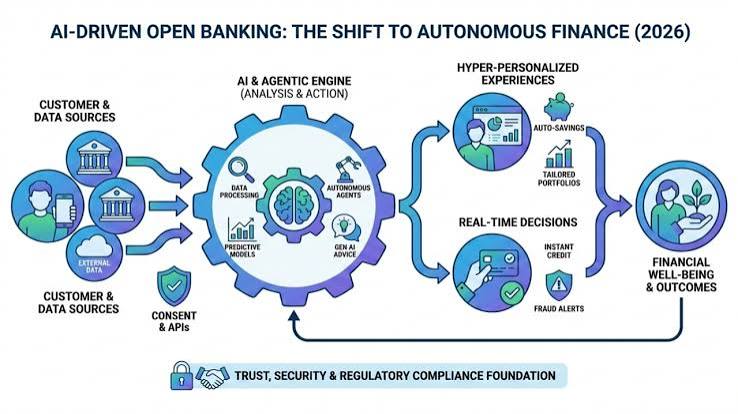
    6. Open Banking: See Everything, Automate Everything

    The biggest game-changer in 2026 is open banking. The CFPB’s Section 1033 rule, finalized in 2024, requires banks to share your financial data with authorized third-party apps. This means you can now connect all your accounts—checking, savings, credit cards, investments, and even your mortgage—in one place, and automate actions across them.

    For example, an app can see that you have $5,000 in a low-interest checking account and $10,000 in credit card debt at 20% APR. It can automatically transfer $4,000 to pay down the debt, leaving a $1,000 buffer. Or it can move money from a savings account to an investment account when your balance exceeds a certain threshold. This cross-account automation was impossible before open banking, and it’s now becoming mainstream.

    Avoiding the Pitfalls of Over-Automation

    While automation is powerful, it’s not a substitute for oversight. Critics warn of ‘financial numbness’—you stop checking your accounts, miss fraud, or fail to adjust when life changes. To avoid this, schedule a quarterly ‘financial check-in’ to review your automated rules, update your budget, and ensure you’re not overpaying for subscriptions you no longer use.

    Also, be mindful of security. Only use regulated, well-reviewed apps, enable two-factor authentication, and understand what data you’re sharing. Open banking is secure, but it’s still wise to monitor your accounts regularly for unauthorized activity.

    Finally, automation assumes a steady income. If you’re a freelancer or have variable cash flow, use ‘smart’ tools that adapt to your spending patterns, and always keep a buffer in your checking account to avoid overdrafts.

    Automating your finances in 2026 is about working smarter, not harder. From split direct deposit to AI-driven cash flow analysis and open banking, these six strategies can help you save more, invest consistently, and pay off debt faster—all without lifting a finger. Just remember to stay engaged with a quarterly review and keep an eye on security. The future of personal finance is here, and it’s automated.

    Summary

    • Split direct deposit to pay yourself first automatically.
    • Use AI-driven cash flow apps to sweep excess funds into savings or investments.
    • Automate bill pay and subscription management to negotiate and cancel unused services.
    • Set up robo-advisors to invest and rebalance automatically.
    • Automate debt payoff with snowball or avalanche methods.
    • Leverage open banking to see all accounts and automate cross-account actions.

    FAQ

    Q: Is financial automation safe?
    A: Yes, if you use regulated, well-reviewed apps and enable two-factor authentication. Open banking is secure, but always monitor your accounts for fraud.

    Q: Can I automate finances with variable income?
    A: Yes, newer ‘smart’ tools use AI to analyze your cash flow and only move money when it’s safe, making them suitable for freelancers and gig workers.

    Q: Do I still need to check my accounts if I automate everything?
    A: Yes, automation reduces manual work but doesn’t eliminate the need for oversight. Schedule quarterly reviews to catch errors, fraud, or subscription creep.

    Q: What’s the best way to start automating?
    A: Start with split direct deposit to savings, then add automatic bill pay and a robo-advisor. Gradually incorporate more advanced tools like AI cash flow analysis.

    Q: Will automation help me pay off debt faster?
    A: Absolutely. Automating extra payments toward your highest-interest or smallest debt can accelerate payoff and remove the temptation to skip payments.