Tag: AI

  • The Search Engine Shake-Up: How AI, Antitrust, and New Rivals Are Redrawing the Map

    The Search Engine Shake-Up: How AI, Antitrust, and New Rivals Are Redrawing the Map

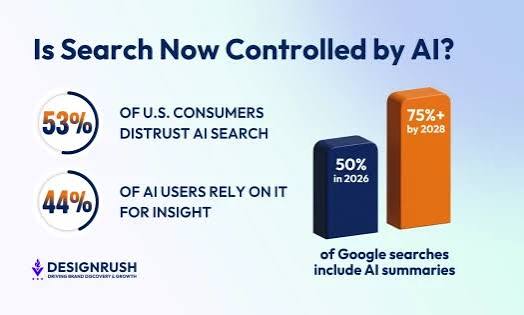
    For two decades, Google has been the front door to the internet. Type a query, get ten blue links, click, done. But that door is now creaking under the weight of generative AI, antitrust rulings, and a generation that would rather ask TikTok for a restaurant recommendation than Google. The search engine is no longer a static utility; it’s a battlefield where the next decade of information access is being decided.

    The numbers tell the story. Google still handles over 8.5 billion searches a day, but its market share has slipped below 90% for the first time in years. Meanwhile, ChatGPT reached 100 million weekly users in two years, and Perplexity an AI-native answer engine—has carved out 10 million monthly users. The queries aren’t disappearing; they’re just going elsewhere. And when they do stay, they often don’t lead to a click at all. Zero-click searches are on the rise, and that has publishers and advertisers alike scrambling.

    The End of the Ten Blue Links

    For most of search’s history, the goal was to send you to a website. Google’s PageRank, launched in 1998, was a clever way to rank pages by their backlinks, and it worked beautifully—so well that it made Google the default gateway to the web. But over the years, the search engine has been slowly answering more questions itself. Featured snippets, knowledge panels, and ‘people also ask’ boxes were early steps toward keeping you on the page.

    Generative AI is the logical endpoint. Instead of a list of links, you get a synthesized paragraph, assembled from multiple sources and written in natural language. Google’s AI Overviews, Microsoft’s Copilot, and Perplexity’s cited answers all do this. The shift is profound: search is no longer about finding a website; it’s about getting an answer. That’s a better experience for many queries, but it’s a nightmare for the publishers who relied on referral traffic to fund their work.

    The Economic Engine Under Stress

    Search engines are, at their core, advertising businesses. Google’s search ads generate over $175 billion annually. That revenue subsidizes the free access we all enjoy. But AI answers threaten the model. If a user gets their answer directly on the search results page, they never click on an ad, and they never visit the website that might have shown them an ad. The click-through rate on organic results has already declined to under 50% for many query types, and AI integration accelerates that trend.

    Microsoft, which partnered with OpenAI to make Bing’s AI search a reality, is betting that the future is conversational and ad-supported in new ways. But the tension is real: every AI-generated answer is a potential ad impression lost. The economic model that funded the internet’s index for two decades is being pulled in two directions—user experience and revenue. How that resolves will shape everything from content creation to the survival of independent media.

    The Antitrust Hammer Falls

    Google’s dominance hasn’t just been a matter of superior algorithms. In August 2024, a federal judge ruled that Google illegally maintained a monopoly in search and text advertising. The remedies are still being determined, but the implications are enormous. If Google is forced to change its default search deals—like the one that makes it the default on iPhones—then Bing, DuckDuckGo, or even a newcomer could gain ground.

    The EU has already acted. The Digital Markets Act designates Google as a ‘gatekeeper,’ requiring choice screens and prohibiting self-preferencing. These regulations are designed to crack open the market, but they also create uncertainty. Will they fragment the search landscape into regional silos? Or will they foster a new wave of innovation?

    Either way, the era of Google as the unchallenged monarch is over. The question is who benefits from the power vacuum: Microsoft, a privacy-focused upstart, or an AI-native answer engine we haven’t met yet.

    The New Rivals: Vertical and Niche

    Google isn’t just losing ground to AI chatbots. It’s losing ground to specialized search engines that do one thing better. For product searches, people go to Amazon. For video, they go to YouTube. For authentic community answers, Reddit has become the default, so much so that Google now pays Reddit to license its data for AI training. For younger demographics, TikTok has replaced Google entirely as the discovery engine for restaurants, fashion, and even news.

    These vertical players don’t aim to replace Google wholesale; they just siphon off the most lucrative and frequent queries. And then there’s the niche players: DuckDuckGo and Brave Search for privacy, Kagi for a paid, ad-free experience. They’re small—Kagi has maybe 50,000 users—but they represent a growing demand for alternatives to the surveillance economy.

    The Trust Problem: Hallucinations and the Black Box

    AI search engines have a problem: they make things up. Large language models are prone to hallucination—presenting false information with complete confidence. Google’s AI Overviews famously recommended putting glue on pizza and cited satirical sources as fact. These are edge cases, but they illustrate the deeper issue: users can’t audit how an answer is generated. With a list of links, you can see the source and judge its credibility. With an AI paragraph, you get an opaque synthesis.

    Proponents argue that AI can be more accurate because it can synthesize across languages and formats, and that it can attribute sources, as Perplexity does. But the ‘black box’ problem remains. When a model is trained on biased or incorrect data, it amplifies those biases. And when the incentives are to keep you on the page, there’s a risk that AI answers will be optimized for engagement rather than accuracy.

    The Publisher’s Dilemma: Adapt or Die

    For websites, the rise of AI search is an existential threat. If Google’s AI Overviews answer your query, you’ll never see the click. Small and independent publishers are most vulnerable—they don’t have the bargaining power to strike licensing deals with AI companies. Large media companies are racing to sign agreements, like the one between OpenAI and The Associated Press, to ensure their content is used in AI training and cited in outputs.

    But there’s a counterargument: AI search could drive more queries overall, because it lowers the friction of asking a question. And it could surface long-tail content that users would never have found through a traditional search. The problem is that these benefits are speculative, while the loss of referral traffic is immediate. Publishers are being forced to adapt—focusing on newsletters, subscriptions, and direct traffic—or face extinction.

    The Privacy Tightrope

    Personalized AI search requires data—lots of it. The more the AI knows about you, the better it can answer your questions. But that’s a privacy nightmare. The trade-off between convenience and surveillance is intensifying. Privacy-focused engines like DuckDuckGo and Brave are growing, but they’re a tiny fraction of the market. And the AI era may only widen the gap: if you want the best AI answers, you might have to let the AI into your life.

    The EU AI Act and other regulations are trying to set boundaries, but the technology is moving faster than the law. The core question is whether we can have the benefits of personalized, conversational search without surrendering our privacy. The answer, so far, is unclear.

    The search engine is not dying; it’s mutating. The next decade will see a multi-front war: Google fighting to keep its ad empire, AI startups pushing for a post-link world, verticals carving out their niches, and regulators reshaping the battlefield. The winners will be those who can balance the demand for fast, accurate answers with the need to sustain the web’s open ecosystem. But the web that emerges may look nothing like the one we know. Search’s future is not a single product—it’s a fragmented, personalized, and increasingly AI-driven landscape.

    Summary

    • Google still dominates with 8.5 billion searches a day, but its share is eroding due to AI, antitrust, and vertical rivals.
    • AI search engines like Perplexity and Google’s AI Overviews shift from links to synthesized answers, threatening the ad-based economic model.
    • The August 2024 antitrust ruling against Google could force changes in default search deals, opening the door for competitors.
    • Vertical searches (Amazon, TikTok, Reddit) siphon off high-value queries, while privacy-focused alternatives gain niche followings.
    • Trust and accuracy are major challenges: LLM hallucinations and black-box algorithms undermine confidence in AI answers.

    FAQ

    Q: Will Google be replaced by AI search engines?
    A: Not overnight. Google still holds ~90% market share and has deep pockets, but AI-native engines like Perplexity are growing. The more likely outcome is a hybrid: Google and Bing integrate AI, while niche players carve out specific use cases.

    Q: How will AI search affect website traffic?
    A: It could reduce referral traffic significantly because AI answers often keep users on the search page. Publishers may need to diversify traffic sources, build direct audiences, or strike licensing deals with AI companies.

    Q: What is a ‘zero-click search’?
    A: A search where the user finds the answer directly on the search results page—via a featured snippet, knowledge panel, or AI overview—without clicking any organic result. This is increasingly common and is a major concern for publishers.

    Q: Are AI search engines accurate?
    A: They can be, but they are prone to hallucination—confidently giving false information. They also lack transparency in how answers are generated. Users should verify critical information from primary sources.

    Q: What can I do to protect my privacy in the age of AI search?
    A: Use privacy-focused engines like DuckDuckGo or Brave, consider paid options like Kagi, and be mindful of the data you share with AI assistants. Remember that personalized AI often requires more personal data.
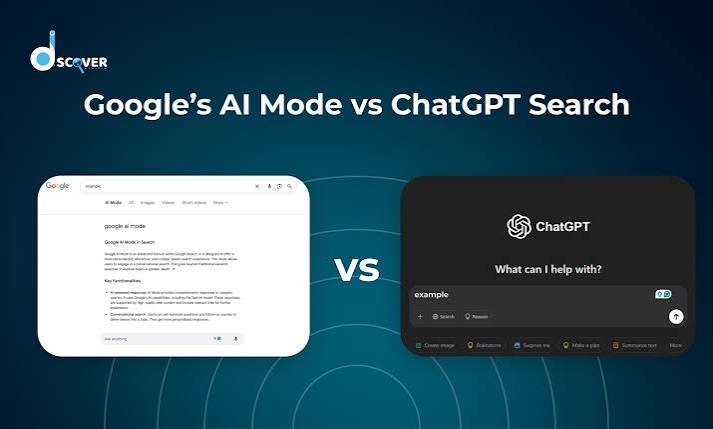

  • Google AI Mode vs. ChatGPT Search: Which AI Search Tool Actually Helps?

    Google AI Mode vs. ChatGPT Search: Which AI Search Tool Actually Helps?

    Two of the biggest names in tech are now fighting over the future of search. Google has rolled out AI Mode, a conversational layer on top of its classic search engine, while OpenAI has turned ChatGPT into a full-fledged search tool. Both promise to replace the old list of blue links with direct, reasoned answers. But they go about it in very different ways.

    One is a search engine with a chatbot grafted on. The other is a chatbot with a search engine tucked inside. That difference shapes everything: how you ask questions, how you follow up, and how much you trust the answers. Here’s a side-by-side look at what each tool actually does, where they stumble, and which one might suit the way you work.

    The Short Version: What Each Tool Is

    Google AI Mode is an opt-in feature inside Google Search, available through Search Labs since March 2025. It uses a custom Gemini 2.0 model to answer complex, multi-step questions directly on the search results page. You type a query like “compare the best OLED TVs for gaming under $1,000,” and instead of links, you get a synthesized comparison with sources cited.

    ChatGPT Search is a built-in feature in ChatGPT, available to all users since late 2024. It uses a fine-tuned GPT-4o (or GPT-4.1) model with a browsing tool that queries Bing’s index and other sources. You ask a question in the chat window, and it responds conversationally with footnoted sources. You can ask follow-up questions in the same thread, refining your search iteratively.

    The core distinction: AI Mode is a search engine that talks; ChatGPT Search is a talker that searches.

    Search Index: The Foundation of Everything

    Google’s index is the largest and most comprehensive in the world, covering billions of pages with real-time updates. AI Mode taps directly into that index, pulling live prices, stock quotes, local inventory, and other fresh data. ChatGPT Search, by contrast, relies primarily on Bing’s index, which is smaller and sometimes less current. OpenAI has been building its own web crawler (GPTBot), but for now, Bing remains the backbone.

    This matters for queries that depend on the latest information. If you ask about a breaking news event or a rapidly changing product price, Google AI Mode has the edge because its index is simply bigger and fresher. ChatGPT Search can still access real-time data through partnerships with news providers like the Associated Press and Reuters, but the underlying index is not as deep.

    Interface: Familiar vs. Conversational

    Google AI Mode lives in a dedicated tab within the Google app or search page. The layout feels familiar—a search bar, a results page—but the answer appears as a paragraph or bulleted list at the top, with links to sources alongside. There’s also a “show thinking” toggle that displays the model’s reasoning steps, a transparency feature that can be illuminating or overwhelming, depending on your patience.

    ChatGPT Search is integrated into the chat interface itself. You don’t need to switch tabs or modes; just ask a question and the model decides whether to search. The answer comes back in a chat bubble with numbered footnotes. You can then ask follow-up questions like “What about the Samsung S90D?” and the model remembers the context. This conversational flow is a major advantage for complex, multi-turn research.

    Follow-Up Questions: The Biggest Practical Difference

    The ability to refine a query is where these tools diverge most. With ChatGPT Search, you can have a back-and-forth dialogue. Ask about OLED TVs, then narrow down by budget, then ask about a specific brand, and the model keeps the thread. This is how real research works—you start broad and drill down.

    Google AI Mode, at least in its current form, is more rigid. Each query is treated as a new search. You can’t say “actually, just the ones under $800” and expect it to remember the previous context. You have to start over or rephrase the entire question. The “show thinking” toggle does reveal the model’s internal reasoning, which can help you understand why it gave a particular answer, but it doesn’t allow for iterative refinement in the same way.

    For a single, complex query, AI Mode shines. For an ongoing research session, ChatGPT Search is far more practical.

    Source Presentation and Trust

    Both tools cite their sources, but they do it differently. Google AI Mode shows inline links within the answer and a separate source panel on the side. This makes it easy to click through and verify claims. ChatGPT Search uses footnote citations—small numbers that you can hover over or click to see the source. It’s unobtrusive but requires an extra step to check.

    Trust is a bigger issue for AI-generated answers than for traditional links. Google has the advantage of brand familiarity and a long track record of search quality. ChatGPT, on the other hand, is a newer entrant but has built trust through its conversational accuracy and transparency about sources. Both are susceptible to hallucination, but the underlying model’s reliability matters more than the interface.

    Pricing and Access

    Google AI Mode is free but requires opting in via Search Labs. It’s not available to everyone by default. ChatGPT Search is free for all users, with rate limits for the free tier; Plus and Pro subscribers get higher limits and priority access. So, out of the box, ChatGPT Search is more accessible—you just open ChatGPT and start asking.

    Business Models and Future Direction

    Google’s AI Mode is ad-free for now, but Google has tested ads in AI Overviews, its earlier AI feature. It’s likely that AI Mode will eventually include sponsored answers or product listings, which could affect the neutrality of results. OpenAI, meanwhile, has no plans for ads in ChatGPT Search. Its revenue comes from subscriptions and API usage, so the priority is keeping users engaged and paying.

    This difference shapes the long-term experience. Google has a financial incentive to push ads, while OpenAI has an incentive to provide the best possible answer to retain subscribers. That’s not to say Google will sacrifice quality, but the ad model is a fundamental part of its business.

    Which One Should You Use?

    There’s no single winner—it depends on how you search.

    • For one-off, complex queries: Google AI Mode is excellent. Ask it to compare products, explain a nuanced topic, or synthesize multiple sources, and you’ll get a well-cited answer fast.
    • For ongoing research projects: ChatGPT Search is the better companion. The ability to ask follow-up questions in the same thread is a game-changer for deep dives.
    • For the freshest data: Google AI Mode, thanks to its larger index.
    • For accessibility: ChatGPT Search, because it’s free and always available.

    Try both. You’ll likely find that each has a place in your workflow. The AI search war is just beginning, and the winners will be the ones who make it easiest to find accurate information—whether that’s through a search box or a chat window.

    Google AI Mode and ChatGPT Search represent two philosophies of AI search: one that enhances the traditional search experience, and one that reimagines it as a conversation. For now, Google AI Mode offers deeper and fresher data, while ChatGPT Search offers a more flexible and interactive way to get answers. As both products evolve—and as OpenAI builds its own index and Google refines its conversational abilities—the gap will likely narrow. But for your daily research needs, the choice comes down to a simple question: do you want to search, or do you want to chat?

    Summary

    • Google AI Mode is an opt-in feature in Google Search that uses Gemini 2.0 to provide conversational, multi-step answers with a “show thinking” toggle.
    • ChatGPT Search is a built-in feature in ChatGPT using GPT-4o with browsing, offering conversational answers with footnote citations and full follow-up context.
    • Key difference: AI Mode uses Google’s massive index; ChatGPT Search relies on Bing’s index (smaller but with news partnerships).
    • User experience: AI Mode is a search engine that talks; ChatGPT Search is a chatbot that searches, allowing iterative refinement.
    • Access: Both are free, but AI Mode is opt-in via Search Labs, while ChatGPT Search is available to all users by default.

    FAQ

    Q: Is Google AI Mode free?
    A: Yes, Google AI Mode is free, but it requires opting in via Search Labs. It’s not available to everyone by default.

    Q: Can I use ChatGPT Search for free?
    A: Yes, ChatGPT Search is free for all users, though free tier has rate limits. Plus and Pro subscribers get higher limits and priority access.

    Q: Which one has fresher data?
    A: Google AI Mode uses Google’s proprietary index, which is larger and updated more frequently. ChatGPT Search relies primarily on Bing’s index, though it has partnerships with news providers for real-time data.

    Q: Can I ask follow-up questions in Google AI Mode?
    A: Not really. Each query is treated as a new search. ChatGPT Search allows full conversational follow-ups in the same thread.

    Q: Does Google AI Mode show ads?
    A: Currently, AI Mode is ad-free, but Google has tested ads in AI Overviews, so ads may come later. ChatGPT Search has no ads and no plans to add them.

  • AI’s Growing Appetite: How Data Centers Are Reshaping Global Electricity Demand

    AI’s Growing Appetite: How Data Centers Are Reshaping Global Electricity Demand

    Every time you ask a chatbot a question or generate an image, a small army of servers whirs into action thousands of miles away. That interaction, part of the invisible infrastructure of modern AI, is quietly becoming one of the most significant new sources of electricity demand on the planet.

    Data centers already consume about 1–2% of global electricity—roughly 460 terawatt-hours in 2022. But that’s just the beginning. With AI workloads expanding rapidly, the International Energy Agency projects data center electricity use could double by 2026, reaching around 1,000 TWh. That’s equivalent to the annual consumption of Japan. The surge is not just a technical challenge; it’s a test of climate commitments, grid reliability, and energy equity.

    From Flat to Spiking: The Historical Shift

    For a decade, the data center industry seemed to defy physics. From 2010 to 2020, global compute demand soared, yet data center energy use stayed nearly flat. Virtualization, more efficient cooling, and better chips kept electricity consumption in check. It was a remarkable achievement.

    Then generative AI arrived. Unlike traditional cloud workloads, which often idle between requests, AI models demand dense, specialized hardware—GPUs and TPUs—that run hot and continuously. Training a single large model like GPT-3 consumes roughly 1,300 MWh, enough to power about 130 US homes for a year. And training is only the first step. Running these models—called inference—now makes up the larger and faster-growing share of AI energy use, as millions of users interact daily.

    The Numbers: How Big, How Fast

    The scale of growth is striking. McKinsey estimates global data center power demand will climb from about 60 gigawatts in 2023 to around 170 GW by 2030—a threefold increase. In the United States, data centers already consume 2–4% of electricity, with some projections seeing that rise to 6–8% by 2030. The hyperscalers—Microsoft, Google, Amazon, and Meta—all report double-digit annual growth in their data center energy usage.

    This growth is not evenly distributed. Regions like northern Virginia, known as “Data Center Alley,” are hitting grid capacity limits. Utilities in Virginia, Texas, and Ireland have issued warnings, and some areas have imposed moratoriums on new connections. The grid is struggling to keep pace with requests for 100+ megawatt connections that come with short lead times.

    Why AI Breaks the Efficiency Curve

    Chip manufacturers continue to deliver gains. NVIDIA’s H100 is several times more efficient per FLOP than its predecessor, the A100. Liquid cooling and even immersion cooling are being deployed to handle rack densities that now exceed 30–50 kW per rack, reducing cooling overhead.

    But these efficiency gains are being outpaced by sheer growth. The Jevons paradox is at work: as AI becomes cheaper and more efficient, it becomes more ubiquitous, driving total energy use upward. Each new capability—image generation, real-time translation, autonomous agents—multiplies the number of inference requests.

    The Climate Conundrum

    For years, tech giants positioned themselves as climate leaders. Google pledged to be carbon-free by 2030, Microsoft by 2030, Amazon by 2040. Yet the AI buildout is making those promises harder to keep. Microsoft’s Scope 3 emissions have risen about 30% since 2020, and Google’s greenhouse gas emissions are up roughly 48% since 2019—largely due to data center construction and energy use.

    Renewable procurement is part of the story. Hyperscalers are the largest corporate buyers of wind and solar power purchase agreements, and they fund new clean energy capacity. But renewable projects take time to permit and build, while data centers go online in a couple of years. In the interim, utilities are building new natural gas plants to ensure reliability—a move that conflicts with climate goals.

    Beyond Electricity: Water and Waste

    The environmental footprint extends beyond power. A 100-megawatt data center can use 1–3 million gallons of water per day for cooling, raising concerns in drought-prone regions. And the hardware itself has a carbon cost: GPU servers have lifespans of just 2–4 years, and manufacturing silicon is energy-intensive—emissions that often go unaccounted in operational energy statistics.

    Who Pays for the Grid? The Equity Question

    Upgrading the grid to handle data center demand is expensive. Utilities are proposing rate hikes and infrastructure investments, and there’s a growing debate over who should foot the bill. Some argue data centers should pay the full cost of their grid connections, while others fear that residential customers will end up subsidizing corporate energy use. In some regions, utilities are seeking to shift costs to ratepayers, sparking criticism.

    The Siting Game: Energy Drives AI Geography

    Energy availability is now a primary factor in where AI infrastructure gets built. Countries with cheap, abundant power—like Iceland, Norway, and parts of the Middle East—are attracting AI investment. China’s “East Data, West Computing” initiative moves data centers to renewable-rich western provinces. In the US, states with deregulated energy markets and low power prices are becoming hotspots.

    A Balanced Path Forward

    Is AI’s energy demand a crisis or an opportunity? The optimists argue that AI will accelerate breakthroughs in materials science, climate modeling, and energy efficiency that justify the near-term costs. The skeptics point to rising absolute emissions and the risk of locking in fossil fuel infrastructure.

    Both views have merit. The key is to ensure that the growth is managed responsibly: improving efficiency, accelerating renewable deployment, making water use sustainable, and ensuring that the benefits of AI are weighed against its environmental costs. The choices made now—from grid planning to efficiency standards—will shape the climate impact of AI for decades.

    AI’s power consumption is not an abstract problem; it’s a tangible force reshaping electricity grids, corporate climate pledges, and local communities. The challenge is to harness AI’s benefits without blowing past environmental limits. That will require innovation in chips and cooling, but also policy decisions about grid investments, rate structures, and efficiency standards. The future of AI is being written in megawatts.

    Summary

    • Data centers use about 1–2% of global electricity, and that could double by 2026, driven largely by AI.
    • Training a single large model like GPT-3 consumes ~1,300 MWh, but inference now is the bigger and faster-growing share.
    • Efficiency gains from chips (e.g., NVIDIA H100) are real but outweighed by the rapid expansion of AI use—a Jevons paradox.
    • Hyperscalers’ climate pledges are under strain: Microsoft’s Scope 3 emissions are up ~30% since 2020; Google’s GHG emissions up ~48% since 2019.
    • Grid planning, water use, and cost allocation are emerging as key policy battlegrounds.

    FAQ

    Q: How much electricity do data centers consume globally?
    A: Estimates vary, but the IEA puts it near 460 TWh in 2022, about 1.5% of global electricity. Some sources say 1–2%.

    Q: What portion of data center energy use is due to AI?
    A: AI is a fast-growing subset. While exact percentages are hard to pin down, inference (running models) is now the larger and faster-growing share compared to training.

    Q: Are efficiency improvements in AI chips helping?
    A: Yes, new chips like NVIDIA H100 are more efficient per FLOP, but total energy use is still rising because AI is being deployed more widely and more often.

    Q: How does data center water use factor into the environmental impact?
    A: Cooling can consume 1–3 million gallons per day for a 100 MW facility, which is a concern in water-stressed regions.

    Q: What are the regulatory responses so far?
    A: The EU’s Energy Efficiency Directive now requires data centers to report energy use. The US has no federal mandate, but some states are taking action. China is relocating data centers to renewable-rich regions.

  • The AI Chip Crunch: Why the Semiconductor Shortage Is Far From Over

    The AI Chip Crunch: Why the Semiconductor Shortage Is Far From Over

    In 2023, a single request to ChatGPT triggered a cascade of computing demand that reshaped the global semiconductor industry. Training a model like GPT-4 can require around 25,000 NVIDIA A100 GPUs running for months a level of compute that was almost unimaginable for most organizations just a few years ago. This surge has transformed the chip shortage from a pandemic-era inconvenience into a structural bottleneck that will define the next decade of technology.

    The story of the chip shortage is not a simple one. It began in late 2020 with empty car lots and PlayStations, but it has evolved into something far more complex: a race to secure the most advanced chips on Earth, a geopolitical tug-of-war, and a multi-trillion-dollar investment boom. Understanding this shift is essential for anyone trying to make sense of the AI revolution—and its limits.

    From Consumer Gadgets to AI Accelerators

    The first wave of the chip shortage, which began in late 2020, was a classic supply-demand shock. Pandemic lockdowns sent millions of people scrambling for laptops, webcams, and gaming consoles, while factory shutdowns and logistics snarls crippled production. Automakers, which had canceled orders during the initial downturn, found themselves at the back of the line when demand rebounded. The result was a shortage that hit everything from pickup trucks to washing machines.

    By 2022, that crisis had largely eased. Consumer demand cooled, and the industry began to catch its breath. But just as the old problem was fading, a new one emerged: the generative AI boom. When OpenAI released ChatGPT in late 2022, it ignited an arms race among tech giants to build ever-larger language models. These models require thousands of specialized chips called GPUs, which are far more powerful for AI workloads than traditional CPUs. NVIDIA, which controls roughly 80–95% of the AI accelerator market, suddenly found itself at the center of the world’s most critical supply chain.

    The nature of the shortage has fundamentally changed. It is no longer about getting a chip for your car or your phone—it’s about getting the most advanced GPUs and memory chips to power AI. Lead times for these components can stretch 12 to 18 months, and some orders placed in 2023 are only being fulfilled in 2025. The bottleneck has moved from manufacturing capacity to advanced packaging, particularly TSMC’s CoWoS technology, which is essential for stacking memory and logic chips together.

    The New Geography of Chip Manufacturing

    The semiconductor supply chain is extraordinarily concentrated. TSMC, based in Taiwan, produces about 90% of the world’s most advanced chips (those with nodes below 7 nanometers). ASML, a Dutch company, has a near-monopoly on the extreme ultraviolet (EUV) lithography machines needed to etch these tiny features. This concentration creates a massive strategic vulnerability—and it has sparked an unprecedented wave of government intervention.

    The US CHIPS Act, passed in 2022, allocated $52.7 billion in subsidies to encourage domestic fabrication. TSMC, Intel, and Samsung are all building new fabs in the US, though construction takes three to five years and costs over $20 billion per leading-edge facility. The EU Chips Act aims to double Europe’s market share with €43 billion in investments. Japan, South Korea, India, and China are all pouring money into domestic capacity. Japan’s Rapidus project is attempting to leapfrog to 2nm chips by 2027, a bold bet that could reshape the industry.

    But these efforts are not a quick fix. A chip fab is a capital-intensive, slow-moving beast. Even with government backing, new capacity won’t come online until 2025 or later. Meanwhile, export controls—imposed by the US in October 2022, October 2023, and January 2025—have restricted China’s access to advanced chips and equipment, fragmenting the global market. NVIDIA, for example, lost roughly $5 billion in China sales in 2023 as a result of these restrictions.

    The AI Bubble Question

    Is the AI-driven chip shortage a structural reality or a speculative bubble? The answer depends on who you ask.

    The bullish case is straightforward: AI demand is real and growing. Hyperscale cloud providers—Microsoft, Google, Amazon, and Meta—are spending over $100 billion per year on capital expenditures, much of it on AI infrastructure. Training and running LLMs requires enormous compute, and as AI is deployed in everything from search to autonomous vehicles, that demand will only increase. The AI chip market is expected to grow from roughly $50 billion in 2023 to over $300 billion by 2030, according to estimates from firms like Gartner and McKinsey. If that forecast holds, the shortage will persist for years.

    The bear case is equally compelling. AI capex is speculative. If the ROI on these massive investments doesn’t materialize—if AI applications fail to generate sufficient revenue—then orders will be canceled. We could see a glut of chips by 2026 or 2027, reminiscent of the fiber-optic bubble in 2000. Analysts at SemiAnalysis and Morgan Stanley have warned that hyperscalers are over-ordering GPUs, creating a false sense of scarcity. Some AI startups are already feeling the pain, unable to access the chips they need, while others are pivoting to smaller, more efficient models that require less compute.

    The truth likely lies in between. The demand for AI compute is real, but it may not grow at the dizzying pace of the last two years. The shortage is not a monolithic event—different segments of the chip market are experiencing different dynamics. Advanced AI chips are scarce; older, less advanced chips are not. Memory, especially HBM (High Bandwidth Memory), is particularly constrained, with only SK Hynix, Samsung, and Micron capable of producing it. The shortage is real, but it is also uneven.

    Who Wins and Who Loses?

    The chip shortage has been a windfall for NVIDIA, which saw its market value soar past $1 trillion in 2023. But for many others, it’s been a crisis. AI startups and researchers without deep pockets are struggling to access GPUs. Cloud providers are rationing compute, forcing some startups to optimize their models for inference or train on smaller, open-source models like Llama and Mistral. These models reduce the need for massive training runs, but they still require inference hardware to run at scale.

    There’s also a human cost. AI data centers consume enormous amounts of electricity—projected to reach 4–8% of US electricity by 2030—and fabs use millions of gallons of water daily. New manufacturing facilities face local opposition over environmental concerns. The shortage exacerbates the digital divide, as only wealthy nations and corporations can access cutting-edge AI.

    The second-order effects are rippling through industries far beyond tech. Automakers are redesigning their supply chains, embracing long-term contracts and vertical integration to secure the chips needed for EVs and autonomous driving. Consumer electronics companies are facing longer product cycles. The shortage has become a lens through which we see the fragility of global supply chains and the geopolitical stakes of technology.

    What Comes Next?

    The chip shortage is not a single event with a clear end date. It is a structural feature of the AI era. The industry is responding—with massive investments, new fabs, and innovative packaging technologies—but the timeline is measured in years. In the meantime, the shortage will continue to shape everything from the cost of AI services to the balance of power between nations.

    For technologists and investors, the key takeaway is that the chip shortage is not just a problem to be solved; it’s a defining condition of the current technological landscape. Those who understand its dynamics—the concentration of supply, the geopolitical pressures, the speculative risks—will be better positioned to navigate the uncertainty. The chips are down, and the world is betting on them.

    The AI chip shortage is a story of unprecedented demand, structural bottlenecks, and geopolitical tension. It has transformed the semiconductor industry from a quiet backbone of modern life into the most contested resource of the digital age. Whether the current boom is a bubble or the beginning of a new industrial era, one thing is certain: the scarcity of advanced chips will continue to shape the trajectory of AI, the fortunes of companies, and the strategies of governments for years to come.

    Summary

    • The chip shortage has shifted from consumer electronics to AI-specific high-end chips (GPUs, HBM memory) since the generative AI boom in 2023.
    • NVIDIA controls ~80–95% of the AI accelerator market, and TSMC produces ~90% of advanced chips, creating extreme supply concentration.
    • Lead times for advanced AI chips are 12–18 months, with some orders taking over two years to fulfill.
    • Government initiatives like the US CHIPS Act and EU Chips Act aim to diversify supply, but new fabs take 3–5 years to build.
    • The debate between a ‘structural shortage’ and an ‘AI bubble’ remains unresolved; a potential glut by 2026–2027 is a real possibility if AI investments don’t yield returns.

    FAQ

    Q: Why is the chip shortage specifically about AI?
    A: AI workloads, particularly training large language models, require thousands of parallel processors like GPUs. The generative AI boom created unprecedented demand for these chips, which are more complex to manufacture than traditional CPUs.

    Q: How long will the AI chip shortage last?
    A: Most experts expect the shortage to persist through 2025 and possibly beyond. New manufacturing capacity is coming online, but it takes 3–5 years to build a fab, and demand continues to grow.

    Q: What is HBM, and why is it so constrained?
    A: HBM (High Bandwidth Memory) is a type of memory that sits close to AI processors, enabling faster data transfer. Only a few companies (SK Hynix, Samsung, Micron) produce it, and it’s essential for high-performance AI systems.

    Q: How are companies coping with the chip shortage?
    A: Companies are using several strategies: optimizing models for efficiency, using open-source models that require less compute, signing long-term supply contracts, and some are even designing their own custom chips (like Google’s TPU or AWS Trainium).

    Q: Could the chip shortage lead to a bubble burst?
    A: There’s a risk. If AI investments don’t generate sufficient returns, hyperscalers could cancel orders, leading to a glut of chips by 2026–2027, similar to the dot-com fiber crash. However, many analysts believe AI demand is structural and will continue to grow.

  • The Secretive $1 Billion AI Device from OpenAI and Jony Ive

    The Secretive $1 Billion AI Device from OpenAI and Jony Ive

    In September 2023, a rumor rippled through the tech world: Sam Altman, CEO of OpenAI, was in talks with Jony Ive, the legendary designer behind the iPhone, to create a new AI-powered hardware device. By 2024, reports pegged the project’s valuation at around $1 billion, with backing from elite investors like Laurene Powell Jobs’ Emerson Collective. But despite the hype, no product has been announced, no name revealed, and no form factor confirmed. So what is this mysterious device, and why does it matter?

    The device is being described as the ‘iPhone of AI’ — a consumer product that could make artificial intelligence as ubiquitous and intuitive as the smartphone made computing. But it enters a market littered with failures like the Humane AI Pin and Rabbit R1, which stumbled because they tried to replace the smartphone entirely. The OpenAI-Ive device, however, comes with a different pedigree: Ive’s design genius, OpenAI’s frontier AI models, and a scale of funding that most hardware startups can only dream of. Here’s what we know, what’s speculative, and why this could be the most important tech project you’ve never seen.

    The Dream Team: Altman, Ive, and the Quest for a New Computing Paradigm

    Jony Ive is not just a designer; he’s the person who made technology desirable. From the iMac’s candy colors to the iPhone’s minimalist elegance, Ive’s work at Apple defined the modern consumer electronics era. When he left Apple in 2019 to start LoveFrom with Marc Newson, many wondered what he’d do next. The answer, it seems, is a device that could redefine how we interact with AI.

    Sam Altman, meanwhile, has been vocal about his belief that the smartphone is a transitional technology. In his view, the next major computing platform will be ‘AI-native’ — not a phone with AI bolted on, but a device designed from the ground up around conversational, context-aware interaction. The partnership between these two visionaries is a bet that the future of computing lies in a device that feels less like a tool and more like a companion.

    The AI Hardware Graveyard: What Humane and Rabbit Got Wrong

    To understand the stakes, look at the recent failures. The Humane AI Pin launched in 2024 at $699, promising to replace your phone with a wearable projector. Reviewers found it overheated, had poor battery life, and delivered AI responses that were often wrong or slow. The Rabbit R1, a $199 pocket gadget, was similarly panned as a repackaged Android app with limited utility. Both devices tried to do too much, too soon, and the AI behind them wasn’t reliable enough to justify abandoning the familiar touchscreen.

    But there’s a counterexample: Meta Ray-Ban Smart Glasses. They succeeded by being unobtrusive — a camera and audio device that complements the phone rather than replacing it. The lesson? AI hardware works when it’s focused and integrates seamlessly with existing habits. The OpenAI-Ive device will need to thread this needle, offering something genuinely new without asking users to throw away their smartphones.

    What Makes This Project Different

    The difference starts with design pedigree. Ive doesn’t just sketch products; he obsesses over materials, weight, and how a device feels in your hand. This is the man who spent months perfecting the iPhone’s rounded corners. His involvement means the device’s physical form won’t be an afterthought — it will be central to the experience.

    Then there’s the AI. Humane and Rabbit relied on third-party models, but this device would be deeply integrated with OpenAI’s frontier models like GPT-4o. That means faster responses, better contextual understanding, and the ability to improve over time as OpenAI’s models advance. It’s a significant technical advantage that could make the device feel genuinely intelligent, not just a gimmick.

    Finally, the funding. Reports suggest the project has raised significant capital, with valuations discussed around $1 billion in early rounds. SoftBank’s Masayoshi Son has also been linked to the project, though his role remains unclear. This isn’t a scrappy startup scraping by; it’s a well-funded venture with the resources to overcome the supply chain and manufacturing hurdles that killed other AI hardware.

    The Skeptics’ Case: Hardware Is Hard, and AI Isn’t Ready

    Critics have a point when they say that design alone won’t save this device. Even Apple, with unlimited resources, has struggled to create new product categories — the Vision Pro’s slow start is a case in point. A startup-like venture faces the same challenges: sourcing components, managing manufacturing, and convincing consumers to adopt a new device.

    More fundamentally, the ‘AI Pin’ problem persists: AI isn’t yet reliable enough to replace screen-based interaction. Hallucinations, latency, and privacy concerns are unsolved. A conversational device might work beautifully in a demo, but fail in the messy reality of daily life. If the AI makes a mistake — mishearing a command, giving wrong information — users will quickly lose trust.

    There’s also a strategic tension. OpenAI’s core business is software and APIs. A hardware device could compete with its own partners, like Apple, which is integrating ChatGPT into Siri, or Microsoft, which is embedding Copilot into Windows. Why would Altman risk alienating them? One answer: control. By owning the hardware experience, OpenAI ensures that its AI isn’t just a feature in someone else’s ecosystem, but the centerpiece of a new one.

    What Could the Device Look Like?

    No one knows for sure, but we can speculate. Given Ive’s history, it might be a small, pebble-like object you wear or carry — perhaps a lapel pin or a pendant. It could be screenless, relying entirely on voice and haptics, or it might have a simple e-ink display. The key is that it should feel natural to talk to, like a friend rather than a computer.

    Some have suggested it could be a new kind of earbud, combining audio with AI assistance. Others imagine a device that projects a visual interface onto any surface, using your surroundings as the screen. The truth is that the form factor will likely be secondary to the interaction model: a device that’s always listening, always ready, and contextually aware of your environment.

    The Bigger Picture: Post-Smartphone Computing

    This project is about more than one device. It’s a test of the thesis that the smartphone era is ending. Altman and Ive both believe that as AI becomes more capable, the interface should shift from app-based touchscreens to conversational, context-aware interaction. If they succeed, this device could be the first step toward a future where you don’t ‘use’ a computer — you simply talk to it.

    But if they fail, it could set back the idea of AI-native hardware for years. The failures of Humane and Rabbit have already made investors cautious. A high-profile flop from OpenAI and Ive would be a devastating blow. Yet the potential payoff is enormous: the company that cracks this could define the next decade of consumer technology.

    The OpenAI-Ive device remains shrouded in secrecy, but its implications are clear. It’s a bet that AI can be more than a feature — it can be the foundation of a new kind of device, one that feels less like a gadget and more like an extension of yourself. Whether it succeeds depends on whether Ive’s design can make AI feel trustworthy, and whether Altman’s technology can deliver on its promise. For now, we wait, watch, and wonder what the ‘iPhone of AI’ will actually be.

    Summary

    • Project: OpenAI and Jony Ive are developing a consumer AI hardware device, reported to be valued at around $1 billion.
    • Key players: Sam Altman (OpenAI), Jony Ive (LoveFrom), Marc Newson, and investor Emerson Collective.
    • Market context: Previous AI hardware like Humane AI Pin and Rabbit R1 failed due to unreliable AI and poor design; Meta’s Ray-Ban glasses show a more successful model.
    • Differentiators: Ive’s design expertise, deep integration with OpenAI’s frontier models, and substantial funding.
    • Challenges: Hardware production is difficult, AI reliability is still an issue, and potential conflicts with OpenAI’s software partners.

    FAQ

    Q: What is the OpenAI and Jony Ive AI device?
    A: It’s a rumored consumer hardware device being developed by OpenAI CEO Sam Altman and designer Jony Ive, aimed at creating a new kind of AI-first device, often dubbed the ‘iPhone of AI.’

    Q: When will it be released?
    A: No official release date has been announced. As of early 2025, the project is in early development, and all information is based on press reports.

    Q: How much funding has the project raised?
    A: Reports suggest the project has raised significant funding, with valuations around $1 billion in early rounds. Potential investors include Emerson Collective and SoftBank’s Masayoshi Son.

    Q: How will it differ from existing AI hardware like the Humane AI Pin?
    A: It will likely feature superior design from Jony Ive and deeper integration with OpenAI’s advanced AI models, addressing the reliability and usability issues that plagued earlier devices.

    Q: Will it replace the smartphone?
    A: The thesis is that it could eventually lead to a post-smartphone era, but for now, it’s more likely to complement the phone rather than replace it entirely.

  • From Data Swamp to AI-Ready: A Practical Guide to Data Modernization

    From Data Swamp to AI-Ready: A Practical Guide to Data Modernization

    Every enterprise is sitting on a goldmine of data but most of it is buried under decades of legacy infrastructure, inconsistent definitions, and missing lineage. When you try to feed that mess into an AI model, you get garbage out. In fact, Gartner estimates that 70-80% of enterprise AI projects fail or underperform due to poor data quality. That’s not a technology problem; it’s a data problem.

    Data modernization is the process of transforming your legacy data stack the pipelines, storage, and governance so that your data is accessible, high-quality, and structured for AI. It’s not about buying a new tool; it’s about rethinking how data flows through your organization. This guide will walk you through the core components, the maturity model, and the practical steps to get your data AI-ready without the hype.

    Why Data Modernization Matters Now

    Generative AI has put a spotlight on data quality. LLMs and RAG systems are only as good as the data they retrieve and train on. If your customer data is duplicated across three systems with different definitions of “active customer,” your AI will produce inconsistent answers. IBM estimates that poor data quality costs US businesses roughly $3.1 trillion annually and that was before AI made it worse.

    Regulatory pressure adds urgency. GDPR, the EU AI Act, and sector-specific rules like HIPAA and SOX require auditable, lineage-tracked data. If you can’t trace a model’s output back to its source data, you’re at risk. And competitors are already using clean, unified data to get faster time-to-insight and better model accuracy.

    The Legacy Problem

    Most enterprises run on 20-30 year-old data stacks: on-premise Oracle or SQL Server databases, mainframes, and siloed data marts. Data is duplicated, inconsistent, and lacks lineage. For example, finance defines “revenue” one way, sales another, and AI models trained on both will produce contradictory forecasts. Legacy systems also can’t handle the volume, velocity, or variety required for AI training or real-time inference.

    The evolution of the data stack shows the path forward:
    2010s: Cloud data warehouses (Snowflake, BigQuery) solved storage and compute scaling but only handled structured data.
    Late 2010s: Data lakes (S3, ADLS) allowed storing unstructured data but became “data swamps” without governance.
    2020s: Lakehouse architecture combined warehouse reliability with lake flexibility, using open formats like Iceberg, Delta, and Hudi.
    2023-present: The GenAI wave forced a shift from “analytics-first” to “AI-first” data strategies. Now you need data for model training, fine-tuning, and RAG—not just dashboards.

    The Core Components of Modernization

    Modernization isn’t a single purchase; it’s a set of coordinated changes across your data stack. Here are the six pillars:

    1. Data Ingestion: From Batch to Real-Time

    Legacy ETL runs nightly batches, which is fine for reports but too slow for AI applications like fraud detection or customer support chatbots. Moving to real-time streaming with tools like Kafka or Flink lets you feed models continuously. This is a foundational shift: AI systems need fresh data to stay relevant.

    2. Storage: The Lakehouse Shift

    Instead of separate warehouses and lakes, a lakehouse stores all your data—structured, semi-structured, and unstructured—in open table formats like Delta Lake or Iceberg. This gives you the reliability of a warehouse with the flexibility of a lake. Databricks, Snowflake, and AWS all support lakehouse architectures, making it the de facto standard.

    3. Data Quality & Observability

    Automated profiling and anomaly detection catch issues before they poison your AI. Tools like Great Expectations, Monte Carlo, and Soda continuously monitor data for schema changes, null rates, and distribution shifts. You can’t fix what you don’t measure.

    4. Governance & Lineage

    Centralized catalogs like DataHub, OpenMetadata, or Collibra provide a single source of truth for data assets. Column-level lineage lets you trace any data point back to its origin—essential for compliance and debugging AI outputs. If a model hallucinates a fact, you need to know which source table it came from.

    5. Semantic Layer

    A semantic layer (dbt, LookML) defines consistent business metrics. Instead of each team having its own “customer count,” you have one canonical definition. AI models then interpret data uniformly, reducing confusion and errors.

    6. Vectorization for RAG

    Retrieval-Augmented Generation (RAG) is a common way to ground LLMs in your own data. It involves converting unstructured text into embeddings and storing them in a vector database like Pinecone, Weaviate, or pgvector. This is a new skill for most data teams, and it comes with its own challenges—chunking strategies, embedding model selection, and hybrid search (combining vector and keyword search).

    The AI-Ready Data Maturity Model

    Think of data modernization as climbing a ladder:

    1. Level 1 – Siloed: Data lives in isolated systems, no central governance. Most orgs start here.
    2. Level 2 – Centralized: Data is in a warehouse or lake, but quality issues persist.
    3. Level 3 – Governed: Lineage, quality checks, and access controls are in place.
    4. Level 4 – AI-Ready: Data is semantically consistent, versioned, and accessible to AI pipelines with automated observability.

    Most enterprises are stuck at Level 1 or 2. The goal is to reach Level 3 and 4, where AI can actually run reliably.

    Different Paths: Migrate vs. Modernize

    There’s an ongoing debate: should you lift-and-shift your existing systems to the cloud, or re-platform with new architectures? Lift-and-shift is faster and cheaper upfront but often perpetuates old problems. Modernizing—rearchitecting your data pipelines and storage—yields long-term benefits but takes more time and investment.

    Another debate is data mesh vs. centralized platform. Data mesh decentralizes data ownership to domain teams, which is attractive in theory but hard to execute. A centralized platform team gives you consistency but can become a bottleneck. The right answer depends on your organization’s size and culture.

    The Real Cost and ROI

    Let’s be honest: modernization is expensive. Large enterprises often spend $5M to $50M+ and take 12-24 months. The ROI is indirect—better data enables AI use cases like customer support automation, fraud detection, and supply chain optimization that deliver measurable savings. The risk is “modernization theater”: buying new tools without changing your data culture or processes. Avoid that trap by focusing on outcomes, not just tooling.

    Governance and Compliance in the AI Era

    AI models amplify data risks. Bias can creep in from skewed training data. Privacy leaks can occur if PII ends up in prompts. And stale data can cause hallucinations. Modernization must include data access controls for AI—for example, applying row-level security to RAG retrieval so users only see data they’re allowed to see. The EU AI Act, effective 2025-2026, imposes stricter data governance requirements for high-risk AI systems, making this non-negotiable.

    Organizational and Cultural Shifts

    Finally, data modernization is as much about people as technology. Data engineers and analysts often have conflicting priorities with AI/ML teams: analytics wants stable, aggregated data; ML wants raw, granular data for training. Breaking down these silos requires cross-functional collaboration and a shared understanding of data as a product.

    Getting Started: A Practical Roadmap

    If you’re ready to start, here’s a high-level path:

    1. Assess your current state: Map your data sources, identify quality issues, and measure your maturity level.
    2. Define AI use cases: Start with one or two high-value AI applications—like a customer support chatbot or fraud detection—and work backward to the data they need.
    3. Modernize incrementally: Don’t boil the ocean. Start with a single domain or data product, implement the lakehouse, lineage, and quality checks, and then expand.
    4. Invest in the semantic layer early: Consistent definitions are the foundation for AI trust.
    5. Build observability from day one: You can’t manage what you don’t monitor.

    Data modernization is a journey, not a destination. But the payoff is real: AI that actually works, insights you can trust, and a competitive edge in a world where data is the new oil.

    Data modernization for AI isn’t a one-time project; it’s a continuous discipline. By moving from siloed, messy data to a governed, AI-ready platform, you can turn your data from a liability into an asset. The key is to start small, focus on outcomes, and build a culture that values data quality as much as model performance.

    Summary

    • 70-80% of enterprise AI projects fail due to poor data quality (Gartner).
    • Data modernization involves transforming ingestion, storage, quality, governance, semantic layer, and vectorization.
    • Most enterprises are at maturity Level 1-2; AI-ready is Level 4.
    • Costs run $5M-$50M+ and take 12-24 months, but ROI comes from AI use cases.
    • Governance and lineage are critical for compliance and to prevent AI risks like bias and privacy leaks.

    FAQ

    Q: What is the difference between data migration and data modernization?
    A: Data migration is moving data from one system to another, often with a lift-and-shift approach. Data modernization involves rearchitecting your data stack—like moving to a lakehouse, implementing real-time streaming, and adding governance—so your data is actually ready for AI.

    Q: How long does data modernization take?
    A: For large enterprises, it typically takes 12-24 months. Smaller efforts can be faster. The key is to scope it incrementally, starting with a specific use case.

    Q: What is a lakehouse and why does it matter for AI?
    A: A lakehouse combines the best of data lakes and warehouses: it stores all data (structured and unstructured) in open formats like Delta Lake or Iceberg, with ACID transactions and schema enforcement. This gives AI models access to diverse data types while maintaining reliability.

    Q: What is a semantic layer and how does it help AI?
    A: A semantic layer defines consistent business metrics and definitions (e.g., “customer” or “revenue”) across your organization. It ensures AI models interpret data uniformly, reducing errors and improving trust.

    Q: How does data governance prevent AI hallucinations?
    A: Governance with lineage tracks data origin, so you can verify the source of any model output. Access controls also prevent the model from retrieving sensitive or incorrect data. This reduces the risk of hallucination and bias.

  • Building Topical Authority: How to Become an AI’s Trusted Source

    Building Topical Authority: How to Become an AI’s Trusted Source

    Imagine asking an AI assistant for the best way to train for a marathon, and it recommends a single website every time. That site didn’t get lucky it built what search experts call ‘topical authority.’ In the age of AI, being the go-to source for a subject isn’t just about ranking on Google; it’s about being the answer that AI systems trust.

    Topical authority is the depth of knowledge a website or brand demonstrates in a specific field, recognized by both search engines and AI. It’s not about ranking for one keyword—it’s about owning an entire topic. As AI systems like ChatGPT and Google’s AI Overviews increasingly generate answers from web content, the stakes have never been higher. This article breaks down how to build that authority, step by step.

    What Is Topical Authority, Really?

    Topical authority is a measure of how much expertise you’ve shown in a particular subject. Think of it like a librarian who has read every book on ancient Rome they’re not just knowledgeable about one fact; they can connect the fall of the empire to the rise of Christianity, the economy, and the art. Search engines and AI systems use similar logic. They look at your content and ask: “Does this source cover the whole topic, or just a sliver?”

    For example, a site that has 50 articles on dog training covering puppy basics, behavior problems, advanced tricks, and breed-specific tips has more topical authority than a site with one great article on ‘how to stop barking.’ The first site is seen as an expert on dog training; the second is just a page with a tip.

    Why AI Systems Care About Authority

    AI models like GPT-4 are trained on vast amounts of text from the internet. They learn which sources are reliable by seeing them cited repeatedly and linked to by other trusted sites. When you ask a chatbot a question, it doesn’t just pick any answer—it pulls from sources that have a track record of accuracy and depth.

    This process is called Retrieval-Augmented Generation (RAG). Many AI systems search the web in real time to answer your question, and they prioritize sources with:
    – High domain authority (trust signals like age, backlinks, and consistent quality)
    – Clear authorship and credentials (who wrote it, and why should we trust them?)
    – Structured, well-organized content (headings, lists, clear sections)
    – Consistent coverage of subtopics within a niche (they don’t just have one article; they have a library)

    In short, AI systems are greedy for expertise. If you build a site that covers a topic exhaustively, you become a prime candidate for citation.

    The Evolution: From Keywords to Entities

    Search engines haven’t always worked this way. Back in the early 2000s, SEO was about stuffing keywords and buying backlinks. But Google’s algorithms evolved. In 2013, Hummingbird introduced semantic search—understanding what you mean, not just the words you type. Then came RankBrain, BERT, and MUM, which let Google understand language like a human.

    Now, Google rewards sites that show “first-hand expertise” and depth, thanks to updates like the Helpful Content update. This is where E-E-A-T comes in—Experience, Expertise, Authoritativeness, and Trustworthiness. Topical authority is the practical way to demonstrate E-E-A-T. You can’t claim expertise without showing you know the whole field.

    For “Your Money Your Life” (YMYL) topics—health, finance, legal—the bar is even higher. If you’re giving medical advice, you need to prove you’re a doctor or a reputable source, not just a blog with good writing.

    The AI Citation Gap: An Opportunity

    Here’s a fascinating twist: many top-ranking Google results aren’t cited by AI systems. Why? Because they lack structured data, clear authorship, or consistent internal linking. This creates a gap. If you can build content that is both human-friendly and machine-readable, you can leapfrog competitors who rely on old-school SEO.

    For instance, a site with 50 interlinked articles on a topic sees significantly higher visibility than one with scattered content. Studies from tools like Semrush and Ahrefs back this up. And when researchers analyzed what ChatGPT cites, they found a strong correlation with sites that have high “entity salience”—meaning they’re recognized as the go-to name in their niche.

    How to Build Topical Authority: A Step-by-Step Strategy

    1. Choose a Niche and Own It

    Don’t try to be everything to everyone. Pick a niche that’s broad enough to have many subtopics but narrow enough to become an authority. For example, instead of “fitness,” go for “powerlifting for beginners.” Then map out every question someone might have—training plans, nutrition, gear, common injuries, competition prep.

    2. Create Pillar Pages and Topic Clusters

    A pillar page is a comprehensive guide to your main topic. It links out to cluster articles that cover specific subtopics in depth. For instance, a pillar page on “powerlifting basics” links to articles on “squat form,” “bench press programming,” and “deadlift accessories.” This structure signals to search engines and AI that you cover the topic thoroughly.

    3. Go Deep, Not Just Wide

    It’s tempting to publish 100 thin articles on minor subtopics. But that can hurt your authority. Instead, focus on depth. Write comprehensive guides that are the definitive resource. Include original research, expert interviews, case studies, and data. The “10x content” philosophy works: create content so good it becomes the reference point for the industry.

    4. Establish Clear Authorship and Credentials

    AI systems look for trust signals. Make sure every article has a byline with the author’s credentials. If you’re writing about finance, include the author’s CFA certification. If it’s health, a medical degree. This isn’t just for humans—it’s for algorithms that scan for expertise.

    5. Use Structured Data and Clean HTML

    Structured data (like schema markup) helps AI understand your content. It’s like giving a machine a map of your article. Use headings, lists, and tables. Ensure your HTML is clean and crawlable. Avoid heavy JavaScript that hides content from bots.

    6. Build a Web of Internal Links

    Link your articles to each other. This creates a “hub-and-spoke” architecture where every page points to related pages. It shows search engines that you have a deep body of work on the topic. It also helps AI systems navigate your site and understand relationships between subtopics.

    7. Get Cited by Other Authorities

    Being linked from other authoritative sites is a powerful signal. Guest post on reputable sites, get mentioned in industry roundups, and collaborate with experts. When other experts cite you, AI systems see you as part of the conversation.

    8. Prune Thin Content

    If you have old, thin articles that don’t add value, remove them or merge them into broader pieces. Thin content dilutes your authority. Search engines see a site with a few great pieces as more trustworthy than a site with hundreds of mediocre ones.

    The Skeptic’s Concern: Is This Just Gaming the System?

    Some argue that “topical authority” is just a fancy term for old SEO tricks. But the shift toward genuine expertise is real. AI systems are getting better at detecting content farms and low-value aggregation. If you create 100 thin articles on minor subtopics, you risk being flagged as spam.

    However, there’s a fine line. Over-optimization—like stuffing keywords or building artificial link networks—can backfire. The key is to focus on genuine value. Write what you know, cite your sources, and aim to be the most helpful resource on the web.

    The Business Case: Does It Drive Revenue?

    Yes, and here’s why. When you become the trusted source, you rank higher on Google, get cited by AI, and attract more organic traffic. That traffic converts because visitors trust you. Brands that rank as “the authority” in their niche see higher click-through rates, more backlinks, and better customer loyalty.

    For example, consider a legal firm that publishes exhaustive guides on personal injury law. They become the first result for “car accident settlement” and are cited by AI assistants. That translates to clients who trust them before they even call.

    Practical Steps for Immediate Action

    1. Audit your current content: Identify your niche and map out gaps in coverage.
    2. Create a pillar page: Write a comprehensive guide to your main topic.
    3. Plan 10-20 cluster articles: Each one should link back to the pillar.
    4. Add author bios with credentials: Make it clear who’s writing and why they’re qualified.
    5. Implement schema markup: Use JSON-LD to help AI understand your content.
    6. Start building relationships: Reach out to other sites in your niche for guest posts and collaborations.

    The Future: AI as a Primary Content Consumer

    We’re entering an era where AI systems read your content before humans do. That means your writing needs to be clear, structured, and factually dense. Avoid fluff. Every sentence should serve a purpose.

    Also, consider how AI might cite you. If a user asks “What’s the best way to train for a marathon?” and the AI pulls from your site, it will likely quote a specific section. Make sure your content is broken into digestible chunks with clear headings so AI can easily extract answers.

    The Bottom Line

    Topical authority isn’t a buzzword—it’s a survival strategy in the AI age. By demonstrating depth, clarity, and trustworthiness, you position yourself as the go-to source for both search engines and AI systems. Start small, go deep, and build your digital reputation one article at a time.

    Building topical authority is a long-term investment. It requires consistent effort, genuine expertise, and a commitment to serving your audience. But the payoff is enormous: when an AI assistant recommends your site as the authoritative answer, you’ve achieved something that no amount of keyword stuffing can replicate. So, pick your niche, create content that matters, and let the machines learn to trust you.

    Summary

    • Topical authority is about becoming the definitive resource for a subject, not just ranking for keywords.
    • AI systems prioritize sources with high domain authority, clear authorship, and comprehensive coverage.
    • Building pillars and topic clusters with deep, interlinked content signals expertise.
    • Citing other authorities and getting cited back boosts your entity salience.
    • Avoid thin content; over-optimization can hurt trust.
    • Structured data and clean HTML make your content machine-readable.

    FAQ

    Q: How long does it take to build topical authority?
    A: It varies, but typically 6-12 months of consistent, high-quality content creation. The key is consistency and depth.

    Q: Can small websites compete with big brands for topical authority?
    A: Yes, if you focus on a niche that big brands ignore. Depth beats breadth when it comes to niche expertise.

    Q: What’s the difference between topical authority and domain authority?
    A: Domain authority is a measure of a website’s overall trust, while topical authority is specific to a subject. You can have high domain authority but low topical authority if your site covers random topics.

    Q: Does AI citation count as a ranking factor?
    A: Not directly, but being cited by AI can drive traffic and backlinks, which indirectly improve your search rankings.

    Q: How do I know if I’m building topical authority?
    A: Track your rankings for a set of related keywords, monitor your organic traffic, and see if AI assistants start citing your content in responses.

  • AI Search in Consumer Electronics: The Quiet Revolution in Your Living Room

    AI Search in Consumer Electronics: The Quiet Revolution in Your Living Room

    When you ask your smart speaker to play “something upbeat for a workout,” and it instantly queues a playlist that matches your pace and mood, you’re experiencing the new wave of AI search. This isn’t the keyword-matching search of old it’s a conversational, context-aware system that understands your intent and acts on it. Consumer electronics are becoming the unlikely frontier for AI search, and the numbers are staggering: voice assistant queries on smart speakers grew about 30% year-over-year in 2024, and smart TV voice search usage jumped 40% after generative AI upgrades. This isn’t a gimmick; it’s a fundamental shift in how we interact with our devices.

    But what exactly is AI search in consumer electronics? It’s the integration of generative AI and large language models into the search functions of everyday devices—smartphones, smart TVs, speakers, wearables, and even refrigerators. Unlike traditional search that matches keywords, AI search understands natural language, remembers preferences, and can execute multi-step tasks like “find my photos from last summer with my dog” or “turn off the lights and play some jazz.” This article unpacks the technology, its growth, and what it means for consumers and the industry.

    From Remote Controls to Conversational AI: The Evolution of Device Search

    To appreciate the current revolution, it helps to see how far we’ve come. The first phase was remote/keyword search: you typed or scrolled through channel listings on your TV. Then came voice assistants like Siri and Alexa (2015-2020), which could recognize limited commands but often faltered with context. The third phase, which we’re in now, is generative AI-powered conversational search. This isn’t just about recognizing words—it’s about understanding meaning. When you say, “Show me action movies from the 90s I haven’t seen,” the AI doesn’t just look for those keywords; it filters, recommends, and even remembers your viewing history.

    The catalyst? Edge AI chips like Apple’s Neural Engine, Qualcomm’s Snapdragon AI, and Google’s Tensor. These processors make on-device AI search fast and private, addressing two of the biggest hurdles: latency and privacy. Plus, the post-ChatGPT wave pushed giants to embed LLMs into existing devices via software updates, so you don’t need new hardware to get these features. It’s a “software upgrade” model that accelerates adoption without requiring new purchases.

    Why Now? The Market and Growth Signals

    The global AI search market was valued at roughly $5-7 billion in 2023 and is projected to grow at a CAGR of 20-25% through 2030. Consumer electronics is a major driver. Why? Because it’s where the volume is—billions of devices are already in homes. And the growth signals are concrete: smart speaker voice queries up 30% YoY, smart TV voice search up 40% after AI upgrades. These aren’t marginal gains; they indicate that users are finding genuine value in conversational search.

    Take smart TVs: with AI recommendations, viewing time has increased 15-20%. That’s not a novelty effect; it’s because the AI learns your tastes and suggests content you actually want to watch. The same applies to smartphones—Google’s Gemini on Pixel and Apple’s on-device LLM in Siri are making search more proactive. For instance, your phone might suggest a route home based on traffic patterns and your calendar, without you asking.

    The Core Capabilities: More Than Just Voice

    One common misconception is that AI search is just voice search. Voice is one input, but AI search also includes text, image, and even gesture-based queries. For example, you can point your phone camera at a plant and ask, “What is this and how do I care for it?” That’s multimodal search. Another capability is cross-app search: “Find my photos from last summer with my dog” pulls from your photo library, location data, and calendar. Then there’s real-time device control: “Turn off the lights and play jazz” coordinates smart home devices. And finally, proactive recommendations—the AI suggests actions based on your habits, like playing a podcast when you start your morning coffee.

    These capabilities are powered by hybrid AI models. Many devices run small on-device models for privacy and speed, while complex queries go to the cloud. This hybrid approach means your data isn’t always sent to servers, which is a privacy plus. But it’s also a source of confusion—users may think all processing is cloud-based, leading to incorrect privacy assumptions.

    Ecosystem Lock-In: The Competitive Frontier

    AI search is becoming a major differentiator for brand ecosystems. Apple, Google, Samsung, and Amazon are all leveraging AI to deepen ecosystem lock-in. For example, Apple’s ecosystem search can find content across your iPhone, iPad, Mac, and Apple TV seamlessly. Google’s Android integrates Gemini across devices, and Samsung’s SmartThings connects TVs, phones, and appliances. This cross-device continuity is a powerful reason to stay within one brand family.

    From a manufacturer’s perspective, AI search is a revenue driver. Samsung offers premium tiers of Galaxy AI, and Apple is exploring Apple Intelligence subscriptions. Smart TVs are also starting to show ads within search results, creating new ad revenue streams. This isn’t just about selling devices; it’s about monetizing the search experience itself.

    The Developer’s Dilemma: AI Search vs. App Stores

    AI search is disrupting app discovery. Instead of browsing an app store, users might ask their device, “Find me a meditation app that works offline.” This bypasses traditional app store SEO and changes the economics for developers. Apps that aren’t optimized for AI search may lose visibility. This is a significant shift, though AI search often orchestrates apps rather than replacing them—it’s a new interface layer, not a wholesale replacement.

    Privacy and Regulation: The Balancing Act

    Privacy is a double-edged sword. On-device AI search is praised for reducing cloud exposure, but concerns remain about voice data retention, biometric inference, and third-party AI training. Regulations like GDPR, CCPA, and the EU AI Act are shaping how on-device vs. cloud search is designed, pushing more local processing. For consumers, this means more control over their data, but it also means less personalization if you opt out of cloud processing.

    The Human Side: Who’s Adopting and Who’s Left Out?

    Adoption is highest among younger demographics (18-34) and tech-savvy households. But AI search is also a boon for accessibility—voice and multimodal interfaces help elderly and disabled users navigate devices more easily. This is a growing market segment, and AI search can be a life-changer for those who struggle with traditional interfaces.

    Misunderstandings to Clear Up

    • “AI search is just voice search.” No, it’s multimodal—text, image, gesture, and proactive suggestions.
    • “It’s the same as Google search on a phone.” Actually, it’s device-centric and action-oriented, not web-index-centric.
    • “All processing is in the cloud.” Many devices use hybrid models—on-device for speed/privacy, cloud for complex queries.
    • “It’s a gimmick.” Data shows measurable engagement increases, like 15-20% more TV viewing time.
    • “It will replace apps.” Not entirely—it changes the interface but often orchestrates apps underneath.
    • “Growth is uniform across categories.” Smart speakers and TVs lead; white goods like fridges lag due to lower use-case frequency.

    The Road Ahead: Fragmentation and Consolidation

    The market is growing fast, but it’s fragmented—no dominant standard yet. Watch for consolidation: Amazon invested in Anthropic, Apple partnered with OpenAI. These moves will shape the landscape. For consumers, the future is ambient intelligence, where your devices anticipate your needs. For the industry, it’s a race to own the search experience in every room of your home.

    AI search in consumer electronics is not a futuristic concept; it’s happening now, in your living room, kitchen, and pocket. The growth is real, the technology is maturing, and the implications are profound. Whether it’s the convenience of conversational commands or the privacy trade-offs, this revolution is reshaping how we interact with our devices. As the market consolidates and standards emerge, one thing is clear: the way we search for content and control our world is changing, and it’s only going to get more intelligent.

    Summary

    • AI search in consumer electronics goes beyond voice search, including text, image, and proactive suggestions.
    • The market is growing at 20-25% CAGR, with smart speakers and TVs leading adoption.
    • Key capabilities include cross-app search, real-time device control, and personalized recommendations.
    • Hybrid on-device/cloud models balance privacy and performance.
    • AI search is a competitive differentiator for ecosystems like Apple, Google, and Samsung, driving revenue through subscriptions and ads.

    FAQ

    Q: What is AI search in consumer electronics?
    A: It’s the integration of generative AI and large language models into search functions on devices like smartphones, smart TVs, and speakers, enabling conversational and multimodal search beyond keyword matching.

    Q: How is AI search different from traditional search?
    A: Traditional search matches keywords, while AI search understands natural language, remembers context, and can execute multi-step tasks like controlling devices or providing personalized recommendations.

    Q: Is AI search the same as voice search?
    A: No, voice is just one input. AI search also includes text, image, and gesture queries, plus proactive suggestions without explicit queries.

    Q: Are my privacy concerns justified?
    A: Many devices use hybrid models with on-device processing for privacy, but data may still be sent to the cloud for complex queries. Regulations are pushing for more local processing.

    Q: Will AI search replace apps?
    A: Not entirely. It often orchestrates apps rather than replacing them, but it changes the user interface layer and app discovery dynamics.

  • How AI Search Is Changing the Way We Find Beauty Products

    How AI Search Is Changing the Way We Find Beauty Products

    Finding the right foundation or skincare product online has always been a gamble. You can’t test the texture, see the exact shade on your skin, or know if it will irritate your sensitive complexion. Traditional search engines only understand keywords, so typing ‘best moisturizer’ gives you generic results, not something tailored to your oily, acne-prone skin.

    AI search in beauty is changing that. Instead of scrolling through endless product pages, you can now upload a selfie to get a skin analysis, snap a photo of a celebrity to find a dupe for their lipstick, or type a conversational query like ‘something for dry skin with SPF 30 under $30.’ This technology is growing fast, with the global AI in beauty market valued at $3–4 billion in 2023 and projected to grow 20–25% annually through 2030. Here’s how it works, why it matters, and what it means for shoppers and brands alike.

    The Problem: Beauty Search Is Broken

    Beauty is a tricky category to shop for online. Unlike buying a book or a pair of jeans, you can’t easily know if a product will work for you. Shade names are inconsistent—what one brand calls ‘Sand’ another calls ‘Beige.’ Ingredients have multiple names, and skin concerns vary wildly from person to person.

    This leads to high return rates—estimated at 20–30% for cosmetics—and a lot of abandoned carts. Shoppers face ‘analysis paralysis’ with thousands of options and no clear way to narrow them down. Traditional search engines fail because they match keywords, not meaning. A query like ‘best foundation for oily skin’ returns generic lists, not personalized recommendations.

    How AI Solves It: Visual, Conversational, and Personalized Search

    AI search uses computer vision, natural language processing, and recommendation algorithms to understand what you actually need. Here are the main applications:

    Visual Search: Find Products by Photo

    You can upload a photo of a product, a celebrity, or even your own face. For example, point your camera at a friend’s lipstick and the AI identifies the brand and shade, or finds a dupe. Google Lens and Amazon’s app both offer this. It’s like having a beauty expert who never sleeps and has seen every product ever made.

    Skin Analysis: Know Your Skin, Get Better Recommendations

    Take a selfie and AI scans your face for concerns like acne, pigmentation, wrinkles, and hydration. L’Oréal’s ModiFace and Perfect Corp’s YouCam are leaders here. The AI assesses your skin’s condition and recommends products that address your specific issues. This goes beyond a generic quiz—it’s a personalized assessment based on visual data.

    Conversational Search: Talk to a Virtual Assistant

    Instead of typing keywords, you can chat with an AI assistant. Amazon’s Rufus is an example—it answers questions like ‘What’s a good sunscreen for sensitive skin?’ or ‘Show me a hydrating serum with hyaluronic acid under $50.’ The AI understands natural language and can handle complex, multi-part queries.

    Personalized Recommendations: Beyond Basic Filters

    AI can combine your visual data, purchase history, and stated preferences to recommend products. Sephora’s Color IQ matches foundation shades precisely, and Ulta’s GLAMLab lets you try on makeup virtually. These tools use AI to cut through the noise and present a curated selection just for you.

    The Growth of Long-Tail Searches

    Search volume for AI beauty is growing, but it’s the long-tail queries that are exploding. Head terms like ‘best foundation’ have high volume but low specificity—everyone searches them, but they don’t lead to conversions. Long-tail terms like ‘dupe for Charlotte Tilbury Pillow Talk for fair neutral skin’ are lower volume individually, but collectively they make up the majority of searches. And they convert much better because the searcher knows exactly what they want.

    AI search is perfect for long-tail queries. It can parse them and return precise results. It can even generate new long-tail queries—for example, you might ask ‘show me products for combination skin with niacinamide and no fragrance,’ and the AI will understand and find matches. This is something traditional search can’t do well.

    Why Brands Are Investing Heavily

    Beauty brands have massive datasets—customer photos, purchase history, reviews—that fuel AI training. This gives them a moat. L’Oréal acquired ModiFace in 2018 to get AR try-on and skin diagnostics. Perfect Corp partners with Estée Lauder and Shiseido. Procter & Gamble uses AI for skin analysis. Sephora and Ulta have their own AI tools.

    The payoff is real: brands report 2–3x higher conversion rates with visual search compared to standard search. Lower return rates mean better margins. And AI generates rich customer data that helps with cross-selling and personalized marketing.

    Consumer Concerns: Privacy and Bias

    Not everything is rosy. Uploading face photos raises privacy concerns. Users worry about how their images are stored and used. There’s also the risk of biased recommendations—if the training data skews toward certain skin tones, the AI might not work well for others. Trust is higher for shade matching than for medical advice, so AI should not replace dermatologists.

    The Future: More Conversational, More Integrated

    As generative AI improves, expect more conversational search. You’ll be able to have a back-and-forth with an AI that remembers your preferences and adjusts recommendations in real time. AR will become more integrated—Apple’s Vision Pro is already exploring beauty demos. And as AI gets better, it will handle even more complex queries, making beauty shopping feel more like having a personal shopper in your pocket.

    AI search in beauty is transforming a frustrating shopping experience into a personalized, efficient one. For consumers, it means less guessing and more confidence. For brands, it’s a competitive advantage that drives sales. As the technology matures, the line between searching and shopping will blur—and the beauty industry will never look the same.

    Summary

    • AI search uses visual recognition, natural language processing, and recommendation algorithms to help shoppers find beauty products.
    • Applications include visual search (photo-based), skin analysis (selfie scans), conversational search (chatbots), and personalized recommendations.
    • The AI in beauty market was worth $3–4 billion in 2023 and is growing at 20–25% annually.
    • Long-tail queries (specific, detailed searches) are growing faster than head terms and are where AI excels.
    • Brands like L’Oréal, Sephora, and Amazon are investing heavily, with conversion rates up to 2–3x higher with visual search.

    FAQ

    Q: Is AI search in beauty accurate?
    A: For shade matching and skin analysis, yes, it’s quite accurate—many tools are trained on diverse datasets. However, it’s not a substitute for professional dermatological advice, and accuracy can vary by skin tone.

    Q: Do I have to upload a selfie to use AI beauty search?
    A: Not always. Some tools work with product photos or text queries. But features like skin analysis or virtual try-on require a selfie, which raises privacy considerations.

    Q: Are AI beauty recommendations biased?
    A: There’s a risk if training data isn’t diverse. Some companies are working to improve inclusivity, but it’s an ongoing challenge. Always test products yourself when possible.

    Q: How do I know if a brand uses AI search?
    A: Look for features like ‘virtual try-on,’ ‘skin analysis,’ ‘shade finder,’ or a chat assistant on their website or app. These are typically powered by AI.

    Q: Will AI replace beauty advisors?
    A: It complements them. AI handles routine queries and data analysis, but human advisors are still valuable for nuanced advice and building trust.

  • Can AI Really Do That? A Clear-Eyed Look at What AI Can and Can’t Do in 2025

    Can AI Really Do That? A Clear-Eyed Look at What AI Can and Can’t Do in 2025

    Every day, millions of people type a simple question into a search bar: “Can AI do [X]?” The [X] might be “write my essay,” “fall in love,” or “take my job.” Since ChatGPT burst onto the scene in November 2022, these queries have exploded—by some estimates, they’ve jumped 400–600% year-over-year. We’re all trying to map the shifting boundary between human and machine capability in real time.

    But here’s the catch: the answer to “Can AI do X?” is almost never a simple yes or no. It’s a moving target, and it’s full of nuance. AI can write a convincing poem, but it doesn’t feel the emotion behind the words. It can pass a bar exam, yet stumble on a basic commonsense question a child would get right. It can generate a photorealistic image of a person who doesn’t exist, but it can’t reliably tie its own shoelaces.

    This article cuts through the hype to give you a grounded, practical understanding of what AI can genuinely do today, where it falls short, and why the question itself might be the wrong one to ask.

    The Short Answer: It Depends on How You Define “Do”

    When someone asks “Can AI do X?” they usually mean one of two things:

    1. Can AI produce a result that looks like a human did it? (e.g., write a story, draw a picture, diagnose an illness)
    2. Can AI understand what it’s doing and do it reliably every time? (e.g., drive a car safely, manage a project, be a friend)

    The distinction matters more than any specific capability. Current AI systems—the ones powering ChatGPT, Midjourney, and their peers—are remarkably good at the first. They can generate text, images, and audio that often fool people in blind tests. But they are far from the second. They don’t “understand” in any human sense, and their reliability is patchy at best.

    Think of it like a parrot that has learned to say “I love you.” The parrot produces the right sounds, but it doesn’t feel love. It’s simulating, not experiencing. That’s the single most important fact about AI today: it can simulate creativity, empathy, and reasoning without having any of those things.

    A Quick History: From “No” to “Maybe” to “Sometimes”

    The question “Can AI do X?” isn’t new. It’s been asked since the 1950s. But for most of that time, the answer was a resounding “no” for almost everything. Early AI like ELIZA could only follow rigid rules—it was a chatbot that mimicked a therapist, but it didn’t understand a word you said. Expert systems in the 1980s could diagnose diseases within narrow parameters, but they crashed if you strayed outside their script.

    Then came a series of narrow breakthroughs. In 1997, Deep Blue beat world chess champion Garry Kasparov—a stunning feat, but Deep Blue couldn’t do anything else. In 2011, IBM Watson won Jeopardy! but struggled to move beyond trivia. In 2012, AlexNet revolutionized computer vision, but it couldn’t write a sentence.

    Everything shifted in 2017 with the invention of the Transformer architecture—the foundation of modern AI. Combined with massive amounts of data and computing power, this led to GPT-3 in 2020, DALL-E in 2021, and ChatGPT in 2022. That’s when the public’s question changed from “Can AI do X?” to “Can AI do my X?”

    What AI Can Do Today (The Honest List)

    Let’s get specific. As of 2025, here’s a realistic snapshot of AI’s capabilities across different domains.

    Text: Yes, but Read the Fine Print

    AI can write essays, poetry, code, legal drafts, and even screenplays. In blind tests, human judges often can’t tell the difference between AI-generated text and human-written text. A study from 2023 found that participants rated AI-generated poetry as more human than actual human poetry—partly because the AI imitated the style so well.

    But there’s a catch. AI can produce text that looks coherent, but it doesn’t know what it’s talking about. It’s a “stochastic parrot,” a term coined by researchers Emily Bender and Timnit Gebru to describe how AI patterns-match without grounding in reality. It can generate a legal contract that sounds perfect, but it might cite a fake case law or miss a crucial clause. It can write a news article, but it might hallucinate facts.

    So, can AI write? Yes. Can it write reliably and accurately? Not yet.

    Images: Impressive, but with Quirks

    DALL-E, Midjourney, and Stable Diffusion can generate photorealistic and artistic images from text prompts. You can type “a portrait of a cat in the style of Van Gogh” and get a convincing result. These models have won art contests and created viral memes. But they still struggle with hands (a classic fail), text rendering, and consistent details across multiple images.

    More importantly, the AI doesn’t have an intention. It’s not trying to express something. It’s just predicting pixels based on patterns from its training data. That’s why you can get a beautiful image, but you can’t have a meaningful conversation with the AI about why it made certain choices.

    Audio: Cloning and Composition

    AI can clone a person’s voice with just a few seconds of audio—a capability that has raised serious ethical concerns, from fake Biden robocalls to unauthorized Drake songs. It can also compose music in various genres, from classical to EDM. The technology is genuinely impressive. But again, the AI doesn’t feel the music. It’s not expressing emotion; it’s mimicking patterns.

    Voice cloning is so good that it’s become a tool for both good (helping people with speech disabilities) and bad (scams and misinformation). The reliability is high, but the ethical implications are huge.

    Video: The Next Frontier

    Text-to-video models like Sora, Runway, and Pika can generate short clips—sometimes up to a minute—that are visually coherent. You can type “a dog skateboarding through a city” and get a video that looks almost real. But longer narratives fall apart. Characters change appearance, physics break, and the AI loses track of what happened earlier. It’s impressive for a demo, but not yet ready for feature films.

    Reasoning: Brilliant and Dumb at the Same Time

    Frontier models like GPT-5-class, Claude 3.5, and Gemini can solve complex math problems, pass the bar exam, and debug code. They’ve scored in the 90th percentile on standardized tests. But they also fail on simple commonsense tasks. Ask one “If I have 10 apples and give away 3, how many do I have?” and it’ll get it right. Ask “If a chicken and a half lays an egg and a half in a day and a half, how many eggs will 3 chickens lay in 3 days?” and it might stumble.

    This inconsistency is a hallmark of current AI. It’s not that AI is dumb—it’s that it doesn’t have a stable understanding of the world. It’s a savant in some areas and a novice in others, with no obvious rhyme or reason.

    Physical World: Way Behind

    Robotics is where AI’s limits are most visible. Companies like Figure, Tesla, and Boston Dynamics are making progress, but robots still struggle with tasks that humans find trivial: folding laundry, opening doors, navigating a cluttered room. The gap between digital intelligence (huge) and physical intelligence (tiny) is one of the most important things to understand about AI.

    Why? Because our digital world is made of text and images, which AI can learn from. But the physical world requires real-world experience, which AI doesn’t have. A robot can’t learn to grasp a fragile object by reading about it; it needs to practice. And practice is slow and expensive.

    The Capability Illusion: Why AI Seems Smarter Than It Is

    You’ve probably seen viral demos of AI doing amazing things—generating a movie trailer, writing a novel, passing a medical exam. But those demos are cherry-picked. For every success, there are dozens of failures that don’t go viral. This is what researchers call the “capability illusion.”

    Benchmarks like MMLU (a massive multitask test) show AI passing professional exams, but these tests don’t capture real-world context. An AI can answer multiple-choice questions about law, but it can’t manage a case from start to finish. It can write code that passes unit tests, but it can’t architect a software system.

    The illusion is reinforced by the fact that AI is generative—it produces fluent, confident-sounding output even when it’s wrong. This is especially dangerous because humans naturally trust confident sources. So when an AI confidently tells you that the capital of Australia is Sydney (it’s actually Canberra), you might believe it.

    Why the Question Matters More Than Ever

    The surge in “Can AI do X?” queries isn’t just idle curiosity. It’s driven by three forces:

    1. Consumer accessibility: Anyone can test AI for free or cheaply. You don’t need a PhD to ask ChatGPT to write a poem or generate an image.
    2. Rapid release cadence: New models come out every 6–12 months, and each one shifts the answer to “Can AI do X?”
    3. Economic anxiety: People are asking about their jobs, their creative work, their relationships. The question is personal.

    This is why it’s not enough to say “Yes, AI can do that.” We need to ask: “Can it do it reliably, safely, and cost-effectively?” That’s the pragmatic question for anyone using AI in the real world.

    The Three Perspectives: Optimist, Skeptic, Pragmatist

    If you read about AI, you’ll find three broad camps:

    The Optimists: People like Sam Altman and Demis Hassabis believe AI is on an exponential curve. They point to “emergent abilities”—skills that appear suddenly at scale, like the ability to solve problems the model wasn’t explicitly trained on. For them, “Can AI do X?” will soon be “Yes” for nearly any cognitive task. They envision a future of human-AI collaboration, not replacement.

    The Skeptics: Researchers like Gary Marcus and Emily Bender argue that current AI is just pattern-matching. They point to persistent failures: hallucination, lack of causal understanding, no ability to self-correct, and no long-term memory. They predict a plateau, or even an “AI winter,” where progress stalls because we’ve hit the limits of scaling. For them, “Can AI do X?” is often answered “Yes” in demos but “No” in production.

    The Pragmatists: Business analysts at McKinsey and Gartner focus on ROI. They ask: “Can AI do X well enough to save time or money?” For many tasks, the answer is “Yes, but with human oversight.” AI can draft a contract, but a lawyer must review it. AI can generate marketing copy, but a human must approve the brand voice. The pragmatists don’t care about philosophical debates; they care about whether AI improves the bottom line.

    All three perspectives have merit. The optimists see the potential; the skeptics see the flaws; the pragmatists see the practical use. The truth is somewhere in the middle: AI is incredibly capable, but it’s not reliable, and it doesn’t understand what it’s doing.

    Practical Takeaways: How to Use AI Without Getting Burned

    So, can AI do [X]? Here’s a practical framework to answer it for yourself:

    1. Define X clearly: Be specific. “Can AI write?” is too vague. “Can AI write a 500-word blog post about gardening that is accurate and engaging?” is better. The more specific you are, the better you can evaluate the output.
    2. Test it yourself: Don’t rely on viral demos. Try AI tools on your own tasks. See where they fall short.
    3. Treat AI as a junior colleague, not a miracle worker: AI can give you a first draft, but you need to check the facts, tone, and quality. It’s like having a smart intern who is enthusiastic but occasionally hallucinates.
    4. Know the limits: If the task requires real-world experience, empathy, or long-term planning, AI will likely disappoint. If it’s a pattern-matching task (like summarizing text or generating images), AI will likely excel.
    5. Stay informed: The field is moving fast. What’s true today might change in six months. Keep reading, keep testing, and keep asking the question.

    The Future: Will the Question Ever Be Fully Answered?

    Probably not. As long as AI keeps evolving, “Can AI do X?” will remain a moving target. In the 1950s, the answer was “no” for everything. In the 1990s, it was “maybe” for chess. In 2025, it’s “sometimes” for many tasks. In 2035, it might be “yes” for most cognitive tasks—or it might have hit a wall.

    What’s certain is that the question will persist, because it touches on something deeply human: our desire to understand what makes us unique. As AI gets better at mimicking us, the question becomes more urgent. But the answer is not just about AI’s capabilities—it’s about ours. What do we value that AI can’t replicate? What makes us human? That’s a question AI can’t answer for us.

    So, can AI do [X]? The honest answer is: maybe, sometimes, with caveats. AI has crossed remarkable thresholds in text, image, audio, and video generation. It can pass exams, create art, and write code. But it doesn’t understand what it’s doing, and it’s often unreliable. The question isn’t just “Can AI do it?” but “Can it do it well, safely, and consistently?” For now, the best approach is to use AI as a powerful tool—one that amplifies human ability but doesn’t replace it. And keep asking the question, because the answer will keep changing.

    Summary

    • AI can generate impressive text, images, audio, and video, but it does so by pattern-matching, not by understanding. It’s a simulation, not genuine intelligence.
    • Reliability is a major issue: AI can do many tasks sometimes, but not consistently. It may pass a bar exam but fail a commonsense question.
    • The “capability illusion” means that viral demos often overstate AI’s real-world usefulness. Benchmarks don’t capture context or judgment.
    • The physical world is where AI lags most: robots and physical AI are far behind digital capabilities.
    • The pragmatic question is not “Can AI do X?” but “Can AI do X reliably, safely, and cost-effectively?” For most tasks, the answer is “with human oversight.”

    FAQ

    Q: Can AI write a novel?
    A: Yes, AI can generate a novel-length text, and some have even been published. But the AI doesn’t have a story to tell—it’s predicting what words come next based on patterns. The result may be coherent, but it often lacks the emotional depth and intentional structure of human-written fiction.

    Q: Can AI fall in love?
    A: No. AI can simulate romantic language and even remember details you tell it, but it doesn’t have feelings. It’s a parrot, not a person. When you say “I love you” to an AI, it’s not experiencing love—it’s generating a response based on training data.

    Q: Can AI take my job?
    A: For some jobs, yes, AI can automate parts of the work. But most experts agree that full replacement is rare in the near term. More likely, AI will change the nature of work, making some tasks easier and creating new roles. The key is to learn to work with AI, not against it.

    Q: Can AI be creative?
    A: AI can generate novel combinations of existing ideas, which we might call “creativity.” But it doesn’t have original intent or the ability to judge what’s good. Human creativity involves experience, emotion, and a sense of purpose—things AI lacks.

    Q: Can AI be trusted?
    A: Not fully. AI is known to “hallucinate”—confidently state false information. It’s also biased by its training data. So, you should always verify AI outputs, especially for important decisions. Treat AI as a tool that needs supervision, not as an infallible oracle.

  • Beyond Text: How Multimodal AI Search Is Changing the Way We Find Things

    Beyond Text: How Multimodal AI Search Is Changing the Way We Find Things

    You’re in your kitchen, staring at a pile of vegetables and a half-empty fridge. You pull out your phone, take a photo of the ingredients, and type “what can I make with these?” Within seconds, you get recipe suggestions, complete with videos. This isn’t a futuristic fantasy it’s a real example of multimodal AI search, a technology that lets you search using images, voice, and video, not just text.

    For decades, search meant typing keywords into a box. But as our digital lives become richer with photos, voice memos, and videos, the way we look for information is evolving. Multimodal AI search understands queries in multiple forms and finds answers across multiple types of content. It’s a shift from ‘searching by typing’ to ‘searching by showing, speaking, or filming.’

    How Multimodal Search Works: The Magic of Embeddings

    At the heart of multimodal search is a concept called embeddings. Think of an embedding as a mathematical fingerprint—a long list of numbers that captures the meaning of a piece of data. For text, an embedding might represent the meaning of a sentence. For an image, it might represent the objects, colors, and layout. For audio, it might capture the words spoken or the tone of voice.

    The key breakthrough is that embeddings from different modalities can be mapped into the same shared space. Imagine a huge coordinate system where a photo of a golden retriever and the text “fluffy dog” are located near each other, because their embeddings are similar. When you search, the system converts your query into an embedding and finds items with embeddings that are closest to it—like finding nearby points on a map.

    This approach, known as vector search, is what powers modern multimodal systems. Instead of matching exact keywords, it measures semantic similarity. So you can search with a picture of a lamp you like, and the system finds visually similar lamps from a catalog, even if they’re described differently.

    From Text to Multimodal: A Brief History

    The journey from text-only search to multimodal search is a story of incremental breakthroughs. In the 1990s, search engines like AltaVista and early Google relied on keyword matching. You typed a word, and the engine found pages with that exact word. It was fast but literal—misspellings or synonyms could trip it up.

    The 2010s brought semantic search. Google’s Hummingbird and RankBrain algorithms started understanding intent and context. If you searched “best way to remove red wine stain,” the engine knew you wanted cleaning advice, not a wine review. But it still worked with text.

    The late 2010s and 2020s saw the rise of neural and vector search. With the advent of transformer models and techniques like CLIP (from OpenAI in 2021), computers learned to connect images and text in a single model. CLIP was a milestone because it showed that a model could learn to understand both images and text together, creating a shared embedding space. This became a foundation for practical multimodal search.

    Now, with the explosion of large language models (LLMs) and vision transformers, systems can not only match an image to text but also reason about them. For example, you can ask, “Why is the sky orange in this photo?” and the AI can infer it’s a sunset, not a wildfire.

    What You Can Do Today: Real-World Uses

    Multimodal search isn’t theoretical—it’s already in your pocket. Here are some concrete examples:

    • Google Lens: Point your camera at a plant, and it tells you what species it is. Take a photo of a landmark, and it gives you its history and nearby restaurants. You can also combine image and text: “Find this chair but in blue.”
    • Voice Assistants: Amazon’s Alexa and Google Assistant let you speak a query. Ask for “videos of how to fix a leaky faucet,” and you get video results. Or, “play the song that goes [humming]”—some assistants can match your hum to the actual song.
    • Visual Shopping: Amazon’s StyleSnap and Pinterest Lens let you upload a photo of an outfit you like, and they find similar clothing items available for purchase. ASOS and IKEA have similar features, boosting conversion rates because shoppers find exact products faster.
    • Video Understanding: Search within videos for specific moments. For example, in a long presentation recording, you can ask, “find the slide where the speaker mentions ‘revenue growth’” and jump to that exact point.
    • Chat with Vision: Tools like ChatGPT with vision (GPT-4o) allow you to upload an image and ask questions about it, like “what’s wrong with this car engine?” based on a photo.

    These are not just gimmicks; they solve real problems. For people with visual impairments, voice search is essential. For non-native speakers, searching with an image can bypass language barriers. For businesses, finding a specific diagram in a PDF or a clip in a video archive saves hours.

    The Tech Behind the Scenes: Vector Databases and More

    To make multimodal search work at scale, you need more than just a model. You need a vector database to store billions of embeddings and retrieve them quickly. Companies like Pinecone, Weaviate, and Milvus offer databases optimized for this task. When you upload an image, the system computes its embedding and stores it. When you search, it computes the query embedding and uses algorithms like approximate nearest neighbor search to find the closest items in milliseconds.

    The entire pipeline also involves preprocessing. For images, that means resizing and normalizing; for audio, converting to spectrograms; for video, sampling frames. These steps ensure the input is in a format the model can process.

    Training these models requires massive datasets. For example, LAION-5B is a dataset with billions of image-text pairs, used to train many open-source models. The compute power needed is enormous, but with cloud GPUs, it’s feasible.

    Challenges and Limitations: Not All Smooth Sailing

    Despite the impressive capabilities, multimodal search faces significant hurdles. First, computational cost: processing images and videos is far more expensive than text. High-resolution images and long videos require heavy computation, which can lead to latency—the annoying delay between pressing search and seeing results.

    Second, noisy real-world inputs: A photo taken in low light, a voice recording with background noise, or a video with shaky camera work can confuse the model. Systems need to be robust to these imperfections.

    Third, data labeling: Training multimodal models requires well-annotated data. Labeling images and videos with descriptions is time-consuming and costly, though methods like contrastive learning (which learns from unlabeled pairs) help.

    Fourth, privacy concerns: Uploading images or audio to a search engine raises questions about data misuse. Users might worry about surveillance or unauthorized use of their data. Companies need to be transparent about how they handle such data.

    Finally, evaluation and bias: It’s hard to measure how well a multimodal search system performs across diverse queries and modalities. Also, models can inherit biases from training data, leading to skewed results for certain groups or objects.

    The Future: Where Are We Headed?

    Looking ahead, multimodal search will likely become even more integrated and seamless. Here are some trends to watch:

    • Real-time understanding: Imagine pointing your phone at a street sign in a foreign country, and the translation appears in augmented reality, with pronunciation audio. This combines image, text, and voice.
    • Multimodal agents: AI assistants that can see your screen, hear your voice, and read your documents simultaneously. They could help you plan a trip by looking at travel photos, listening to your preferences, and pulling up flight options.
    • Integration with wearables: Smart glasses or earbuds that continuously listen and see, allowing you to ask questions about your environment hands-free.
    • Domain-specific search: In medicine, search x-rays for anomalies; in legal, search video depositions for specific testimony; in engineering, search 3D models for parts.

    These advances will require continued improvements in model efficiency, privacy-preserving techniques (like on-device processing), and better evaluation frameworks.

    How to Try Multimodal Search Yourself

    You don’t need to be a developer to experience multimodal search. Here are easy ways to try it today:

    • Use Google Lens: Open the Google app on your phone, tap the camera icon, and point it at objects, plants, or landmarks. Ask follow-up questions like “where can I buy this?”
    • Try voice search: On your phone or smart speaker, say “Hey Google, show me videos of how to knit a scarf” or ask for weather info.
    • Use ChatGPT: Upload an image of a dish you want to identify, and ask, “What’s this and how do I cook it?”
    • Shop visually: On Amazon app, use the camera to search for products. Or, on Pinterest, upload a photo of a room to find similar decor.

    These tools are free and user-friendly, giving you a taste of the future of search.

    Multimodal AI search is more than a convenience—it’s a fundamental change in how we interact with information. By allowing us to search with images, voice, and video, it makes finding things faster, more intuitive, and accessible to more people. As the technology matures, we can expect search to understand not just our words, but our world.

    Summary

    • Multimodal AI search accepts queries and returns results across multiple types of data, like text, images, voice, and video.
    • It relies on embeddings—mathematical representations that map different data types into a shared space, enabling semantic similarity search.
    • Major players include Google Lens, Bing/Copilot, ChatGPT with vision, and Amazon visual search.
    • Real-world uses include identifying plants, finding products with photos, voice-activated video search, and querying within video content.
    • Challenges include computational cost, handling noisy inputs, data labeling, privacy concerns, and bias.
    • The future points to real-time, context-aware assistants integrated into daily life, from wearables to domain-specific tools.

    FAQ

    Q: What is multimodal AI search?
    A: Multimodal AI search is a search system that understands and processes queries in more than one form, such as text plus image, voice, or video, and can return results across multiple content types. For example, you can take a photo of a plant and search for its name, or ask a voice assistant to show you videos on a topic.

    Q: How does it work technically?
    A: It uses multimodal embeddings, which are mathematical vectors that represent the meaning of any data type (text, image, audio) in a common space. The search system calculates similarity between your query’s embedding and those of stored content, retrieving the closest matches.

    Q: What are some common examples of multimodal search in everyday products?
    A: Google Lens (image search), Amazon’s visual search (find a product from a photo), voice assistants like Alexa (voice queries), and ChatGPT with vision (upload an image and ask questions) are all examples.

    Q: What are the main challenges facing multimodal search?
    A: Key challenges include high computational cost, difficulty handling messy real-world inputs, expensive data labeling, privacy concerns with user-uploaded media, and potential biases in the models.

    Q: How can I try multimodal search now?
    A: Use Google Lens on your phone, speak a query to a voice assistant, upload an image to ChatGPT, or use visual search features on shopping apps like Amazon or Pinterest.

  • How to Optimize Your YouTube Videos for AI: A Practical Guide

    How to Optimize Your YouTube Videos for AI: A Practical Guide

    When you search for a tutorial on YouTube, you might get an AI-generated summary at the top of the results. Or you might ask a chatbot like ChatGPT a question and see your video cited as a source. This is happening because AI systems are now reading your videos not watching them, but extracting text, metadata, and audio to understand what they’re about.

    This shift means that the way you optimize your YouTube content needs to change. Traditional SEO focused on getting clicks and views. Now, you also need to make your videos understandable to AI systems that may use them to answer questions directly. This guide explains how AI processes video content and offers practical steps to make your videos more visible and useful to these systems.

    What AI Actually Does with Your Video

    AI doesn’t watch your video in the human sense. It can’t appreciate your editing style or laugh at your jokes. Instead, it extracts structured data from your video file. Here’s what it looks for:

    • Title and description: These are the primary semantic signals. They tell AI what the video is about in a nutshell.
    • Transcripts and captions: The spoken words in your video become text that AI can search and analyze. This is the most important factor for factual grounding.
    • Audio track: AI uses speech-to-text to convert your spoken words into text. This is essentially the same as the transcript, but it’s generated on the fly if you don’t provide captions.
    • Thumbnails and visual frames: AI can recognize objects and scenes in images, but this is less used for text-based answers. However, some systems use OCR (optical character recognition) to read text on thumbnails.
    • Chapters and timestamps: These help AI break your video into searchable segments, making it easier to pull the most relevant part.
    • Comments and engagement metrics: These are used as social proof signals. A video with many comments and likes may be considered more authoritative.

    To make your video AI-friendly, you need to optimize each of these elements.

    Why YouTube Matters for AI

    YouTube is the second-largest search engine in the world, with over 500 hours of video uploaded every minute. Its massive, structured library makes it a primary source for AI training and inference. AI models like Google’s Gemini and OpenAI’s GPT are trained on transcripts from YouTube videos (sometimes with permission, sometimes not). And when you ask a question, these models can retrieve relevant segments from YouTube videos to inform their answers.

    This means that if your video is well-optimized, it could be cited as a source in an AI-generated answer. This is like getting a backlink from a high-authority site, but in the AI era. It can drive traffic and establish your credibility.

    Practical Optimization Steps

    1. Write Clear Transcripts and Captions

    The most important thing you can do is provide a high-quality transcript. If you don’t, YouTube’s automatic speech-to-text will do it for you, but it may contain errors. A clean transcript ensures AI gets accurate information.

    • Speak clearly and avoid heavy accents or background noise. AI speech-to-text works best with clear, single-speaker audio.
    • Use full sentences and define acronyms. Don’t say “ASAP” without spelling it out. AI may not understand the acronym unless it’s defined.
    • Repeat key phrases. AI likes redundancy. If you’re explaining a concept, use the same key terms multiple times in different sentences. This helps AI understand the main topic.
    • Upload your own transcript or captions file. This gives you control over the text. You can edit for clarity and ensure it matches your spoken words.

    2. Optimize Your Title and Description

    Your title and description are the first things AI reads. They should be descriptive and include your core keyword naturally.

    • Include the main question or topic in the title. For example, if your video is about setting up a router, your title might be “How to Set Up a Wireless Router: Step-by-Step Guide.” This is more AI-friendly than “Router Setup Tutorial.”
    • Write a detailed description that summarizes the video. Use the first 100 characters to state the main topic. Include a full summary of what the viewer will learn, and naturally incorporate related keywords.
    • Avoid clickbait. AI can’t be fooled by sensational titles. It looks for semantic relevance. A misleading title will hurt your chances of being cited.

    3. Use Chapters and Timestamps

    Chapters help AI segment your video into parts. This makes it easier for AI to find the exact section that answers a specific question.

    • Add descriptive chapter titles. Instead of “Part 1,” “Part 2,” use “How to Unbox the Router,” “How to Connect the Cables,” etc.
    • Ensure timestamps are accurate. If you say a topic starts at 1:30, make sure it actually does.
    • Add chapters to the description and as a separate chapter file in YouTube Studio.

    4. Optimize Thumbnails and Alt Text

    While AI primarily uses text, visual context is becoming more important. Some AI systems use OCR to read text on thumbnails, so make sure any text is relevant and readable.

    • Keep thumbnail text minimal and large. If you have text on your thumbnail, make sure it’s easy to read on a small screen.
    • Use descriptive file names for your thumbnail image. When you upload a custom thumbnail, name the file something like “how-to-set-up-router-thumbnail.jpg” instead of “img_1234.jpg.”
    • Add alt text if possible. YouTube doesn’t have a direct alt text field for thumbnails, but you can add it in the video metadata if you’re using a content management system.

    5. Pay Attention to Engagement Signals

    AI uses comments and likes as social proof. A video with many positive comments may be considered more authoritative.

    • Encourage comments and likes in your video. Ask viewers to leave a comment if they found the video helpful.
    • Respond to comments. This increases engagement and signals to AI that the content is actively discussed.
    • Monitor for spam. AI might be swayed by negative or spam comments. Keep your comment section clean.

    Common Mistakes to Avoid

    • Over-stuffing keywords. AI can detect unnatural keyword repetition. Write for humans first, but with AI in mind.
    • Ignoring audio quality. If AI can’t transcribe your video accurately, it won’t understand it. Invest in a good microphone.
    • Forgetting to update old videos. AI is always learning. If you have old videos, consider updating them with better transcripts and metadata.

    The Future of AI and YouTube

    As AI becomes more integrated into search, the line between human and AI optimization will blur. YouTube itself is testing AI features like summaries and conversational search. This means that optimizing for AI now will prepare you for the future of the platform.

    However, there are ethical considerations. Some creators worry that AI might use their content without permission. While this is a legitimate concern, the reality is that AI is already using publicly available data. Making your content AI-friendly doesn’t give AI permission to scrape it; it just makes it more accessible.

    Ultimately, the goal is to create content that is clear, informative, and well-structured. That’s good for both human viewers and AI systems.

    Optimizing your YouTube videos for AI isn’t about tricking algorithms—it’s about making your content more understandable and accessible. By providing clear transcripts, descriptive metadata, and logical chapters, you not only help AI systems cite your work accurately but also improve the experience for human viewers. As AI continues to shape how we discover information, these practices will become increasingly important for anyone who wants their content to be seen and heard.

    Summary

    • AI doesn’t watch videos; it extracts text, metadata, audio, and visual frames to understand content.
    • The most critical optimization is a clear, accurate transcript and captions.
    • Titles and descriptions should be descriptive, not clickbait, to help AI understand the topic.
    • Chapters and timestamps allow AI to segment your video and find specific answers.
    • Engagement signals like comments and likes influence AI’s perception of authority.

    FAQ

    Q: Does AI actually watch my video?
    A: No, AI systems don’t watch videos in the human sense. They extract text, metadata, audio, and visual frames to understand the content. This is why transcripts and metadata are so important.

    Q: Will optimizing for AI hurt my human viewers?
    A: Not if you do it right. Clear transcripts, descriptive titles, and logical chapters improve the experience for human viewers too. The key is to write naturally, not stuff keywords.

    Q: Do I need to upload my own transcripts?
    A: It’s highly recommended. YouTube’s automatic captions are often inaccurate. A clean transcript ensures AI gets the right information and helps with accessibility.

    Q: Can AI use my video without my permission?
    A: This is a complex legal and ethical issue. AI companies have used public data for training, sometimes without explicit permission. However, you can control how your content is used by managing your channel settings and being aware of YouTube’s policies.

    Q: Is this the same as traditional SEO?
    A: There’s overlap, but it’s not the same. Traditional SEO focuses on ranking in search results. AI optimization focuses on being cited by AI systems in answer engines. Both are important, but the tactics differ—AI requires more emphasis on semantic clarity and transcript quality.

  • The Authenticity Wars: Why AI Detectors and Humanizers Are Fighting Over Your Words

    The Authenticity Wars: Why AI Detectors and Humanizers Are Fighting Over Your Words

    In late 2022, a new kind of digital arms race began. On one side, tools like GPTZero and Turnitin claimed they could spot text written by AI with near-perfect accuracy. On the other, services like Undetectable.ai and StealthGPT promised to rewrite that text so it would slip past those detectors. Both sides are selling the same thing: a definition of what is authentic.

    The stakes are not just about grades or Google rankings. This is a cultural conflict about what we mean when we say something is written by a human. If machines can imitate human expression closely enough to fool us, then the very idea of authorship, originality, and voice is up for grabs. This article unpacks the technology, the players, and the deeper questions behind the fight over your words.

    The Technology: How Detectors and Humanizers Work

    AI detectors like GPTZero and Originality.ai rely on two statistical fingerprints: perplexity and burstiness. Perplexity measures how predictable a piece of text is. Humans tend to write in surprising ways, so a low perplexity score (meaning the text is very predictable) is a telltale sign of AI. Burstiness looks at variation in sentence length and structure. Human writing has natural rhythm, mixing long, meandering sentences with short, punchy ones. AI tends to produce more uniform sentences, so low burstiness is another red flag.

    Humanizers, on the other hand, are designed to manipulate these very metrics. They rewrite AI output by injecting unexpected word choices, varying sentence lengths, and adding a few deliberate grammatical quirks—all to raise the perplexity and burstiness scores. The irony is that humanizers are themselves AI tools. They are using machine intelligence to make machine text look more human.

    But here is the catch: detection accuracy is far from perfect. A 2023 Stanford study found that detectors incorrectly flagged essays by non-native English speakers as AI-generated at much higher rates than those by native speakers. OpenAI itself shut down its own AI classifier in July 2023, citing a “low rate of accuracy.” Detector companies like Turnitin claim 95–99% accuracy on their own benchmarks, but independent evaluations, such as one by the Center for Countering Digital Hate in 2024, show that real-world accuracy drops sharply, especially when text has been edited or paraphrased.

    The Two Camps: Control vs. Freedom

    The debate is not just technical; it is a clash of worldviews.

    The detection camp argues that AI content must be labeled or removed to preserve trust in education, journalism, and online information. They see it as a public-safety issue: undisclosed AI can spread misinformation, enable academic fraud, and flood the internet with spam. For them, detectors are a necessary shield.

    The humanization camp counters that detectors are unreliable and punitive. They point to false accusations against students, particularly those who are not native English speakers, who have been threatened with disciplinary action for work they genuinely wrote. They also argue that AI is a legitimate tool for people who struggle with writing due to disabilities, neurodivergence, or language barriers. The “authenticity” standard, they say, is culturally biased—it privileges a certain style of writing that is not universal.

    The Economic Stakes: Who Profits from Authenticity

    This is not a philosophical debate happening in a vacuum. There is real money at stake.

    In the content marketing world, Google’s March 2024 update made clear that it does not penalize AI content per se; it rewards “helpful content” regardless of origin. That stance undercuts the entire value proposition of AI detectors for SEO purposes. Yet, agencies still fear de-indexing if their AI-generated articles are detected, so they spend thousands on humanization services to make the text appear more natural.

    In academia, Turnitin’s AI detector is used by roughly 10,000 institutions. False positives have led to student disciplinary cases, including a widely publicized incident at UC Davis in 2023, where a student was accused of cheating based on the detector’s flawed output. The fear of being falsely accused creates a “guilty until proven innocent” environment, especially for ESL students who already face biases.

    In journalism, outlets like CNET and Sports Illustrated suffered credibility damage when they were caught publishing undisclosed AI content. The pressure to produce more content with fewer resources clashes with the need for transparency to maintain reader trust.

    The Deeper Question: What Does Authenticity Mean?

    Underneath the technical arms race and the economic incentives lies a cultural anxiety. Before 2022, we assumed that a piece of writing came from a human mind. That assumption was the foundation of trust in public discourse. When we read an essay, a news article, or a social media post, we implicitly trust that a human thought it, felt it, and chose those words to express it.

    AI collapses that assumption. If a machine can produce text that passes as human, then human writing is no longer a reliable signal of human thought. This is not just a problem for plagiarism detection; it is a challenge to the very idea of authorship and voice.

    Some argue that this anxiety is overblown. They say that writing has always been a tool, and AI is just a new tool in the writer’s kit. The authenticity of a piece of writing should be judged by its content, not its origin. Others insist that provenance matters—that knowing who (or what) wrote something is essential for evaluating its reliability and value.

    The battle between AI detectors and humanizers is not going to end with a decisive victory. The technology will keep evolving, and the cultural debate over authenticity will continue. But the next time you see a claim that a text is “AI-free” or “human-written,” remember that those labels are not neutral descriptions. They are weapons in a fight over what we can trust, and who gets to decide.

    Summary

    • AI detectors use perplexity and burstiness to identify machine-generated text, but their accuracy is contested, especially for non-native English speakers.
    • Humanizers use AI to rewrite text and evade detection, creating an arms race that undermines trust in both tools.
    • The debate reflects a cultural conflict over the meaning of authenticity, with implications for education, journalism, and online discourse.
    • Economic pressures in SEO, academia, and media drive the demand for both detection and humanization services.
    • The real question is not just technological but philosophical: what does it mean for a text to be authentic?

    FAQ

    Q: Are AI content detectors accurate?
    A: Accuracy varies. Detector companies claim high accuracy on their own benchmarks, but independent studies show real-world performance drops significantly, especially with edited or paraphrased text. A 2023 Stanford study found bias against non-native English speakers.

    Q: What is perplexity and burstiness?
    A: Perplexity measures how predictable text is; humans tend to be less predictable than AI. Burstiness is variation in sentence length and structure; humans mix long and short sentences, while AI tends to be more uniform. Detectors use these metrics to flag AI text.

    Q: Why would someone use a humanizer?
    A: People use humanizers to make AI-generated text appear more natural and avoid detection, often to bypass detectors in academic or professional settings. Some argue it is a legitimate tool for non-native speakers or those with writing difficulties.

    Q: Does Google penalize AI content?
    A: No. Google’s March 2024 update states it rewards “helpful content” regardless of origin, focusing on quality and relevance rather than whether AI or a human wrote it.

    Q: What are the ethical concerns with AI detectors?
    A: Detectors can falsely accuse students of cheating, especially ESL students, and create a chilling effect. They are also surveillance tools that can be used to police writing, raising concerns about privacy and fairness.

  • AI Wearables and Smart Glasses: The Next Computing Revolution or a Passing Fad?

    AI Wearables and Smart Glasses: The Next Computing Revolution or a Passing Fad?

    In late 2023, Meta and Ray-Ban quietly sold over a million pairs of their second-generation smart glasses. That number, reported in late 2024, marked a turning point for a category that had been dormant since Google Glass flopped a decade earlier. Now, with the global smart eyewear market projected to grow from $8–10 billion in 2023 to $30–50 billion by 2030, and the broader AI wearables market expected to exceed $100 billion, it’s clear that something has shifted.

    This article explores why AI-powered hardware is suddenly capturing attention, what products are actually available, and whether these devices represent the beginning of a post-smartphone era or just another tech industry overpromise. We’ll look at the three trends that converged to make this possible, examine the optimistic and skeptical viewpoints, and help you understand what’s real and what’s hype.

    The Rise of AI Wearables: What Changed?

    For years, wearables were stuck in a rut. Smartwatches tracked your steps, earbuds played music, and VR headsets remained niche. Then, generative AI arrived. Suddenly, devices could understand what you saw, heard, and said. This wasn’t just a new feature; it was a new interface. Instead of tapping buttons or swiping screens, you could simply talk to your device, and it would do things for you.

    Three key trends came together to make this possible:

    1. Generative AI maturity: Large language models like ChatGPT, Gemini, and Claude can now process vision, audio, and text in real time. This means a device can ‘see’ a landmark, translate a conversation, or schedule an appointment just by listening to you.
    2. Chip efficiency: Qualcomm’s Snapdragon AR2/AR3 and other edge AI chips allow for on-device processing. This reduces the lag and privacy concerns of sending everything to the cloud.
    3. Consumer acceptance: After a decade of smartwatches and earbuds, wearing technology on your body feels normal. The ‘Glasshole’ stigma of Google Glass days has faded, especially among younger people.

    What’s On the Market Now?

    Several products are already available, each taking a different approach:

    • Ray-Ban Meta Smart Glasses ($299–$379): These look like regular sunglasses but have cameras, speakers, and Meta’s AI assistant. You can take photos, ask about what you’re seeing, and get live translations.
    • Humane AI Pin ($699 + $24/mo): A small device that clips to your clothing. It projects a display onto your hand and uses voice and vision recognition to answer questions and perform tasks.
    • Rabbit R1 ($199): A handheld device with a ‘Large Action Model’ that can learn to use apps for you, aiming to eliminate the need to open them yourself.
    • Samsung Galaxy Ring ($399) and Oura Ring Gen 3 ($299 + subscription): These smart rings focus on health tracking, using AI to analyze sleep, activity, and readiness scores.
    • Apple Vision Pro ($3,499): A high-end spatial computing headset that blends digital content with the real world, using AI for hand and eye tracking.
    • Meta Quest 3 ($499): A more affordable mixed-reality headset that uses AI to understand and map your surroundings.
    • Brilliant Labs Frame ($349): Open-source AR glasses with a multimodal AI assistant called Noa.

    These are just the early entries. Google has teasered AI-native glasses, and Apple is reportedly working on a competing pair. Samsung and Google have even partnered on an ‘Android XR’ platform for headsets and glasses.

    The Optimistic Case: Ambient Computing and More

    Proponents argue that AI wearables represent the next natural step in computing. They call it ‘ambient computing’ — technology that fades into the background, ready to assist whenever you need it.

    Removing friction: Instead of pulling out your phone to check the weather, translate a sign, or find directions, you just ask your glasses or pin. This hands-free convenience is especially valuable in professions like surgery, mechanics, or warehouse work, where your hands are busy.

    Accessibility: Voice and vision interfaces can be a game-changer for people with disabilities, elderly users, or anyone who finds traditional screens challenging. For example, someone with limited mobility could use AI glasses to read text aloud or identify objects.

    Health revolution: Continuous biometric monitoring combined with AI pattern recognition could catch diseases earlier, personalize treatments, and reduce healthcare costs. The Oura Ring already provides insights that some users credit with improving their sleep and activity habits.

    Privacy by design: On-device AI processing means less data sent to the cloud. This could actually be more private than using a smartphone, where apps often upload everything to servers.

    The Skeptical View: Problems and Pitfalls

    However, critics are quick to point out that current AI wearables are far from perfect. They face significant hurdles that could prevent mainstream adoption.

    Battery life is the bottleneck: AI processing is power-hungry. Many of these devices last only a few hours on a charge, not the all-day battery life we expect from a phone. Users won’t accept another device to charge daily.

    A solution looking for a problem: Most people are satisfied with their smartphones. They already do everything AI wearables promise, just by pulling them out of their pocket. The value proposition isn’t clear to the average consumer.

    Privacy and surveillance concerns: Cameras and microphones on faces raise civil liberties questions. Bystanders can’t consent to being recorded, and the ‘glasshole’ stigma may return. In fact, some establishments have already banned smart glasses.

    Social acceptability: Wearing a camera on your face in public, workplaces, or even bathrooms is likely to be awkward at best, hostile at worst. The social norms around recording devices have not caught up with the technology.

    The Post-Smartphone Question

    At the heart of the debate is whether AI wearables can truly replace the smartphone. Industry optimists say yes — they represent the first credible challenger to the phone as the primary computing device. The pitch is simple: instead of pulling out a phone, you speak, gesture, or glance, and AI handles the rest.

    But skeptics note that all current AI wearables still require a smartphone for connectivity and processing. They are accessories, not replacements. The Humane AI Pin, for instance, relies on a companion app for setup and some features. Until these devices can operate independently, they won’t replace phones.

    Moreover, the smartphone has evolved to be a versatile tool that we use for everything from banking to socializing. Replacing it would require a device that can do all that, and more, in a form factor that’s acceptable in every social setting. That’s a tall order.

    What’s Next: Predictions and Possibilities

    Despite the challenges, there’s no denying the momentum. Meta and Ray-Ban’s success is a significant validation. Google’s Android XR partnership with Samsung indicates that big players are betting big on this future. OpenAI’s reported talks with Jony Ive suggest that even the AI research community sees hardware as the next frontier.

    We can expect to see more products, better battery life, and more refined designs in the coming years. The key will be whether these devices can find that killer app — the one thing that makes people say, ‘I can’t live without this.’ For smartwatches, it was health tracking. For AI wearables, it might be real-time translation, or perhaps something we haven’t thought of yet.

    For now, the market is still early. If you’re an early adopter, there are exciting options to explore. If you’re waiting for the second or third generation, that’s a reasonable strategy too. The technology is promising, but the road to mainstream adoption is full of obstacles. Only time will tell if AI wearables are the phone’s successor or just another footnote in tech history.

    AI wearables and smart glasses are at a pivotal moment. The convergence of generative AI, efficient chips, and cultural acceptance has created a fertile ground for innovation. Yet, the challenges of battery life, privacy, and social acceptability are formidable. The next few years will be crucial in determining whether these devices become indispensable tools or fade into niche novelty. For now, the excitement is justified, but so is the caution.

    Summary

    • The global smart eyewear market is projected to grow from $8–10 billion in 2023 to $30–50 billion by 2030, with AI wearables potentially exceeding $100 billion.
    • Key products include Ray-Ban Meta Smart Glasses, Humane AI Pin, Rabbit R1, Samsung Galaxy Ring, and Apple Vision Pro.
    • Three trends converged to enable AI wearables: generative AI maturity, chip efficiency, and consumer acceptance.
    • Optimists see ambient computing, accessibility, and health benefits; skeptics worry about battery life, privacy, and social acceptability.
    • All current AI wearables still require a smartphone, making them accessories rather than replacements for now.

    FAQ

    Q: Do AI glasses replace smartphones?
    A: Not yet. All current AI wearables still require a smartphone for connectivity and processing, so they function as accessories rather than replacements.

    Q: How much do AI glasses cost?
    A: Prices vary widely. The Ray-Ban Meta Smart Glasses are $299–$379, the Brilliant Labs Frame is $349, while the Humane AI Pin is $699 plus a subscription, and the Apple Vision Pro is $3,499.

    Q: Are AI glasses socially acceptable to wear?
    A: It depends on the context. Some people find them useful, but wearing a camera on your face can make others uneasy. Some establishments have banned smart glasses.

    Q: What are the main concerns about AI wearables?
    A: The main concerns are battery life (they often last only hours), privacy (cameras and microphones may record others without consent), and the social stigma of wearing recording devices.

    Q: Why are AI wearables becoming popular now?
    A: Because generative AI has matured enough to process vision, audio, and text in real time, and chips have become efficient enough to run AI on-device. This, combined with consumer acceptance of wearables, has made these devices genuinely useful.

  • Agentic Browsers vs. Traditional Browsers: What Changes and Why It Matters

    Agentic Browsers vs. Traditional Browsers: What Changes and Why It Matters

    Imagine asking your browser to plan a three-day trip to Lisbon on a budget of $800, and then watching it open tabs, compare flights, check hotel reviews, and even draft an itinerary all without you touching the keyboard. That’s the promise of ‘agentic browsers,’ a new class of web software that uses AI to act on your behalf. Traditional browsers the Chrome, Safari, and Firefox you know are passive tools: they show you the web, but you do all the work. Agentic browsers aim to flip that script.

    This shift isn’t just a new feature; it’s a change in how we interact with the web. Instead of a human driving every click and keystroke, an AI agent can take the wheel for multi-step tasks. Understanding the difference between these two models helps you see where the web is heading and what it means for your online life. Here’s a clear breakdown of what sets them apart, how they work, and what to watch for.

    The Traditional Browser: Your Digital Window

    A traditional browser is a software application that retrieves and displays web pages. Chrome, Safari, Firefox, and Edge are the familiar faces. Their core jobs are straightforward: you type a URL, click a link, or enter a search query, and the browser fetches the page, renders it with HTML, CSS, and JavaScript, and shows it to you. You handle the rest—reading, deciding where to go next, filling out forms, and fixing problems when something breaks.

    The architecture is built for this human-driven interaction. A rendering engine (like Blink or WebKit) draws the page, a JavaScript engine (such as V8 or SpiderMonkey) runs code, and a networking stack fetches data. You have tabs, bookmarks, history, extensions, and password managers—all tools to help you navigate, but none that act autonomously.

    Think of a traditional browser as a powerful car: it can go fast, but you are always in the driver’s seat, steering, braking, and deciding the route.

    The Agentic Browser: Your Digital Assistant

    An agentic browser, by contrast, is designed to perform tasks on your behalf. It doesn’t just display the web; it interacts with it. Using large language models (LLMs) and other AI, it can break down a high-level goal into smaller steps, navigate websites, click buttons, fill forms, and adapt when things go wrong—all without step-by-step human input.

    For example, if you ask an agentic browser to “find a good used bike under $500,” it might search classified sites, filter results, compare prices, and even contact sellers via messaging forms, all while you supervise. It can maintain memory across sessions, remembering your preferences and past actions.

    Early examples include OpenAI’s Operator (a research preview from January 2025), Perplexity’s Comet, and startups like Dia. Even traditional browsers are dabbling: Chrome has added AI features like “Help me write,” and Microsoft is integrating Copilot into Edge. Developer frameworks like Browser-use and Playwright MCP allow programmers to build agentic control into existing browsers.

    The Core Differences: A Side-by-Side Look

    Here’s a quick comparison to highlight the key shifts:

    | Feature | Traditional Browser | Agentic Browser |
    |—|—|—|
    | Primary user | Human | Human + AI agent (or agent alone) |
    | Interaction model | Direct manipulation | Delegation + supervision |
    | Task execution | User performs steps | Agent performs steps autonomously |
    | Error handling | User troubleshoots | Agent self-corrects (or escalates) |
    | State/memory | Session-based, local | Persistent, cross-session, cloud-synced |
    | Trust model | User sees every action | Agent acts on user’s behalf (requires new trust mechanisms) |

    The most significant change is the interaction model. With a traditional browser, you are the sole actor. With an agentic browser, you become a supervisor, setting goals and approving actions. This shift introduces new challenges around trust, privacy, and control.

    Why Now? The Tech Behind the Shift

    The jump from traditional to agentic browsers didn’t happen overnight. It’s the result of several technological advances converging in the mid-2020s.

    First, LLMs got much better at understanding and generating text, which lets them parse web page content and decide what actions to take. Models like GPT-4 can look at a page’s HTML or accessibility tree and figure out which button to click or which field to fill.

    Second, “computer-use” models emerged. OpenAI’s GPT-4o and Anthropic’s Claude 3.5 Sonnet demonstrated they could operate a computer screen by processing screenshots and sending mouse and keyboard commands. This ability is a stepping stone to full browser control.

    Third, the Model Context Protocol (MCP), an open standard from Anthropic introduced in November 2024, standardizes how agents connect to tools and data. It makes it easier for browsers to integrate with external services, so an agent can check your calendar, email, or payment systems securely.

    Finally, web accessibility improvements, like better DOM accessibility trees and ARIA roles, give agents a clearer picture of page structure, much like a screen reader does for visually impaired users.

    The Upsides: What Agentic Browsers Offer

    For power users, the appeal is productivity. Agents can handle repetitive tasks—like filling out forms, comparing prices, or compiling research—in parallel, saving hours. Imagine a browser that, while you work on one thing, is also booking your flights, reserving a table, and sending an email to confirm.

    Accessibility is another win. People with motor or visual impairments can delegate complex navigation to an agent, bypassing the need for precise mouse movements or constant visual scanning.

    “The browser as a copilot” is a common vision: the agent doesn’t replace you; it augments your abilities. You stay in control, approving critical actions, but the tedious legwork is automated.

    The Downsides and Risks: What to Watch For

    Agentic browsers aren’t without flaws. Autonomy introduces risk. An agent might misinterpret a page, click the wrong link, or share data in ways you didn’t intend. The trust model is fundamentally different—you can’t see every action, so you need new mechanisms for transparency and consent.

    Privacy is a major concern. An agent that remembers your preferences and past actions across sessions is storing a lot of personal data. Where is that stored? Who has access? Cloud-based agents like OpenAI’s Operator add another layer: your actions are processed on remote servers.

    Security is another issue. Malicious websites might exploit agents, tricking them into harmful actions, just as they trick humans with phishing. We need new safety protocols for agent-based browsing.

    Finally, there’s the question of control. Some people may feel uncomfortable ceding decision-making to an AI, even for minor tasks. The balance between autonomy and oversight is a design challenge.

    The Bottom Line: A Spectrum, Not a Binary

    It’s important to note that the line between traditional and agentic isn’t sharp. Most agentic browsers are built on top of traditional browser engines, and traditional browsers are adding agent-like features. Chrome’s AI tab organizer, for instance, is a small step toward agentic behavior. The future likely holds a spectrum, where you can choose how much autonomy to grant your browser.

    As a user, you’ll need to weigh the convenience gains against the risks. For some tasks, you’ll want full control; for others, you’ll happily delegate. The key is to understand what your browser is doing and to stay informed about the trust and safety mechanisms in place.

    In short, the shift from traditional to agentic browsers is not about replacing the browser; it’s about changing the relationship between you and the web. Whether that’s a leap forward or a step into the unknown depends on how well we manage the trade-offs.

    The arrival of agentic browsers marks a turning point in how we use the web. Traditional browsers put the human at the center of every interaction; agentic browsers introduce an AI partner that can act on your behalf. The technology is promising, but it brings real questions about trust, privacy, and control. As these tools evolve, you’ll have more choices—and more responsibility—in deciding how much autonomy to grant your browser.

    Summary

    • Traditional browsers (Chrome, Safari, Firefox) are human-driven: you type, click, and decide every step.
    • Agentic browsers (like OpenAI’s Operator, Perplexity’s Comet) use AI to perform multi-step tasks autonomously, such as planning a trip or comparing products.
    • Key differences include interaction model (direct vs. delegated), error handling (user vs. AI), and memory (session-based vs. persistent).
    • Why now? Advances in LLMs, computer-use models, MCP, and web accessibility have made autonomous browsing feasible.
    • Benefits include productivity gains and improved accessibility; risks include privacy issues, security vulnerabilities, and loss of user control.

    FAQ

    Q: What is an agentic browser?
    A: An agentic browser is a web browser that uses AI agents to perform tasks autonomously on your behalf, such as booking a trip or filling out forms, without step-by-step human input.

    Q: How is it different from a traditional browser?
    A: A traditional browser requires you to manually navigate and perform every action. An agentic browser can understand goals, break them into steps, and execute them, while you supervise.

    Q: Are agentic browsers safe?
    A: They are new, so safety is still evolving. Risks include privacy (data storage and sharing), security (malicious sites targeting agents), and errors (misinterpretation). Look for transparency and control features.

    Q: Do I need to be tech-savvy to use an agentic browser?
    A: No, the goal is to make complex tasks easier. You interact with the agent in plain language, but you should still understand what it does and how to approve actions.

    Q: Will agentic browsers replace traditional browsers?
    A: Not immediately. They will likely coexist, with traditional browsers incorporating agent-like features and agentic browsers relying on traditional engines. You’ll have options for how much autonomy to grant.