When you ask an AI assistant for the best project management tool, it often pulls from a handful of websites. But a new investigation reveals that three of those sites are not what they seem—they’ve published over 215,000 pages of “best software” content, likely generated by bots, and AI systems like Perplexity treat them as trusted sources.
This isn’t just a quirk of search algorithms. It’s a sign that the AI-powered web is vulnerable to a new kind of spam—one that doesn’t target Google rankings but targets the very systems that power AI answers. The result is a feedback loop where low-quality content gets elevated simply because it exists at massive scale.
The Scale of the Problem
Imagine a single editorial team trying to write genuinely useful “best software” articles. Each piece would require hands-on testing, expert opinions, and careful updates. A realistic operation might publish a few hundred per year. Yet three sites have collectively published 215,128 pages of this content—a number that would take a human team centuries to produce.
This is the finding from a report by Trellner.com, titled “Manufactured Sources Behind AI Recommendations.” The report, which gained traction on Hacker News, exposes how these sites use programmatic SEO (pSEO) to generate pages at industrial scale. Each page is technically unique—different titles, different introductory paragraphs—but they all follow the same template, often scraping data from software vendor sites and wrapping it in boilerplate opinion.
How Programmatic SEO Works
Programmatic SEO is not new. It’s a technique where publishers use templates and databases to create thousands of pages targeting specific search queries. For example, a site might have a database of 500 software categories and 50 use cases, then generate a page for each combination: “best CRM for real estate agents,” “best CRM for nonprofits,” “best CRM for startups.” That’s 25,000 pages from just one niche.
What makes this different from classic content spinning is that modern pSEO often uses real data. The pages might include accurate pricing tables, feature lists scraped from vendor sites, and even genuine user reviews. The problem is that the “opinion” content—the actual recommendation—is written by algorithms, not humans. A human editor never tests the software or forms a genuine opinion.
The Trellner report identified three specific sites that have mastered this technique. While the report names them, the key takeaway is that they’re not obscure spam sites—they rank well and are cited by AI assistants. That’s because their pages perfectly match the kind of long-tail queries people type into AI tools.
Why AI Systems Fall for It
AI assistants like Perplexity use a technique called Retrieval-Augmented Generation (RAG). When you ask a question, the system retrieves relevant web pages, then uses them to craft an answer. The retrieval step is based on signals like keyword matching, domain authority, and link popularity—not on editorial quality.
Content farms exploit this by producing pages that exactly match common AI prompts. If someone asks “best project management software for small teams,” the AI finds a page with that exact phrase in the title and content. The page looks authoritative because it has thousands of words, lists many options, and cites data from vendor sites.
The result is a perverse incentive: instead of chasing Google rankings, spammers chase AI citations. The traffic from an AI citation isn’t a click on a search result—it’s being named in an AI answer, which drives users to visit the cited page. And with Perplexity’s revenue-sharing program, publishers get paid when their content is cited, creating a financial motive for manufacturing content specifically to be cited.
The Feedback Loop
Once an AI system cites a page, that citation can boost the page’s apparent authority. Other AI systems may see the page as a trusted source because it’s cited by Perplexity or ChatGPT. This creates a feedback loop where manufactured content gets elevated simply because AI systems reference each other’s sources.
This is particularly damaging for legitimate publishers who invest in real editorial content. A journalist who spends weeks testing software and writing a nuanced review is competing against thousands of templated pages that can be generated overnight. The AI systems don’t distinguish between the two—they just see relevant keywords and high page counts.
The problem is systemic. As one Hacker News commenter noted, if AI systems reward volume and keyword matching, publishers will optimize for that. It’s not just the fault of the three sites; it’s a flaw in how AI retrieval works.
What AI Companies Say
Perplexity and other AI companies face a quality control challenge. They cannot manually vet every source they cite. They rely on ranking signals—PageRank-like metrics, domain authority, freshness—that content farms can manipulate. A site that publishes 100,000 pages will naturally accrue a lot of internal links, which can boost its perceived authority.
Perplexity’s likely defense is that they’re continuously improving their algorithms to detect low-quality content. But the Trellner report suggests the problem is structural. As long as AI systems rely on scalable signals, they will be vulnerable to scalable manipulation.
The Broader Implications
This story is not just about software recommendations. It’s about the integrity of AI-powered answers. If AI systems are supposed to provide trustworthy information, their citation infrastructure must be robust against gaming. Otherwise, they risk becoming a platform for spam—just like Google search results were in the early 2000s.
The Trellner report is an example of independent investigation—a smaller outlet doing the kind of work that major tech journalism hasn’t yet covered systematically. It highlights a growing issue: the supply chain of AI information is being polluted by manufactured content.
For users, the takeaway is to be skeptical of AI recommendations, especially for commercial queries. The software that an AI suggests may not be the best—it may just be the one with the most pages written about it.
The discovery of 215,128 robot-written “best software” pages—and their prominence in AI citations—reveals a critical weakness in how AI systems gather information. As AI assistants become our primary gatekeepers to knowledge, the quality of their sources matters more than ever. Without better detection methods, the web risks being flooded with content designed not to inform, but to game the machines we trust to inform us.
Summary
- Three sites published 215,128 “best software” pages, likely generated via programmatic SEO, and AI assistants like Perplexity cite them.
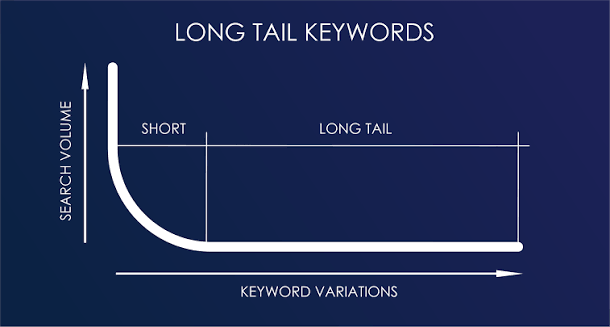
- Programmatic SEO uses templates and scraped data to create thousands of similar pages, targeting long-tail queries that match AI prompts.
- AI systems retrieve sources based on keywords and authority signals, which content farms can manipulate at scale.
- Perplexity’s revenue-sharing program creates a financial incentive to manufacture content for AI citations.
- The problem is systemic, affecting the integrity of AI recommendations and crowding out legitimate publishers.
FAQ
Q: What is programmatic SEO?
A: Programmatic SEO (pSEO) is a technique where publishers use templates and databases to automatically generate thousands of web pages. Each page is technically unique but follows a fixed structure, often targeting specific search queries to attract traffic.
Q: How do AI assistants like Perplexity decide which sources to cite?
A: They use retrieval-augmented generation (RAG), which pulls relevant web pages based on keyword matching and authority signals like domain age and link popularity. The process does not evaluate editorial quality.
Q: Why are software recommendation pages particularly vulnerable to this type of spam?
A: Software queries have high commercial intent (people often buy products after reading reviews), and the niche is data-rich—pricing and features can be scraped from vendor sites. This makes it easy to generate many pages with real data but fake opinions.
Q: Does this affect only Perplexity, or other AI tools too?
A: The report focuses on Perplexity, but any AI assistant that uses web retrieval—like ChatGPT with browsing or Google’s AI Overviews—can be vulnerable to similar tactics.
Q: What can users do to avoid being misled by AI recommendations?
A: Be skeptical of recommendations, especially for commercial products. Cross-check with multiple sources, look for human-authored reviews, and consider the possibility that the AI is citing content farms.