Tag: ChatGPT

  • How ChatGPT Really Works: A Plain-English Guide to the Inner Mechanics

    How ChatGPT Really Works: A Plain-English Guide to the Inner Mechanics

    You type a question, hit enter, and within seconds a coherent, often insightful answer appears. It feels like magic or like talking to a very knowledgeable friend. But under the hood, ChatGPT is not retrieving facts from a database, nor does it truly ‘understand’ your words in the human sense. It’s a pattern-completion engine, built on a complex neural network, that has learned to mimic human language from vast amounts of text.

    This guide unpacks the core mechanics of ChatGPT tokenization, the transformer architecture, autoregressive generation, and the role of parameters like temperature in plain English. Whether you’re a developer building on top of the API, a power user trying to get better responses, or just curious about the buzz, understanding these fundamentals will help you use ChatGPT more effectively and set realistic expectations.

    It’s All About Tokens

    Before ChatGPT can process your text, it breaks it down into small chunks called tokens. A token isn’t the same as a word. It’s a subword unit—sometimes a whole word, sometimes a part of a word, sometimes even a single character. For example, the word “unbelievable” might be split into “un,” “believ,” and “able.” Why do this? Because it allows the model to handle a vast vocabulary without needing a separate representation for every possible word. It also helps with rare or misspelled words.

    The tokenization process is invisible to you, but it matters for two practical reasons. First, the model’s context window—the maximum amount of text it can process at once—is measured in tokens, not words. A context window of 8,000 tokens might sound like a lot, but it’s roughly equivalent to 6,000 words, depending on the language. Second, API costs are calculated per token. So, being mindful of token usage can save you money.

    The Transformer: The Brain Behind the Operation

    ChatGPT is built on a transformer architecture, a type of neural network introduced in 2017. Transformers are particularly good at handling sequential data like text because they use a mechanism called self-attention. In simple terms, self-attention allows the model to weigh the importance of every word in the input relative to every other word. When processing the sentence “The cat sat on the mat because it was tired,” the model can link “it” to “cat” by paying attention to the relationship between those tokens.

    But here’s the kicker: the model doesn’t process text one word at a time in order. Instead, it looks at the entire input sequence simultaneously, computing attention scores for all pairs of tokens. This parallel processing is what makes transformers so powerful—and so fast compared to earlier models that processed sequentially.

    The transformer has multiple layers, each with its own attention heads. Lower layers might capture simple patterns like word order, while higher layers capture more abstract relationships like grammar and even some reasoning. The final output is a probability distribution over the entire vocabulary for what the next token should be.

    Autoregressive Generation: One Token at a Time

    The core of ChatGPT’s text generation is autoregressive: it predicts one token at a time, then feeds that token back into the input to predict the next one. It’s like a very fast, sophisticated version of the autocomplete on your phone. When you ask “What’s the capital of France?”, the model doesn’t immediately know the answer. It starts generating the most likely first token, say “The,” then based on that, predicts the next token, “capital,” and so on, until it produces a stopping token that signals the end of the response.

    This process is inherently probabilistic. At each step, the model calculates probabilities for all possible next tokens. The way it picks from those probabilities is controlled by temperature and sampling parameters.

    • Temperature (ranging from 0 to 2) controls randomness. A lower temperature (e.g., 0.2) makes the model more deterministic, always choosing the highest-probability token. This is good for factual questions or code. A higher temperature (e.g., 1.0) allows more random choices, leading to more creative or varied outputs, but also increasing the chance of errors or incoherence.
    • Top-p (nucleus sampling) is another parameter that limits the pool of tokens considered. Instead of considering all possible tokens, it only considers the smallest set whose cumulative probability exceeds a threshold (e.g., 0.9). This can produce more focused responses.

    Even at temperature 0, the model isn’t guaranteed to be deterministic due to floating-point arithmetic variations across hardware. So don’t be surprised if you get slightly different answers on different occasions.

    The Context Window: How Much the Model Can “See”

    Every ChatGPT conversation has a context window—the total number of tokens the model can process at once. For example, GPT-4 might have an 8K or 32K token limit, while newer models like GPT-4 Turbo support up to 128K tokens. This includes your prompts, the model’s previous responses, and any system instructions—all of it must fit within the window.

    If you exceed the limit, the model won’t just crash; it will truncate the conversation, often dropping the oldest messages. This is why ChatGPT can “forget” earlier parts of a long conversation. Even within the window, the model’s attention can dilute. As the sequence grows, the model may pay less attention to tokens at the beginning, leading to inconsistencies. So, for complex tasks, it’s often better to keep conversations concise or summarize earlier points.

    The Role of Prompts: System, User, and Assistant

    When you interact with ChatGPT, there are actually three types of messages in the conversation:

    • System prompt: A set of instructions given to the model before the conversation starts. It sets the overall behavior, like “You are a helpful assistant” or “You are a pirate who always speaks in sea shanties.” The system prompt is a strong influence, but not an absolute constraint. The model can deviate if the user messages conflict.
    • User messages: Your inputs.
    • Assistant messages: The model’s responses. These are also fed back into the model on each turn, so the model has the full history.

    Crafting effective prompts is about being clear and specific. The better the model understands your intent, the better the output. But remember, the model isn’t reading between the lines—it’s pattern-matching on the text it’s seen in training. So, providing examples (few-shot prompting) or giving step-by-step instructions can dramatically improve results.

    How the Model Was Trained: From Base Model to Chatbot

    The ChatGPT you interact with today didn’t emerge fully formed. It started as a base model trained on a massive corpus of text from the internet, books, and other sources. This training taught the model grammar, facts, reasoning patterns, and biases present in the data. But a base model is not necessarily helpful or safe—it might generate harmful text or answer questions with random tangents.

    To make it conversational, the model went through fine-tuning and Reinforcement Learning from Human Feedback (RLHF). In RLHF, human AI trainers rank different responses to the same prompt. The model then learns to favor responses that humans consider better—more helpful, accurate, and harmless. This is why ChatGPT often declines to answer harmful questions or says “I’m sorry, but I can’t help with that.” It’s a learned behavior, not a hard-coded rule.

    This training process also introduces limitations. The model’s knowledge is frozen at its training cutoff, so it has no awareness of events after that date. It also can hallucinate—generate plausible-sounding but incorrect information—because it’s not recalling facts but predicting sequences based on patterns.

    Tool Use and Memory: Extending the Model’s Capabilities

    Recent versions of ChatGPT have added features that go beyond pure text generation. Tool use (also called function calling) allows the model to request specific actions, like running a calculation or fetching data from an API. The model doesn’t execute the tool itself; it outputs a structured request, and the system performs the action and returns the result. This extends the model’s abilities beyond its training data.

    Memory is another feature that lets the model remember facts across conversations. It’s implemented by storing information in a separate memory system and injecting it into the context window as needed. This isn’t true long-term learning; it’s more like a note-taking system. The model’s weights remain unchanged.

    Why Understanding This Matters

    Knowing how ChatGPT works isn’t just academic. It helps you:

    • Debug: If the model gives a wrong answer, you can spot if it’s due to hallucination, context truncation, or a poorly designed prompt.
    • Plan prompts: You can craft prompts that stay within the context window and provide the necessary information.
    • Estimate costs: Since API billing is per token, being aware of token usage helps you budget.
    • Set expectations: You’ll know that ChatGPT is not a sentient being, but a statistical text generator. It can be incredibly useful, but it’s not a reliable source of truth for critical decisions.

    So the next time you interact with ChatGPT, remember: you’re not talking to a brain; you’re engaging with a highly sophisticated pattern-matching machine that has learned to play with words. And that’s quite remarkable in itself.

    Understanding the inner workings of ChatGPT demystifies the technology and helps you use it more effectively. It’s not magic—it’s a complex interplay of tokenization, attention mechanisms, and probabilistic generation, all trained on human language. While it has limitations, grasping these fundamentals empowers you to craft better prompts, interpret outputs critically, and appreciate the engineering marvel that it is.

    Summary

    • ChatGPT breaks text into tokens (subword units), not words, which impacts context limits and costs.
    • The transformer architecture uses self-attention to process entire sequences in parallel, enabling sophisticated language patterns.
    • Generation is autoregressive: one token at a time, based on probabilities influenced by temperature and sampling.
    • The context window is the model’s working memory; exceeding it truncates history, causing “forgetfulness.”
    • Fine-tuning and RLHF align the model to be helpful and safe, but it remains a pattern-matching system, not a knowledge database.

    FAQ

    Q: Is ChatGPT deterministic?
    A: Not always. Even at temperature 0, floating-point variations can cause different outputs across runs. Higher temperatures introduce more randomness.

    Q: Does ChatGPT have internet access?
    A: Not by default. It doesn’t browse the web unless a tool is enabled. Its knowledge is limited to its training data cutoff.

    Q: Why does ChatGPT sometimes give wrong answers?
    A: It’s not retrieving facts; it’s predicting text based on patterns. If the pattern is misleading or the context is ambiguous, it can hallucinate plausible but incorrect information.

    Q: How long is the context window?
    A: It depends on the model version. GPT-4 typically has 8K or 32K tokens, while some newer models support up to 128K tokens. Check the specific model’s documentation.

    Q: Can I control the creativity of ChatGPT?
    A: Yes, via the temperature parameter. Lower values (e.g., 0.2) produce more focused, deterministic responses; higher values (e.g., 1.0) yield more creative and varied output.
  • Stop Googling Symptoms: The New AI Tool That Diagnosed My Issue in 4 Seconds

    Stop Googling Symptoms: The New AI Tool That Diagnosed My Issue in 4 Seconds

    I had a strange rash on my forearm, and my first instinct was to Google it. Ten minutes later, I was convinced I had a rare tropical disease, despite never leaving my city. Sound familiar? This is the classic ‘Dr. Google’ trap: a symptom search that spirals into cyberchondria, fueled by worst-case-scenario results and conflicting advice from random forums.

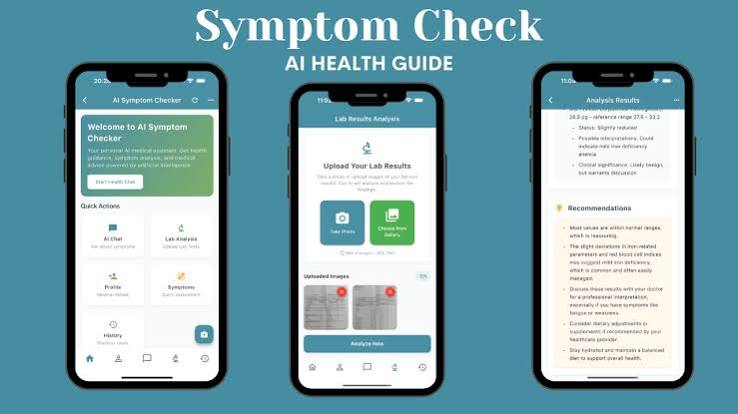
    But last week, I tried something different. Instead of typing symptoms into a search bar, I opened an AI chatbot and described my rash in plain English. Four seconds later, it gave me a list of likely causes, asked a clarifying question, and suggested I see a dermatologist if it didn’t improve in a week. No panic, no doom-scrolling, just a clear, synthesized answer. This is the promise of AI symptom checkers: speed, context, and calm. But can they really replace the diagnostic power of a human doctor? Let’s dig into what these tools can and can’t do.

    The Problem with Dr. Google

    For years, the go-to method for self-diagnosis has been search engines. Google processes over 1 billion health-related queries daily. But searching for symptoms is like opening a firehose of information: you get pages of WebMD, Mayo Clinic articles, Reddit threads, and content farms, all with varying degrees of credibility. You have to click through, compare sources, and filter out the noise. A 2020 study found that 35% of US adults have used the internet to self-diagnose, and a significant portion of them end up with ‘cyberchondria’ — anxiety triggered by the alarming, worst-case-scenario results that search engines often surface. A headache becomes a brain tumor; a cough becomes lung cancer. This is not just an inconvenience; it can lead to unnecessary stress and even delayed care when people either overreact or dismiss real symptoms.

    The AI Alternative: Conversational Symptom Checkers

    AI-powered symptom checkers — like ChatGPT, Google’s Gemini, and specialized tools such as Ada Health, K Health, and Buoy — offer a different approach. Instead of returning a list of links, they engage in a conversation. You describe your symptoms in your own words, and the AI asks clarifying questions, just like a doctor would. It synthesizes your answers and provides a list of possible conditions, ranked by likelihood, in seconds. The 4-second diagnosis I experienced is not unusual; LLMs can process and analyze text at lightning speed.

    The key advantage is the conversational back-and-forth. A search engine doesn’t know you; it just matches keywords. An AI can ask, ‘Does the pain worsen when you eat?’ or ‘Have you noticed any other symptoms like fever?’ This mimics a clinician’s history-taking, providing a more personalized and nuanced response.

    How Accurate Are These Tools?

    Accuracy is the elephant in the room. Studies show that AI symptom checkers get the correct diagnosis in the top-3 list roughly 50-70% of the time, depending on the tool and the case. A 2023 study in JAMA Internal Medicine found that ChatGPT performed comparably to physicians in some diagnostic scenarios but had significant gaps. For common, straightforward conditions, AI can be remarkably accurate. For rare or complex diseases, it often misses the mark.

    It’s also important to understand what these tools are actually doing. They are not ‘diagnosing’ in the clinical sense. They are pattern-matching your symptoms against vast datasets of medical information to generate a list of differential possibilities. A doctor’s diagnosis involves clinical judgment, physical examination, and often lab tests. An AI cannot touch you, cannot run tests, and cannot read your body language. It operates purely on the information you provide, which may be incomplete or inaccurate.

    The Regulatory Gray Zone

    Most consumer AI symptom checkers are not FDA-approved as medical devices. They are marketed as ‘informational tools’ or ‘wellness aids,’ not diagnostic instruments. This means they don’t have to meet the same rigorous standards as medical devices. The disclaimer on these apps often reads: ‘This tool is for informational purposes only and is not a substitute for professional medical advice.’ That’s a critical caveat.

    This regulatory gray zone raises ethical and legal questions. Who is liable if an AI gives a wrong answer that leads to harm? Can you sue a chatbot? These are open questions that regulators are still grappling with. In the meantime, it’s up to the user to use these tools responsibly.

    Could AI Cure Cyberchondria?

    One of the most intriguing possibilities is that AI could actually reduce health anxiety. Instead of being bombarded with worst-case scenarios, you get a calm, synthesized answer that puts your symptoms in perspective. AI can say, ‘This is most likely a minor skin irritation, but if it spreads or doesn’t improve in a week, consult a doctor.’ This kind of contextual framing can be incredibly reassuring.

    However, the opposite is also possible. If an AI suggests a serious condition without proper framing — for example, listing ‘brain tumor’ as a possibility for a headache — it could amplify anxiety. The way the AI communicates risk is crucial. Some tools do this well, others not so much.

    Equity and Access: A Double-Edged Sword

    AI symptom checkers could be a boon for underserved populations who lack easy access to doctors. They are available 24/7, cost little or nothing, and can be used from a smartphone. They could help people in rural areas or developing countries get preliminary guidance without traveling long distances.

    But there are barriers. These tools require digital literacy, internet access, and often English proficiency, although multilingual support is growing. They also rely on the user being able to describe their symptoms accurately. If you’re not tech-savvy or if you’re in a panic, you might not use the tool effectively.

    The Enthusiast’s View: Empowering Patients

    Proponents argue that AI symptom checkers are a revolutionary triage tool. They give patients immediate, personalized information, reducing unnecessary doctor visits and providing clarity. For minor issues, an AI can reassure you that it’s nothing serious. For more concerning symptoms, it can prompt you to seek care sooner. This can save time, money, and even lives.

    The Skeptic’s View: Dangerous Over-Trust

    Medical professionals warn against over-reliance on these tools. They lack context (your medical history, physical exam findings, and lab results). They can miss rare or complex conditions, and they might encourage delayed care if they incorrectly reassure you. The ‘black box’ problem is also a concern: users don’t know why the AI gave a particular answer, so they can’t assess its reliability.

    My Take: Use It as a First Step, Not a Last Word

    So, should you stop Googling your symptoms? Yes, perhaps. But should you replace your doctor with an AI? Absolutely not. These tools are best used as a starting point — a way to get quick, synthesized information and decide whether you need to see a professional. They are not a substitute for a doctor’s judgment.

    My 4-second experience was genuinely helpful. It gave me peace of mind and a clear action plan. But I knew its limitations. It wasn’t diagnosing me; it was offering possibilities based on a pattern. For anything serious, persistent, or concerning, I’d still go to a doctor. The key is to use AI as an informed companion, not an oracle.

    The next time you have a weird symptom, resist the urge to Google. Instead, try an AI symptom checker. You’ll get a faster, more contextualized answer, and you might just avoid the dreaded cyberchondria spiral. But remember: these tools are a starting point, not a final diagnosis. Use them to gather information, but always let a real doctor make the call.

    Summary

    • AI symptom checkers can synthesize your symptoms into a list of possible causes in seconds, unlike traditional search engines that return a jumble of links.
    • Studies show AI tools are correct in the top-3 diagnoses 50-70% of the time, but they are not FDA-approved and lack clinical judgment.
    • These tools are best used for triage, not as a replacement for professional medical advice.
    • They may reduce cyberchondria by providing calm, contextual answers, but they can also amplify anxiety if they suggest serious conditions without proper framing.
    • Access and digital literacy are barriers, but AI tools could help underserved populations if made more accessible.

    FAQ

    Q: Are AI symptom checkers accurate?
    A: Studies show they get the correct diagnosis in the top-3 list about 50-70% of the time, but accuracy varies by tool and condition. They are not as reliable as a doctor’s diagnosis.

    Q: Can AI tools actually diagnose me?
    A: No. They generate possible causes based on pattern matching, but they do not have the clinical context or ability to perform exams and tests. They are informational tools, not diagnostic instruments.

    Q: Are these tools FDA-approved?
    A: Most consumer AI symptom checkers are not FDA-approved as medical devices. They are marketed as ‘informational’ or ‘wellness’ tools.

    Q: Is it safe to use AI instead of seeing a doctor?
    A: It is not safe to rely solely on AI for serious or persistent symptoms. Use it as a triage tool to decide if you need to see a doctor, but always seek professional care for concerning issues.

    Q: Can AI reduce health anxiety?
    A: Possibly, by providing calm, synthesized answers instead of alarming search results. However, it can also amplify anxiety if it suggests serious conditions without proper framing. Use it with caution.

  • AI Search Market Share: What Business Intelligence Teams Need to Know

    AI Search Market Share: What Business Intelligence Teams Need to Know

    The search landscape is shifting under the feet of every business. Traditional link-list search the familiar ’10 blue links’ is being supplemented, and in some cases replaced, by AI-powered answer engines that synthesize information directly. For business intelligence (BI) teams, this isn’t just a tech trend; it’s a fundamental change in how customers find information, how advertising works, and how brand authority is measured.

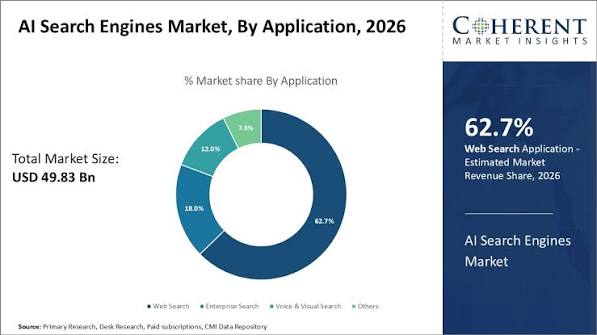
    As of early 2025, Google still commands roughly 90% of the global search market, but AI-native search engines like Perplexity and ChatGPT Search are carving out a small but rapidly growing niche. More importantly, AI is being embedded into the incumbent’s product itself: Google AI Overviews now appear on a significant share of search results. This article breaks down the current market share data, the strategic positions of key players, and the practical implications for businesses that rely on search for growth and intelligence.

    Defining AI Search: More Than Just a New Engine

    AI search refers to search experiences that leverage large language models (LLMs), generative AI, and retrieval-augmented generation (RAG) to answer queries directly, synthesize information from multiple sources, and provide conversational results. This is distinct from traditional search engines like Google, Bing, or DuckDuckGo, which primarily deliver a list of links ranked by relevance.

    Key players in the AI search space include:

    • ChatGPT Search (OpenAI), launched in October 2024, which integrates real-time web access into the ChatGPT interface.
    • Perplexity, a purpose-built ‘answer engine’ that provides cited, conversational responses.
    • Google AI Overviews and Gemini, which embed AI-generated answers directly into Google’s search results.
    • Microsoft Bing Copilot, which uses GPT-4 to power conversational search on Bing.
    • You.com, Brave Search AI, and emerging entrants like Meta AI search and Amazon Rufus for shopping.

    Market Share: The Numbers Behind the Hype

    Despite the buzz, AI-native search engines still hold a tiny slice of the overall search pie. Perplexity, ChatGPT Search, and You.com collectively account for less than 1–2% of global search queries. Google remains the dominant force at ~90%, with Bing at 3–4%, and a long tail of others making up the remainder.

    Yet that small percentage masks significant momentum in specific segments. Perplexity, the leading standalone AI search engine, has grown to an estimated 15–20 million monthly active users, with reported annualized revenue of ~$50 million in late 2024. ChatGPT Search, leveraging OpenAI’s existing base of over 200 million weekly active users, has seen rapid adoption, though OpenAI does not disclose search-specific usage figures.

    Perhaps the most impactful shift is within Google itself. AI Overviews are now estimated to appear on 30–80% of Google search results pages, depending on geography and query type. This means AI is not just a separate market—it’s becoming the default experience for many users on the world’s most-used search engine.

    Why Business Intelligence Teams Should Care

    The rise of AI search has profound implications for how businesses track, attribute, and optimize their online presence.

    1. Ad Spend and the Zero-Click Problem

    If AI search answers a query directly, users may never click through to a website. This ‘zero-click’ behavior breaks traditional pay-per-click (PPC) economics, where advertisers pay for each visit. Marketers need to understand where these zero-click answers dominate and adjust their strategies accordingly. For example, if a user asks ‘best CRM for small business’ and gets a synthesized answer from ChatGPT Search, the opportunity for a traditional ad impression may vanish.

    2. Data and Attribution Shifts

    AI search engines cite sources differently than traditional link lists, and referral traffic patterns are changing. BI teams must develop new tracking methods—such as AI-specific UTM parameters and server-side tracking—to accurately measure the impact of AI search on their web traffic. Monitoring which AI engines surface a brand (or a competitor) first is becoming a key performance indicator.

    3. Competitive Intelligence

    Tracking your brand’s visibility in AI search results—and your competitors’—is a new frontier for competitive intelligence. Are you cited as a source in Perplexity’s answers? Does ChatGPT Search mention your product in a comparison? These metrics can serve as leading indicators of brand authority in the AI era.

    4. Enterprise Search as a Related Market

    Internal AI search tools like Glean and Microsoft Copilot for M365 are a separate but related market, growing at over 30% CAGR. Businesses are deploying these tools to help employees find information faster, and BI teams may need to integrate data from these platforms into their analytics.

    The Incumbent’s View: Google’s Defense

    Google argues that AI Overviews are an enhancement, not a replacement, and points to high user satisfaction metrics. The company’s counter-strategy includes deep integration of its Gemini model, an AI Mode for search, and maintaining default search deals (like the one with Apple) that keep its market share locked in.

    However, Google faces a real risk: AI Overviews reduce click-through rates to publishers, potentially undermining the open web ecosystem that feeds its index. If publishers see less traffic, they may produce less content, which could degrade the quality of Google’s search results over time. Antitrust remedies from the U.S. DOJ case could also force changes to Google’s default search deals, opening distribution windows for competitors.

    The Challenger’s View: Perplexity and OpenAI

    Perplexity positions itself as an ‘answer engine’ with citation transparency, appealing to researchers and business professionals who need verifiable sources. It was the first to launch a standalone AI search product and has built a loyal following among tech-savvy users.

    OpenAI, on the other hand, sees search as a feature within a broader assistant ecosystem, not a standalone product. Its distribution advantage is enormous: over 200 million people already use ChatGPT. The company is also exploring advertising, which would directly compete with Google’s core ad business.

    Both challengers face high compute costs, and their monetization models—subscriptions and nascent ads—are unproven at scale. Perplexity launched ads in 2024, and OpenAI is testing advertising in ChatGPT, but it’s unclear how much revenue these can generate.

    The Publisher’s Dilemma: To Block or to License

    AI search reduces referral traffic to publishers, prompting many to block AI crawlers (e.g., The New York Times, Reuters) or negotiate licensing deals. However, there’s a counter-narrative: AI search can drive high-intent traffic if a brand is cited as a source. In this new paradigm, ‘being the answer’ is the new SEO. For BI teams, tracking AI-citation share can be a leading indicator of brand authority and future organic traffic.

    What This Means for Your BI Strategy

    1. Monitor AI search visibility: Set up tracking to see how often your brand appears in AI search results and from which engines.
    2. Adjust attribution models: Incorporate AI search referrals into your analytics, using custom parameters and server-side tracking to capture data accurately.
    3. Re-evaluate SEO: Traditional keyword optimization is still relevant, but focus on creating content that AI engines are likely to cite as authoritative sources.
    4. Track ad performance: Understand where zero-click answers dominate and adjust your PPC campaigns accordingly.
    5. Stay agile: The market is evolving rapidly—what’s true today may change next quarter. Keep an eye on new entrants and shifts in user behavior.

    AI search is not a distant future—it’s happening now. While AI-native engines still hold a small market share, the integration of AI into Google’s core product means that AI-generated answers are already a significant part of the search experience. For business intelligence teams, the imperative is clear: adapt your tracking, re-evaluate your strategies, and start treating AI search visibility as a critical metric. The search landscape is changing, and those who understand the shift will be better positioned to thrive in it.

    Summary

    • AI-native search engines (Perplexity, ChatGPT Search, You.com) hold <1–2% of global search queries, but Google AI Overviews appear on 30–80% of search results pages.
    • Perplexity leads standalone AI search with 15–20 million monthly active users and ~$50M annualized revenue.
    • ChatGPT Search leverages OpenAI’s 200M+ weekly users, but search-specific usage is undisclosed.
    • AI search disrupts traditional PPC models due to zero-click answers, requiring new tracking and attribution methods.
    • Businesses should monitor AI-citation share as a leading indicator of brand authority.

    FAQ

    Q: What is AI search?
    A: AI search uses large language models and generative AI to answer queries directly with synthesized, conversational results, rather than just providing a list of links.

    Q: How big is the AI search market?
    A: AI-native search engines currently hold less than 1–2% of global search queries, but Google AI Overviews—which are AI-generated—appear on a significant share of Google’s results pages.

    Q: Who are the main players in AI search?
    A: Key players include Perplexity, ChatGPT Search (OpenAI), Google AI Overviews/Gemini, Microsoft Bing Copilot, and You.com.

    Q: How does AI search affect advertising?
    A: AI search can lead to zero-click answers, where users don’t click through to websites, which disrupts traditional pay-per-click advertising models.

    Q: How can businesses track their performance in AI search?
    A: Businesses can use AI-specific UTM parameters, server-side tracking, and monitor AI-citation share to measure visibility and referral traffic from AI search engines.

  • Google AI Mode vs. ChatGPT Search: Which AI Search Tool Actually Helps?

    Google AI Mode vs. ChatGPT Search: Which AI Search Tool Actually Helps?

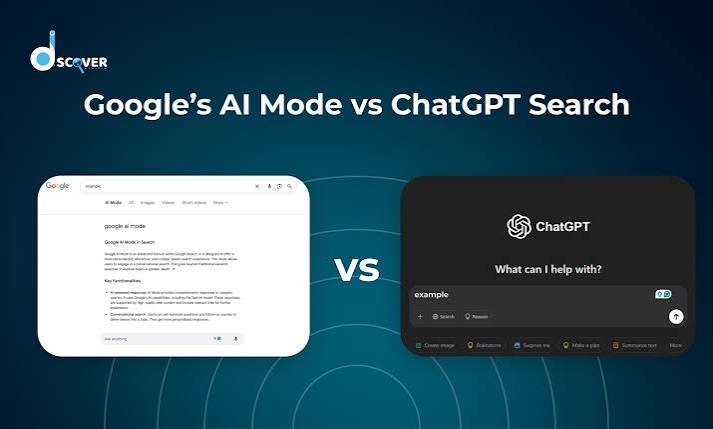
    Two of the biggest names in tech are now fighting over the future of search. Google has rolled out AI Mode, a conversational layer on top of its classic search engine, while OpenAI has turned ChatGPT into a full-fledged search tool. Both promise to replace the old list of blue links with direct, reasoned answers. But they go about it in very different ways.

    One is a search engine with a chatbot grafted on. The other is a chatbot with a search engine tucked inside. That difference shapes everything: how you ask questions, how you follow up, and how much you trust the answers. Here’s a side-by-side look at what each tool actually does, where they stumble, and which one might suit the way you work.

    The Short Version: What Each Tool Is

    Google AI Mode is an opt-in feature inside Google Search, available through Search Labs since March 2025. It uses a custom Gemini 2.0 model to answer complex, multi-step questions directly on the search results page. You type a query like “compare the best OLED TVs for gaming under $1,000,” and instead of links, you get a synthesized comparison with sources cited.

    ChatGPT Search is a built-in feature in ChatGPT, available to all users since late 2024. It uses a fine-tuned GPT-4o (or GPT-4.1) model with a browsing tool that queries Bing’s index and other sources. You ask a question in the chat window, and it responds conversationally with footnoted sources. You can ask follow-up questions in the same thread, refining your search iteratively.

    The core distinction: AI Mode is a search engine that talks; ChatGPT Search is a talker that searches.

    Search Index: The Foundation of Everything

    Google’s index is the largest and most comprehensive in the world, covering billions of pages with real-time updates. AI Mode taps directly into that index, pulling live prices, stock quotes, local inventory, and other fresh data. ChatGPT Search, by contrast, relies primarily on Bing’s index, which is smaller and sometimes less current. OpenAI has been building its own web crawler (GPTBot), but for now, Bing remains the backbone.

    This matters for queries that depend on the latest information. If you ask about a breaking news event or a rapidly changing product price, Google AI Mode has the edge because its index is simply bigger and fresher. ChatGPT Search can still access real-time data through partnerships with news providers like the Associated Press and Reuters, but the underlying index is not as deep.

    Interface: Familiar vs. Conversational

    Google AI Mode lives in a dedicated tab within the Google app or search page. The layout feels familiar—a search bar, a results page—but the answer appears as a paragraph or bulleted list at the top, with links to sources alongside. There’s also a “show thinking” toggle that displays the model’s reasoning steps, a transparency feature that can be illuminating or overwhelming, depending on your patience.

    ChatGPT Search is integrated into the chat interface itself. You don’t need to switch tabs or modes; just ask a question and the model decides whether to search. The answer comes back in a chat bubble with numbered footnotes. You can then ask follow-up questions like “What about the Samsung S90D?” and the model remembers the context. This conversational flow is a major advantage for complex, multi-turn research.

    Follow-Up Questions: The Biggest Practical Difference

    The ability to refine a query is where these tools diverge most. With ChatGPT Search, you can have a back-and-forth dialogue. Ask about OLED TVs, then narrow down by budget, then ask about a specific brand, and the model keeps the thread. This is how real research works—you start broad and drill down.

    Google AI Mode, at least in its current form, is more rigid. Each query is treated as a new search. You can’t say “actually, just the ones under $800” and expect it to remember the previous context. You have to start over or rephrase the entire question. The “show thinking” toggle does reveal the model’s internal reasoning, which can help you understand why it gave a particular answer, but it doesn’t allow for iterative refinement in the same way.

    For a single, complex query, AI Mode shines. For an ongoing research session, ChatGPT Search is far more practical.

    Source Presentation and Trust

    Both tools cite their sources, but they do it differently. Google AI Mode shows inline links within the answer and a separate source panel on the side. This makes it easy to click through and verify claims. ChatGPT Search uses footnote citations—small numbers that you can hover over or click to see the source. It’s unobtrusive but requires an extra step to check.

    Trust is a bigger issue for AI-generated answers than for traditional links. Google has the advantage of brand familiarity and a long track record of search quality. ChatGPT, on the other hand, is a newer entrant but has built trust through its conversational accuracy and transparency about sources. Both are susceptible to hallucination, but the underlying model’s reliability matters more than the interface.

    Pricing and Access

    Google AI Mode is free but requires opting in via Search Labs. It’s not available to everyone by default. ChatGPT Search is free for all users, with rate limits for the free tier; Plus and Pro subscribers get higher limits and priority access. So, out of the box, ChatGPT Search is more accessible—you just open ChatGPT and start asking.

    Business Models and Future Direction

    Google’s AI Mode is ad-free for now, but Google has tested ads in AI Overviews, its earlier AI feature. It’s likely that AI Mode will eventually include sponsored answers or product listings, which could affect the neutrality of results. OpenAI, meanwhile, has no plans for ads in ChatGPT Search. Its revenue comes from subscriptions and API usage, so the priority is keeping users engaged and paying.

    This difference shapes the long-term experience. Google has a financial incentive to push ads, while OpenAI has an incentive to provide the best possible answer to retain subscribers. That’s not to say Google will sacrifice quality, but the ad model is a fundamental part of its business.

    Which One Should You Use?

    There’s no single winner—it depends on how you search.

    • For one-off, complex queries: Google AI Mode is excellent. Ask it to compare products, explain a nuanced topic, or synthesize multiple sources, and you’ll get a well-cited answer fast.
    • For ongoing research projects: ChatGPT Search is the better companion. The ability to ask follow-up questions in the same thread is a game-changer for deep dives.
    • For the freshest data: Google AI Mode, thanks to its larger index.
    • For accessibility: ChatGPT Search, because it’s free and always available.

    Try both. You’ll likely find that each has a place in your workflow. The AI search war is just beginning, and the winners will be the ones who make it easiest to find accurate information—whether that’s through a search box or a chat window.

    Google AI Mode and ChatGPT Search represent two philosophies of AI search: one that enhances the traditional search experience, and one that reimagines it as a conversation. For now, Google AI Mode offers deeper and fresher data, while ChatGPT Search offers a more flexible and interactive way to get answers. As both products evolve—and as OpenAI builds its own index and Google refines its conversational abilities—the gap will likely narrow. But for your daily research needs, the choice comes down to a simple question: do you want to search, or do you want to chat?

    Summary

    • Google AI Mode is an opt-in feature in Google Search that uses Gemini 2.0 to provide conversational, multi-step answers with a “show thinking” toggle.
    • ChatGPT Search is a built-in feature in ChatGPT using GPT-4o with browsing, offering conversational answers with footnote citations and full follow-up context.
    • Key difference: AI Mode uses Google’s massive index; ChatGPT Search relies on Bing’s index (smaller but with news partnerships).
    • User experience: AI Mode is a search engine that talks; ChatGPT Search is a chatbot that searches, allowing iterative refinement.
    • Access: Both are free, but AI Mode is opt-in via Search Labs, while ChatGPT Search is available to all users by default.

    FAQ

    Q: Is Google AI Mode free?
    A: Yes, Google AI Mode is free, but it requires opting in via Search Labs. It’s not available to everyone by default.

    Q: Can I use ChatGPT Search for free?
    A: Yes, ChatGPT Search is free for all users, though free tier has rate limits. Plus and Pro subscribers get higher limits and priority access.

    Q: Which one has fresher data?
    A: Google AI Mode uses Google’s proprietary index, which is larger and updated more frequently. ChatGPT Search relies primarily on Bing’s index, though it has partnerships with news providers for real-time data.

    Q: Can I ask follow-up questions in Google AI Mode?
    A: Not really. Each query is treated as a new search. ChatGPT Search allows full conversational follow-ups in the same thread.

    Q: Does Google AI Mode show ads?
    A: Currently, AI Mode is ad-free, but Google has tested ads in AI Overviews, so ads may come later. ChatGPT Search has no ads and no plans to add them.

  • How AI Search Is Reshaping Travel Planning: From Itineraries to Bookings

    How AI Search Is Reshaping Travel Planning: From Itineraries to Bookings

    Imagine typing a single sentence “Plan a 5-day trip to Lisbon under $1,500 including flights, hotels, and food” and getting a full itinerary with links to book. That’s no longer a futuristic fantasy. LLM-based search engines like ChatGPT with browsing, Perplexity, and Google’s AI Overviews are turning travel planning from a multi-tab research grind into a conversational chat.

    Travel is emerging as a major vertical for AI-driven discovery because it checks every box: high complexity, high transaction value, and deeply fragmented information. This article breaks down what’s happening, who’s leading the charge, and where the friction remains.

    Why Travel Is a Natural Fit for LLMs

    Travel planning is messy. You juggle dates, budgets, preferences, group sizes, weather, events, visa rules, and transport modes. Traditional search engines return lists of links that you must open, compare, and cross-reference. LLMs, by contrast, can synthesize all those variables in a single conversation. Ask “Where should we go in October with a toddler?” and the model can weigh climate, flight times, stroller-friendly hotels, and pediatric care all in plain language.

    This conversational fit is one reason travel is considered a “killer vertical” for AI search. Another is money. Travel ads are a multi-billion-dollar segment for Google, and the transaction value per booking is high — a single trip can cost thousands. Capturing that funnel is a huge commercial prize.

    Finally, travel information is scattered across OTAs, airlines, review sites, forums, and social media. LLMs excel at aggregating and summarizing that fragmentation, offering a one-stop answer instead of a dozen tabs.

    Who’s Building AI Travel Tools

    The landscape splits into two camps: tech giants and travel incumbents, each with distinct strategies.

    Tech giants are embedding AI directly into search. Google’s AI Overviews now appear at the top of travel-related queries, generated by Gemini. OpenAI’s ChatGPT with browsing can pull live data, and its SearchGPT prototype is testing AI-first search. Microsoft’s Copilot in Bing offers travel planning capabilities. These tools are general-purpose, but travel is one of their most-used verticals.

    Travel incumbents are building their own assistants. Expedia launched an AI trip planner that started with ChatGPT and has since moved to in-house models. Booking.com has an AI Trip Planner in beta. Kayak offers Kayak AI for chat-based search. TripAdvisor has an AI trip builder. These companies control inventory data, which gives them an edge in accuracy.

    Startups are also charging in: Mindtrip, Layla, GuideGeek, Wonderplan, and Roam Around are building travel-specific agents that combine LLMs with live inventory. Venture funding for such startups has surged since 2023, with several raising Series A and B rounds.

    Where AI Search Excels: Inspiration and Planning

    The current sweet spot for LLMs is the early part of the travel funnel: inspiration and planning. Ask “Plan a 5-day trip to Lisbon under $1,500 including flights, hotels, and food,” and a good model will generate a day-by-day itinerary with estimated costs. It can suggest hidden gems, account for dietary restrictions, and adjust for your travel style — all in seconds.

    This is a massive time save. What used to take hours of research across dozens of sites now takes minutes. And it democratizes expertise: a well-prompted LLM can replicate the advice of a seasoned travel agent, making high-quality planning accessible to anyone.

    Where AI Search Stumbles: Comparison and Booking

    But the funnel doesn’t end at planning. Comparison and booking are where AI faces real challenges.

    Real-time pricing and availability are hard. LLMs can hallucinate — invent a flight time or a hotel that doesn’t exist. Even when they retrieve live data, aggregating across multiple sources (OTAs, airlines, direct suppliers) is technically complex, and accuracy varies. A wrong flight time or a fake hotel room is a dealbreaker for travelers.

    Booking completion is even harder. Most AI agents can’t complete a transaction end-to-end because of payment authentication, security, and liability issues. So the current model is: AI plans, the user books elsewhere. This breaks the seamless experience and limits the commercial capture for AI providers.

    The Trust Gap

    Trust is the biggest hurdle. A 2023 Deloitte survey found that roughly a third of travelers are open to using AI for planning, but a majority still hesitate. The reasons are clear: hallucination, lack of transparency about sources, and fear of booking errors. Younger demographics (Gen Z and Millennials) are more willing, but even they want verification.

    Incumbents like Expedia and Booking.com have an advantage here because they control the inventory data. Their AI assistants can pull from their own systems, reducing the chance of hallucination. But they’re limited to their own offerings, which narrows comparison.

    What’s Next: The Road to Full-Funnel AI

    Several developments could push AI from planning to booking. First, improvements in retrieval-augmented generation (RAG) can ground LLMs in real-time data, reducing hallucinations. Second, partnerships between AI providers and OTAs could enable seamless booking — for instance, ChatGPT could hand off to Expedia’s checkout. Third, new business models are emerging: commission-based AI agents, affiliate partnerships, and subscription-based premium planning tools.

    But there’s a structural tension. Tech giants want to capture the full funnel; incumbents want to keep control. The outcome will shape how travelers discover and book for years to come.

    AI search has already transformed the inspiration and planning stages of travel, offering personalized itineraries in minutes. But until accuracy and booking completion catch up, the full funnel remains out of reach. For travelers, the best approach is to use AI as a powerful starting point, then verify and book through trusted channels. For the industry, the race is on to bridge the trust gap and turn AI from a planning tool into a booking companion.

    Summary

    • LLMs are increasingly used for travel planning, with capabilities like natural-language queries and personalized recommendations.
    • Travel is a high-value vertical due to its complexity, transaction size, and fragmented information.
    • Major players include Google, OpenAI, Microsoft, and travel incumbents like Expedia and Booking.com.
    • AI excels at inspiration and planning but struggles with real-time pricing, accuracy, and end-to-end booking.
    • The trust gap and liability issues are the main barriers to full adoption.

    FAQ

    Q: Can AI search engines actually book my trip?
    A: Not yet reliably. Most AI agents can plan an itinerary, but booking completion is rare due to payment, authentication, and liability issues. You’ll typically need to book manually.

    Q: How accurate are AI travel recommendations?
    A: Accuracy varies. LLMs can hallucinate, so it’s essential to verify details like flight times and hotel availability through official sources.

    Q: Which travel companies offer AI planning tools?
    A: Expedia, Booking.com, Kayak, and TripAdvisor all have AI-powered planners or assistants. Startups like Mindtrip and Layla also offer specialized tools.

    Q: Is AI travel planning free?
    A: Many tools are free, especially those from incumbents or integrated into search engines. Some startups may offer premium subscriptions for advanced features.

    Q: Will AI replace travel agents?
    A: Not entirely. AI can handle routine planning, but human agents excel at complex, high-touch trips and providing accountability. A hybrid approach is likely.

  • AI Reputation Management: Making Sure ChatGPT Gets Your Story Right

    AI Reputation Management: Making Sure ChatGPT Gets Your Story Right

    When someone asks ChatGPT about your brand, what does it say? If you don’t know, you’re already behind. In the age of AI answers, your reputation isn’t just what Google shows it’s what a language model synthesizes from scattered online sources. Here’s how to take control.

    For two decades, managing your reputation meant optimizing for search engines: rank high on Google, and you were set. But now, users increasingly ask AI assistants like ChatGPT, Perplexity, or Google’s AI Overviews for recommendations and facts. Instead of a list of links, they get a single, synthesized answer. If that answer is wrong or unflattering, you might never get a chance to correct it—the user has already moved on.

    This isn’t a distant concern. It’s happening right now, and it’s changing how brands and individuals must approach their online presence. The good news? The same tools that got you to the top of search results can be adapted to influence AI’s narrative. The bad news? Most people don’t know it yet.

    What Is AI Reputation Management?

    AI reputation management—also called generative engine optimization (GEO) or LLM reputation management—is the practice of shaping the information that large language models retrieve and synthesize about you or your brand. It’s not about tricking the AI; it’s about feeding it accurate, consistent, and favorable source material so that when it summarizes your story, it gets it right.

    Think of AI as a journalist who reads everything on the internet about you and then writes a summary. If the sources are messy, contradictory, or sparse, the summary will be too. Your job is to make that journalist’s job easy by providing clear, structured, and credible information.

    How AI “Reads” the Web

    To understand how to manage your AI reputation, you need to know how AI models work. There are two main pathways:

    1. Training data: LLMs like GPT-4 are trained on massive amounts of text from the internet. They have a knowledge cutoff—a point in time after which they don’t automatically know new information. For older facts, this training data is the primary source.
    2. Retrieval-augmented generation (RAG): Many AI tools, especially search-based ones like Perplexity or Bing Copilot, pull live web results at query time. They retrieve relevant articles, pages, and reviews, then synthesize them into an answer. This pathway is more actionable because you can influence it in real time.

    Both pathways matter. Your goal is to have a consistent, positive narrative across both.

    Why Traditional SEO Isn’t Enough

    Traditional SEO focuses on ranking a list of links. You want to be on page one of Google. But AI doesn’t give you a list—it gives you a paragraph. It extracts and summarizes information from multiple sources, often citing them inline. So your objective shifts from ‘get me to the top’ to ‘make sure the synthesis is accurate and favorable.’

    This is a fundamental change. With AI, the answer itself is the product. If the AI gets it wrong, you don’t just lose a click—you lose credibility in the user’s mind, and they may never visit your site.

    The Primary Levers of Control

    You have four main ways to influence what AI says about you:

    1. Owned Content

    Your website, blog, press releases, and social profiles are your direct voice. Make sure they’re crawlable and clearly structured. Use consistent naming, dates, and claims. The AI will often rely on these as primary sources.

    2. Third-Party Validation

    AI models trust reputable sources. A Wikipedia page, a mention in a major news outlet, a listing on Crunchbase or LinkedIn—these carry weight. If you have a Wikipedia page, ensure it’s accurate and up-to-date. If you don’t, consider whether you meet notability guidelines (and don’t edit it yourself—that’s a conflict of interest).

    3. Structured Data

    Schema markup is a type of code that helps machines understand your content. For example, you can mark up your organization’s name, logo, contact info, or FAQ sections. This helps AI parse your entity relationships and answer questions about you more accurately.

    4. Consistency

    This can’t be overstated. If your name is ‘John Smith’ on LinkedIn but ‘Jonathan Smith’ on your website, the AI might get confused. Align your bio, dates, and claims across all platforms to reduce ambiguity. The less conflicting information, the better.

    Monitoring Your AI Reputation

    You can’t manage what you don’t measure. Emerging tools like Brand24, Mention, and specialized GEO platforms like Profound or Otterly now track how AI models answer queries about you. They’ll show you what ChatGPT says when asked about your brand, and even the sentiment of that answer.

    Set up alerts for your brand name plus AI-related keywords. Regularly test queries yourself—ask ChatGPT, Perplexity, and Google’s AI Overviews what they say about you. This is the only way to know if your efforts are working.

    The Shift from Search to Answers

    For two decades, Google’s blue links were the gatekeeper of online reputation. Now, users increasingly ask questions and receive a single, synthesized answer. This is often called the ‘zero-click’ problem: AI answers eliminate the need to visit a website. Traffic may drop, but the importance of the answer itself skyrockets.

    If the AI gets your story wrong, you may never get a chance to correct it in the user’s mind. That’s why proactive management is crucial.

    Training Data vs. Live Retrieval

    Models like GPT-4 have a knowledge cutoff; they rely on training data for older facts. You can’t easily change that. But newer models and AI search tools supplement with live web retrieval. That’s where you can make a difference in the short term.

    If you’re launching a new product, for example, ensure you have fresh, authoritative content that AI can retrieve. The more high-quality content you publish, the more likely AI will pick it up.

    The Rise of Generative Engine Optimization (GEO)

    In 2023, researchers from Princeton, Georgia Tech, and IIT Delhi coined the term ‘Generative Engine Optimization.’ They demonstrated that adding certain phrases or statistics to web content can shift an LLM’s generated answers. This was a wake-up call for marketers: AI isn’t just a search engine; it’s a new medium that can be optimized.

    The techniques are still evolving, but the core principle is clear: you need to make your content AI-friendly. That means clear, concise, factual, and well-structured.

    High-Profile Incidents: Why It Matters

    Several incidents have pushed AI reputation management up the corporate agenda. In 2024, Air Canada’s chatbot invented a refund policy that the airline had to honor, even though the bot was wrong. The airline was held liable for its AI’s hallucination. This shows that AI errors can have real legal and financial consequences.

    Similarly, executives and celebrities have faced misinformation spread by AI. A wrong summary can affect job prospects, speaking invitations, or investor confidence. The stakes are high.

    Corporate Perspective: Proactive Strategy and Crisis Response

    For brands, the strategy is twofold:

    Proactive: Treat AI as a ‘new journalist’ that reads everything and writes a summary. Feed it accurate, consistent, and positive source material. Keep your digital footprint clean and up-to-date.

    Crisis response: If an AI hallucinates or amplifies negative content, you can’t always demand a takedown—AI models don’t have a customer service line. Instead, use a ‘flooding strategy’: publish authoritative, positive content that shifts the balance of sources. The more good content, the more likely AI will pick it up.

    Measurement: New KPIs like ‘AI share of voice,’ ‘answer sentiment,’ and ‘citation accuracy’ are emerging. Track these alongside traditional metrics to gauge your AI reputation health.

    Individual Perspective: Personal Brand Management

    Executives and public figures must also manage their AI narrative. A wrong AI summary can affect your career. Ensure your Wikipedia page is accurate, your LinkedIn is consistent, and your digital footprint reflects your desired story.

    You might also want to control how visible you are. Some individuals want less AI visibility for privacy reasons; others want more. The same tools can be used for suppression or amplification.

    Ethical Considerations and Criticisms

    Not everyone is on board with GEO. Critics argue that optimizing content for machines rather than humans is a form of ‘synthetic manipulation’ that degrades the quality of public information. If brands only publish flattering content, AI summaries may become less balanced, reducing the reliability of AI as an information tool.

    There’s also a power imbalance: large brands with extensive resources can dominate AI narratives, while smaller voices may be drowned out. This raises questions about who owns the narrative and whether AI is making reputation management fairer or more skewed.

    These are valid concerns. As you engage in AI reputation management, aim for accuracy and transparency—not just favorable spin. A balanced, factual narrative is more sustainable and ethically sound.

    Practical Steps to Get Started

    Here’s a checklist to begin managing your AI reputation today:

    1. Audit your current AI presence. Ask ChatGPT, Perplexity, and Google AI Overviews about your brand. Note what they say and where they get it from.
    2. Clean up your owned content. Ensure your website, social profiles, and bios are consistent and up-to-date.
    3. Improve third-party sources. Update your LinkedIn, Crunchbase, and other directories. Work on getting mentions in reputable outlets.
    4. Implement structured data. Add schema markup to your website to help AI understand your brand.
    5. Monitor regularly. Use tools or manual checks to track changes in AI answers over time.
    6. Adjust your strategy. Publish content that addresses any gaps or misconceptions you find.

    AI reputation management isn’t a passing fad—it’s a fundamental shift in how online reputation works. By understanding how AI reads and synthesizes information, and by actively managing your digital footprint, you can ensure that when someone asks an AI about you, it gets the story right. Start today, because in the age of answers, your reputation is only one query away.

    Summary

    • AI reputation management (or GEO) shapes what LLMs say about you, differing from SEO by optimizing for synthesis over link ranking.
    • AI uses training data and live retrieval; both can be influenced, but live retrieval is more actionable.
    • Key levers: owned content, third-party validation, structured data, and consistency.
    • Monitor your AI presence with emerging tools and regular manual checks.
    • Ethical concerns exist, so aim for accuracy and transparency in your strategy.

    FAQ

    Q: What is Generative Engine Optimization (GEO)?
    A: GEO is the practice of optimizing web content to improve how AI engines (like ChatGPT or Perplexity) generate answers about a brand. It involves structuring content so that AI models can easily extract and synthesize accurate, favorable information.

    Q: How is AI reputation management different from traditional SEO?
    A: SEO focuses on ranking high in search results with links. AI reputation management focuses on the synthesized answer—the paragraph that AI generates. You want that answer to be accurate and positive, not just to get a click.

    Q: Can I change what AI says about me?
    A: To a degree. You can’t directly edit a model’s training data, but you can influence live retrieval by publishing consistent, authoritative content. If AI is currently saying something wrong, flooding the internet with correct, positive information can shift the narrative.

    Q: What tools can I use to monitor AI mentions?
    A: Tools like Brand24, Mention, and specialized GEO platforms like Profound or Otterly track AI answers about your brand. You can also manually test queries on ChatGPT and other AI assistants.

    Q: Is AI reputation management ethical?
    A: It depends on how you do it. Publishing accurate, transparent information is ethical. Spreading misleading content or trying to game the system is not. Aim for a balanced, truthful narrative.

  • How to Talk to an AI Assistant: A Practical Guide to Better Prompts

    How to Talk to an AI Assistant: A Practical Guide to Better Prompts

    You’ve probably asked an AI assistant a question and gotten a vague, rambling, or just plain wrong answer. It’s not necessarily your fault but it might be your prompt. The difference between a generic reply and a spot-on response often comes down to how you phrase your request.

    This guide turns the art of prompting into a set of practical, evidence-backed techniques. Whether you’re using ChatGPT, Claude, or Gemini, these strategies will help you get more accurate, relevant, and useful answers whether you’re writing an email, debugging code, or brainstorming ideas.

    What Actually Happens When You Type a Prompt?

    Before we get to the tips, it helps to understand what the AI is doing. Large language models (LLMs) like GPT-4 are statistical text predictors. They don’t query a database of facts; they generate the most likely next word based on patterns in their training data. That means the quality of your output depends heavily on the clarity and specificity of your input.

    There’s also no memory beyond the current conversation window (which varies from model to model, typically 8,000 to 200,000 tokens). And they can hallucinate—confidently produce false information—especially on niche topics. Keeping these quirks in mind will make you a more effective prompter.

    The Core Techniques That Actually Work

    1. Be Specific and Detailed

    Vague prompts produce vague answers. Instead of “Tell me about marketing,” try “Explain the key differences between inbound and outbound marketing for a small business owner with a limited budget.” Adding context—who the audience is, what format you want, any constraints—dramatically improves the response.

    Example:
    – Weak: “Write a poem about the ocean.”
    – Strong: “Write a haiku about the ocean at sunset, using vivid sensory language.”

    2. Provide Examples (Few-Shot Prompting)

    Showing the model 1–3 examples of what you want is one of the most reliable ways to get the right format and tone. This is called few-shot prompting.

    Example: If you want a summary in a specific style, give one:

    “Summarize the following article in three bullet points, each under 50 words. Example: [insert example]. Now do this for: [your text]”

    3. Use Role-Playing or Personas

    Asking the AI to “act as” an expert changes the depth and structure of the response. This works because it nudges the model toward certain vocabulary, tone, and levels of detail.

    Example:
    – Instead of: “Give me tips for negotiating a salary.”
    – Try: “Act as a career coach with 20 years of experience. Provide a step-by-step strategy for negotiating a salary at a tech startup.”

    4. Break Complex Tasks into Steps (Chain-of-Thought)

    For logic, math, or multi-step problems, ask the model to “think step by step” or “explain your reasoning.” This often improves accuracy because it forces the model to work through the problem incrementally.

    Example:
    – Weak: “Solve this: 15% of 240 plus 8.”
    – Strong: “Solve this step by step: First, calculate 15% of 240. Then add 8 to the result. Show each step.”

    5. Iterate and Refine

    Don’t expect a perfect answer the first time. Treat prompting as a conversation: ask follow-ups, correct errors, and rephrase. The best results often come from two or three exchanges.

    Example:
    – First prompt: “Draft a thank-you email to my team.”
    – Follow-up: “Make it more casual and add a specific mention of the project we just finished.”

    6. Specify Output Format

    If you want a table, a list, JSON, or a specific word count, say so. This controls the structure and makes the output usable.

    Example: “List the pros and cons of electric cars in a table with columns: Pro, Con, Explanation.”

    Beyond the Basics: Advanced Prompting Strategies

    Use System Prompts (If You Have Access)

    In many AI tools (especially via APIs), you can set a system prompt that defines the assistant’s behavior for the entire conversation. For example: “You are a concise, helpful assistant that always cites sources.” This is a powerful way to set expectations.

    A/B Test Your Prompts

    Because LLMs are sensitive to wording, small changes can flip an answer from wrong to right. If you’re not getting what you want, try rewording the same request in a couple of different ways and compare the outputs.

    Know Your Model’s Strengths

    Different models have different quirks. For instance, Claude is known for handling long contexts well, while ChatGPT’s code interpreter excels at data analysis. Tailor your prompts to leverage these strengths.

    Common Pitfalls to Avoid

    • Being too vague: “Tell me about history” will get you a generic overview. Narrow it down.
    • Overloading the prompt: Too many requirements can confuse the model. Prioritize what matters most.
    • Ignoring hallucinations: Always fact-check critical information, especially for medical, legal, or financial topics.
    • Giving up after one try: One poor answer doesn’t mean the AI is useless—it means you need to refine your prompt.

    Why Prompting Matters More Than Ever

    As AI tools become ubiquitous, prompting is turning into a job skill. Companies now hire prompt engineers, and online courses have proliferated. But you don’t need a certification to benefit. Start applying these techniques today, and you’ll see a noticeable difference in the quality of your AI interactions.

    One caveat: Some researchers argue that future models will be robust to poorly worded prompts, making these skills less critical. Others see prompting as a durable literacy, like learning to search effectively on Google. Either way, knowing how to communicate your intent clearly is a useful skill right now.

    A Quick Reference Cheat Sheet

    • Vague prompt? Add context: audience, format, constraints.
    • Need a specific format? Show an example or ask for a table/list/JSON.
    • Complex problem? Ask for step-by-step reasoning.
    • Wrong tone? Use a persona: “Act as…”
    • Not satisfied? Iterate—don’t start over.

    Talking to an AI assistant is a skill, and like any skill, it improves with practice. Start by being more specific, providing examples, and breaking tasks into steps. Treat each interaction as a conversation, and don’t be afraid to refine your prompts based on the responses you get. With these techniques, you’ll be getting better answers in no time.

    Summary

    • Be specific: Vague prompts lead to vague answers; add context and constraints.
    • Use examples: Few-shot prompting helps the model match your desired format and style.
    • Break down complex tasks: Ask for step-by-step reasoning to improve accuracy.
    • Iterate: Treat prompting as a conversation; refine based on responses.
    • Specify output format: Request tables, lists, or JSON for structured results.

    FAQ

    Q: Why does my AI give different answers to the same question?
    A: LLMs are stochastic—they generate the most likely next token, and slight variations in wording or random sampling can produce different outputs. This is normal. If you need consistency, try rephrasing your prompt to be more specific or using a lower ‘temperature’ setting if available.

    Q: How do I get the AI to stop being too verbose?
    A: Explicitly request a concise answer. For example: ‘Answer in 3 bullet points, each under 50 words.’ Or use a persona: ‘Act as a concise editor and summarize…’

    Q: Can I trust the AI’s facts?
    A: No, not always. LLMs can hallucinate—make up plausible-sounding but false information. Always verify critical facts, especially for medical, legal, or financial topics.

    Q: What if my prompt still doesn’t get the right answer?
    A: Try rephrasing, adding more context, or breaking the task into smaller parts. Also consider that the model may not have enough information—provide any missing details.

    Q: How long can my prompt be?
    A: It depends on the model’s context window, which ranges from 8k to 200k tokens. In practice, keep prompts under a few thousand words for best results. If you have a long document, summarize it first or use chunking techniques.

  • Can You Really Tell If Text Was Written by AI? The Truth About Detectors

    Can You Really Tell If Text Was Written by AI? The Truth About Detectors

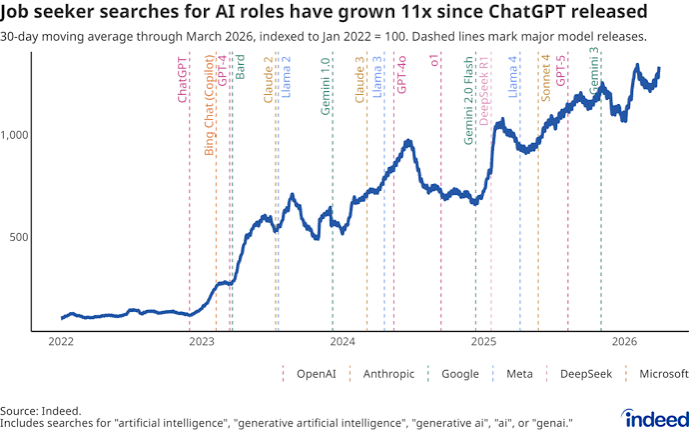
    Since ChatGPT launched in November 2022, a new question has crept into our digital lives: “Is this AI-written?” Whether you’re a teacher grading essays, a recruiter reading cover letters, or just someone scrolling through social media, you’ve probably wondered which parts of the internet were crafted by a human and which were generated by a machine. Google searches for “AI detector” and “how to tell if text is AI-generated” have skyrocketed, and a whole industry of detection tools has sprung up to answer the call. But here’s the uncomfortable truth: these detectors are far from perfect, and the race to catch AI-generated text is more complicated than it seems.

    The Surge in AI Detection Searches

    Interest in AI detection exploded right after ChatGPT went public. Before November 2022, almost nobody was searching for “AI detector.” Now, millions of people are trying to figure out if the text they’re reading or writing is machine-made. This interest has stayed high, with spikes whenever a new AI model like GPT-4 or Gemini hits the market.

    Why the sudden concern? Because AI-generated content has flooded the internet. From blog posts and product reviews to academic papers and news articles, machines are now writing at scale. This has created what some call an “authenticity crisis”: we can no longer assume that words were written by a human. That matters for trust in journalism, fairness in education, and even personal communication like dating profiles and emails.

    How Do AI Detectors Actually Work?

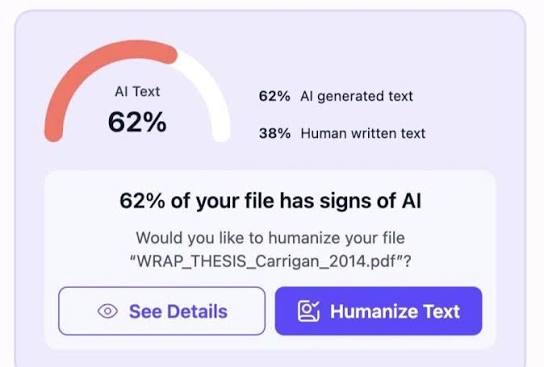
    Most detectors rely on two main signals: perplexity and burstiness. Perplexity measures how “surprised” a language model is by a piece of text. AI-generated text tends to be more predictable, so it has lower perplexity. Burstiness looks at variation in sentence length and structure. Humans naturally mix long and short sentences, while AI text tends to be more uniform.

    Some newer tools use watermarking, which involves embedding invisible statistical patterns in AI output. But that only works if the AI provider cooperates, and it’s not widely deployed yet.

    The Problem: Detectors Are Not Reliable

    Here’s the catch: no AI detector is definitively reliable. OpenAI itself shut down its AI Classifier in July 2023, admitting it had a “low rate of accuracy.” Independent studies have found that detectors frequently misclassify non-native English writing as AI-generated. This has real consequences. Students have been falsely accused of cheating, and freelance writers have lost clients because a detector flagged their human-written work.

    The tools claim accuracy rates of 80–99%, but those numbers are contested. In practice, the results can be wildly inconsistent. A text that one detector flags as AI-written might be cleared by another. And as AI models improve, they get better at mimicking human quirks, making detection even harder.

    The Arms Race Between Detectors and AI

    This is a cat-and-mouse game. As detectors get better, AI models are trained to produce more “human-like” text. Users also use paraphrasing tools to evade detection. It’s a continuous loop: one side builds a better trap, the other side finds a way around it.

    Some researchers argue that reliable detection is fundamentally impossible in the long run. As models improve, AI text will become indistinguishable from human text. They advocate for a shift from detection to provenance—cryptographic signing of human-authored content. That way, you could verify a human wrote something, rather than trying to guess if a machine did.

    Who’s Searching, and Why?

    Different groups search for AI detection for different reasons:

    • Students and educators: Teachers want to catch AI-generated essays; students want to avoid false accusations.
    • Employers and recruiters: They check whether cover letters or resumes were AI-written.
    • Content consumers: People want to know if news articles, reviews, or social media posts are machine-made.
    • Writers and creators: They self-check their own work to make sure it passes filters, especially for SEO or academic submission.

    The Educator’s Dilemma

    Teachers and professors are on the front lines. Many see AI detection as a necessary tool to preserve academic integrity. But false positives are a major frustration. Students who write in a straightforward, formulaic style—especially non-native English speakers—are often flagged as AI, even when their work is entirely human.

    Some educators argue that detection is the wrong approach entirely. They say education should adapt to an AI world by emphasizing the process over the product: in-class writing, oral defenses, and project-based assessments. This might be a more sustainable solution than an endless technological arms race.

    The Student’s Double Bind

    Students face a tough situation. Many use AI as a legitimate learning tool—for brainstorming, outlining, or grammar checking. But they fear being falsely accused of cheating. Some report being forced to “prove” their humanity, which is an absurd burden to place on a student.

    Non-native English speakers are disproportionately affected. Their natural writing style often triggers false positives, which is deeply unfair. Imagine writing an essay in a second language, only to be told it’s too “robot-like” to be human.

    The Writer’s Burden of Proof

    Freelance writers and journalists are also caught in the crossfire. Clients increasingly ask them to run their work through AI detectors, even when the work is entirely human-written. This creates a burden of proof and can lead to lost income if a detector falsely flags their work. It’s a strange world where a human has to prove they’re not a machine.

    Platform Responses: Labeling and Enforcement

    Major platforms like Google, Meta, and TikTok have started requiring or encouraging AI-content labeling. But enforcement and detection remain inconsistent. Google has said it will penalize “scaled content abuse,” meaning mass-produced AI content that manipulates search rankings. But distinguishing between helpful AI-assisted writing and spam is tricky.

    As AI-generated content becomes more common, platforms will need clearer policies. But given the unreliability of detectors, any automated enforcement will likely have false positives and negatives.

    What Should You Do?

    If you’re trying to decide whether a piece of text is AI-written, here’s some practical advice:

    • Don’t rely solely on detectors. Use them as one signal, not the final word.
    • Look for context clues. Is the text unusually uniform in tone? Does it lack personal anecdotes or specific examples? These can be hints, but they’re not definitive.
    • Consider the source. If the content comes from a known AI-heavy site, it’s more likely AI-written.
    • When in doubt, ask. If you’re an educator, have a conversation with the student. If you’re a recruiter, talk to the candidate. A human conversation can reveal authenticity better than any algorithm.

    The Future: Detection vs. Provenance

    The AI detection industry is booming, but its future is uncertain. As AI models get better, detectors will struggle to keep up. The most promising long-term solution might be provenance: a way to cryptographically sign human-authored content, so we can verify origin rather than guess.

    For now, the honest answer to “Can you tell if text was written by AI?” is: sometimes, but not reliably. The tools are improving, but they’re not perfect. And as the arms race continues, the question itself might become obsolete.

    The surge in searches for “is this AI-written” reflects a real shift in how we consume and produce text. AI detectors are helpful tools, but they’re not infallible. The best approach is to use them with caution, combine them with human judgment, and push for broader solutions like provenance. As AI becomes even more integrated into our lives, the ability to navigate this new landscape with critical thinking will matter more than any single detection tool.

    Summary

    • Google searches for AI detection terms have surged since ChatGPT’s release, with interest remaining high.
    • Detectors use perplexity and burstiness to identify AI text, but these methods are unreliable and often produce false positives.
    • OpenAI shut down its own AI Classifier due to low accuracy, and studies show detectors disproportionately flag non-native English writing.
    • Different groups—educators, students, employers, writers—use detectors for various reasons, but many face unfair consequences from false positives.
    • The long-term solution may be provenance (cryptographic signing) rather than detection, but for now, we must use detectors with caution.

    FAQ

    Q: How accurate are AI detectors?
    A: Most detectors claim 80–99% accuracy, but these claims are contested. Independent studies have found significant error rates, especially for non-native English speakers. OpenAI’s own classifier was shut down due to low accuracy.

    Q: Can I get falsely accused of using AI?
    A: Yes. Many students and writers have been falsely flagged by detectors. False positives are a known issue, particularly for text that is clear, formulaic, or written by non-native speakers.

    Q: What’s the difference between perplexity and burstiness?
    A: Perplexity measures how predictable the text is to a language model. Burstiness measures variation in sentence length and structure. AI text tends to have lower perplexity and burstiness than human writing.

    Q: Will AI detectors ever be perfect?
    A: Many researchers doubt it. As AI models improve, they become better at mimicking human writing. Some argue that reliable detection is impossible in the long run, and we should focus on provenance instead.

    Q: What should I do if my work is flagged as AI?
    A: If you wrote the text yourself, you can explain the context, show drafts or notes, and discuss your process. Tools like history logs or timestamps can also help prove authorship.

  • AI Job Searches Have Grown 11-Fold Since ChatGPT: What It Means for Workers and Employers

    AI Job Searches Have Grown 11-Fold Since ChatGPT: What It Means for Workers and Employers

    When ChatGPT launched on November 30, 2022, it didn’t just introduce a new tool  it triggered a seismic shift in how people think about their careers. Within months, searches for “AI jobs” on major job platforms skyrocketed. According to Indeed’s Hiring Lab, the volume of searches for AI-related terms has grown roughly 11-fold since before ChatGPT’s release. That’s not a small blip; it’s a tidal wave of interest.

    But here’s the twist: while interest exploded, the actual number of AI job postings grew far more slowly only about 2 to 4 times in the same period. That gap between what people are searching for and what’s actually available is the real story. It’s a tale of hope, hype, and a workforce trying to figure out its place in an AI-driven world.

    The ChatGPT Effect: From Curiosity to Career Change

    Before ChatGPT, AI jobs were a niche corner of the tech industry. Data scientists, machine learning engineers, and research scientists held advanced degrees and specialized skills. If you weren’t already in that world, you probably didn’t think about AI jobs at all.

    Then ChatGPT made AI tangible. Suddenly, anyone could ask a computer to write a poem, debug code, or summarize a dense report. It was like watching a magic trick that turned out to be real. That moment of accessibility sparked a global “aha” — and with it, a wave of career-related searches.

    Indeed’s data shows the spike wasn’t just about “AI jobs” as a phrase. Searches for “AI engineer,” “prompt engineer,” “machine learning engineer,” and even “AI safety” all climbed sharply. LinkedIn reported similar trends, adding “AI” as a top skill tag. Google Trends confirmed the surge was worldwide, with especially high interest in India, the U.S., the UK, and Canada.

    But why did search volume grow so much faster than actual job openings? Part of the answer is that ChatGPT arrived during a turbulent time in the labor market. Tech layoffs in 2022–2023 left many workers looking for their next move, and AI seemed like a safe bet. Venture capital poured into AI startups, creating new roles — but not enough to match the flood of searchers.

    The Demand-Supply Gap: More Searchers Than Jobs

    Here’s a number that puts things in perspective: searches went up 11 times, but postings only went up 2 to 4 times. That’s a huge mismatch. For every AI job listed, there are far more people searching than before.

    What does that mean for job seekers? Put simply, it’s competitive. Many searchers don’t yet have the skills employers want — things like Python, PyTorch, or model fine-tuning. That creates a lot of frustration and what some call “AI job search fatigue.” People see the hype, apply to roles, and then discover the bar is higher than expected.

    On the employer side, recruiters are drowning in applications, many from unqualified candidates. Some job seekers have started adding “AI” to their resumes without real experience, a kind of keyword inflation that forces companies to rely more on technical tests and practical assessments.

    This gap isn’t necessarily bad news. It’s a signal that the workforce is eager to learn. Enrollment in AI courses on platforms like Coursera and Udacity has surged. Universities report record numbers of students in AI and data science programs. The search spike is a leading indicator of a more AI-literate workforce in the making.

    Why People Are Searching: Opportunity and Fear

    The surge isn’t just about ambition; it’s also about anxiety. A significant chunk of those searches likely come from workers worried that AI might replace their jobs. They’re not necessarily applying — they’re checking the horizon to see if their role is at risk.

    That dual motivation — hope and fear — shapes how the trend plays out. On the optimistic side, AI can be a skill multiplier. A marketer who learns to use AI tools can become more productive without becoming a programmer. A writer who understands prompt engineering can offer new services. Many roles are being redefined rather than eliminated.

    New job categories have also emerged that didn’t exist before 2022. “Prompt engineer,” “AI ethicist,” “AI trainer,” and “LLM operator” are genuinely new titles. These roles blend technical and non-technical skills, opening doors for people from diverse backgrounds.

    On the skeptical side, there’s a risk of a hype bubble. Gartner-style hype cycles suggest that interest might normalize as employers clarify what AI roles actually require. The initial gold rush may settle into a more realistic landscape where the hype fades but the underlying demand for AI skills remains steady.

    How Employers Are Responding

    Faced with a flood of unqualified applicants, many companies are changing their approach. Instead of hiring externally, they’re investing in internal upskilling programs. They’re training existing employees in AI basics, data literacy, and even model fine-tuning. This approach has two benefits: it builds a loyal, skilled workforce, and it avoids the risk of hiring someone who just looks good on paper.

    For job seekers, this means that the path to an AI role isn’t always a new job title. Sometimes it’s about adding AI skills to your current role. An accountant who learns to use AI for data analysis becomes more valuable without needing to switch careers. A customer service manager who understands AI chatbots can improve their team’s efficiency.

    A Global Perspective

    Interest in AI jobs isn’t uniform around the world. India and Southeast Asia show the highest growth rates, driven by large young populations and strong IT outsourcing industries. In the U.S. and Europe, growth is steadier, with more focus on AI ethics, governance, and applied roles.

    Remote work has accelerated this global trend. AI jobs are disproportionately remote-friendly, which makes them attractive to talent in lower-cost regions. A developer in Bangalore can apply for a role at a Silicon Valley startup without relocating. That’s a powerful draw for searchers worldwide.

    What This Means for Your Career

    So, what should you take away from this 11-fold surge? First, don’t let the hype pressure you into a panic. The search spike doesn’t mean everyone needs to become an AI engineer tomorrow. It means there’s a growing demand for AI literacy across many fields.

    Second, focus on skills, not just titles. If you’re interested in AI, start with the fundamentals: understanding what AI can and can’t do, learning basic data concepts, and experimenting with tools like ChatGPT. You don’t need a Ph.D. to get started.

    Third, be realistic about the job market. The gap between searches and postings means competition is fierce. But it also means that those who do invest in real, verifiable skills will stand out. Employers are desperate for people who can actually do the work, not just talk about it.

    Finally, consider how AI applies to your current job. The most successful workers will likely be those who combine their existing expertise with AI capabilities. That’s a powerful combination that no algorithm can replace.

    The 11-fold surge in AI job searches is a reflection of a workforce waking up to a new reality. It’s a mix of excitement and anxiety, opportunity and uncertainty. While the gap between searches and actual openings is real, it also points to a transition period. As the hype settles, the true value will lie in skills and adaptability. Whether you’re a job seeker, an employer, or just someone curious about the future, the message is clear: AI is here to stay, and learning to work with it is one of the smartest career moves you can make.

    Summary

    • Searches for “AI jobs” have grown 11-fold since ChatGPT launched in November 2022.
    • Job postings for AI roles grew only 2-4 times in the same period, creating a demand-supply gap.
    • The surge is driven by both opportunity-seeking and fear of automation, especially after tech layoffs.
    • Employers are responding with internal upskilling programs rather than relying solely on external hires.
    • AI jobs are increasingly remote-friendly, fueling global interest, particularly in India and Southeast Asia.

    FAQ

    Q: Why did searches for AI jobs grow so much faster than actual job postings?
    A: The 11x search growth reflects a surge in curiosity and career exploration triggered by ChatGPT, but the actual number of AI roles grew more slowly. Many searchers are exploring possibilities or upskilling, not all are applying, and employers are also being more selective due to a flood of unqualified applications.

    Q: Do I need a technical degree to get an AI job?
    A: Not necessarily. While many AI roles require strong technical skills, there are also new positions like prompt engineer or AI ethicist that value non-technical backgrounds. Focus on building practical skills through courses and hands-on projects.

    Q: Is the AI job search trend just a hype bubble?
    A: There’s some hype, but the underlying demand for AI skills is real and likely to persist. The initial spike may normalize, but AI is becoming integral to many industries, so jobs will continue to evolve.

    Q: How can I stand out when applying for AI roles?
    A: Employers are skeptical of resume keyword inflation, so demonstrate real skills. Build a portfolio of projects, contribute to open-source, or take certifications from recognized platforms. Show that you can apply AI to solve practical problems.

    Q: What should I do if I’m worried AI might replace my job?
    A: Instead of panicking, invest in learning AI tools relevant to your field. Understand how AI can augment your work. Upskilling is the best defense against automation.

  • Generative Engine Optimization: Making Your Content Visible to AI Answers

    Generative Engine Optimization: Making Your Content Visible to AI Answers

    When you ask ChatGPT or Perplexity a question, the answer you get is often a synthesized paragraph built from a handful of sources. The AI doesn’t show you a list of blue links; it gives you a summary with citations. For website owners, this changes everything. If your content isn’t one of those cited sources, you’re invisible to a growing audience that gets answers without ever clicking through.

    This shift from search to answers is what Generative Engine Optimization (GEO) addresses. GEO is the practice of making your content more likely to be cited, summarized, or recommended by AI-powered engines. It’s not a replacement for traditional SEO it’s a new layer focused on how AI models retrieve and trust information.

    What Exactly Is GEO?

    Generative Engine Optimization (GEO) is the art and science of optimizing content so that AI answer engines like ChatGPT, Perplexity, Google AI Overviews, and Bing Copilot pick it up and feature it in their responses. Traditional SEO targets search engine crawlers and ranking algorithms to win a top spot on a results page. GEO targets large language models (LLMs) and their retrieval systems to win a citation in a synthesized answer.

    The term was coined in a February 2024 paper by researchers at Princeton, Georgia Tech, and IIT Delhi. The paper, “Generative Engine Optimization: A New Paradigm for Content Optimization,” showed that adding quantitative, statistical, and factual language to content increased its visibility in AI-generated answers by up to 40%.

    How AI Engines Choose Sources

    Most AI answer engines use a technique called Retrieval-Augmented Generation (RAG). Here’s how it works in plain terms: when you ask a question, the engine first searches through a vast index of documents, looking for ones that are semantically similar to your query. That means it’s not just matching keywords it’s understanding meaning. Then, it feeds the top few documents to a large language model, which reads them and generates a coherent answer.

    So which documents get picked? Research and observation suggest that AI engines favor sources that:

    • Are semantically close to the query’s meaning, not just its keywords.
    • Contain explicit, extractable facts clear numbers, dates, names, and statements.
    • Come from domains that appear authoritative (high domain trust, recognized expertise).
    • Are structured in a way that makes information easy to pull out lists, tables, clear headings, and concise paragraphs.

    There’s also a training data bias: content that appears frequently in a model’s training data (often older, high-authority content) has an inherent advantage. If your content has been around for years and is widely referenced, the AI is more likely to recall it.

    GEO vs. SEO: What’s Different?

    To understand GEO, it helps to contrast it with SEO. SEO focuses on keywords, backlinks, and technical site structure. Its goal is to get a page to rank in the top 10 results on a search engine results page (SERP). GEO focuses on entity clarity, structured data, quotable statistics, and semantic authority. Its goal is to be one of the 3–5 sources an AI cites in a synthesized answer.

    Here’s a concrete example. In SEO, you might write an article about “best running shoes” and optimize it for the keyword phrase. In GEO, you’d also include a clear list of top shoes with specific features, a table comparing prices, and a concise summary at the top. When an AI engine retrieves content to answer “what are the best running shoes?”, it can easily pull facts from your structured list and citation.

    Why GEO Matters Now

    The shift from search to answers is happening faster than many expected. In May 2024, Google launched AI Overviews, which appear at the top of billions of queries. Bing integrated GPT-4 back in 2023. Dedicated answer engines like Perplexity are growing rapidly, especially among younger users who prefer direct answers over link lists.

    This matters because of the “zero-click” dynamic. In traditional search, users click through to websites. With AI answers, users may never leave the results page. For publishers, being cited is now a primary traffic driver. If your content isn’t cited, you’re missing out on a growing share of user attention.

    Practical GEO Tactics You Can Use

    So how do you make your content AI-friendly? Based on early research and practitioner experience, here are concrete steps:

    1. Add clear, quotable statistics. The GEO paper found that adding quantitative language boosts visibility. If you’re making a claim, back it with a number. Instead of “many companies use AI,” say “62% of companies report using AI in some form.”
    2. Structure your content with headings and lists. AI engines love extractable information. Use H2 and H3 headings to break up your content, and use bullet points or numbered lists for key facts. This makes it easy for an LLM to pick out the exact sentence it needs.
    3. Write a concise summary at the top. A TL;DR section or a “Key Takeaways” box helps AI engines quickly grasp what your page is about. It also improves user experience.
    4. Use structured data (schema markup). While GEO is still evolving, structured data helps AI understand your content’s entities. Implement schema types like Article, FAQ, or Product to give clear signals about what your page covers.
    5. Focus on entity clarity. Make sure your content clearly identifies the main entities—people, places, products, concepts—and their relationships. Use consistent names and avoid ambiguous references.
    6. Cite authoritative sources. When you reference external data, link to high-authority sources. This builds trust and makes your content more likely to be considered authoritative itself.
    7. Include quotes and expert opinions. Research shows that AI engines often cite content with direct quotes. If you have an expert quote, include it verbatim.
    8. Keep content fresh. AI models update their training data and retrieval indexes. Regularly updating your content keeps it relevant and increases the chances it will be cited.

    The Skeptical View: Is GEO a Moving Target?

    Not everyone is convinced GEO is a stable discipline. Skeptics point out that LLM behavior changes with each model update. A tactic that works today might not work next year. This is a valid concern. Search engines also change their algorithms constantly, yet SEO has evolved into a mature practice. GEO is likely to follow a similar path, but it’s still early.

    Another concern is “citation without traffic.” Being cited in an AI answer doesn’t necessarily mean users click through to your site. The answer itself might satisfy the query completely. Some argue that GEO should focus on brand visibility rather than direct traffic. If your brand is cited as an authority, that builds trust even if people don’t click immediately.

    Where GEO Is Heading

    The field is young, but it’s growing fast. Major SEO agencies now have GEO practice areas. Academic research is continuing, with follow-up studies on citation behavior. And AI platforms are experimenting with ad placements inside AI answers, creating a new advertising surface that could compete with organic citations.

    For website owners, the message is clear: start optimizing for AI now. The strategies are not radically different from good content practices—clarity, authority, and structure—but they’re tailored to the way AI consumes information. By making your content more citable, you position yourself to remain visible in the new answer economy.

    Generative Engine Optimization is not a fad; it’s a response to a fundamental shift in how people get information. As AI answers become the default, the ability to be cited by these engines will determine your online visibility. The good news is that GEO builds on solid content practices: be clear, be specific, be structured. By adopting GEO tactics now, you’re not just optimizing for algorithms—you’re ensuring that when someone asks an AI a question, your expertise is part of the answer.

    Summary

    • GEO (Generative Engine Optimization) optimizes content for AI answer engines like ChatGPT, Perplexity, and Google AI Overviews.
    • Unlike SEO, which targets keyword ranking, GEO focuses on being cited in AI-synthesized answers.
    • Key tactics include adding statistics, using structured data, writing clear summaries, and maintaining entity clarity.
    • The term was coined in a 2024 academic paper that showed a 40% boost in visibility from quantitative language.
    • GEO is still evolving, but early adoption can help you stay visible as AI answers grow.

    FAQ

    Q: What is the difference between SEO and GEO?
    A: SEO optimizes for search engine crawlers to rank high in link results; GEO optimizes for AI models to be cited in generated answers. GEO focuses on semantic clarity, structured data, and quotable facts.

    Q: How do AI engines decide which sources to cite?
    A: They use retrieval-augmented generation (RAG), which first finds documents similar to the query, then feeds them to an LLM. They favor sources that are semantically relevant, contain explicit facts, come from authoritative domains, and are well-structured.

    Q: Does GEO require completely new content?
    A: Not necessarily. You can adapt existing content by adding summaries, statistics, and better structure. The goal is to make information easy for AI to extract.

    Q: Is GEO worth it if AI answers don’t send clicks?
    A: Yes, for brand visibility. Being cited positions you as an authority, even if users don’t click through immediately. Over time, this can lead to direct visits and trust.

    Q: What’s the biggest challenge in GEO?
    A: The field changes quickly as AI models update. Tactics that work today may need adjustment tomorrow. Staying informed and adapting is key.

  • 10 ChatGPT Prompts That Can Realistically Save You 5 Hours a Week

    10 ChatGPT Prompts That Can Realistically Save You 5 Hours a Week

    Imagine getting Friday afternoon back. No frantic email catch-up, no hour-long meeting-note cleanup, no staring at a blank page willing a draft into existence. For many knowledge workers, that’s not a fantasy—it’s the reported payoff of using a handful of well-crafted ChatGPT prompts. The math is simple: 5 hours per week equals about 12 minutes saved per day per prompt, across 10 prompts. But is that realistic? Data from productivity studies and user surveys suggests that casual users save 1–3 hours weekly, while those who invest in prompt craft report 5–10+. The difference lies not in the tool, but in how precisely you ask.

    This guide walks through 10 high-impact prompts, each targeting a recurring, time-sucking task. You’ll also learn why these prompts work, how to adapt them to your own workflow, and where the 5-hour claim holds up—and where it doesn’t. No magic bullets, just practical delegation.

    Why These 10 Prompts? The Time-Saving Mechanism

    ChatGPT saves time by taking over tasks that are repetitive, structured, or template-based—the kind of work that eats minutes here and there but adds up to hours by Friday. The key is specificity: a vague prompt like “Write an email” yields a generic response that needs extensive editing, negating any time savings. The prompts below are engineered to be specific, with placeholders for your details and explicit instructions for format, tone, and length.

    The 10 Prompts

    1. Email Triage and Drafting

    Prompt: “Act as my executive assistant. Draft a reply to [sender] about [topic]. The tone should be [professional/friendly]. Include a clear ask: [what you need from them]. Keep it under 150 words. Sign off with [your name].”

    Why it saves time: The average worker spends 2.5 hours daily on email. This prompt cuts drafting from 10 minutes to 2.

    2. Meeting Notes Summarization

    Prompt: “Here are my raw meeting notes: [paste notes]. Summarize into three sections: Key Decisions, Action Items (with owner and deadline), and Open Questions. Use bullet points. Keep it under 200 words.”

    Why it saves time: A 1-hour meeting generates 30 minutes of note cleanup. This reduces it to 5 minutes.

    3. Content Repurposing

    Prompt: “Turn this blog post [paste] into 5 LinkedIn posts. Each post should have a hook, a key insight, and a call-to-action. Vary the angle: one educational, one provocative, one personal, one statistical, one question-based.”

    Why it saves time: Content repurposing can take 45 minutes per piece. This prompt delivers in 5 minutes.

    4. Spreadsheet Formula Generation

    Prompt: “I have a column of sales figures in A1:A50. Write a formula to calculate the average, excluding any blank cells and values over $10,000. Explain what each part does.”

    Why it saves time: Formula syntax errors can eat 15 minutes each. This gets you a working formula on the first try.

    5. Research Synthesis

    Prompt: “Summarize the key findings from these three articles: [links or text]. Focus on common themes, contradictions, and implications for [your field]. Use a table to compare.”

    Why it saves time: Reading and synthesizing three 2,000-word articles takes 1 hour. This prompt takes 10 minutes.

    6. Code Debugging

    Prompt: “Here’s my code: [paste]. It’s supposed to [what it should do], but it throws this error: [paste error]. Identify the bug, explain why it happens, and provide a corrected version.”

    Why it saves time: Debugging can take 30 minutes per bug. This narrows it to 5.

    7. Project Plan Creation

    Prompt: “Create a project plan for [project name]. Break it into phases with deliverable and estimated duration. Include milestones and potential risks. Format as a table.”

    Why it saves time: Drafting a plan from scratch takes 2 hours. This generates a solid skeleton in 15 minutes.

    8. Brainstorming and Ideation

    Prompt: “I need ideas for [problem]. Generate 20 diverse options, ranging from conventional to wild. For each, give a one-sentence description and a potential challenge.”

    Why it saves time: Brainstorming with a team can take 1 hour. This prompt yields a starting point in 5 minutes.

    9. Document Formatting and Editing

    Prompt: “Here’s my draft: [paste]. Rewrite it for clarity, improve sentence flow, and ensure consistent formatting. Keep the original meaning. Show changes with track changes-like annotations.”

    Why it saves time: Editing a 1,000-word document takes 20 minutes. This cuts it to 5.

    10. Learning and Explanation

    Prompt: “Explain [concept] to me as if I were a 10-year-old. Use an analogy. Then explain it as if I were a college student. Compare the two explanations.”

    Why it saves time: Understanding a new concept can involve hours of reading. This prompt gets you to ‘good enough’ in 10 minutes.

    The Reality Check: Will You Actually Save 5 Hours?

    Surveys of ChatGPT users suggest that most save 1–3 hours per week. The 5-hour mark is achievable for power users who:
    – Spend the first week building a prompt library.
    – Customize each prompt to their specific tasks.
    – Use the paid tier (GPT-4o) for better reasoning.
    – Verify factual output—hallucinations are real, especially with numbers and citations.

    If you’re a marketer, writer, analyst, or developer, these 10 prompts can plausibly save 5+ hours. If you’re in a role requiring face-to-face interaction or physical presence, your mileage will vary.

    Customization: The Secret to Real Savings

    The prompts above are starting points. To maximize time savings, modify them to fit your exact workflow. For example, if you’re a legal assistant, change the email prompt to include legal citation format. If you’re a product manager, adjust the meeting notes prompt to include ‘Blockers’ as a section. Save your customized versions in a document or use ChatGPT’s ‘Custom Instructions’ feature to bake in your preferences.

    The First Week Is Slower—But It Compounds

    Don’t expect to save time on day one. Learning to write effective prompts has a learning curve. Expect the first week to be a wash as you experiment. By week two, you’ll see modest gains. By week four, the compounding effect kicks in—you’ll have a library of proven prompts, and each new task takes seconds to delegate.

    A Caveat: Fact-Checking and Bias

    ChatGPT is not always accurate. Any prompt that involves facts, statistics, or citations—like the research synthesis or spreadsheet formulas—requires verification. And AI models inherit biases from their training data, so review outputs for fairness, especially in emails or public-facing content. The time you save on drafting must be partially reinvested in checking.

    Beyond Time: Quality Gains

    Time isn’t the only win. Users report fewer typos, more consistent formatting, and better-structured documents. These quality improvements can be more valuable than the hours saved, especially if you’re producing client-facing work.

    The 5-hour weekly savings from ChatGPT isn’t a given—it’s a target. These 10 prompts give you a toolkit to hit it, provided you invest in customization and verification. Start with one or two prompts this week, refine them, and build from there. The compounding gains are real, but they require an initial investment of effort. The reward isn’t just a lighter workload; it’s the mental space to focus on work that actually needs your human judgment.

    Summary

    • 10 specific prompts target email, meetings, content repurposing, spreadsheets, research, code, planning, brainstorming, editing, and learning.
    • Realistic savings: Most users save 1–3 hours/week; 5+ is achievable for power users with customization.
    • Customization is key: One-size-fits-all prompts fail; adapt them to your role and workflow.
    • Verify AI output: Fact-check numbers, citations, and code—hallucinations happen.
    • Compounding gains: First week is slower; by week four, a personal prompt library yields exponential time savings.

    FAQ

    Q: Are these prompts guaranteed to save 5 hours a week?
    A: No. Actual savings depend on your role, task complexity, and prompt skill. Most users see 1–3 hours, but power users can reach 5+ by customizing and reusing prompts.

    Q: Do I need ChatGPT Plus for these prompts to work?
    A: Most will work on the free tier, but GPT-4o (paid) provides better reasoning and longer context, which improves output quality for complex tasks like code debugging or research synthesis.

    Q: Can I use these prompts with other AI tools like Claude or Gemini?
    A: Yes, the prompts are tool-agnostic. You may need to adjust wording slightly, but the structure and intent translate across AI assistants.

    Q: How do I avoid ChatGPT making up facts in research summaries?
    A: Always cross-check dates, statistics, and direct quotes against the original sources. Ask ChatGPT to cite its sources, but don’t trust them blindly—verify.

    Q: What if my employer is concerned about data privacy?
    A: Avoid pasting confidential or sensitive data into any public AI tool. Use enterprise versions with data protection guarantees, or generalize details in your prompts.

  • ChatGPT for Beginners: Your First Steps to Using AI Chatbots

    ChatGPT for Beginners: Your First Steps to Using AI Chatbots

    You’ve probably heard about ChatGPT by now—it’s the AI chatbot that took the world by storm, reaching 100 million users in just two months. But if you’re new to it, you might be wondering: What exactly is it, and how can I use it? This guide is for you. We’ll break down what ChatGPT is, how it works, and how you can start using it today, even if you’re not tech-savvy.

    Think of ChatGPT as a super-smart assistant that can chat with you, answer questions, help you write, and even brainstorm ideas. It’s like having a knowledgeable friend who’s available 24/7. But like any tool, it has its strengths and limitations. In this guide, we’ll cover the basics, give you practical tips, and help you avoid common pitfalls.

    What is ChatGPT?

    ChatGPT is a conversational AI chatbot developed by OpenAI, a research organization. It was first released on November 30, 2022, and quickly became the fastest-growing consumer app in history. The name ‘ChatGPT’ stands for Generative Pre-trained Transformer, which is a type of large language model (LLM). In simple terms, it’s a computer program trained on a massive amount of text from the internet—books, articles, websites—to predict the next word in a sentence. This allows it to generate human-like responses to your prompts.

    You can access ChatGPT through your web browser at chatgpt.com, or via mobile apps for iOS and Android. There’s also a desktop app for macOS and Windows. The free tier gives you access to GPT-3.5, which is quite capable. If you want more advanced features, you can subscribe to ChatGPT Plus for about $20 a month, which gives you access to GPT-4 and other enhanced models.

    How Does ChatGPT Work? (A Simple Analogy)

    Imagine you have a friend who has read every book, article, and website on the internet. When you ask them a question, they don’t ‘know’ the answer in the way you do—they just recall patterns from all that reading. ChatGPT works similarly. It doesn’t have real knowledge or understanding; it predicts the most likely response based on patterns it learned during training.

    One important thing to know: ChatGPT has a ‘knowledge cutoff.’ It only knows information up to a certain date (for GPT-4, that’s around October 2023). It can’t access real-time information unless you enable web browsing, which is available in paid tiers. So if you ask about today’s news, it might not know unless you turn on that feature.

    Getting Started: Your First Conversation

    Using ChatGPT is as simple as typing a question and hitting enter. But to get the best results, you need to write good prompts. Here are some tips:

    • Be specific: Instead of ‘Tell me about dogs,’ try ‘What are the best dog breeds for apartments?’
    • Provide context: Give ChatGPT background information to help it understand your request.
    • Ask follow-up questions: ChatGPT remembers the conversation, so you can refine your queries.
    • Use it as a thinking partner: Don’t just accept the first answer. Ask for alternatives, pros and cons, or more details.

    For example, if you’re planning a trip to Paris, you could start with: ‘I’m planning a 5-day trip to Paris in June. Can you suggest an itinerary?’ Then follow up with: ‘What about budget-friendly restaurants?’ The AI will adjust its responses based on your conversation.

    Practical Uses for Beginners

    ChatGPT can help with a wide range of tasks. Here are some common ones:

    • Writing assistance: Draft emails, essays, or social media posts. For instance, ‘Write a polite email to my boss asking for a day off.’
    • Brainstorming: Generate ideas for projects, names, or solutions. ‘Give me 10 ideas for a birthday party theme for a 10-year-old.’
    • Learning: Ask for explanations of complex topics. ‘Explain quantum physics in simple terms.’
    • Coding: Get help with programming snippets. ‘Write a Python function to reverse a string.’
    • Summarization: Paste a long article and ask for a summary. ‘Summarize this in 3 bullet points.’

    Understanding the Limitations

    While ChatGPT is impressive, it’s not perfect. Here are some key limitations:

    • Hallucinations: It can make up facts or be confidently wrong. Always verify important information.
    • Bias: Since it’s trained on internet data, it can reflect societal biases. Be aware of this.
    • Privacy: Conversations may be used for training unless you opt out. Don’t share sensitive personal information.
    • Over-reliance: If you use it passively, you might reduce your own critical thinking. Use it as a tool, not a replacement for your brain.

    Tips for Responsible Use

    To get the most out of ChatGPT while avoiding pitfalls:

    • Fact-check: For important info, cross-reference with reliable sources.
    • Protect your privacy: Avoid sharing passwords, financial details, or personal data.
    • Use it ethically: In school or work, follow guidelines. Many institutions now allow AI use with disclosure.
    • Experiment: Try different prompts and see what works. The more you practice, the better you’ll get.

    The Bigger Picture: AI in Everyday Life

    ChatGPT is part of a larger AI revolution. It’s now embedded in tools like Microsoft Word, Excel, and Outlook. Understanding how to use it is becoming a basic skill. But it’s also raising important questions about education, jobs, and ethics. As a beginner, you’re entering a world where AI literacy is increasingly valuable. By learning the basics now, you’re setting yourself up for the future.

    ChatGPT is a powerful tool that can make your life easier, whether you’re writing, learning, or just curious. Start with simple prompts, explore its features, and always keep its limitations in mind. The key is to use it as an assistant, not an oracle. With practice, you’ll find it becomes an indispensable part of your digital toolkit.

    Summary

    • ChatGPT is a free AI chatbot that can answer questions, help with writing, and more.
    • It works by predicting the next word based on patterns in internet text, not by ‘knowing’ facts.
    • To get good results, be specific in your prompts and use follow-up questions.
    • Be aware of limitations: it can make mistakes, have biases, and has a knowledge cutoff.
    • Use it responsibly: fact-check important info, protect your privacy, and don’t over-rely on it.

    FAQ

    Q: Is ChatGPT free?
    A: Yes, there’s a free tier that uses GPT-3.5. For more advanced features, you can pay for ChatGPT Plus.

    Q: Can ChatGPT access the internet?
    A: Only if you enable web browsing, which is available in paid tiers. Otherwise, it has a knowledge cutoff.

    Q: Will ChatGPT replace my job?
    A: It can automate some tasks, but it’s more likely to change jobs than replace them. Use it to enhance your skills.

    Q: How do I write a good prompt?
    A: Be specific, provide context, and ask follow-up questions. For example, ‘Explain X in simple terms’ works well.

    Q: Is my data safe?
    A: OpenAI uses conversations to improve models, but you can opt out. Avoid sharing sensitive info.