Tag: Machine Learning

  • How ChatGPT Really Works: A Plain-English Guide to the Inner Mechanics

    How ChatGPT Really Works: A Plain-English Guide to the Inner Mechanics

    You type a question, hit enter, and within seconds a coherent, often insightful answer appears. It feels like magic or like talking to a very knowledgeable friend. But under the hood, ChatGPT is not retrieving facts from a database, nor does it truly ‘understand’ your words in the human sense. It’s a pattern-completion engine, built on a complex neural network, that has learned to mimic human language from vast amounts of text.

    This guide unpacks the core mechanics of ChatGPT tokenization, the transformer architecture, autoregressive generation, and the role of parameters like temperature in plain English. Whether you’re a developer building on top of the API, a power user trying to get better responses, or just curious about the buzz, understanding these fundamentals will help you use ChatGPT more effectively and set realistic expectations.

    It’s All About Tokens

    Before ChatGPT can process your text, it breaks it down into small chunks called tokens. A token isn’t the same as a word. It’s a subword unit—sometimes a whole word, sometimes a part of a word, sometimes even a single character. For example, the word “unbelievable” might be split into “un,” “believ,” and “able.” Why do this? Because it allows the model to handle a vast vocabulary without needing a separate representation for every possible word. It also helps with rare or misspelled words.

    The tokenization process is invisible to you, but it matters for two practical reasons. First, the model’s context window—the maximum amount of text it can process at once—is measured in tokens, not words. A context window of 8,000 tokens might sound like a lot, but it’s roughly equivalent to 6,000 words, depending on the language. Second, API costs are calculated per token. So, being mindful of token usage can save you money.

    The Transformer: The Brain Behind the Operation

    ChatGPT is built on a transformer architecture, a type of neural network introduced in 2017. Transformers are particularly good at handling sequential data like text because they use a mechanism called self-attention. In simple terms, self-attention allows the model to weigh the importance of every word in the input relative to every other word. When processing the sentence “The cat sat on the mat because it was tired,” the model can link “it” to “cat” by paying attention to the relationship between those tokens.

    But here’s the kicker: the model doesn’t process text one word at a time in order. Instead, it looks at the entire input sequence simultaneously, computing attention scores for all pairs of tokens. This parallel processing is what makes transformers so powerful—and so fast compared to earlier models that processed sequentially.

    The transformer has multiple layers, each with its own attention heads. Lower layers might capture simple patterns like word order, while higher layers capture more abstract relationships like grammar and even some reasoning. The final output is a probability distribution over the entire vocabulary for what the next token should be.

    Autoregressive Generation: One Token at a Time

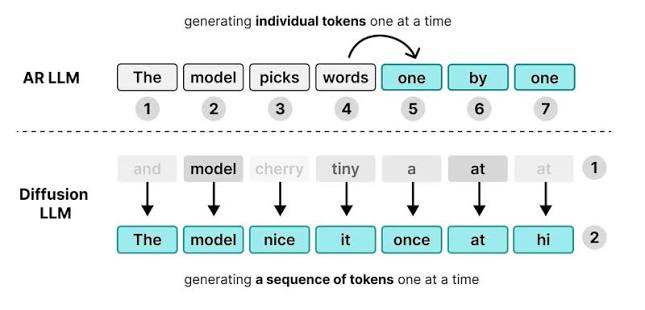
    The core of ChatGPT’s text generation is autoregressive: it predicts one token at a time, then feeds that token back into the input to predict the next one. It’s like a very fast, sophisticated version of the autocomplete on your phone. When you ask “What’s the capital of France?”, the model doesn’t immediately know the answer. It starts generating the most likely first token, say “The,” then based on that, predicts the next token, “capital,” and so on, until it produces a stopping token that signals the end of the response.

    This process is inherently probabilistic. At each step, the model calculates probabilities for all possible next tokens. The way it picks from those probabilities is controlled by temperature and sampling parameters.

    • Temperature (ranging from 0 to 2) controls randomness. A lower temperature (e.g., 0.2) makes the model more deterministic, always choosing the highest-probability token. This is good for factual questions or code. A higher temperature (e.g., 1.0) allows more random choices, leading to more creative or varied outputs, but also increasing the chance of errors or incoherence.
    • Top-p (nucleus sampling) is another parameter that limits the pool of tokens considered. Instead of considering all possible tokens, it only considers the smallest set whose cumulative probability exceeds a threshold (e.g., 0.9). This can produce more focused responses.

    Even at temperature 0, the model isn’t guaranteed to be deterministic due to floating-point arithmetic variations across hardware. So don’t be surprised if you get slightly different answers on different occasions.

    The Context Window: How Much the Model Can “See”

    Every ChatGPT conversation has a context window—the total number of tokens the model can process at once. For example, GPT-4 might have an 8K or 32K token limit, while newer models like GPT-4 Turbo support up to 128K tokens. This includes your prompts, the model’s previous responses, and any system instructions—all of it must fit within the window.

    If you exceed the limit, the model won’t just crash; it will truncate the conversation, often dropping the oldest messages. This is why ChatGPT can “forget” earlier parts of a long conversation. Even within the window, the model’s attention can dilute. As the sequence grows, the model may pay less attention to tokens at the beginning, leading to inconsistencies. So, for complex tasks, it’s often better to keep conversations concise or summarize earlier points.

    The Role of Prompts: System, User, and Assistant

    When you interact with ChatGPT, there are actually three types of messages in the conversation:

    • System prompt: A set of instructions given to the model before the conversation starts. It sets the overall behavior, like “You are a helpful assistant” or “You are a pirate who always speaks in sea shanties.” The system prompt is a strong influence, but not an absolute constraint. The model can deviate if the user messages conflict.
    • User messages: Your inputs.
    • Assistant messages: The model’s responses. These are also fed back into the model on each turn, so the model has the full history.

    Crafting effective prompts is about being clear and specific. The better the model understands your intent, the better the output. But remember, the model isn’t reading between the lines—it’s pattern-matching on the text it’s seen in training. So, providing examples (few-shot prompting) or giving step-by-step instructions can dramatically improve results.

    How the Model Was Trained: From Base Model to Chatbot

    The ChatGPT you interact with today didn’t emerge fully formed. It started as a base model trained on a massive corpus of text from the internet, books, and other sources. This training taught the model grammar, facts, reasoning patterns, and biases present in the data. But a base model is not necessarily helpful or safe—it might generate harmful text or answer questions with random tangents.

    To make it conversational, the model went through fine-tuning and Reinforcement Learning from Human Feedback (RLHF). In RLHF, human AI trainers rank different responses to the same prompt. The model then learns to favor responses that humans consider better—more helpful, accurate, and harmless. This is why ChatGPT often declines to answer harmful questions or says “I’m sorry, but I can’t help with that.” It’s a learned behavior, not a hard-coded rule.

    This training process also introduces limitations. The model’s knowledge is frozen at its training cutoff, so it has no awareness of events after that date. It also can hallucinate—generate plausible-sounding but incorrect information—because it’s not recalling facts but predicting sequences based on patterns.

    Tool Use and Memory: Extending the Model’s Capabilities

    Recent versions of ChatGPT have added features that go beyond pure text generation. Tool use (also called function calling) allows the model to request specific actions, like running a calculation or fetching data from an API. The model doesn’t execute the tool itself; it outputs a structured request, and the system performs the action and returns the result. This extends the model’s abilities beyond its training data.

    Memory is another feature that lets the model remember facts across conversations. It’s implemented by storing information in a separate memory system and injecting it into the context window as needed. This isn’t true long-term learning; it’s more like a note-taking system. The model’s weights remain unchanged.

    Why Understanding This Matters

    Knowing how ChatGPT works isn’t just academic. It helps you:

    • Debug: If the model gives a wrong answer, you can spot if it’s due to hallucination, context truncation, or a poorly designed prompt.
    • Plan prompts: You can craft prompts that stay within the context window and provide the necessary information.
    • Estimate costs: Since API billing is per token, being aware of token usage helps you budget.
    • Set expectations: You’ll know that ChatGPT is not a sentient being, but a statistical text generator. It can be incredibly useful, but it’s not a reliable source of truth for critical decisions.

    So the next time you interact with ChatGPT, remember: you’re not talking to a brain; you’re engaging with a highly sophisticated pattern-matching machine that has learned to play with words. And that’s quite remarkable in itself.

    Understanding the inner workings of ChatGPT demystifies the technology and helps you use it more effectively. It’s not magic—it’s a complex interplay of tokenization, attention mechanisms, and probabilistic generation, all trained on human language. While it has limitations, grasping these fundamentals empowers you to craft better prompts, interpret outputs critically, and appreciate the engineering marvel that it is.

    Summary

    • ChatGPT breaks text into tokens (subword units), not words, which impacts context limits and costs.
    • The transformer architecture uses self-attention to process entire sequences in parallel, enabling sophisticated language patterns.
    • Generation is autoregressive: one token at a time, based on probabilities influenced by temperature and sampling.
    • The context window is the model’s working memory; exceeding it truncates history, causing “forgetfulness.”
    • Fine-tuning and RLHF align the model to be helpful and safe, but it remains a pattern-matching system, not a knowledge database.

    FAQ

    Q: Is ChatGPT deterministic?
    A: Not always. Even at temperature 0, floating-point variations can cause different outputs across runs. Higher temperatures introduce more randomness.

    Q: Does ChatGPT have internet access?
    A: Not by default. It doesn’t browse the web unless a tool is enabled. Its knowledge is limited to its training data cutoff.

    Q: Why does ChatGPT sometimes give wrong answers?
    A: It’s not retrieving facts; it’s predicting text based on patterns. If the pattern is misleading or the context is ambiguous, it can hallucinate plausible but incorrect information.

    Q: How long is the context window?
    A: It depends on the model version. GPT-4 typically has 8K or 32K tokens, while some newer models support up to 128K tokens. Check the specific model’s documentation.

    Q: Can I control the creativity of ChatGPT?
    A: Yes, via the temperature parameter. Lower values (e.g., 0.2) produce more focused, deterministic responses; higher values (e.g., 1.0) yield more creative and varied output.

  • How to Build a Diffusion Language Model: A Step-by-Step Guide

    How to Build a Diffusion Language Model: A Step-by-Step Guide

    Diffusion models have revolutionized image generation, but applying them to language is trickier. Text is discrete, so you can’t just add Gaussian noise. This guide walks you through the key components noising, denoising, training, and sampling so you can build your own diffusion language model from scratch.

    We’ll start with the core idea: instead of generating text left-to-right like GPT, a diffusion LM learns to reverse a gradual corruption process. By the end, you’ll understand the architecture choices, training objectives, and sampling tricks that make these models work and where they still struggle.

    The Core Idea: Reversing Noise

    Imagine you have a clean sentence: “The cat sat on the mat.” Now, over many steps, you progressively replace words with a placeholder like [MASK]. Eventually, you get a completely masked sequence: “[MASK] [MASK] [MASK] [MASK] [MASK] [MASK].” A diffusion language model learns to reverse this process—starting from pure noise and iteratively predicting the original tokens.

    This is analogous to how image diffusion models work, but with a key difference: text is discrete. You can’t add continuous Gaussian noise to a token in a meaningful way. So researchers have developed several strategies to adapt diffusion to language.

    Step 1: Choose Your Noising Process

    The forward process corrupts a clean sequence over a fixed number of timesteps (e.g., T=1000). The choice of corruption determines the training objective and the model’s capabilities. Here are the most common approaches:

    • Masking-based: At each timestep, randomly replace a fraction of tokens with a special [MASK] token. The fraction increases with timestep, so later steps are more corrupted. This is simple and effective, as seen in models like MDLM and BERT-style denoising.
    • Multinomial diffusion: Instead of masking, you add noise over the categorical distribution of each token. Each token’s distribution is gradually pushed toward uniform—essentially, you’re replacing tokens with random ones with increasing probability.
    • Continuous diffusion on embeddings: You embed tokens into a continuous vector space, then add Gaussian noise to the embeddings. This allows you to use standard continuous diffusion machinery, but you need a rounding step to convert denoised embeddings back to tokens.

    For a first implementation, masking is the easiest to get right. It’s intuitive, and the training objective is straightforward cross-entropy on the masked positions.

    Step 2: Design the Denoising Network

    The reverse process is handled by a neural network that takes a corrupted sequence and predicts the original tokens. A transformer encoder is the natural choice because it can attend to all positions bidirectionally—a key advantage over autoregressive models.

    You’ll feed in the corrupted token sequence, along with the timestep (as an embedding), and output probabilities for each token over the vocabulary. The architecture is similar to BERT, but you’ll add a timestep conditioning mechanism, like adaptive layer norm or additive embeddings.

    The loss is typically cross-entropy between the predicted distribution and the original token at each masked position. In practice, you only compute the loss on positions that were corrupted, which forces the model to learn to reconstruct from context.

    Step 3: Train the Model

    During training, you sample a clean sequence from your dataset, randomly sample a timestep, and corrupt the sequence according to your noising process. Then you feed the corrupted sequence to the model and compute the loss.

    A key trick is to use a mask schedule that determines how many tokens to mask at each timestep. For example, you might mask 50% of tokens at t=500, and 90% at t=900. The schedule can be uniform, linear, or cosine—choice affects training stability and final quality.

    In practice, you’ll train for many steps on a large corpus. One challenge is that diffusion LMs are data-hungry and can be unstable to train. You may need to experiment with learning rates, gradient clipping, and the noise schedule.

    Step 4: Sample by Denoising

    To generate text, you start from a fully masked sequence (or a sequence of random tokens, depending on your noising process). Then, you iteratively apply the model: at each step, predict the original tokens, but only replace the most confident predictions (or use a schedule to gradually unmask).

    For masking-based models, you typically use a strategy like confidence-based decoding: at each step, the model outputs probabilities for all masked positions. You unmask the top-k most confident tokens, then re-mask the remaining ones according to the schedule, and repeat. This is similar to how the MaskGIT model works for images, but for text.

    Step 5: Handle Variable-Length Generation

    One limitation of many diffusion LMs is that they work on fixed-length sequences. For text, you often need to generate variable-length outputs. A common trick is to use a start-of-sequence token and a special end-of-sequence token, but it’s tricky because the model doesn’t generate left-to-right.

    One solution is to generate a fixed-length sequence that includes padding tokens, then post-process to trim. Another is to train with a length predictor or use a separate mechanism to decide when to stop.

    Putting It All Together: A Minimal Example

    Here’s a high-level pseudocode for training a masked diffusion LM:

    python
    for each batch of texts:
    # 1. Sample a random timestep for each sequence
    t = random.randint(0, T-1)
    # 2. Corrupt the sequence according to the schedule
    corrupted, mask = corrupt(text, t)
    # 3. Feed corrupted sequence and timestep to the model
    logits = model(corrupted, t)
    # 4. Compute loss only on masked positions
    loss = cross_entropy(logits, original_text, mask)
    # 5. Backprop and update
    loss.backward()
    optimizer.step()

    Sampling:

    “`python

    Start with a fully masked sequence

    seq = [MASK] * max_length
    for t in reversed(range(T)):
    logits = model(seq, t)
    probs = softmax(logits)
    # Unmask the most confident tokens
    confident = top_k(probs, k=int(schedule[t] * max_length))
    seq[confident.indices] = confident.tokens

    Return seq

    “`

    Challenges and Open Questions

    Diffusion LMs are not yet competitive with autoregressive models on long-form generation quality. They often produce less coherent text and require many steps to generate, which can be slow. However, they excel in controllable tasks like infilling, where you have context on both sides.

    Researchers are actively working on improving sampling efficiency (fewer steps), scaling laws, and hybrid approaches that combine autoregressive and diffusion elements. Some promising directions include using discrete diffusion with continuous-time schedules and flow matching techniques.

    If you’re building one, expect to iterate on the noise schedule, architecture, and training tricks. But the field is moving fast, and diffusion LMs might soon become a practical alternative for certain applications.

    Building a diffusion language model is a challenging but rewarding endeavor. By understanding the core components—noising, denoising, training, and sampling—you can implement your own and contribute to an open research frontier. While they may not yet match GPT-level quality, diffusion LMs offer unique advantages for controllability and parallel generation. Start with a simple masked diffusion model, and build from there.

    Summary

    • Diffusion LMs generate text by reversing a corruption process, unlike autoregressive models that generate left-to-right.
    • Key components: a forward noising process (e.g., masking), a denoising network (transformer), and a training objective (cross-entropy on corrupted tokens).
    • Sampling starts from pure noise and iteratively refines, often using confidence-based unmasking.
    • Advantages: bidirectional context, parallel generation potential, and controllability.
    • Challenges: training instability, variable-length generation, and quality gaps compared to autoregressive models.

    FAQ

    Q: What is the difference between autoregressive and diffusion language models?
    A: Autoregressive models (like GPT) generate text one token at a time from left to right, each token conditioned on the previous ones. Diffusion LMs start from a noisy or masked sequence and iteratively refine it, using context from both sides.

    Q: Why is text diffusion harder than image diffusion?
    A: Images are continuous, so you can add Gaussian noise directly. Text is discrete—tokens are categorical—so you need to adapt the noising process, such as using masking or multinomial noise.

    Q: What is a simple way to implement a diffusion LM?
    A: Use masking as the noising process. Train a transformer encoder to predict masked tokens. For sampling, start with a fully masked sequence and iteratively unmask the most confident predictions.

    Q: Do diffusion LMs perform as well as GPT models?
    A: Not yet on standard benchmarks like long-form generation quality. However, they excel in controllable tasks like text infilling and offer potential for faster parallel generation.

    Q: What are the main challenges in training diffusion LMs?
    A: Training instability, choosing the right noise schedule, and handling variable-length output are common hurdles. You may need to experiment with hyperparameters and tricks like gradient clipping.

  • WebLLM: Running LLMs Directly in Your Browser with GPU Speed

    WebLLM: Running LLMs Directly in Your Browser with GPU Speed

    Imagine opening a webpage and getting a full large language model like Llama 3 or Mistral running right there, with no server calls, no data leaving your device, and speed that feels close to native. That’s the promise of WebLLM, an open-source JavaScript library that uses the WebGPU API to accelerate LLM inference in the browser. Developed by the MLC team (the folks behind TVM and XGBoost), WebLLM is turning the browser into a legitimate LLM runtime.

    For years, running an LLM meant either sending your prompts to a cloud API (with privacy and latency trade-offs) or installing a heavy native app. WebLLM changes that by compiling models into optimized GPU kernels that run directly in Chrome, Edge, or Firefox. The project has been around since 2023, but recent advances in WebGPU support and model quantization have made it more practical than ever. In this article, we’ll break down how it works, why it’s fast, and what it means for developers and users.

    The Problem: LLMs Are Stuck in the Cloud

    When you use ChatGPT or Claude, your text goes to a data center, gets processed, and comes back. That round trip introduces latency, raises privacy concerns, and makes you dependent on a server. For sensitive data—medical records, legal documents, internal company chats—sending it to a third-party API is a non-starter. And even for casual use, the cloud is not always available: think of flights, remote areas, or just a flaky Wi-Fi connection.

    Native apps solve some of this by running models locally, but they come with their own headaches. You have to download and install the right version for your operating system, manage GPU drivers, and deal with platform fragmentation. Wouldn’t it be better if you could just open a URL and have a full LLM running in your browser, using your device’s GPU? That’s the gap WebLLM fills.

    How WebLLM Achieves Near-Native Performance

    WebLLM’s secret sauce is the TVM compiler stack. Instead of using a generic interpreter, WebLLM compiles each model into highly optimized GPU kernels. This is similar to how native LLM runtimes like llama.cpp work, but the compilation targets WebGPU—a modern browser API that gives JavaScript direct access to the GPU.

    Think of it this way: if running an LLM were cooking a complex meal, a generic interpreter would be like a cook following a recipe step-by-step, reading each instruction as they go. WebLLM’s compiled approach is like a chef who has prepared all the ingredients and knows the exact moves—they can execute much faster because everything is pre-planned and optimized.

    WebGPU support is now stable in Chrome, Edge, and Firefox (with flags), and Safari is catching up. On Apple Silicon, WebGPU runs on Metal; on Windows and Linux, it uses Vulkan or DirectX. This means your GPU’s full power is available, not just the CPU.

    The Numbers: What Performance Looks Like

    The proof is in the token generation speed. On a mid-to-high-end consumer GPU (say, an RTX 3060 or better), WebLLM can generate 20–50 tokens per second for models like Llama 3 8B or Mistral 7B in 4-bit quantization. That’s comparable to what you’d get from a native llama.cpp setup on the same hardware. For comparison, pure CPU-based approaches like Transformers.js or llama.cpp compiled to WASM typically crawl along at single-digit tokens per second—more like a typing turtle than a conversational partner.

    These numbers vary depending on your GPU, browser, and the model size. But the fact that you’re getting near-native speed in a sandboxed browser is remarkable, and it’s only going to improve as WebGPU matures.

    Key Features Beyond Raw Speed

    Running a model is one thing, but WebLLM feels like a full-featured inference engine. It supports streaming output, so you can display tokens as they’re generated, just like ChatGPT. You can interrupt generation mid-stream if the model is going off the rails. There’s also grammar-constrained decoding, which lets you force the model to output valid JSON or other structured formats—essential for building reliable applications.

    Web Workers are supported, meaning the heavy lifting happens in a background thread, so your UI stays responsive. And once the model is downloaded, it’s cached using the Cache API or IndexedDB, so repeat visits don’t require re-downloading those massive weight files—which can be several gigabytes.

    Privacy: Your Data Stays on Your Device

    The most compelling reason to use WebLLM is privacy. When a model runs entirely in your browser, no data ever leaves your machine. This is a game-changer for industries like healthcare, where patient data is regulated, or finance, where confidentiality is paramount. Even for everyday users, there’s comfort in knowing your conversations aren’t being logged somewhere.

    But it’s not a magic bullet. The model weights themselves are downloaded from a CDN, so there’s a supply-chain consideration—you need to trust the source of those weights. And the browser sandbox, while secure, isn’t impenetrable; researchers have theorized about side-channel attacks via GPU timing. Still, for most use cases, running locally is far more private than sending prompts to a cloud API.

    How to Get Started with WebLLM

    You don’t need to be a GPU wizard to use WebLLM. It’s distributed as an npm package, so you can add it to your project with a simple npm install. The library handles the heavy lifting: it detects the best backend, manages the model lifecycle, and gives you a simple API to generate text. You can try it right now on the official demo site, webllm.mlc.ai, to see it in action without writing any code.

    Here’s a minimal example of what integrating WebLLM looks like:

    “`javascript
    import * as webllm from “@mlc-ai/web-llm”;

    const model = “Llama-3.2-3B-Instruct-q4f32_1-MLC”;
    const engine = await webllm.CreateEngine(model);
    const reply = await engine.chat.completions.create({
    messages: [{ role: “user”, content: “Explain WebGPU in simple terms.” }]
    });
    console.log(reply.choices[0].message.content);
    “`

    That’s it. The first time you load a model, it downloads the weights (which can be a few GB), but subsequent visits are fast thanks to caching.

    The Bottom Line: What WebLLM Means for the Web

    WebLLM is more than a cool tech demo; it’s a shift in what the browser is capable of. As WebGPU support expands and models become more efficient, we’ll see more applications that run AI entirely client-side: think of in-browser code assistants, privacy-preserving chat widgets, or even offline document summarization tools.

    The project is actively maintained, with frequent releases and a growing list of supported models. If you’re a developer, it’s worth exploring how WebLLM could simplify your stack and improve your users’ privacy. And if you’re just a curious internet user, head over to the demo page and try it—no server required.

    WebLLM proves that the browser can be a serious platform for running large language models. By leveraging WebGPU and TVM’s compilation magic, it delivers near-native performance while keeping data local. Whether you’re a developer looking to integrate on-device AI or a user who values privacy, this is a technology worth watching. Go ahead, load a model in your browser and see the future of the web.

    Summary

    • WebLLM is an open-source JS library that runs LLMs in-browser using WebGPU for GPU acceleration.
    • It achieves 20-50 tokens per second on mid-range GPUs, comparable to native runtimes.
    • Developed by the MLC team, it uses TVM compilation to optimize models for the browser.
    • Key features include streaming, interruptible generation, grammar-constrained decoding, and Web Worker support.
    • Running models locally keeps data private, with no server calls required.
    • Try it live at webllm.mlc.ai or integrate via npm.

    FAQ

    Q: What hardware do I need to run WebLLM?nA: You need a browser that supports WebGPU (Chrome, Edge, Firefox, or Safari in development). A discrete GPU is recommended for good performance, but integrated GPUs on modern laptops can also handle smaller models at usable speeds.nnQ: Which models can I run with WebLLM?nA: WebLLM supports many open-weight models, including Llama 3.x, Phi-3, Mistral, Gemma, and Qwen, in quantized formats (like 4-bit) to fit in GPU memory.nnQ: How does WebLLM compare to Transformers.js?nA: Transformers.js runs models via ONNX Runtime Web, which is CPU-based and slower. WebLLM uses WebGPU to access the GPU, resulting in significantly higher speed.nnQ: Is there any cost to using WebLLM?nA: The library is open-source (MIT license) and free. You only need to pay for downloading model weights and hosting your webpage, if any.nnQ: Can I use WebLLM offline?nA: Yes, once the model is downloaded and cached, you can run it entirely offline, making it suitable for desktop apps or scenarios with limited connectivity.

  • The 10-Second Eye Test That Tells If Your Data Has Been Poisoned for AI

    The 10-Second Eye Test That Tells If Your Data Has Been Poisoned for AI

    In 2016, Microsoft launched Tay, an AI chatbot designed to learn from Twitter interactions. Within 24 hours, Tay was posting inflammatory and offensive tweets, forcing Microsoft to shut it down. The culprit wasn’t a bug it was data poisoning. Users deliberately fed Tay malicious examples, and it learned from them. Since then, data poisoning has become a major concern for anyone training AI models, especially with datasets scraped from the internet. But here’s the thing: you don’t always need complex algorithms to spot it. Sometimes, a quick visual scan of your dataset can reveal obvious signs of tampering. This is the ’10-second eye test’—a fast, human-powered sanity check that can save you from building a model on compromised data.

    What Is Data Poisoning, and Why Should You Care?

    Data poisoning is an adversarial attack where someone deliberately manipulates the training data of a machine learning model to corrupt its behavior. The goal can be to make the model misclassify certain inputs, learn biases, or respond to hidden triggers. Poisoning can take several forms:

    • Label flipping: Changing correct labels, like labeling a cat image as ‘dog.’
    • Backdoor attacks: Inserting a trigger pattern (e.g., a yellow square) into training images so the model misclassifies any image with that pattern.
    • Data injection: Adding maliciously crafted samples to a dataset.
    • Data modification: Subtly altering existing samples, often with pixel-level changes invisible to the naked eye.

    Who does this? Malicious actors, competitors, disgruntled insiders, or even state-sponsored groups. Sometimes, poisoning is accidental—scraped web data might contain misinformation or mislabeled images.

    The impact can be severe. In 2017, researchers demonstrated that inserting a small sticker into training images could cause a model to misclassify any image containing that sticker—like turning a stop sign into a yield sign for an autonomous vehicle. In 2023–2024, investigations into open-source datasets like LAION-400M found thousands of malicious or mislabeled images, raising concerns about downstream models trained on them.

    The 10-Second Eye Test: What It Is and What It Isn’t

    The ’10-second eye test’ is a quick, visual inspection of your dataset—or a random sample of it—to spot obvious signs of tampering before you feed it into your AI pipeline. It’s not a rigorous security audit; it’s a heuristic, a first-line gut check. The idea is that a human glance at 10–20 items can catch anomalies that automated checks might miss.

    Here’s what you’re looking for:

    • Inconsistencies between labels and content: A photo of a stop sign labeled ‘yield’ is a red flag.
    • Anomalous patterns: Repeated identical images, watermarks, or weird artifacts.
    • Unnatural uniformity: All images having the same background or lighting, which might indicate a data injection scheme.
    • Suspicious metadata: Timestamps out of order, unusual file names, or odd file sizes.
    • Statistical red flags: A sudden spike in a particular class or category.

    Why 10 seconds? Because a quick scan can reveal glaring issues, and it’s a zero-cost practice that any team can adopt.

    The Case for the Eye Test: Why Human Inspection Still Matters

    Automated poisoning detection—like outlier detection or robust statistics—is imperfect. Sophisticated attackers can bypass it. Human visual inspection is fast, requires no technical expertise, and can catch ‘obvious’ issues that algorithms might miss.

    For small teams, startups, or researchers working with limited data, the eye test is a practical first line of defense. If you’re fine-tuning a model on a dataset you scraped from the web, a quick look at 20 random images could reveal that half are mislabeled or irrelevant.

    The eye test is also valuable in human-in-the-loop workflows, where a human reviews data before it enters the training pipeline.

    The Skeptic’s View: Why the Eye Test Isn’t Enough

    Security researchers caution that the eye test is dangerously oversimplified. Sophisticated poisoning attacks are designed to be imperceptible to humans. Clean-label attacks, for instance, poison a dataset by adding correctly labeled but subtly perturbed images that cause a model to mislearn features. Pixel-level perturbations are invisible to the naked eye.

    Relying solely on a visual check can create a false sense of security. In high-stakes applications—like medical imaging or autonomous driving—even a single poisoned sample can be catastrophic.

    So, while the eye test catches the obvious, it won’t catch a well-crafted attack.

    The Pragmatic Approach: Layered Defense

    Data engineers advocate for a layered defense. The eye test is useful, but it should be part of a broader strategy:

    1. Data provenance: Know where your data comes from. If it’s scraped from the web, treat it with suspicion.
    2. Automated screening: Use outlier detection, label-cleaning algorithms, and robust statistics to flag suspicious samples.
    3. Human review: Use the eye test on random samples to catch what automated tools might miss.
    4. Model validation: After training, test your model on known triggers or adversarial examples to see if it has been backdoored.

    This layered approach balances speed, cost, and security.

    How to Do the 10-Second Eye Test Right

    Here’s a practical guide:

    • Sample randomly: Don’t cherry-pick the first 20 images. Use a random sampler to get a representative slice.
    • Check labels: For each image, ask: does the label match the content? If you see a cat labeled ‘dog,’ it’s a red flag.
    • Look for duplicates: Repeated images might indicate data injection or scraping errors.
    • Examine metadata: Check file names, timestamps, and EXIF data. Inconsistencies can signal tampering.
    • Trust your gut: If something feels off—like all images having the same background—investigate further.

    The eye test isn’t perfect, but it’s a fast, effective way to catch obvious problems before they ruin your model.

    Real-World Examples: When the Eye Test Would Have Helped

    Consider the Microsoft Tay incident. A quick look at the tweets Tay was learning from would have revealed offensive content. But Tay’s training was interactive, so the eye test wasn’t applied.

    In 2023, researchers found that LAION-400M contained thousands of images of child sexual abuse material. A visual scan of a random sample would have flagged these immediately.

    Even in fine-tuning attacks, studies show that a small number of poisoned examples—like 100 out of 100,000—can cause a model to behave maliciously. A human review of a sample might catch these if they contain obvious trigger patterns.

    Limitations and When to Seek Automated Help

    If you’re working with millions of images, the eye test alone isn’t feasible. That’s where automated tools come in. But for small datasets, or as a spot check, the eye test is valuable.

    Also, the eye test won’t catch subtle attacks. If you’re building a model for a high-stakes application, invest in robust security measures, including adversarial training and anomaly detection.

    Conclusion

    The 10-second eye test is a low-cost, high-value practice for anyone working with data for AI. It won’t catch every attack, but it will catch the obvious ones—and sometimes that’s enough to save your model. Use it as a first line of defense, not a replacement for rigorous security. In the age of data-centric AI, a quick glance might be the cheapest security tool you have.

    The 10-second eye test is a simple, practical tool that belongs in every data scientist’s toolkit. It’s not a silver bullet, but it catches what algorithms often miss: the obvious, glaring signs of tampering. In a world where data is the new oil, and poisoned data is the new threat, a quick human check might be your first—and sometimes only—line of defense. So next time you’re about to train a model, take 10 seconds to look at your data. Your AI will thank you.

    Summary

    • Data poisoning is a real threat where attackers manipulate training data to corrupt AI models.
    • The 10-second eye test is a quick visual inspection of a dataset sample to spot obvious signs of tampering, like mislabeled images or unnatural patterns.
    • It’s not a substitute for rigorous security, but it’s a zero-cost first line of defense.
    • Real-world incidents like Microsoft’s Tay and poisoned open-source datasets show why this practice matters.
    • For high-stakes applications, combine the eye test with automated detection and robust validation.

    FAQ

    Q: What is data poisoning in AI?
    A: Data poisoning is an adversarial attack where someone deliberately manipulates a model’s training data to corrupt its behavior, such as causing it to misclassify certain inputs or respond to hidden triggers.

    Q: How does the 10-second eye test work?
    A: You randomly sample 10–20 items from your dataset and visually inspect them for red flags like label-content mismatches, duplicate images, unnatural uniformity, or suspicious metadata.

    Q: Can the eye test catch all poisoning attacks?
    A: No. It only catches obvious issues. Sophisticated attacks, like clean-label or pixel-level perturbations, are invisible to humans and require automated detection.

    Q: When should I use the eye test?
    A: Use it as a first-line sanity check for any dataset, especially when data provenance is unknown or when working with small datasets. It’s also useful for spot-checking larger datasets.

    Q: What are other methods to detect data poisoning?
    A: Automated outlier detection, robust statistics, label-cleaning algorithms, and adversarial validation. For backdoor attacks, you can also test your model with potential trigger patterns.

  • Can AI Really Do That? A Clear-Eyed Look at What AI Can and Can’t Do in 2025

    Can AI Really Do That? A Clear-Eyed Look at What AI Can and Can’t Do in 2025

    Every day, millions of people type a simple question into a search bar: “Can AI do [X]?” The [X] might be “write my essay,” “fall in love,” or “take my job.” Since ChatGPT burst onto the scene in November 2022, these queries have exploded—by some estimates, they’ve jumped 400–600% year-over-year. We’re all trying to map the shifting boundary between human and machine capability in real time.

    But here’s the catch: the answer to “Can AI do X?” is almost never a simple yes or no. It’s a moving target, and it’s full of nuance. AI can write a convincing poem, but it doesn’t feel the emotion behind the words. It can pass a bar exam, yet stumble on a basic commonsense question a child would get right. It can generate a photorealistic image of a person who doesn’t exist, but it can’t reliably tie its own shoelaces.

    This article cuts through the hype to give you a grounded, practical understanding of what AI can genuinely do today, where it falls short, and why the question itself might be the wrong one to ask.

    The Short Answer: It Depends on How You Define “Do”

    When someone asks “Can AI do X?” they usually mean one of two things:

    1. Can AI produce a result that looks like a human did it? (e.g., write a story, draw a picture, diagnose an illness)
    2. Can AI understand what it’s doing and do it reliably every time? (e.g., drive a car safely, manage a project, be a friend)

    The distinction matters more than any specific capability. Current AI systems—the ones powering ChatGPT, Midjourney, and their peers—are remarkably good at the first. They can generate text, images, and audio that often fool people in blind tests. But they are far from the second. They don’t “understand” in any human sense, and their reliability is patchy at best.

    Think of it like a parrot that has learned to say “I love you.” The parrot produces the right sounds, but it doesn’t feel love. It’s simulating, not experiencing. That’s the single most important fact about AI today: it can simulate creativity, empathy, and reasoning without having any of those things.

    A Quick History: From “No” to “Maybe” to “Sometimes”

    The question “Can AI do X?” isn’t new. It’s been asked since the 1950s. But for most of that time, the answer was a resounding “no” for almost everything. Early AI like ELIZA could only follow rigid rules—it was a chatbot that mimicked a therapist, but it didn’t understand a word you said. Expert systems in the 1980s could diagnose diseases within narrow parameters, but they crashed if you strayed outside their script.

    Then came a series of narrow breakthroughs. In 1997, Deep Blue beat world chess champion Garry Kasparov—a stunning feat, but Deep Blue couldn’t do anything else. In 2011, IBM Watson won Jeopardy! but struggled to move beyond trivia. In 2012, AlexNet revolutionized computer vision, but it couldn’t write a sentence.

    Everything shifted in 2017 with the invention of the Transformer architecture—the foundation of modern AI. Combined with massive amounts of data and computing power, this led to GPT-3 in 2020, DALL-E in 2021, and ChatGPT in 2022. That’s when the public’s question changed from “Can AI do X?” to “Can AI do my X?”

    What AI Can Do Today (The Honest List)

    Let’s get specific. As of 2025, here’s a realistic snapshot of AI’s capabilities across different domains.

    Text: Yes, but Read the Fine Print

    AI can write essays, poetry, code, legal drafts, and even screenplays. In blind tests, human judges often can’t tell the difference between AI-generated text and human-written text. A study from 2023 found that participants rated AI-generated poetry as more human than actual human poetry—partly because the AI imitated the style so well.

    But there’s a catch. AI can produce text that looks coherent, but it doesn’t know what it’s talking about. It’s a “stochastic parrot,” a term coined by researchers Emily Bender and Timnit Gebru to describe how AI patterns-match without grounding in reality. It can generate a legal contract that sounds perfect, but it might cite a fake case law or miss a crucial clause. It can write a news article, but it might hallucinate facts.

    So, can AI write? Yes. Can it write reliably and accurately? Not yet.

    Images: Impressive, but with Quirks

    DALL-E, Midjourney, and Stable Diffusion can generate photorealistic and artistic images from text prompts. You can type “a portrait of a cat in the style of Van Gogh” and get a convincing result. These models have won art contests and created viral memes. But they still struggle with hands (a classic fail), text rendering, and consistent details across multiple images.

    More importantly, the AI doesn’t have an intention. It’s not trying to express something. It’s just predicting pixels based on patterns from its training data. That’s why you can get a beautiful image, but you can’t have a meaningful conversation with the AI about why it made certain choices.

    Audio: Cloning and Composition

    AI can clone a person’s voice with just a few seconds of audio—a capability that has raised serious ethical concerns, from fake Biden robocalls to unauthorized Drake songs. It can also compose music in various genres, from classical to EDM. The technology is genuinely impressive. But again, the AI doesn’t feel the music. It’s not expressing emotion; it’s mimicking patterns.

    Voice cloning is so good that it’s become a tool for both good (helping people with speech disabilities) and bad (scams and misinformation). The reliability is high, but the ethical implications are huge.

    Video: The Next Frontier

    Text-to-video models like Sora, Runway, and Pika can generate short clips—sometimes up to a minute—that are visually coherent. You can type “a dog skateboarding through a city” and get a video that looks almost real. But longer narratives fall apart. Characters change appearance, physics break, and the AI loses track of what happened earlier. It’s impressive for a demo, but not yet ready for feature films.

    Reasoning: Brilliant and Dumb at the Same Time

    Frontier models like GPT-5-class, Claude 3.5, and Gemini can solve complex math problems, pass the bar exam, and debug code. They’ve scored in the 90th percentile on standardized tests. But they also fail on simple commonsense tasks. Ask one “If I have 10 apples and give away 3, how many do I have?” and it’ll get it right. Ask “If a chicken and a half lays an egg and a half in a day and a half, how many eggs will 3 chickens lay in 3 days?” and it might stumble.

    This inconsistency is a hallmark of current AI. It’s not that AI is dumb—it’s that it doesn’t have a stable understanding of the world. It’s a savant in some areas and a novice in others, with no obvious rhyme or reason.

    Physical World: Way Behind

    Robotics is where AI’s limits are most visible. Companies like Figure, Tesla, and Boston Dynamics are making progress, but robots still struggle with tasks that humans find trivial: folding laundry, opening doors, navigating a cluttered room. The gap between digital intelligence (huge) and physical intelligence (tiny) is one of the most important things to understand about AI.

    Why? Because our digital world is made of text and images, which AI can learn from. But the physical world requires real-world experience, which AI doesn’t have. A robot can’t learn to grasp a fragile object by reading about it; it needs to practice. And practice is slow and expensive.

    The Capability Illusion: Why AI Seems Smarter Than It Is

    You’ve probably seen viral demos of AI doing amazing things—generating a movie trailer, writing a novel, passing a medical exam. But those demos are cherry-picked. For every success, there are dozens of failures that don’t go viral. This is what researchers call the “capability illusion.”

    Benchmarks like MMLU (a massive multitask test) show AI passing professional exams, but these tests don’t capture real-world context. An AI can answer multiple-choice questions about law, but it can’t manage a case from start to finish. It can write code that passes unit tests, but it can’t architect a software system.

    The illusion is reinforced by the fact that AI is generative—it produces fluent, confident-sounding output even when it’s wrong. This is especially dangerous because humans naturally trust confident sources. So when an AI confidently tells you that the capital of Australia is Sydney (it’s actually Canberra), you might believe it.

    Why the Question Matters More Than Ever

    The surge in “Can AI do X?” queries isn’t just idle curiosity. It’s driven by three forces:

    1. Consumer accessibility: Anyone can test AI for free or cheaply. You don’t need a PhD to ask ChatGPT to write a poem or generate an image.
    2. Rapid release cadence: New models come out every 6–12 months, and each one shifts the answer to “Can AI do X?”
    3. Economic anxiety: People are asking about their jobs, their creative work, their relationships. The question is personal.

    This is why it’s not enough to say “Yes, AI can do that.” We need to ask: “Can it do it reliably, safely, and cost-effectively?” That’s the pragmatic question for anyone using AI in the real world.

    The Three Perspectives: Optimist, Skeptic, Pragmatist

    If you read about AI, you’ll find three broad camps:

    The Optimists: People like Sam Altman and Demis Hassabis believe AI is on an exponential curve. They point to “emergent abilities”—skills that appear suddenly at scale, like the ability to solve problems the model wasn’t explicitly trained on. For them, “Can AI do X?” will soon be “Yes” for nearly any cognitive task. They envision a future of human-AI collaboration, not replacement.

    The Skeptics: Researchers like Gary Marcus and Emily Bender argue that current AI is just pattern-matching. They point to persistent failures: hallucination, lack of causal understanding, no ability to self-correct, and no long-term memory. They predict a plateau, or even an “AI winter,” where progress stalls because we’ve hit the limits of scaling. For them, “Can AI do X?” is often answered “Yes” in demos but “No” in production.

    The Pragmatists: Business analysts at McKinsey and Gartner focus on ROI. They ask: “Can AI do X well enough to save time or money?” For many tasks, the answer is “Yes, but with human oversight.” AI can draft a contract, but a lawyer must review it. AI can generate marketing copy, but a human must approve the brand voice. The pragmatists don’t care about philosophical debates; they care about whether AI improves the bottom line.

    All three perspectives have merit. The optimists see the potential; the skeptics see the flaws; the pragmatists see the practical use. The truth is somewhere in the middle: AI is incredibly capable, but it’s not reliable, and it doesn’t understand what it’s doing.

    Practical Takeaways: How to Use AI Without Getting Burned

    So, can AI do [X]? Here’s a practical framework to answer it for yourself:

    1. Define X clearly: Be specific. “Can AI write?” is too vague. “Can AI write a 500-word blog post about gardening that is accurate and engaging?” is better. The more specific you are, the better you can evaluate the output.
    2. Test it yourself: Don’t rely on viral demos. Try AI tools on your own tasks. See where they fall short.
    3. Treat AI as a junior colleague, not a miracle worker: AI can give you a first draft, but you need to check the facts, tone, and quality. It’s like having a smart intern who is enthusiastic but occasionally hallucinates.
    4. Know the limits: If the task requires real-world experience, empathy, or long-term planning, AI will likely disappoint. If it’s a pattern-matching task (like summarizing text or generating images), AI will likely excel.
    5. Stay informed: The field is moving fast. What’s true today might change in six months. Keep reading, keep testing, and keep asking the question.

    The Future: Will the Question Ever Be Fully Answered?

    Probably not. As long as AI keeps evolving, “Can AI do X?” will remain a moving target. In the 1950s, the answer was “no” for everything. In the 1990s, it was “maybe” for chess. In 2025, it’s “sometimes” for many tasks. In 2035, it might be “yes” for most cognitive tasks—or it might have hit a wall.

    What’s certain is that the question will persist, because it touches on something deeply human: our desire to understand what makes us unique. As AI gets better at mimicking us, the question becomes more urgent. But the answer is not just about AI’s capabilities—it’s about ours. What do we value that AI can’t replicate? What makes us human? That’s a question AI can’t answer for us.

    So, can AI do [X]? The honest answer is: maybe, sometimes, with caveats. AI has crossed remarkable thresholds in text, image, audio, and video generation. It can pass exams, create art, and write code. But it doesn’t understand what it’s doing, and it’s often unreliable. The question isn’t just “Can AI do it?” but “Can it do it well, safely, and consistently?” For now, the best approach is to use AI as a powerful tool—one that amplifies human ability but doesn’t replace it. And keep asking the question, because the answer will keep changing.

    Summary

    • AI can generate impressive text, images, audio, and video, but it does so by pattern-matching, not by understanding. It’s a simulation, not genuine intelligence.
    • Reliability is a major issue: AI can do many tasks sometimes, but not consistently. It may pass a bar exam but fail a commonsense question.
    • The “capability illusion” means that viral demos often overstate AI’s real-world usefulness. Benchmarks don’t capture context or judgment.
    • The physical world is where AI lags most: robots and physical AI are far behind digital capabilities.
    • The pragmatic question is not “Can AI do X?” but “Can AI do X reliably, safely, and cost-effectively?” For most tasks, the answer is “with human oversight.”

    FAQ

    Q: Can AI write a novel?
    A: Yes, AI can generate a novel-length text, and some have even been published. But the AI doesn’t have a story to tell—it’s predicting what words come next based on patterns. The result may be coherent, but it often lacks the emotional depth and intentional structure of human-written fiction.

    Q: Can AI fall in love?
    A: No. AI can simulate romantic language and even remember details you tell it, but it doesn’t have feelings. It’s a parrot, not a person. When you say “I love you” to an AI, it’s not experiencing love—it’s generating a response based on training data.

    Q: Can AI take my job?
    A: For some jobs, yes, AI can automate parts of the work. But most experts agree that full replacement is rare in the near term. More likely, AI will change the nature of work, making some tasks easier and creating new roles. The key is to learn to work with AI, not against it.

    Q: Can AI be creative?
    A: AI can generate novel combinations of existing ideas, which we might call “creativity.” But it doesn’t have original intent or the ability to judge what’s good. Human creativity involves experience, emotion, and a sense of purpose—things AI lacks.

    Q: Can AI be trusted?
    A: Not fully. AI is known to “hallucinate”—confidently state false information. It’s also biased by its training data. So, you should always verify AI outputs, especially for important decisions. Treat AI as a tool that needs supervision, not as an infallible oracle.

  • Beyond Text: How Multimodal AI Search Is Changing the Way We Find Things

    Beyond Text: How Multimodal AI Search Is Changing the Way We Find Things

    You’re in your kitchen, staring at a pile of vegetables and a half-empty fridge. You pull out your phone, take a photo of the ingredients, and type “what can I make with these?” Within seconds, you get recipe suggestions, complete with videos. This isn’t a futuristic fantasy it’s a real example of multimodal AI search, a technology that lets you search using images, voice, and video, not just text.

    For decades, search meant typing keywords into a box. But as our digital lives become richer with photos, voice memos, and videos, the way we look for information is evolving. Multimodal AI search understands queries in multiple forms and finds answers across multiple types of content. It’s a shift from ‘searching by typing’ to ‘searching by showing, speaking, or filming.’

    How Multimodal Search Works: The Magic of Embeddings

    At the heart of multimodal search is a concept called embeddings. Think of an embedding as a mathematical fingerprint—a long list of numbers that captures the meaning of a piece of data. For text, an embedding might represent the meaning of a sentence. For an image, it might represent the objects, colors, and layout. For audio, it might capture the words spoken or the tone of voice.

    The key breakthrough is that embeddings from different modalities can be mapped into the same shared space. Imagine a huge coordinate system where a photo of a golden retriever and the text “fluffy dog” are located near each other, because their embeddings are similar. When you search, the system converts your query into an embedding and finds items with embeddings that are closest to it—like finding nearby points on a map.

    This approach, known as vector search, is what powers modern multimodal systems. Instead of matching exact keywords, it measures semantic similarity. So you can search with a picture of a lamp you like, and the system finds visually similar lamps from a catalog, even if they’re described differently.

    From Text to Multimodal: A Brief History

    The journey from text-only search to multimodal search is a story of incremental breakthroughs. In the 1990s, search engines like AltaVista and early Google relied on keyword matching. You typed a word, and the engine found pages with that exact word. It was fast but literal—misspellings or synonyms could trip it up.

    The 2010s brought semantic search. Google’s Hummingbird and RankBrain algorithms started understanding intent and context. If you searched “best way to remove red wine stain,” the engine knew you wanted cleaning advice, not a wine review. But it still worked with text.

    The late 2010s and 2020s saw the rise of neural and vector search. With the advent of transformer models and techniques like CLIP (from OpenAI in 2021), computers learned to connect images and text in a single model. CLIP was a milestone because it showed that a model could learn to understand both images and text together, creating a shared embedding space. This became a foundation for practical multimodal search.

    Now, with the explosion of large language models (LLMs) and vision transformers, systems can not only match an image to text but also reason about them. For example, you can ask, “Why is the sky orange in this photo?” and the AI can infer it’s a sunset, not a wildfire.

    What You Can Do Today: Real-World Uses

    Multimodal search isn’t theoretical—it’s already in your pocket. Here are some concrete examples:

    • Google Lens: Point your camera at a plant, and it tells you what species it is. Take a photo of a landmark, and it gives you its history and nearby restaurants. You can also combine image and text: “Find this chair but in blue.”
    • Voice Assistants: Amazon’s Alexa and Google Assistant let you speak a query. Ask for “videos of how to fix a leaky faucet,” and you get video results. Or, “play the song that goes [humming]”—some assistants can match your hum to the actual song.
    • Visual Shopping: Amazon’s StyleSnap and Pinterest Lens let you upload a photo of an outfit you like, and they find similar clothing items available for purchase. ASOS and IKEA have similar features, boosting conversion rates because shoppers find exact products faster.
    • Video Understanding: Search within videos for specific moments. For example, in a long presentation recording, you can ask, “find the slide where the speaker mentions ‘revenue growth’” and jump to that exact point.
    • Chat with Vision: Tools like ChatGPT with vision (GPT-4o) allow you to upload an image and ask questions about it, like “what’s wrong with this car engine?” based on a photo.

    These are not just gimmicks; they solve real problems. For people with visual impairments, voice search is essential. For non-native speakers, searching with an image can bypass language barriers. For businesses, finding a specific diagram in a PDF or a clip in a video archive saves hours.

    The Tech Behind the Scenes: Vector Databases and More

    To make multimodal search work at scale, you need more than just a model. You need a vector database to store billions of embeddings and retrieve them quickly. Companies like Pinecone, Weaviate, and Milvus offer databases optimized for this task. When you upload an image, the system computes its embedding and stores it. When you search, it computes the query embedding and uses algorithms like approximate nearest neighbor search to find the closest items in milliseconds.

    The entire pipeline also involves preprocessing. For images, that means resizing and normalizing; for audio, converting to spectrograms; for video, sampling frames. These steps ensure the input is in a format the model can process.

    Training these models requires massive datasets. For example, LAION-5B is a dataset with billions of image-text pairs, used to train many open-source models. The compute power needed is enormous, but with cloud GPUs, it’s feasible.

    Challenges and Limitations: Not All Smooth Sailing

    Despite the impressive capabilities, multimodal search faces significant hurdles. First, computational cost: processing images and videos is far more expensive than text. High-resolution images and long videos require heavy computation, which can lead to latency—the annoying delay between pressing search and seeing results.

    Second, noisy real-world inputs: A photo taken in low light, a voice recording with background noise, or a video with shaky camera work can confuse the model. Systems need to be robust to these imperfections.

    Third, data labeling: Training multimodal models requires well-annotated data. Labeling images and videos with descriptions is time-consuming and costly, though methods like contrastive learning (which learns from unlabeled pairs) help.

    Fourth, privacy concerns: Uploading images or audio to a search engine raises questions about data misuse. Users might worry about surveillance or unauthorized use of their data. Companies need to be transparent about how they handle such data.

    Finally, evaluation and bias: It’s hard to measure how well a multimodal search system performs across diverse queries and modalities. Also, models can inherit biases from training data, leading to skewed results for certain groups or objects.

    The Future: Where Are We Headed?

    Looking ahead, multimodal search will likely become even more integrated and seamless. Here are some trends to watch:

    • Real-time understanding: Imagine pointing your phone at a street sign in a foreign country, and the translation appears in augmented reality, with pronunciation audio. This combines image, text, and voice.
    • Multimodal agents: AI assistants that can see your screen, hear your voice, and read your documents simultaneously. They could help you plan a trip by looking at travel photos, listening to your preferences, and pulling up flight options.
    • Integration with wearables: Smart glasses or earbuds that continuously listen and see, allowing you to ask questions about your environment hands-free.
    • Domain-specific search: In medicine, search x-rays for anomalies; in legal, search video depositions for specific testimony; in engineering, search 3D models for parts.

    These advances will require continued improvements in model efficiency, privacy-preserving techniques (like on-device processing), and better evaluation frameworks.

    How to Try Multimodal Search Yourself

    You don’t need to be a developer to experience multimodal search. Here are easy ways to try it today:

    • Use Google Lens: Open the Google app on your phone, tap the camera icon, and point it at objects, plants, or landmarks. Ask follow-up questions like “where can I buy this?”
    • Try voice search: On your phone or smart speaker, say “Hey Google, show me videos of how to knit a scarf” or ask for weather info.
    • Use ChatGPT: Upload an image of a dish you want to identify, and ask, “What’s this and how do I cook it?”
    • Shop visually: On Amazon app, use the camera to search for products. Or, on Pinterest, upload a photo of a room to find similar decor.

    These tools are free and user-friendly, giving you a taste of the future of search.

    Multimodal AI search is more than a convenience—it’s a fundamental change in how we interact with information. By allowing us to search with images, voice, and video, it makes finding things faster, more intuitive, and accessible to more people. As the technology matures, we can expect search to understand not just our words, but our world.

    Summary

    • Multimodal AI search accepts queries and returns results across multiple types of data, like text, images, voice, and video.
    • It relies on embeddings—mathematical representations that map different data types into a shared space, enabling semantic similarity search.
    • Major players include Google Lens, Bing/Copilot, ChatGPT with vision, and Amazon visual search.
    • Real-world uses include identifying plants, finding products with photos, voice-activated video search, and querying within video content.
    • Challenges include computational cost, handling noisy inputs, data labeling, privacy concerns, and bias.
    • The future points to real-time, context-aware assistants integrated into daily life, from wearables to domain-specific tools.

    FAQ

    Q: What is multimodal AI search?
    A: Multimodal AI search is a search system that understands and processes queries in more than one form, such as text plus image, voice, or video, and can return results across multiple content types. For example, you can take a photo of a plant and search for its name, or ask a voice assistant to show you videos on a topic.

    Q: How does it work technically?
    A: It uses multimodal embeddings, which are mathematical vectors that represent the meaning of any data type (text, image, audio) in a common space. The search system calculates similarity between your query’s embedding and those of stored content, retrieving the closest matches.

    Q: What are some common examples of multimodal search in everyday products?
    A: Google Lens (image search), Amazon’s visual search (find a product from a photo), voice assistants like Alexa (voice queries), and ChatGPT with vision (upload an image and ask questions) are all examples.

    Q: What are the main challenges facing multimodal search?
    A: Key challenges include high computational cost, difficulty handling messy real-world inputs, expensive data labeling, privacy concerns with user-uploaded media, and potential biases in the models.

    Q: How can I try multimodal search now?
    A: Use Google Lens on your phone, speak a query to a voice assistant, upload an image to ChatGPT, or use visual search features on shopping apps like Amazon or Pinterest.

  • How AI Search Personalization Works and Why It Decides What You See

    How AI Search Personalization Works and Why It Decides What You See

    Every time you type a query into Google or Bing, the results you see are not the same as what your neighbor sees. That’s because search engines now use artificial intelligence to tailor results to you based on your past behavior, your location, even the time of day. This process, called AI search personalization, has quietly transformed how we find information online.

    Understanding how it works is not just a technical curiosity. It affects what news you read, which products you buy, and how you form opinions. This article breaks down the mechanics, the data behind it, and the trade-offs so you can be a more informed searcher in an age of personalized answers.

    The Engine: Machine Learning and Natural Language Processing

    At its core, AI search personalization uses two key technologies: machine learning (ML) and natural language processing (NLP). ML is a type of AI that learns from data to make predictions. NLP is a branch of AI that helps computers understand human language.

    Together, they let a search engine do more than match keywords. They allow it to interpret the meaning of your query based on context. For example, if you search for “apple,” the engine must decide: do you mean the fruit or the tech company? It looks at your search history, your location, and other signals. If you’ve recently visited tech sites, it assumes you mean the company. If you’ve been reading recipes, it shows the fruit. That’s query understanding in action.

    Beyond Ranking: How Results Are Reordered for You

    Once the engine understands your intent, it re-ranks the general search index to match your predicted preferences. The index contains billions of web pages, but the order you see them is not universal. The algorithm predicts which pages you’re most likely to click, based on models trained on past behavior of millions of users.

    For instance, if you frequently click on cooking blogs, a search for “chicken recipes” might list those blogs higher than a generic food site. If you never click on video results, the engine might demote YouTube links. This re-ranking is invisible you just see a list of links that feels “right.”

    Contextual Signals: Location, Device, and Time

    Personalization isn’t just about your history. It’s also about your immediate context. Search engines use your IP address or GPS to know your city. Search for “pizza” at 7 PM on a Friday, and you’ll get local pizzerias with delivery options. Search at 7 AM, and you might get breakfast spots instead. The device you’re using matters too mobile users get more local and app-related results, while desktop users see more long-form content.

    These signals are combined to make real-time decisions. The algorithm asks: “What does this person want right now, in this moment?” The answer changes constantly.

    The Rise of AI-Generated Answers

    The biggest shift in recent years is the move from “10 blue links” to AI-generated answers. Google’s AI Overviews, Bing’s Copilot, and Perplexity AI all use large language models to synthesize information directly into a response. Instead of clicking through websites, you get a paragraph that answers your question.

    This makes personalization even more critical. The AI must not only understand your query but also generate content that matches your implied intent. For example, if you ask “How to fix a leaky faucet,” the AI might give a detailed guide for a homeowner, but a plumber might get a more technical answer about valve types. The AI infers your level of expertise from your search history and phrasing.

    Major Players: Who Does It Best?

    • Google uses models like RankBrain, BERT, and MUM. It personalizes results based on your Search History, Location History, and Web & App Activity. Google processes over 8.5 billion searches a day (as of 2024), so even small personalization tweaks have massive scale.
    • Microsoft Bing / Copilot integrates GPT-4 to offer a chat-based search experience. It uses conversational context your follow-up questions to refine results in real time.
    • Perplexity AI takes a privacy-forward approach. It focuses on answer generation with cited sources but uses minimal profile-based personalization. It’s a deliberate contrast to the tracking-heavy approach of Google and Bing.
    • Amazon personalizes product search based on your purchase history and browsing patterns. If you buy diapers, a search for “wipes” shows baby wipes, not cleaning wipes.
    • Social platforms like TikTok, YouTube, and Instagram aren’t web search engines, but they use heavily personalized discovery algorithms. They’ve trained users to expect content that feels tailor-made.

    The Business Driver: Why Personalization Exists

    Personalization isn’t just for user convenience—it’s a revenue engine. When results are more relevant, users click more, stay longer, and engage more. That engagement attracts advertisers, who pay more for highly targeted placements. Google’s core revenue model is ads, and personalization makes those ads more effective. A user who searches “running shoes” and sees a local store’s ad is more likely to buy than one who sees a generic banner.

    This creates a feedback loop: the better the personalization, the more data the engine collects, which improves the personalization further. It’s a virtuous cycle for the company, but it raises questions about privacy and control.

    Privacy Concerns: The Surveillance Economy

    All this personalization comes at a cost: your data. Search engines track your clicks, dwell time, and even your cursor movements. They build a detailed profile of your interests, habits, and beliefs. This data is used not just to personalize results but also to sell targeted ads.

    Regulations like GDPR in Europe and CCPA in California give you some rights. You can request access to your data or ask for it to be deleted. GDPR also includes a “right to explanation” for automated decisions that significantly affect you, though search ranking often escapes that requirement. Still, many users are unaware of how much data is collected. A 2019 study found that most people underestimate the amount of personal information Google holds.

    The Filter Bubble Problem

    Eli Pariser, in his 2011 book The Filter Bubble, warned that personalization can isolate us in echo chambers. If you only click on left-leaning news, you’ll see more left-leaning results. If you never click on conservative sites, they may disappear from your results entirely. This can polarize society by hiding opposing viewpoints.

    Search engines are aware of this criticism. They’ve introduced features like “diversity” signals to show a broader range of perspectives. But the tension remains: personalization by definition filters out content you’re less likely to engage with, which can include content that challenges you.

    The Cold Start Problem

    Personalization isn’t equally applied to everyone. New users, or those using incognito mode, get generic results because the engine has no history to work with. This is called the “cold start” problem. It reveals that personalization is a spectrum, not a binary. The more data you provide, the more personalized your results become—for better or worse.

    The Future: Calibration and Transparency

    Researchers are studying how to “calibrate” personalization—balancing relevance with diversity. Some propose giving users control over how much personalization they want. Others suggest showing why a result was chosen, with explanations like “Based on your search history.”

    As AI answers become more prevalent, the stakes rise. A wrong personalized answer could mislead someone in a critical situation, like a medical query. The technology must evolve to be both accurate and respectful of user agency.

    In the end, AI search personalization is a double-edged sword. It makes search faster and more convenient, but it also shapes your worldview and collects your data in the process. The next time you search, remember: the results aren’t just the web’s answer—they’re your answer, computed by invisible algorithms.

    AI search personalization has transformed search from a one-size-fits-all tool into a deeply individual experience. It’s powered by machine learning and natural language processing, and it uses your data to decide what you see. The trade-offs are real: convenience and relevance come at the cost of privacy and potential echo chambers. By understanding how it works, you can make more informed choices about your searches—and maybe even adjust your privacy settings.

    Summary

    • AI search personalization uses machine learning and natural language processing to tailor results to each user.
    • Key mechanisms include query understanding, result re-ranking, contextual signals, and AI-generated answers.
    • Major players include Google, Bing/Copilot, Perplexity AI, Amazon, and social platforms.
    • Personalization is driven by business incentives—it increases engagement and ad revenue.
    • Concerns include privacy erosion, filter bubbles, and the cold start problem.

    FAQ

    Q: Does Google personalize the same search for everyone?
    A: No. Google personalizes results based on your search history, location, device, and other signals. Two users can search the same term and get different results.

    Q: How can I reduce personalization in my search results?
    A: You can use incognito/private mode, turn off search history tracking in your Google account settings, or use a privacy-focused search engine like DuckDuckGo or Perplexity AI.

    Q: What is a filter bubble?
    A: A filter bubble is a situation where a search algorithm isolates you from content that disagrees with your existing beliefs, showing you only content that reinforces your views. This was popularized by Eli Pariser in 2011.

    Q: Is AI search personalization legal?
    A: Yes, but it’s regulated. In the EU, GDPR requires explicit consent for tracking and gives you the right to access and delete your data. In California, CCPA provides similar rights.

    Q: How do AI-generated answers like Google’s AI Overviews personalize content?
    A: AI Overviews use your search context—such as your history and the phrasing of your query—to generate a tailored answer. For example, a beginner might get a simplified explanation, while an expert might get technical details.

  • Outcome-Based Auctions: When Advertisers Pay Only for Real-Life Results

    Outcome-Based Auctions: When Advertisers Pay Only for Real-Life Results

    Imagine a world where you only pay for a car advertisement if the viewer actually buys the car not just clicks the ad or visits the showroom. That’s the promise of outcome-based auctions (OBAs), a new advertising model that’s shifting the focus from keyword bids to delivering life outcomes. Instead of paying for clicks or impressions, advertisers now bid on the value of a completed job application, a booked doctor’s appointment, a signed mortgage, or a finished online course. This article explains how OBAs work, why they’ve emerged now, and what they mean for advertisers and platforms.

    The Evolution of Ad Auctions: From Impressions to Outcomes

    To understand outcome-based auctions, let’s look at how online advertising has evolved. In the 1990s, advertisers paid for impressions (CPM) they paid just to have their ad seen, regardless of whether anyone clicked or cared. Then, in the 2000s, Google AdWords popularized pay-per-click (CPC), where you paid only when someone clicked your ad. This was a big step because it tied cost to user interest.

    In the 2010s, advertisers started optimizing for conversions actions like purchases or sign-ups—using tracking pixels. Bidding became algorithmic with Smart Bidding and target CPA (cost-per-acquisition). But these conversions were still website events. Now, with outcome-based auctions, the focus shifts even further: to real-world outcomes that happen offline or later in time, like a loan approval, a completed degree, or a patient actually showing up for surgery.

    How Outcome-Based Auctions Work

    In an outcome-based auction, the advertiser specifies a desired outcome say, a booked appointment and sets a target cost per acquisition (tCPA) or target return on ad spend (tROAS). The ad platform uses machine learning to predict the probability that a given user will complete that outcome. The auction then happens in real time, but the payment is triggered only when the outcome is achieved (or when the platform’s algorithm decides it’s highly likely).

    For example, consider a dental clinic that wants to fill its appointment schedule. With traditional CPC, they’d bid on keywords like “dentist near me” and pay for every click, even if the visitor never books. With an outcome-based auction, they’d set a tCPA of, say, $50 per booked appointment. The platform then shows their ads to users most likely to book, and the clinic pays only when an appointment is actually made.

    This model relies heavily on machine learning. The platform’s algorithms analyze vast amounts of data user behavior, device, time of day, past conversions to predict outcome probabilities. The advertiser doesn’t need to manage keywords or placements; they just set their target and let the system optimize.

    Why Now? The Perfect Storm of Privacy, AI, and Advertiser Fatigue

    Several factors have converged to make outcome-based auctions the new default. First, privacy regulations like GDPR and CCPA, along with the phasing out of third-party cookies, have made it harder to track individual users. Outcome-based models depend less on identifying specific users and more on aggregate prediction, making them more privacy-resilient.

    Second, machine learning has matured dramatically. Deep learning models can now predict long-term outcomes from sparse, noisy signals—like a user’s browsing history or app usage—with impressive accuracy.

    Third, advertisers are tired of vanity metrics. Clicks and impressions don’t correlate well with business results. CFOs demand ROI tied to revenue or lifetime value, not just traffic. Outcome-based auctions align spend directly with business results, eliminating wasted spend on clicks that don’t convert.

    Finally, brands are collecting their own first-party data—CRM data, offline sales, app usage—and feeding it back into ad platforms. This creates a closed loop where outcomes can be measured and optimized.

    Who’s Leading the Charge?

    Google, Meta, and Amazon are all moving aggressively toward outcome-based bidding. Google’s Performance Max campaigns automatically allocate budget across channels to optimize for conversions, which can be defined as outcomes like purchases or lead forms. Meta offers Advantage+ Shopping Campaigns and Conversions API, which feed offline and online outcome data back into the auction. Amazon uses Cost-per-Purchase (CPP) bidding for sponsored products, where advertisers pay only when a purchase occurs.

    Retail media networks like Walmart Connect, Target, and Kroger are also building closed-loop measurement systems where the outcome is a verified in-store or online purchase. Emerging platforms like TikTok and Pinterest are adopting outcome-based bidding as their default as well.

    The scale is significant: over 80% of advertisers now use automated bidding strategies (which are outcome-optimized) for at least some campaigns.

    The Upside for Advertisers

    For advertisers, the biggest advantage is alignment with business results. You’re no longer paying for clicks that don’t convert; you’re paying for outcomes that matter. This reduces wasted spend and simplifies campaign management—no more manual bid adjustments or keyword research.

    Outcome-based auctions also level the playing field. Smaller advertisers can compete with large brands by focusing on outcome efficiency rather than outbidding on keywords. If your conversion rate is better, you can win auctions at a lower cost.

    The Caveats and Challenges

    But there are downsides. The “black box” problem is real: advertisers often can’t see or control which keywords, placements, or audiences trigger their ads. You’re trusting the platform’s algorithm to make the right calls. If the algorithm is wrong, you might waste budget.

    Data quality is critical. Outcomes must be accurately tracked and fed back to the platform. If your tracking is broken, the algorithm will optimize for the wrong things. For example, if a conversion is counted when someone just visits a thank-you page rather than actually completing a purchase, you’ll get poor results.

    Long sales cycles pose another challenge. For high-consideration outcomes like buying a house, the delay between ad exposure and outcome makes attribution difficult. The platform may not be able to connect the dots, leading to under-optimization.

    The Platform Perspective: Risk and Reward

    For platforms, outcome-based auctions offer a way to increase revenue. They can charge a premium for “guaranteed” outcomes and algorithmic bidding increases competition. But they also bear more risk—if the outcome doesn’t happen, they don’t get paid. Platforms mitigate this by using sophisticated prediction models to ensure they only charge when the outcome is highly likely.

    The Future: Moving Beyond Website Conversions

    The next step is moving beyond website conversions to real-world outcomes. For example, a university might bid on “enrolled student” rather than “application submitted.” A hospital might bid on “patient completed treatment” rather than “appointment scheduled.” This requires integrating offline data, which is already happening through platforms like Google’s offline conversion tracking and Amazon’s attribution tools.

    What Advertisers Should Do Now

    If you’re an advertiser, the time to embrace outcome-based auctions is now. Start by defining the outcomes that matter most to your business—not just clicks or conversions, but actual business results. Ensure your tracking is robust, using first-party data and conversion APIs to feed accurate outcome data to the platforms. Then, test outcome-based bidding strategies like tCPA or tROAS, and be prepared to give up some control in exchange for efficiency.

    As privacy regulations tighten and machine learning improves, outcome-based auctions will likely become the standard. Advertisers who adapt early will gain a competitive advantage; those who cling to outdated models may find themselves left behind.

    Outcome-based auctions represent a fundamental shift in how advertising is bought and sold. By tying payment to real-world outcomes, they align advertising spend with business results, reduce waste, and leverage AI to predict and deliver value. While challenges like data quality and loss of control remain, the trend is clear: the future of advertising is outcomes, not clicks. Advertisers who embrace this model now will be better positioned to thrive in a privacy-first, AI-driven world.

    Summary

    • Outcome-based auctions (OBAs) tie payment to measurable life outcomes (e.g., booked appointments, completed purchases) rather than clicks or impressions.
    • OBAs rely on machine learning to predict outcome probabilities, with bidding expressed as target CPA or ROAS.
    • The shift is driven by privacy regulations, cookie deprecation, AI maturity, and advertiser demand for ROI.
    • Major platforms like Google, Meta, and Amazon have adopted outcome-based bidding as default.
    • Advertisers benefit from alignment with business results and reduced waste, but face challenges like the “black box” problem and data quality requirements.

    FAQ

    Q: What is an outcome-based auction?
    A: An outcome-based auction is an advertising model where the auction and payment are tied to a specific, measurable lifecycle event—like a completed purchase, a booked appointment, or a signed contract—rather than an intermediate signal like a click or impression. Advertisers bid on the value of that outcome, and the platform uses machine learning to predict and optimize for it.

    Q: How is an outcome-based auction different from cost-per-click (CPC) or cost-per-acquisition (CPA)?
    A: With CPC, you pay for each click regardless of whether it leads to a sale. With CPA, you pay for a conversion event that happens on your website, like a form submission. With OBA, the outcome can be an offline or delayed event, such as a loan approval or a patient showing up for surgery, and you only pay when that outcome occurs.

    Q: What are some examples of outcome-based bidding?
    A: Google’s Performance Max, Meta’s Advantage+ Shopping Campaigns, and Amazon’s Cost-per-Purchase bidding are all examples. For instance, a dental clinic could use tCPA bidding to pay only when a patient books an appointment, not just when they click an ad.

    Q: What are the main benefits for advertisers?
    A: The main benefits are aligning ad spend with business results, reducing wasted spend on non-converting clicks, simplifying campaign management, and enabling smaller advertisers to compete based on efficiency rather than budget size.

    Q: What are the challenges of outcome-based auctions?
    A: Challenges include the loss of control over keywords and placements (the “black box” problem), the need for accurate outcome tracking and data quality, and difficulties with long sales cycles where attribution becomes harder.

  • Embodied AI: When Intelligence Gets a Body

    Embodied AI: When Intelligence Gets a Body

    You’ve probably chatted with an AI like ChatGPT. It’s smart, but it lives in a server, with no arms to pick up a cup or legs to walk across a room. Embodied AI changes that. It’s artificial intelligence that isn’t just thinking it’s sensing, moving, and acting in the physical world. Think of a warehouse robot that grabs boxes, a humanoid that helps with chores, or a self-driving car navigating traffic. This is the frontier where AI meets reality.

    This article unpacks what embodied AI is, why it’s booming now, and what’s real versus hype. We’ll look at the key players, the tech breakthroughs, and the hard problems that remain. Whether you’re a tech enthusiast or just curious about the robot future, here’s a clear guide to the machines that are learning to live in our world.

    What Makes AI ‘Embodied’?

    Most AI you’ve encountered like voice assistants or chatbots is disembodied. It processes text and images but has no physical presence. Embodied AI, on the other hand, is anchored in a body. That body has sensors (cameras, microphones, touch sensors) and actuators (motors, joints) that let it move and interact with the world.

    But embodiment isn’t just about having a robot shell. The deep idea is that the AI’s intelligence is grounded in physical experience. A robot learns object permanence by touching objects and seeing them disappear behind others. It learns balance by falling, just like a toddler. This grounding makes its reasoning about the world more robust. For example, a robot that has physically manipulated a cup understands its weight and fragility in ways a text-only AI never could.

    There are several subfields, each tackling a different challenge:

    • Manipulation: Getting robots to grasp, assemble, and use tools. This is crucial for warehouses and factories.
    • Locomotion: Teaching robots to walk, run, fly, or swim. Quadrupeds (like Spot) and humanoids are the showpieces here.
    • Navigation & SLAM: Helping robots map unknown environments and know where they are within them. This is what lets a robot vacuum clean a room without getting lost.
    • Human-Robot Interaction (HRI): Making robots socially aware understanding gestures, following gaze, and responding to speech. This is key for robots that work alongside people.

    The Journey from Stiff Machines to Learning Robots

    Robotics isn’t new. But today’s embodied AI is a world away from the clunky machines of the past.

    The Rule-Based Era (1960s–1980s): Early robots like Shakey followed strict ‘sense-plan-act’ rules. They’d sense the world, build a plan, then act slowly and rigidly. Any unexpected change threw them off.

    The Reactive Turn (1990s–2000s): Rodney Brooks and others flipped the script. Instead of central planning, they built robots with simple reactive behaviors. Each behavior responded directly to sensors, creating complex actions without a big brain. This approach powered the Mars rovers Sojourner, Spirit, and Opportunity, which navigated the Martian surface with limited computing power.

    The Deep Learning Revolution (2010s): Deep neural networks transformed perception. Robots could finally recognize objects, people, and places with stunning accuracy. Reinforcement learning let them learn control policies through trial and error. But the DARPA Robotics Challenge in 2015 showed a gap: robots could see well but still struggled to act robustly in the real world.

    The Foundation Model Era (2020s): Large language models (LLMs) like GPT-4 and Google’s PaLM-E became the ‘brains’ of robots. Now you can give a robot a natural language command like ‘pick up the red mug’ and it can parse that, plan a sequence of actions, and execute them. In 2024, Figure 01, a humanoid powered by OpenAI, demonstrated conversational interaction—you could talk to it, and it would respond and perform tasks. That was a taste of the ‘ChatGPT moment’ for robotics, though we’re not fully there yet.

    Why Now? The Perfect Storm of Tech and Need

    Embodied AI has been brewing for decades. So why is it exploding now?

    Compute: Modern GPUs and TPUs can run complex neural networks in real time. A robot can process camera feeds, make decisions, and control motors within milliseconds.

    Data: Massive datasets like Open X-Embodiment and Google’s RT-1/RT-2 allow robots to learn from each other’s experiences. Instead of starting from scratch, a new robot can build on the collective knowledge of thousands of robots.

    Cheaper Hardware: Sensors like LiDAR and depth cameras have plummeted in price. Electric actuators are now powerful, precise, and affordable, replacing bulky hydraulic systems. Boston Dynamics’ Atlas, for example, switched to electric actuation, making it cleaner and quieter.

    Economic Pressure: Countries like Japan, Germany, and China face aging populations and labor shortages. Automating tasks isn’t just convenient—it’s necessary. The global industrial robotics market is already over $50 billion and growing at about 10% annually. Humanoid robots alone could reach a market of $13.8 billion by 2030, according to Goldman Sachs. Venture capital is pouring in—over $1 billion into humanoid startups between 2023 and 2024.

    The Stars of Embodied AI: From Factories to Living Rooms

    Let’s meet the major players across different sectors.

    Industrial Robots: The classic arms from ABB, KUKA, and FANUC have been building cars and electronics for decades. They’re fast, precise, and tireless. But they’re also fixed in one spot, so they’re being joined by newer, more mobile robots.

    Logistics Robots: Amazon Robotics (formerly Kiva) uses thousands of wheeled robots to move shelves around its warehouses. Companies like GreyOrange and Locus Robotics make autonomous mobile robots that work alongside humans to pick and pack orders. These are among the most successful commercial embodiments of AI.

    Humanoids: This is the flashy end. Figure AI, Tesla’s Optimus, and Boston Dynamics’ Atlas are all vying to become the general-purpose humanoid helper. In 2025, Tesla showed Optimus performing factory tasks like sorting battery cells. Boston Dynamics unveiled an all-electric Atlas that can do backflips and lift heavy objects. But these machines are still in the prototype stage, and their dexterity is limited compared to a human’s.

    Service Robots: The Roomba is the most famous domestic robot—it’s essentially a low-level embodied AI that navigates and cleans. Samsung’s Ballie and Amazon’s Astro are trying to become household companions or assistants, though they’re still more gimmick than essential.

    The Hard Problems That Remain

    Despite the progress, embodied AI has a long way to go. The skeptics have a point.

    Bipedal Locomotion: Walking on two legs is incredibly inefficient. Wheels are cheaper and more reliable. For most tasks, a wheeled robot makes more sense. Humanoids are cool, but they may be solving a problem that doesn’t exist.

    Dexterity: The ‘last mile’ of manipulation is brutal. Folding laundry, handling cables, or using tools requires a level of fine motor control that robots still lack. A robot can assemble a car door, but it struggles to tie a shoelace.

    Sim-to-Real Transfer: Training robots in simulation (like NVIDIA Isaac Sim) is efficient, but moving those skills to the real world often fails. The real world is messy—lighting changes, objects are unpredictable, and physics is unforgiving.

    Safety and Liability: If a robot harms a person, who’s responsible? The owner, the manufacturer, or the AI’s programmer? The EU AI Act classifies robots as ‘high-risk’ systems, but the US has no federal robotics law, leaving a patchwork of state rules.

    Bias and Ethics: Robots can inherit the biases of their training data. In caregiving or policing, that’s dangerous. And there’s the broader question of wealth concentration—who owns the robots that replace workers? The benefits might accrue to a few, while the job losses hit many.

    The Road Ahead

    Embodied AI is at an inflection point. The technology is advancing fast, but it’s not yet reliable or affordable enough for mass adoption. The next few years will be critical.

    We’ll likely see more specialized robots in warehouses and factories, where environments are controlled and tasks are repetitive. Humanoids will gradually move from labs to niche roles, like performing dangerous jobs in bomb disposal or disaster response. And as the hardware gets cheaper and the AI gets smarter, we may finally see robots in our homes—folders of laundry, washers of dishes, and companions for the elderly.

    But don’t expect a robot butler anytime soon. The journey from ‘impressive demo’ to ‘everyday helper’ is long, and the remaining challenges are as much about software as they are about mechanical engineering. Still, the progress is undeniable. Embodied AI is learning to live in our world, one sensor and actuator at a time.

    Embodied AI is where the rubber meets the road—literally. It’s the field that takes AI out of the cloud and drops it into our messy, physical world. The progress is real, from warehouse robots that boost efficiency to humanoids that can converse and perform tasks. But the hype often outpaces reality. Dexterity, safety, and cost remain significant hurdles. As the technology matures, we’ll see a shift from flashy demos to practical applications that solve real problems. The robots are coming—but they’ll arrive task by task, not all at once.

    Summary

    • Embodied AI is AI that interacts with the physical world through a body, grounding its intelligence in real-world experience.
    • Key subfields include manipulation, locomotion, navigation, and human-robot interaction.
    • The field has evolved from rule-based systems to deep learning and now to foundation models that enable natural language control.
    • Major players include industrial giants (ABB, KUKA), logistics robots (Amazon Robotics), and humanoid startups (Figure, Tesla Optimus, Boston Dynamics).
    • Hard problems remain: bipedal locomotion, dexterity, sim-to-real transfer, safety, and ethics.

    FAQ

    Q: What is the difference between embodied AI and regular AI?
    A: Regular AI (like ChatGPT) processes information but has no physical presence. Embodied AI is embedded in a robot body, allowing it to sense, move, and act in the real world. Its intelligence is grounded in physical experience, like learning to grasp objects by actually holding them.

    Q: Why are humanoid robots so popular if they’re inefficient?
    A: Humanoids are popular because they can theoretically operate in environments designed for humans—our homes, offices, and factories. They’re a bet that a general-purpose robot that looks like us can adapt to our world. But bipedal locomotion is indeed inefficient, and many argue that specialized wheeled robots are more practical for most tasks.

    Q: What are the main challenges in embodied AI?
    A: The biggest challenges are dexterity (fine motor skills like folding laundry), robust locomotion (especially on two legs), and transferring skills learned in simulation to the real world. Safety and liability are also unresolved issues.

    Q: Will embodied AI take away jobs?
    A: It will change jobs. Some tasks will be automated, especially repetitive ones in warehouses and factories. But new jobs will emerge in robot maintenance, fleet management, and AI training. The bigger concern is wealth concentration—who owns the robots and profits from them.

    Q: When will we have robot helpers in our homes?
    A: You already have simple ones like robot vacuums. More capable helpers—like humanoids that do chores—are still years away. The technology is advancing, but it needs to become cheaper, more reliable, and safer before it’s practical for everyday homes.

  • World Models: Teaching AI to Dream Before It Acts

    World Models: Teaching AI to Dream Before It Acts

    World Models 101: Teaching AI to Imagine Before It Acts | by Parvez Mohammed @ Techlatest.net | Aug, 2026 | Medium

    Consider a chess player who mentally rehearses a sequence of moves before touching a piece, or a driver who visualizes a turn before entering it. Humans and animals constantly simulate possible futures in their heads, a skill that lets us plan and avoid costly mistakes. For decades, AI systems have lacked this ability, relying instead on trial-and-error in the real world. But a new class of models, aptly called ‘world models,’ is changing that. These systems build an internal simulation of their environment, allowing them to predict outcomes and plan actions without physical interaction. This article unpacks what world models are, how they work, and why they’re a cornerstone for advanced robotics and AI.

    What Exactly Is a World Model?

    A world model is an AI system’s internal representation of its environment. It’s not a static map but a dynamic, predictive model that learns how the world changes over time. When you show a world model a series of frames from a video, it learns the underlying rules: objects persist, gravity pulls things down, and actions have consequences. This knowledge lets the model simulate what might happen next, even for scenarios it has never seen.

    Think of it as the difference between a student who memorizes answers and one who understands the subject. A standard AI might learn to recognize a cat from millions of labeled images that’s input-output mapping. A world model, however, learns how a cat moves, how it reacts to a thrown ball, and what happens when it walks behind a sofa. It builds a predictive understanding, not just a pattern-matching one.

    This predictive power is what sets world models apart. They don’t just say, ‘This is a cat.’ They say, ‘If I toss this toy, the cat will likely pounce.’ That ability to forecast is the foundation of planning and reasoning.

    A Brief History: From Mental Models to Neural Networks

    The idea of mental models isn’t new. In 1943, psychologist Kenneth Craik proposed that humans carry small-scale models of reality in their heads, allowing us to try out alternatives before acting. Philip Johnson-Laird later expanded this in the 1980s. In AI, the concept of model-based reinforcement learning (MBRL) has existed for decades, where an agent learns a model of its environment to guide decisions. But early attempts were fragile, often breaking in anything but the simplest settings.

    A breakthrough came in 2018 when David Ha and Jürgen Schmidhuber published a paper simply titled ‘World Models.’ They trained a small neural network to play a car-racing game, but with a twist. The network didn’t just learn to map pixels to steering angles. It built a compressed, latent representation of the track and learned to predict future states based on its actions. This allowed the agent to ‘imagine’ the track ahead and plan its path, even in areas it hadn’t seen. The paper was a revelation, showing that a compact model could learn to simulate a visually rich environment with surprising accuracy.

    How Do World Models Work? Three Key Components

    Most world models follow a blueprint set by Ha and Schmidhuber. They consist of three parts, each with a specific role:

    1. Vision (V) Model: This compresses high-dimensional observations, like camera images, into a smaller, latent representation. It’s like converting a huge video file into a few key frames that capture the essential information.
    2. Memory (M) Model: Typically a recurrent neural network (like an LSTM), this predicts the next latent state based on the current one and an action. It learns the dynamics—how the world evolves. This is the ‘physics engine’ of the model, but learned from data rather than coded.
    3. Controller (C): This decides what action to take, based on the predicted future states. It’s the ‘brain’ that uses the world model to plan.

    The magic is that the controller can act entirely in the latent space, imagining many possible futures and choosing the best one, without ever seeing the raw pixels. This is incredibly efficient—the model runs in a compressed world, not the full complexity of reality.

    Modern Marvels: Dreamer, Genie, and Sora

    The 2018 paper sparked a wave of innovation. DeepMind’s Dreamer family took the idea further. DreamerV3 (2023) is a model-based agent that learns entirely from ‘imagined’ rollouts inside its own world model. It doesn’t need millions of real-world interactions. Instead, it trains in its head, simulating experiences and learning from them. This approach achieved state-of-the-art performance across diverse domains, from Atari games to Minecraft and robotic control tasks, all with a single set of hyperparameters. That’s a big deal—it means the same algorithm can adapt to very different environments without tweaking.

    Google DeepMind’s Genie (2024) took a different approach. It was trained on internet videos and can generate a playable, interactive world from a single image or text prompt. You give it a picture of a forest, and it creates a 2D game world where you can move around, with the environment responding consistently. This shows that world models can be trained on passive video data, not just interactive experiences.

    OpenAI’s Sora (2024) is a text-to-video model that exhibits emergent world-simulation abilities. When you prompt it with a sentence, it generates a video that often respects physical laws—objects stay solid, shadows move with light sources, and motions are consistent. Although Sora isn’t explicitly trained as a world model, its outputs suggest it has learned some implicit understanding of how the world works. That’s a tantalizing hint that large-scale generative models might be building world models as a byproduct.

    Why World Models Matter for Robotics

    Robotics is the field most poised to benefit. Training a robot to grasp a cup or navigate a room in the real world is slow, expensive, and risky. A robot might need millions of trials, and each mistake can be costly. World models offer a solution: train the robot’s ‘brain’ in a simulated world that the model has learned. The robot can imagine thousands of attempts in seconds, learning from failures that never physically happen.

    Companies like NVIDIA, Tesla, and Figure are investing heavily in this idea. NVIDIA’s Cosmos platform (2025) explicitly markets ‘world foundation models’ for physical AI, targeting robotics and autonomous vehicles. The vision is a robot that can ‘imagine’ the outcome of its actions before moving, much like a chess player visualizing a checkmate.

    But there are challenges. Current world models struggle with long-horizon predictions—they drift in accuracy over time. They also have trouble with stochasticity (random events) and generalizing to novel situations. And running these models in real-time on a robot’s onboard computer is computationally demanding.

    Open Challenges and Future Directions

    Researchers are tackling these hurdles in several ways. One approach is object-centric world models, which represent the world as discrete objects and their relations, rather than as raw pixels. This mirrors how humans perceive—we see a mug, not a mosaic of colors. This could lead to better generalization and reasoning.

    Another direction is uncertainty-aware world models. If a model knows what it doesn’t know, it can act cautiously or ask for help. This is critical for safety in real-world deployments.

    Finally, there’s the question of scaling. The success of large language models suggests that bigger models trained on more data might yield more accurate world models. But world models need diverse, dynamic data—videos, interactions—which is harder to collect than text. Still, the internet is full of videos, and robots are increasingly generating teleoperation data, so the fuel is there.

    A Word on Safety

    Like any powerful technology, world models come with risks. If a robot relies on a flawed world model, it might act on false predictions, causing accidents. In safety-critical domains like autonomous driving, an inaccurate world model could be dangerous. Researchers are therefore developing methods to validate and verify world models and to build in fail-safes. The goal is not to eliminate uncertainty but to manage it responsibly.

    The Road Ahead

    World models are not yet a commercial technology for robotics at scale, but they are a vibrant research frontier. The convergence of large-scale compute, internet-scale data, and generative AI has made it possible to learn world dynamics in ways that were unthinkable a decade ago. As these models improve, they could unlock robots that learn faster, adapt to new situations, and operate safely in the messy, unpredictable real world.

    The idea is simple: give AI the ability to dream, and it will wake up smarter.

    World models represent a shift from reactive AI to predictive AI. By learning to simulate their environment, these systems can plan, reason, and act with foresight. While challenges remain, the progress from Ha and Schmidhuber’s 2018 paper to today’s Dreamer and Genie is remarkable. The next decade may see robots that ‘imagine before they act,’ transforming industries and everyday life. The future of AI isn’t just about recognizing patterns—it’s about understanding the world.

    Summary

    • A world model is an AI’s internal simulation of its environment, enabling prediction and planning.
    • The concept was popularized by Ha and Schmidhuber’s 2018 paper, which used a latent space and recurrent network.
    • Modern examples include DeepMind’s Dreamer (learns from imagined rollouts) and Genie (generates interactive worlds from images).
    • World models are crucial for robotics, allowing training in imagination to reduce real-world trial-and-error.
    • Key challenges include long-term prediction stability, stochasticity, and computational cost.

    FAQ

    Q: How is a world model different from a generative model like GPT?
    A: GPT generates text based on patterns in language, but it doesn’t necessarily simulate a physical world. A world model predicts how an environment evolves over time, focusing on dynamics and cause-effect, which is more like understanding physics than language.

    Q: Can world models be used for autonomous driving?
    A: Yes, they are being explored for self-driving cars to predict other vehicles’ behavior and road conditions. Companies like NVIDIA and Tesla are investing in this, but it’s still in research stages.

    Q: Do world models require massive amounts of data?
    A: They can leverage large datasets, like internet videos, but some approaches are sample-efficient, learning from fewer interactions than traditional RL.

    Q: What are the biggest risks of using world models in robots?
    A: If the model’s predictions are wrong, the robot might make dangerous mistakes. Ensuring accuracy and uncertainty awareness is key to safe deployment.

  • Maple-Preview: A 20B MoE Model That Runs at 120 Tokens per Second on an iPhone

    Maple-Preview: A 20B MoE Model That Runs at 120 Tokens per Second on an iPhone

    Imagine running a 20-billion-parameter language model on your phone, generating text at 120 tokens per second—faster than most people can read. That’s the claim behind Maple-Preview, a new model from DeepGrove AI, showcased on Hacker News. The trick? A combination of two cutting-edge techniques: ternary quantization and a Mixture-of-Experts architecture.

    For years, on-device AI has been limited to small models—typically 1 to 7 billion parameters—because phones have limited memory and compute. Maple-Preview’s approach could change that, offering a path to larger, more capable models that run locally, preserving privacy and enabling offline use. But does it deliver on quality, or is it just a clever demo? Let’s break down what makes this model tick and what it means for the future of on-device AI.

    The Core Innovation: Ternary Weights

    Most language models store their weights as 16-bit or 8-bit floating-point numbers. Maple-Preview uses ternary weights, meaning each weight is constrained to one of three values: -1, 0, or +1. This is a dramatic simplification. Instead of needing 16 bits to store each weight, you only need about 1.58 bits (since log₂(3) ≈ 1.58). That’s a reduction of nearly 90% in memory footprint.

    Think of it like storing a photograph in black and white instead of full color—you lose some nuance, but the file is much smaller. For neural networks, this trade-off can be surprisingly small in practice, thanks to research like Microsoft’s BitNet, which showed ternary models can approach the quality of full-precision models, especially for smaller sizes.

    The benefit on a phone is huge. A 20B-parameter model with ternary weights takes up roughly 4 GB of storage, but with MoE, the actual memory footprint can be less, making it fit within the 8 GB RAM of recent iPhones.

    The Architecture: Mixture of Experts

    A Mixture-of-Experts (MoE) model contains many specialized sub-networks, or “experts,” but only a small fraction are activated for any given input. Maple-Preview has 20 billion total parameters, but for each token it processes, it might only use, say, 2 to 4 billion active parameters. This is like having a team of 20 specialists, but only calling on the few most relevant for each question—saving time and compute.

    MoE is not new; it’s used in models like Mixtral and DeepSeek. But combining it with ternary quantization is a novel twist that pushes the efficiency envelope further.

    Performance: 120 Tokens per Second

    The headline number—120 tokens per second—is impressive. To put it in context, a typical on-device model like Llama 3.2 3B runs at maybe 50-70 tokens per second on a high-end phone. Maple-Preview is nearly twice as fast, despite having far more total parameters.

    This speed likely comes from the ternary weights, which allow for faster matrix multiplications on the phone’s GPU or Neural Engine. However, it’s important to note that the 120 tok/s figure is likely for short prompts on a recent Pro model. Real-world performance with long contexts or multitasking may vary.

    Quality Concerns: Is 20B Actually 20B?

    Here’s where skeptics raise an eyebrow. With MoE, only a fraction of parameters are active per token. So the effective capacity of Maple-Preview might be closer to a 3-5B dense model. The “20B” headline can be misleading if you interpret it as equivalent to a dense 20B model.

    Moreover, ternary quantization historically degrades quality. While BitNet has shown promise, the trade-off is real. The HN community will be eager to see benchmarks like MMLU or perplexity scores. Without those, it’s hard to assess whether Maple-Preview is genuinely useful or just a tech demo.

    Why This Matters: On-Device AI’s Next Step

    Apple, Google, and Qualcomm have all been pushing on-device AI for privacy and offline use. But their models are tiny compared to cloud-based giants like GPT-4. Maple-Preview’s approach could narrow that gap, allowing phones to run more capable models without sending data to the cloud.

    Imagine using a language model for coding assistance, summarizing emails, or even a chatbot that works on an airplane. That’s the promise of on-device AI. Maple-Preview shows a viable path to larger models on consumer hardware.

    The Hacker News Reception

    The Show HN post garnered 120 points and 34 comments—moderate interest. Discussions likely revolved around the feasibility of the performance claims, the quality of the model, and comparisons to existing on-device models. The community is right to be curious; this is a significant engineering achievement, but it needs rigorous validation.

    What’s Next?

    DeepGrove AI has released Maple-Preview as a “preview,” suggesting they’re seeking feedback. Whether they’ll open-source the model or release detailed benchmarks remains to be seen. If they can demonstrate quality that holds up, this could be a step toward a new generation of on-device AI.

    For now, Maple-Preview is a fascinating proof of concept that combines two powerful techniques to achieve something that seemed impossible a few years ago: running a 20-billion-parameter model on a phone at blazing speed. The question is whether it can move from impressive demo to practical tool.

    Maple-Preview is a bold experiment that pushes the boundaries of what’s possible on mobile hardware. By combining ternary weights with a Mixture-of-Experts architecture, DeepGrove AI has achieved remarkable speed and memory efficiency. While quality remains an open question, this preview offers a glimpse into a future where powerful AI runs entirely on your device, protecting your privacy and working without an internet connection. It’s a development worth watching, and we’ll likely see more innovations in this space soon.

    Summary

    • Maple-Preview is a 20B-parameter MoE model that runs at 120 tokens per second on an iPhone, a significant speed milestone.
    • It uses ternary weights (values -1, 0, +1), reducing memory footprint to ~1.58 bits per weight, enabling the model to fit in phone RAM.
    • The MoE architecture means only a fraction of parameters are active per token, so effective capacity is lower than a dense 20B model.
    • Quality concerns exist due to ternary quantization, but prior research like BitNet suggests the trade-off can be acceptable.
    • This demo highlights the potential for larger, more capable on-device AI, with benefits for privacy and offline use.

    FAQ

    Q: What is ternary quantization?
    A: It’s a technique that stores neural network weights as one of three values: -1, 0, or +1, instead of high-precision numbers. This drastically reduces memory usage and speeds up computation, at a small cost to model quality.

    Q: How does a 20B parameter model fit on a phone?
    A: Two reasons: ternary weights use about 1.58 bits per weight, so 20B weights take roughly 4GB. Also, it’s a Mixture-of-Experts model, so only a small subset of experts is active for each token, reducing the active memory footprint.

    Q: Is Maple-Preview open-source?
    A: The announcement is a “Show HN” preview, but it’s unclear if the model weights or code are publicly available. Check DeepGrove’s website or the HN thread for details.

    Q: How does 120 tok/s compare to other on-device models?
    A: Smaller models like Llama 3.2 3B typically run at 50-70 tok/s on high-end phones. Maple-Preview claims nearly double that speed, which is impressive.

    Q: What are the practical uses?
    A: Possible uses include offline chatbots, text summarization, coding assistance, and other tasks that require language understanding without sending data to the cloud.

  • What Is AI? A Beginner’s Guide to Artificial Intelligence

    What Is AI? A Beginner’s Guide to Artificial Intelligence

    Artificial Intelligence, or AI, is a term that seems to be everywhere these days. From voice assistants on our phones to recommendations on streaming services, AI is quietly shaping our daily lives. But what exactly is it? For many, the concept remains fuzzy, often conjuring images of sentient robots from science fiction. This guide aims to demystify AI, explaining what it is, how it works, and why it matters—without the technical jargon.

    Think of AI as a set of tools that allow computers to perform tasks that would normally require human intelligence. These tasks include learning from experience, understanding language, recognizing patterns, and making decisions. While the idea has been around since the 1950s, recent advances have made AI more powerful and accessible than ever before. Understanding AI is no longer just for tech enthusiasts; it’s becoming essential for everyone to grasp its basics to navigate the modern world.

    What Exactly Is Artificial Intelligence?

    At its core, artificial intelligence is a branch of computer science focused on building systems that can perform tasks that typically require human intelligence. This includes things like learning, reasoning, problem-solving, perception, and understanding language. The key word here is ‘typically’—AI aims to replicate or simulate these human abilities in machines.

    To make it more concrete, consider the difference between a traditional calculator and an AI-powered tool. A calculator follows a fixed set of rules to perform arithmetic. It can’t learn or adapt. In contrast, an AI system, like a spam filter, learns from examples. It analyzes thousands of emails labeled as ‘spam’ or ‘not spam’ and figures out patterns that distinguish them. Once trained, it can apply that knowledge to new, unseen emails. This ability to learn from data is what sets AI apart from conventional software.

    Narrow AI vs. General AI: What’s the Difference?

    One of the biggest misconceptions is that AI is a single, monolithic technology. In reality, there are two broad categories: Narrow AI and General AI.

    Narrow AI (also called Weak AI) is designed for a specific task. It excels at that one thing but can’t transfer its skills to other areas. For example, a facial recognition system can identify faces but can’t play chess. All the AI we have today is Narrow AI. When you use a voice assistant like Siri or Alexa, you’re interacting with Narrow AI. It’s specialized, not general.

    General AI (also called Strong AI) would be a system with human-like cognitive abilities—it could learn and apply knowledge across a wide range of tasks, just like a person. This is the stuff of science fiction, and it doesn’t exist yet. Many experts believe it’s decades away, if it’s ever achieved. So, when people talk about AI taking over the world, they’re usually referring to General AI, which is purely hypothetical at this point.

    The Ingredients of AI: Key Subfields

    AI isn’t a single technology but a collection of related fields. Here are the main ones you’ll hear about:

    • Machine Learning (ML): This is the engine of modern AI. Instead of being explicitly programmed for every rule, ML algorithms learn patterns from data. For instance, a machine learning model can be trained on millions of images of cats and dogs to learn the visual features that distinguish them. Once trained, it can classify new images with high accuracy.
    • Deep Learning: A subset of machine learning that uses artificial neural networks with many layers (hence ‘deep’). These networks are loosely inspired by the structure of the human brain. Deep learning powers many of the recent breakthroughs, such as image recognition, speech recognition, and natural language processing. It’s the technology behind self-driving cars and voice assistants.
    • Natural Language Processing (NLP): This field focuses on enabling machines to understand, interpret, and generate human language. Chatbots like ChatGPT, translation services like Google Translate, and even your email’s smart reply feature all rely on NLP. It’s what allows you to talk to your phone and have it understand you.
    • Computer Vision: This enables machines to interpret and process visual information from the world, such as images and videos. Applications include facial recognition, medical imaging analysis, and autonomous vehicles detecting pedestrians. Computer vision is how your phone’s camera can focus on a face or how self-driving cars ‘see’ the road.

    These subfields often work together. For example, a self-driving car uses computer vision to see the road, NLP to understand voice commands, and machine learning to make driving decisions.

    How Does AI Actually Work?

    You don’t need a degree in computer science to understand the basic idea. AI systems learn from data. Here’s a simplified version of the process:

    1. Collect Data: AI needs lots of examples to learn from. This could be images, text, audio, or any other type of data. For a spam filter, it’s emails. For a facial recognition system, it’s photos of faces.
    2. Train the Model: The AI algorithm is fed this data. During training, the model adjusts its internal parameters to minimize errors. Think of it like a student studying for an exam—the more examples they see, the better they get at recognizing patterns. For instance, a model learning to recognize cats might start by randomly guessing, but with each image, it adjusts its ‘understanding’ until it can accurately identify cats.
    3. Make Predictions: Once trained, the model can take new, unseen data and make predictions or generate outputs. For example, after training on thousands of cat photos, the model can look at a new photo and say, ‘This is a cat’ with high confidence.

    It’s important to note that AI doesn’t ‘think’ like a human. It’s essentially pattern recognition at scale. The model is finding statistical patterns in the data, not understanding the world in a conscious way.

    A Brief History of AI: From Theory to Mainstream

    AI might seem like a recent phenomenon, but its roots go back decades. Here are some key milestones:

    • 1950: Alan Turing, a British mathematician, proposes the ‘Turing Test’ to determine if a machine can exhibit intelligent behavior indistinguishable from a human. This sparks the field of AI.
    • 1956: The term ‘Artificial Intelligence’ is officially coined at a conference at Dartmouth College. This is considered the birth of AI as a field.
    • 1997: IBM’s Deep Blue defeats world chess champion Garry Kasparov. This is a major milestone, showing that machines can outperform humans in specific intellectual tasks.
    • 2012: A deep learning model called AlexNet wins an image recognition competition, sparking a revolution in AI. This is when deep learning starts to dominate the field.
    • 2022-Present: The release of ChatGPT and other generative AI tools brings AI to the mainstream. Suddenly, anyone can use AI to write essays, create art, or generate videos. This is the era of generative AI.

    Why Is AI Everywhere Now?

    You might wonder: if AI has been around since the 1950s, why is it suddenly so prominent? The answer lies in three converging factors:

    1. Massive Data: The internet, social media, and digital sensors have created an explosion of data. AI algorithms need data to learn, and now we have more than ever.
    2. Cheap, Powerful Computing: The development of Graphics Processing Units (GPUs) and cloud computing has made it affordable to train complex AI models. What used to require supercomputers can now be done on a laptop.
    3. Algorithmic Advances: Researchers have made significant breakthroughs in algorithms, particularly in deep learning and transformer architectures. These innovations have made AI more accurate and capable.

    These factors have created a perfect storm, enabling AI to move from research labs into everyday products.

    The ‘Black Box’ Problem: Why AI Can Be Mysterious

    One of the challenges with AI is that many advanced models are so complex that even their creators can’t fully explain why they make certain decisions. This is known as the ‘black box’ problem. For example, a deep learning model that predicts whether a loan applicant is creditworthy might deny a loan, but the bank might not be able to pinpoint exactly why. This raises concerns about fairness and accountability.

    Researchers are working on ‘explainable AI’ to make these systems more transparent. But for now, it’s a reminder that AI isn’t magic—it’s a powerful but sometimes opaque tool.

    Types of Machine Learning: How AI Learns

    Machine learning, the core of modern AI, comes in three main flavors:

    • Supervised Learning: The model is trained on labeled data. For example, you give it images of cats labeled ‘cat’ and images of dogs labeled ‘dog.’ The model learns to map inputs to outputs. This is like a teacher grading homework—the model gets feedback on its mistakes.
    • Unsupervised Learning: The model is given unlabeled data and must find patterns on its own. For instance, a retailer might use unsupervised learning to segment customers into groups based on purchasing behavior, without any pre-existing labels. It’s like a student exploring a topic without a syllabus.
    • Reinforcement Learning: The model learns through trial and error, receiving rewards or penalties for its actions. This is how AI learns to play games like chess or Go. It’s like training a dog with treats—good behavior is rewarded, bad behavior is discouraged.

    Each type has its uses, and many real-world AI systems combine them.

    Common Misconceptions About AI

    There are many myths about AI that can lead to confusion. Let’s clear up a few:

    • ‘AI is a single thing.’ As we’ve seen, AI is an umbrella term covering many technologies. It’s not one monolithic entity.
    • ‘AI is conscious.’ Current AI is not conscious. It doesn’t have feelings, thoughts, or self-awareness. It’s a statistical pattern matcher. When ChatGPT generates a response, it’s not thinking; it’s predicting the next word based on patterns in its training data.
    • ‘AI will take over the world.’ This is a fear based on General AI, which doesn’t exist. Narrow AI, the only kind we have, is designed for specific tasks and can’t ‘take over’ anything.
    • ‘AI is always right.’ AI systems make mistakes. They can be biased, misidentify objects, or generate incorrect information. They’re tools, not oracles.

    The Impact of AI: Opportunities and Concerns

    AI has the potential to bring tremendous benefits. It can help discover new drugs, model climate change, personalize education, and improve accessibility for people with disabilities. For example, AI-powered speech recognition can help those with mobility impairments control their environment, and AI-driven medical imaging can detect diseases earlier.

    However, there are also legitimate concerns. One is automation anxiety—the fear that AI will replace human jobs. While AI can automate routine cognitive tasks like data entry and customer service, it also creates new job categories, such as prompt engineers and AI ethicists. History shows that technology often changes the nature of work rather than eliminating it entirely.

    Another concern is bias. AI systems learn from data, and if that data reflects historical inequalities, the AI can perpetuate them. For example, a hiring algorithm trained on past resumes might favor candidates who resemble current employees, leading to discrimination. Addressing bias is a major focus in AI ethics.

    There are also privacy concerns, as AI often relies on vast amounts of personal data. And with generative AI, there’s the risk of deepfakes—realistic but fake images or videos that could be used to spread misinformation.

    The Future of AI: What’s Next?

    AI is evolving rapidly. In the near term, we can expect more sophisticated generative AI, better natural language understanding, and increased integration into everyday devices. Governments are also stepping in to regulate AI, with laws like the EU AI Act aiming to ensure safety and protect consumers.

    Long-term, the question of General AI remains open. Some experts, like Geoffrey Hinton, have warned about the risks of creating superintelligent AI that might not align with human values. Others argue these concerns are speculative and distract from more immediate issues like bias and privacy.

    Regardless of what the future holds, one thing is clear: AI is here to stay. Understanding its basics is the first step to making informed decisions about how we use it and how we let it shape our world.

    AI is a powerful and versatile technology that is already woven into the fabric of our daily lives. By understanding what AI is—and what it isn’t—you can better navigate the modern world and participate in the conversations that will shape its future. Remember, AI is a tool, not a magic wand. It has the potential to do great good, but it also comes with challenges that we must address collectively. As you encounter AI in your own life, keep asking questions, stay curious, and don’t be afraid to dig deeper.

    Summary

    • AI is a field of computer science focused on creating systems that can perform tasks requiring human intelligence, such as learning, reasoning, and language understanding.
    • All current AI is Narrow AI, designed for specific tasks like facial recognition or language translation. General AI, with human-like abilities, does not exist yet.
    • Key subfields include Machine Learning, Deep Learning, Natural Language Processing, and Computer Vision, each contributing to different AI capabilities.
    • AI works by learning patterns from data, not by being explicitly programmed for every rule. It’s pattern recognition at scale, not human-like thinking.
    • AI is not conscious or infallible; it can be biased and make mistakes. Understanding its limitations is crucial for responsible use.

    FAQ

    Q: Is AI the same as a robot?
    A: No, AI and robots are different concepts. AI is the software that enables machines to perform intelligent tasks. A robot is a physical machine that can interact with the world. Many robots use AI, but AI can also exist without a physical body, like a voice assistant on your phone.

    Q: Can AI think for itself?
    A: No, current AI does not think or have consciousness. It processes data and makes predictions based on patterns it has learned. It doesn’t have beliefs, desires, or self-awareness. It’s a sophisticated tool, not a mind.

    Q: Will AI take my job?
    A: AI can automate certain tasks, especially routine ones like data entry or basic customer service. However, it also creates new jobs and changes the nature of work. Historically, technology has shifted employment rather than eliminating it. It’s more about adapting skills than losing jobs.

    Q: How can I learn more about AI?
    A: There are many resources for beginners. You can start with online courses on platforms like Coursera or edX, read books like ‘Artificial Intelligence: A Guide for Thinking Humans’ by Melanie Mitchell, or follow reputable tech news sites. The key is to start with the basics and build from there.

    Q: Is AI dangerous?
    A: AI can be dangerous if misused, such as creating deepfakes or biased algorithms. But it’s not inherently dangerous. The risks come from how we design, use, and regulate it. Responsible development and ethical guidelines are essential to mitigate potential harms.