Tag: budgeting

  • 6 Ways to Automate Your Finances in 2026: From AI Cash Flow to Open Banking

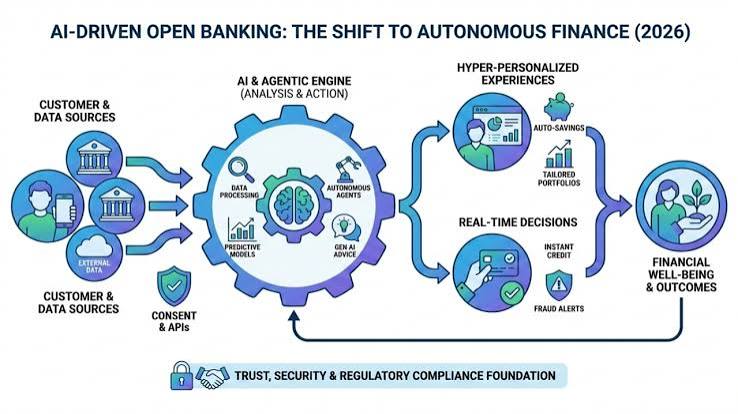
    Open Banking in 2026 : AI-Driven Personalization and Decision-Making

    Imagine a world where your bills pay themselves, your savings grow on autopilot, and your investments rebalance without you lifting a finger. That world is not just a fantasy—it’s the reality of financial automation in 2026. With the fintech sector maturing and open banking finally taking hold, automating your finances has never been easier or more powerful.

    But automation isn’t just about convenience; it’s about overcoming human nature. Behavioral research shows we’re terrible at consistently saving and avoiding late fees. Automation leverages ‘default bias’—the tendency to stick with pre-set choices—to help you build wealth effortlessly. In this guide, we’ll explore six concrete ways to automate your finances in 2026, from AI-driven cash flow analysis to smart bill negotiation, and show you how to avoid the pitfalls of over-automation.

    1. Split Direct Deposit: Pay Yourself First, Automatically

    The simplest and most powerful automation starts with your paycheck. In 2026, more employers and payroll providers like ADP and Gusto offer split direct deposit, allowing you to route portions of your paycheck to multiple accounts automatically. Instead of manually transferring money to savings each month, you can set it up so that, say, 20% of your paycheck goes directly into a high-yield savings account or investment account, and the rest goes to checking.

    This ‘pay yourself first’ strategy ensures that saving happens before you even see the money, making it nearly impossible to spend. It’s the ultimate set-and-forget move, and it’s available to anyone with a regular paycheck.

    2. AI-Driven Cash Flow Analysis: Sweep Excess Funds Automatically

    In 2026, the most innovative automation apps use machine learning to analyze your income and spending patterns. Apps like Digit and Qapital now offer ‘smart sweep’ features that automatically move ‘excess’ funds from your checking account into savings or investments. For example, if you typically spend $3,000 a month and your income is $4,000, the app might automatically transfer $500 to savings on payday—but it also adapts to your behavior, so if you have an unusually high month, it won’t leave you overdrawn.

    This is a game-changer for people with variable income, like freelancers or gig workers, because the AI learns your cash flow patterns and only moves money when it’s safe. It’s like having a personal financial assistant that never sleeps.

    3. Smart Bill Pay and Subscription Management

    Subscription creep is a silent budget killer. In 2026, services like Rocket Money and Trim have taken bill automation to the next level. They don’t just pay your bills; they negotiate them. These apps can automatically cancel unused subscriptions, negotiate lower rates on cable, internet, and phone bills, and even dispute bank fees on your behalf.

    For example, if you’re paying $150 a month for cable but a competitor offers the same package for $100, the app will negotiate with your provider to match the price—or cancel it if you don’t use it. This is automation that saves you money without any effort on your part.

    4. Robo-Advisors: Automate Your Investing

    Robo-advisors like Betterment, Wealthfront, and Vanguard’s Digital Advisor have been around for a while, but by 2026 they’ve become even more sophisticated. They automatically invest your contributions based on your risk tolerance, rebalance your portfolio, and even harvest tax losses to minimize your tax bill. Assets under management in robo-advisors are projected to exceed $2 trillion by 2026, a testament to their popularity.

    The key is to set up automatic contributions from your checking account to your robo-advisor on payday. You can choose to have a fixed amount or a percentage of your income invested automatically. Over time, compound interest does the heavy lifting, and you don’t have to think about it.

    5. Automated Debt Payoff: Snowball and Avalanche on Autopilot

    While most articles focus on saving and investing, automating debt repayment is arguably the most impactful use case. In 2026, you can set up your bank or a debt payoff app to automatically make more than the minimum payment on your highest-interest debt (the avalanche method) or your smallest debt (the snowball method).

    Apps like Tally and Even can automate this for you, distributing extra payments across your credit cards or loans strategically. For example, if you have three credit cards with different balances and interest rates, the app will automatically apply your extra payment to the card that saves you the most in interest. This removes the temptation to skip a payment or spend the money elsewhere.

    6. Open Banking: See Everything, Automate Everything

    The biggest game-changer in 2026 is open banking. The CFPB’s Section 1033 rule, finalized in 2024, requires banks to share your financial data with authorized third-party apps. This means you can now connect all your accounts—checking, savings, credit cards, investments, and even your mortgage—in one place, and automate actions across them.

    For example, an app can see that you have $5,000 in a low-interest checking account and $10,000 in credit card debt at 20% APR. It can automatically transfer $4,000 to pay down the debt, leaving a $1,000 buffer. Or it can move money from a savings account to an investment account when your balance exceeds a certain threshold. This cross-account automation was impossible before open banking, and it’s now becoming mainstream.

    Avoiding the Pitfalls of Over-Automation

    While automation is powerful, it’s not a substitute for oversight. Critics warn of ‘financial numbness’—you stop checking your accounts, miss fraud, or fail to adjust when life changes. To avoid this, schedule a quarterly ‘financial check-in’ to review your automated rules, update your budget, and ensure you’re not overpaying for subscriptions you no longer use.

    Also, be mindful of security. Only use regulated, well-reviewed apps, enable two-factor authentication, and understand what data you’re sharing. Open banking is secure, but it’s still wise to monitor your accounts regularly for unauthorized activity.

    Finally, automation assumes a steady income. If you’re a freelancer or have variable cash flow, use ‘smart’ tools that adapt to your spending patterns, and always keep a buffer in your checking account to avoid overdrafts.

    Automating your finances in 2026 is about working smarter, not harder. From split direct deposit to AI-driven cash flow analysis and open banking, these six strategies can help you save more, invest consistently, and pay off debt faster—all without lifting a finger. Just remember to stay engaged with a quarterly review and keep an eye on security. The future of personal finance is here, and it’s automated.

    Summary

    • Split direct deposit to pay yourself first automatically.
    • Use AI-driven cash flow apps to sweep excess funds into savings or investments.
    • Automate bill pay and subscription management to negotiate and cancel unused services.
    • Set up robo-advisors to invest and rebalance automatically.
    • Automate debt payoff with snowball or avalanche methods.
    • Leverage open banking to see all accounts and automate cross-account actions.

    FAQ

    Q: Is financial automation safe?
    A: Yes, if you use regulated, well-reviewed apps and enable two-factor authentication. Open banking is secure, but always monitor your accounts for fraud.

    Q: Can I automate finances with variable income?
    A: Yes, newer ‘smart’ tools use AI to analyze your cash flow and only move money when it’s safe, making them suitable for freelancers and gig workers.

    Q: Do I still need to check my accounts if I automate everything?
    A: Yes, automation reduces manual work but doesn’t eliminate the need for oversight. Schedule quarterly reviews to catch errors, fraud, or subscription creep.

    Q: What’s the best way to start automating?
    A: Start with split direct deposit to savings, then add automatic bill pay and a robo-advisor. Gradually incorporate more advanced tools like AI cash flow analysis.

    Q: Will automation help me pay off debt faster?
    A: Absolutely. Automating extra payments toward your highest-interest or smallest debt can accelerate payoff and remove the temptation to skip payments.
  • 5 Subscription Services You Are Wasting Money On (Cancel Now)

    Stop Wasting Money: 10 Subscriptions to Cancel Today

    The average American spends over $200 a month on subscription services, yet most of us have no idea what we’re actually paying for. A 2023 survey found that the typical consumer holds between 4 and 7 active subscriptions but underestimates their total by at least two or three. That’s a lot of forgotten auto-pays and unused memberships quietly draining your bank account.

    But here’s the kicker: studies show that 30 to 40% of that subscription spend is wasted. That means you’re likely throwing away $60 to $100 every month on services you barely use or forgot you even had. The good news? You can get that money back in minutes by canceling the right subscriptions. In this guide, we’ll break down the five most commonly wasted subscription categories and show you exactly how to decide what to cut — and what to keep.

    The Subscription Economy: A Trap of Convenience

    The subscription model is a brilliant business invention. It turns a one-time purchase into a recurring revenue stream, and it’s now a $120 billion market that’s projected to explode to over $900 billion by 2026. But for consumers, it’s a minefield of ‘set and forget’ billing. Free trials auto-convert, prices creep up, and before you know it, you’re paying for a dozen services you never think about.

    Why do we let this happen? It’s not just forgetfulness. Behavioral economists point to the ‘endowment effect’ — we overvalue what we already have — and the ‘sunk cost fallacy,’ where we keep paying because we’ve already paid in the past. Add in the fact that many services make cancellation deliberately difficult (phone-only cancellations, retention offers, ‘pause’ instead of ‘cancel’), and it’s no wonder we stay subscribed.

    But here’s the thing: canceling a subscription is almost always reversible. You can re-subscribe in two clicks if you miss it. So the real question isn’t ‘Will I regret canceling?’ It’s ‘Am I getting value for this money right now?’ Let’s look at the five biggest culprits.

    1. Gym Memberships: The Classic Money Pit

    Gym memberships are the poster child for wasted subscription spend. The industry counts on the fact that a huge percentage of members never actually show up. In fact, many gyms make their profit from ‘no-shows’ — people who pay monthly but rarely or never visit.

    If you haven’t been to the gym in the last 30 days, you’re almost certainly wasting money. A typical membership costs $30 to $50 a month, which adds up to $360 to $600 a year. That’s a vacation, a new phone, or a year’s worth of home workout equipment.

    What to do instead: Cancel the membership and try a pay-per-visit option or a class pack. Or invest in a few pieces of home equipment and a free workout app. If you’re someone who genuinely goes 3+ times a week, keep it — but for most of us, it’s a no-brainer cut.

    2. Streaming Services: The Overlap Problem

    The average person subscribes to 3 to 4 streaming platforms, but most only actively use one or two. The problem is that every platform has that one show you want to watch, so you keep the subscription ‘just in case.’ But with prices rising across the board — Netflix, Spotify, and Disney+ have all raised prices multiple times in the past five years — those ‘just in case’ subscriptions add up fast.

    Here’s a simple test: If you haven’t opened the app in the last 30 days, cancel it. You can always re-subscribe when a new season drops. And if you’re worried about losing access to your watchlist, remember that most platforms save your profile for months after cancellation.

    Pro tip: Rotate your subscriptions. Subscribe to one service for a month, binge what you want, then cancel and switch to another. You’ll save hundreds a year and never miss a show.

    3. Cable TV Packages: The Double-Dip Trap

    If you’re paying for cable and streaming services, you’re almost certainly double-paying for the same content. Cable packages often cost $100 or more per month, and many people keep them out of habit even though they watch most of their content on streaming platforms.

    Take a hard look at your cable bill. Are you watching any channels that aren’t available on a streaming service? If not, cut the cord. You can often get the same news, sports, and entertainment through a combination of streaming services for a fraction of the cost.

    What to do instead: Check if your internet provider offers a streaming bundle, or use an antenna for local channels. You’ll likely save $50 to $100 a month without losing anything you actually watch.

    4. Subscription Boxes: The Novelty That Fades

    Beauty boxes, snack boxes, clothing boxes — they’re fun at first, but the novelty wears off quickly. Most subscription boxes cost $20 to $50 a month, and the items inside are often samples or low-quality products you wouldn’t buy on their own.

    If you’re not excitedly using every item from your last box, it’s time to cancel. The ‘surprise’ factor fades after a few months, and you’re left with a pile of stuff you don’t need.

    What to do instead: Treat yourself to a one-time purchase of a high-quality product you actually want. You’ll get more joy from a single $50 purchase than from five months of boxes.

    5. Extended Warranties and Device Protection Plans

    These are the sneakiest subscriptions because they often auto-renew without you noticing. You bought a laptop or phone, added a protection plan, and then forgot about it. But these plans are rarely worth the cost — especially on items past their useful life.

    If you have a device that’s more than two years old, the protection plan is probably costing you more than the device is worth. And if you’ve never filed a claim, you’re just giving the company free money.

    What to do instead: Check your credit card benefits — many cards offer extended warranty protection for free. If not, self-insure by putting the monthly cost into a savings account. You’ll have a fund for repairs or replacements without paying a company for the privilege.

    The ‘Subscription Detox’ Method

    Ready to take control? Here’s a simple three-step process:

    1. Audit your bank statements. Look for recurring charges you don’t recognize. Use a tracking app like Rocket Money or Truebill to catch the sneaky ones.
    2. Apply the 30-day rule. If you haven’t used a service in the last 30 days, cancel it. No exceptions.
    3. Schedule a ‘subscription Sunday’ once a quarter to review your active subscriptions and cancel anything you no longer need.

    Remember, canceling is not permanent. You can always re-subscribe. The goal is to stop paying for things you don’t use right now.

    Subscriptions are convenient, but they’re also a silent drain on your finances. By canceling the five categories above, you could save $100 or more every month — that’s $1,200 a year. And the best part? You won’t miss a thing. So go ahead, do a quick audit, and cancel what you don’t need. Your bank account will thank you.

    Summary

    • The average American spends $219–$273 per month on subscriptions, but 30–40% of that is wasted.
    • The five most commonly wasted subscriptions are gym memberships, streaming services, cable TV, subscription boxes, and extended warranties.
    • Use the 30-day rule: if you haven’t used it in the last month, cancel it.
    • Canceling is reversible — you can always re-subscribe if you miss it.
    • Schedule a quarterly ‘subscription detox’ to stay on top of your spending.

    FAQ

    Q: Will canceling a subscription affect my credit score?
    A: No, canceling a subscription has no impact on your credit score. It’s simply a billing change.

    Q: What if I’m in the middle of a free trial?
    A: Cancel before the trial ends to avoid being charged. Set a reminder on your phone for a few days before the trial expires.

    Q: Can I re-subscribe after canceling?
    A: Yes, most services allow you to re-subscribe at any time. Your account history and watchlists are usually saved for months.

    Q: Are there any subscriptions that are always worth keeping?
    A: Yes, some subscriptions provide genuine value even if underused, like Amazon Prime for frequent shoppers, cloud storage for phone backups, or identity theft protection for peace of mind. The key is to evaluate each one on its own merits.

    Q: How do I find all my hidden subscriptions?
    A: Check your bank and credit card statements for recurring charges. You can also use apps like Rocket Money or Truebill to automatically detect and track subscriptions.

  • 12 Frugal Living Tips That Can Realistically Double Your Savings This Year

    12 Frugal Living Tips – Low Tox Life

    Frugal living isn’t about deprivation or pinching every penny until it screams. It’s about making mindful choices that maximize the value of every dollar you earn. In a world where 64% of Americans live paycheck to paycheck and credit card debt has surpassed $1.1 trillion, the idea of ‘doubling your savings’ sounds like a pipe dream. But here’s the truth: while no legitimate financial expert can guarantee you’ll literally double your savings in a year, most households can cut their discretionary spending by 20–50% by plugging ‘spending leaks’—those sneaky subscriptions, impulse buys, and energy waste that quietly drain your bank account.

    This isn’t about extreme couponing or dumpster diving (unless you’re into that). It’s about practical, sustainable changes that redirect wasted money into a high-yield savings account, where it can grow at 4–5% APY. For example, if you currently save $200 a month, cutting just $200 more in waste and earning 4% interest could leave you with nearly $4,900 in a year—versus $2,400 without changes. That’s close to doubling, and it’s achievable for most people.

    In this guide, we’ll walk through 12 actionable frugal living tips that focus on cutting waste without sacrificing joy. Whether you’re a seasoned saver or just starting, these strategies will help you build a healthier financial future—one mindful dollar at a time.

    1. Automate Your Savings: Pay Yourself First

    The easiest way to save more is to make it automatic. Set up a recurring transfer from your checking account to a high-yield savings account on payday. This ‘pay yourself first’ approach ensures you save before you have a chance to spend. Even $50 a week adds up to $2,600 a year, and with a 4% APY, you’ll earn interest on top. The key is to treat savings like a non-negotiable bill—because your future self deserves it.

    2. Audit Your Subscriptions: The Silent Budget Killer

    The average person spends $86 a month on subscriptions—and often underestimates by three times. That’s over $1,000 a year! Take an afternoon to list every subscription: streaming services, gym memberships, apps, magazines, even that ‘free trial’ you forgot to cancel. Use a spreadsheet or a dedicated app to track them. Then, cancel anything you haven’t used in the last 30 days. You can always re-subscribe later if you miss it. This single audit can free up hundreds of dollars annually.

    3. Meal Plan Like a Pro: Cut Food Waste and Dining Out

    Americans spend an average of $6,000 a year on food away from home. That’s a massive leak. Start by planning your meals for the week: check your pantry, make a shopping list, and stick to it. Batch-cook on Sundays to have ready-to-eat meals for busy weekdays. Not only will you reduce the temptation to order takeout, but you’ll also cut food waste—the USDA estimates that 30-40% of the food supply is wasted. A little planning can save you $200–300 a month.

    4. Embrace the ‘Latte Factor’—But Make It Work for You

    The ‘latte factor’ isn’t about giving up your daily coffee; it’s about being aware of small, recurring expenses. If you buy a $5 latte every workday, that’s $1,300 a year. Instead, brew coffee at home and treat yourself to a café latte once a week. You’ll still enjoy the experience, but you’ll save over $1,000 annually. The same logic applies to bottled water, snacks, and other impulse buys. Small changes compound into big savings.

    5. Slash Your Energy Bills with Efficiency Upgrades

    The Department of Energy says households can save 10–30% on energy bills through efficiency measures—that’s $200–400 a year on average. Start with simple fixes: switch to LED bulbs, unplug electronics when not in use, and seal drafts around windows and doors. Invest in a programmable thermostat to automatically adjust heating and cooling when you’re away. These upgrades pay for themselves quickly and reduce your carbon footprint too.

    6. Kill Impulse Purchases with the 24-Hour Rule

    Impulse purchases cost the average American $1,800 a year. To curb this, implement a 24-hour rule: for any non-essential item over $50, wait a full day before buying. This cooling-off period helps you distinguish between ‘want’ and ‘need.’ Often, the urge fades, and you’ll realize you didn’t need it after all. For online shopping, add items to your cart and then close the tab—if you still want it tomorrow, you can buy it then.

    7. Negotiate Your Bills: A Few Minutes Can Save Hundreds

    Many people never negotiate their cable, internet, or insurance bills, but a simple phone call can yield significant savings. Research competitor rates, then call your provider and ask for a better deal. Be polite but firm—mention you’re considering switching. Loyalty doesn’t always pay; companies often offer retention discounts to keep you. You can save $100–500 a year per bill. Set a reminder to do this annually.

    8. Use the Library and Free Community Resources

    Your local library is a goldmine of free resources: books, e-books, audiobooks, movies, and even museum passes. Instead of buying books or renting movies, borrow them. Many libraries also offer free workshops, classes, and internet access. Similarly, look for free community events—concerts, festivals, and fitness classes—that provide entertainment without the price tag. This isn’t about deprivation; it’s about discovering free alternatives that enrich your life.

    9. Practice ‘No-Spend’ Challenges to Reset Your Habits

    A no-spend challenge is a powerful way to reset your spending habits. Choose a period—a weekend, a week, or even a month—where you only spend on essentials like rent, utilities, and groceries. This forces you to get creative with what you already have and reveals how much you spend on non-essentials. Many people find they save $200–500 during a month-long challenge. Afterward, you’ll be more mindful of your spending.

    10. Buy Used and Refurbished: Quality at Half the Price

    Before buying anything new, check if you can get it used or refurbished. Platforms like eBay, Facebook Marketplace, and Craigslist offer everything from furniture to electronics at a fraction of the retail price. For tech, consider certified refurbished products from manufacturers—they’re often like new and come with warranties. This not only saves money but also reduces waste. The key is to inspect items carefully and buy from reputable sellers.

    11. Grow Your Own Food—Even Just a Few Herbs

    You don’t need a farm to save on groceries. Start with a small herb garden on your windowsill—basil, mint, and parsley are easy to grow and cost pennies compared to store-bought. If you have outdoor space, try tomatoes, lettuce, or peppers. Even a modest garden can save you $100–300 a year, and the fresh taste is unbeatable. Plus, gardening is a rewarding hobby that reduces stress.

    12. Redirect Your Savings into a High-Yield Account

    All these tips only work if you actually save the money you free up. Open a high-yield savings account (HYSA) that offers 4–5% APY—much better than the near-zero rates of traditional banks. Automatically transfer the money you save from each tip into this account. For example, if you save $100 on groceries, transfer that $100 to savings. This ‘pay yourself the difference’ strategy ensures your frugality translates into real savings growth.

    The Bottom Line: Frugality Is a Tool, Not a Punishment

    Frugal living isn’t about living a life of lack; it’s about making conscious choices that align with your values and goals. By cutting waste, you free up resources to spend on what truly matters—whether that’s travel, education, or early retirement. Remember, the goal isn’t to be cheap; it’s to be intentional. Start with one or two tips, and gradually incorporate more. Over time, you’ll see your savings grow, and you’ll feel more in control of your financial future.

    Doubling your savings in a year isn’t a magic trick—it’s a realistic goal when you combine mindful spending with smart saving strategies. By plugging the leaks in your budget, you can redirect thousands of dollars into a high-yield account, where it can grow. The 12 tips above are practical, sustainable, and designed to fit into your life without making you feel deprived. Start small, stay consistent, and watch your savings—and your peace of mind—grow.

    Summary

    • Automate savings to pay yourself first and ensure consistent growth.
    • Audit subscriptions—the average person spends $86/month, often underestimating by 3x.
    • Meal planning can save $200–300/month by reducing dining out and food waste.
    • Energy efficiency upgrades can cut bills by 10–30%, saving $200–400/year.
    • Redirect all savings into a high-yield account (4–5% APY) to maximize growth.

    FAQ

    Q: Is it really possible to double my savings in a year?
    A: While no one can guarantee a literal doubling, most households can reduce discretionary spending by 20–50%. Combined with high-yield savings interest, this can nearly double your annual savings if you have significant spending leaks.

    Q: What’s the first step to start saving more?
    A: Begin by tracking your spending for a month to identify where your money goes. Then, automate a transfer to savings on payday, and audit subscriptions to cut waste.

    Q: How can I save money without feeling deprived?
    A: Focus on cutting waste, not joy. For example, brew coffee at home but still treat yourself weekly. Use the library for free entertainment, and buy used items for quality at lower prices.

    Q: Are there any risks to extreme frugality?
    A: Extreme frugality can lead to burnout, social isolation, or hoarding if taken too far. It’s important to balance saving with spending on experiences and needs that support your well-being.

    Q: What’s the best way to make my savings grow faster?
    A: Put your savings in a high-yield savings account with 4–5% APY. Automate transfers to ensure consistency, and consider investing for long-term growth once you have an emergency fund.

  • 7 Smart Money-Saving Hacks That Actually Work in 2026

    I'm a finance expert - seven fast ways to save money in 2026

    In 2026, the financial landscape is a mixed bag. Inflation has cooled from its 2022–2023 peaks, but prices are still climbing at a rate that outpaces wage growth for many. The Federal Reserve is holding interest rates in the 3.5–4.5% range, which means borrowing is expensive, but saving can be rewarding if you know where to look. Meanwhile, consumer debt has hit a record $1.2 trillion, and the average American is bleeding $219 a month on subscriptions they barely use. The old advice—clip coupons, use cash envelopes, manually track every penny—feels outdated and exhausting. The good news? Technology has evolved to do the heavy lifting for you. In 2026, the smartest money-saving strategies aren’t about willpower; they’re about setting up automated systems that work in the background. From AI-powered budgeting apps to smart home devices that cut your energy bills, here are seven hacks that actually work in the current economic climate.

    1. Automate Your Savings with AI-Powered Budgeting Apps

    Gone are the days of manually logging every coffee purchase. In 2026, budgeting apps like Cleo, Monarch, and YNAB have integrated AI and open banking APIs to give you real-time tracking and personalized insights. These apps can automatically categorize your spending, identify wasteful subscriptions, and even transfer spare change to a savings account. For example, Cleo uses AI to chat with you about your finances, flagging unusual charges and suggesting a weekly savings goal. The key is to set up ‘set-and-forget’ rules: auto-round-up purchases to the nearest dollar, auto-transfer a fixed amount to savings on payday, and let the app negotiate your bills. The result? You save without thinking about it. Just be sure to monitor your account to avoid overdrafts—automation isn’t a substitute for occasional check-ins.

    2. Kill the Subscription Trap with Virtual Cards and Audits

    The average American spends $219 a month on subscriptions—a 143% increase since 2020. Free trials auto-renew, forgotten memberships pile up, and bundled services seem like a deal until you realize you’re paying for 10 channels you never watch. The hack? Do a quarterly subscription audit. List every recurring charge, then cancel what you don’t use. To prevent future slip-ups, use virtual card numbers from services like Privacy.com or your Apple Card. These generate unique card numbers for each merchant, so you can set spending limits or block charges entirely. The FTC’s new ‘click-to-cancel’ rule (effective 2025) makes it easier to cancel online, so there’s no excuse to keep paying for that gym you never visit. Remember, not all subscriptions are bad—bundles like Disney+/Hulu/ESPN can save money if you actually use them. The goal is intentionality, not elimination.

    3. Let Smart Home Tech Cut Your Energy Bills

    Smart thermostats like the EcoBee or Nest have been around for a while, but in 2026 they’re cheaper and more effective than ever. On average, they save 10–15% on heating and cooling costs by learning your schedule and adjusting temperatures automatically. Pair them with smart plugs for your electronics—these can turn off standby power vampires (think TVs, game consoles, and chargers) that waste energy even when off. The upfront cost is $100–$250 per device, but utility rebates and IRA tax credits (still active in 2026) can offset that. For example, many utilities offer $50–$100 rebates for smart thermostats, and the federal tax credit covers up to 30% of the cost for energy-efficient upgrades. The payback period varies by climate, but in most regions, you’ll break even within a year or two, then enjoy pure savings.

    4. Buy Refurbished Electronics and Save 30–50%

    The refurbished electronics market has exploded, and major brands now sell certified refurbished directly. Apple, Samsung, and Dell offer ‘renewed’ products with warranties that match new items—AppleCare even covers refurbished iPhones. You can save 30–50% off retail prices, and the quality is often indistinguishable from new. The key is to buy from reputable sources: the manufacturer’s own store, or certified sellers on Amazon or Best Buy. Check the warranty and return policy, and look for ‘grade A’ or ‘like new’ condition. Battery health and cosmetic condition vary, so read the fine print. For example, a refurbished iPhone 14 might cost $600 instead of $800, and you get the same performance. This hack is a win for your wallet and the planet.

    5. Use Flash-Food Apps to Slash Grocery Bills

    Food waste is a huge expense—the average family throws away $1,500 of food a year. Apps like Too Good To Go and Flashfood are changing that by connecting you with restaurants and grocery stores that sell surplus food at deep discounts. You can get a ‘surprise bag’ of groceries for $5–$10 that would normally cost $20–$30. The catch? You don’t know exactly what you’ll get, and you need to pick it up during a specific time window. It’s a fun way to try new foods and cut your grocery bill by up to 50%. Pair this with AI meal-planning apps that suggest recipes based on what’s in your fridge, and you’ll waste less and save more. For example, the app ‘SuperCook’ scans your pantry and gives you recipes you can make with what you have, reducing impulse buys.

    6. Optimize Your Credit Card Rewards (If You Pay in Full)

    Credit card rewards are a double-edged sword. If you carry a balance, the interest (average APR of 22–24%) will wipe out any rewards. But if you pay your balance in full every month, you can earn serious cash back. In 2026, the best strategy is to use a card with 5% rotating categories (like the Chase Freedom Flex) and pair it with card-linked offers from Amex Offers or Chase Offers. These give you statement credits for spending at specific merchants—for example, $10 back on a $50 purchase at a restaurant. Sign-up bonuses are also lucrative; you can earn $200–$500 in cash back by meeting a minimum spend. Just be disciplined: set up autopay for the full balance, and never spend more than you normally would just to earn rewards. This hack is about optimization, not spending more.

    7. Slash Your Phone and Internet Bills with MVNOs and Negotiation

    The telecom industry is more competitive than ever. Mobile Virtual Network Operators (MVNOs) like Mint, Visible, and US Mobile offer plans on the same networks as the big carriers (Verizon, T-Mobile, AT&T) for under $25 a month. For example, Mint’s 15GB plan is $15 a month if you pay annually. The catch? You may get deprioritized during peak times, but for most users, the difference is negligible. For internet, use the FCC’s broadband map to see all available providers in your area, then call your current provider and threaten to switch—retention offers are common. You can also check if you qualify for the Affordable Connectivity Program (if it’s still funded) or local fiber deals. The key is to renegotiate every year; loyalty doesn’t pay in 2026.

    Saving money in 2026 isn’t about deprivation or coupon-clipping—it’s about leveraging technology to make saving automatic. From AI budgeting apps that do the math for you, to smart home devices that cut your energy bills, to refurbished electronics that save you hundreds, these hacks are designed to work with your lifestyle, not against it. Start with one or two that resonate with you, and you’ll see the difference in your bank account within months. The future of personal finance is smart, automated, and—best of all—painless.

    Summary

    • Automate savings with AI budgeting apps that round up purchases and auto-transfer to savings.
    • Audit and cancel unused subscriptions using virtual card numbers to block future charges.
    • Install smart thermostats and plugs to save 10–15% on energy, with rebates offsetting upfront costs.
    • Buy certified refurbished electronics to save 30–50% with warranties that match new.
    • Use flash-food apps like Too Good To Go to cut grocery bills by up to 50% and reduce waste.
    • Optimize credit card rewards only if you pay in full—avoid interest that erases gains.
    • Switch to MVNOs and negotiate internet bills to save on phone and broadband costs.

    FAQ

    Q: Are AI budgeting apps safe to use with my bank accounts?\nA: Yes, reputable apps use bank-level encryption and read-only access via open banking APIs. They can’t move money without your permission, but always enable two-factor authentication and review permissions regularly.\n\nQ: How do I know if a refurbished product is worth it?\nA: Look for ‘certified refurbished’ from the manufacturer or a reputable seller, check the warranty (should be at least 1 year), and read reviews on battery health and condition. If the price is 30–50% off new, it’s usually a good deal.\n\nQ: Will smart home devices really save me money?\nA: On average, smart thermostats save 10–15% on heating and cooling, and smart plugs can cut standby power usage by up to 10% of your electricity bill. The payback period is typically 1–2 years, after which you’re saving money.\n\nQ: What’s the best way to cancel a subscription that’s hard to cancel?\nA: The FTC’s ‘click-to-cancel’ rule requires companies to make it as easy to cancel as it was to sign up. If you’re still having trouble, use a virtual card number to block future charges, or contact your bank to stop the payment.\n\nQ: Can I really get a phone plan for under $25 a month?\nA: Yes, MVNOs like Mint and Visible offer plans for $15–$25 a month on major networks. You may experience slower data during peak times, but for most people, it’s a great trade-off for the savings.

  • The Ultimate Guide to Free Budget Tracker Templates (Excel & Google Sheets)

    Google Sheets vs. Excel: Which is right for you?

    In an era of subscription fatigue and data privacy concerns, the humble spreadsheet has made a surprising comeback as a budgeting tool. Free budget tracker templates for Excel and Google Sheets offer a no-cost, fully customizable alternative to paid apps like YNAB or Mint. They put you in complete control of your financial data, with no algorithms deciding what you see—just your numbers, your rules.

    But with countless templates available online, how do you choose the right one? This guide breaks down what makes a great template, where to find them, and how to avoid common pitfalls. Whether you’re a spreadsheet novice or a formula-savvy power user, you’ll learn how to leverage these free tools to take charge of your finances.

    Why Spreadsheets Beat Budgeting Apps (For Many People)

    Budgeting apps promise convenience, but they come with hidden costs: monthly subscriptions, mandatory data sharing with third parties, and a one-size-fits-all approach that rarely matches your unique financial life. Spreadsheets, on the other hand, offer:

    • Full control: You decide every category, formula, and layout.
    • Privacy: Your data stays on your device or in your own cloud account—no bank syncing, no data mining.
    • Zero cost: First-party templates from Microsoft and Google are completely free, with no trials or upsells.
    • Skill building: Using templates teaches you valuable spreadsheet skills like SUMIF, VLOOKUP, and pivot tables—skills that pay off in other areas of life and work.

    Anatomy of a Good Budget Tracker Template

    A well-designed template should include these core components:

    • Income section: Rows for salary, freelance, side hustles, and any other income sources.
    • Expense categories: Housing, utilities, groceries, transportation, entertainment, debt payments, and savings—each with its own row.
    • Budgeted vs. Actual columns: Side-by-side columns that let you compare what you planned to spend against what you actually spent.
    • Variance calculation: A formula that automatically shows the difference (over or under budget) for each category.
    • Totals and summaries: Automatic sums for total income, total expenses, remaining balance, and savings rate.
    • Visualizations: Pie charts or bar charts that give you a quick visual snapshot of where your money goes.
    • Period coverage: Monthly, bi-weekly, or annual layouts—some templates even include 12 monthly tabs in one file.

    Where to Find Free Templates

    First-Party Sources (Safest Bet)

    • Microsoft Office Template Gallery: Accessible from within Excel (File > New) or online at templates.office.com. Search “budget” to find dozens of free, professionally designed templates.
    • Google Sheets Template Gallery: Open Google Sheets, click Template Gallery, and scroll to the “Personal” section. You’ll find monthly and annual budget templates ready to use.

    Third-Party Sources (More Variety, More Caution)

    • Vertex42: A long-standing site offering high-quality, free spreadsheet templates for personal and business use.
    • Smartsheet: Offers free budget templates, though some require sign-up.
    • Tiller: Known for bank-import integrations, but their templates are often lead magnets for their paid service.
    • Personal finance blogs: Many bloggers offer free templates as lead magnets for their courses or newsletters. These can be excellent, but be prepared for email sign-ups.

    Excel vs. Google Sheets: Which Platform Wins?

    | Feature | Excel | Google Sheets |
    |———|——-|—————|
    | Cost | Paid (Microsoft 365) or limited free web version | Free with a Google account |
    | Collaboration | Limited unless shared via OneDrive | Real-time multi-user editing |
    | Offline use | Full offline capability | Requires offline mode setup |
    | Templates | Built-in gallery + online library | Built-in gallery + add-ons |
    | Automation | VBA macros | Google Apps Script |
    | Mobile | Excel app | Google Sheets app |

    Choose Excel if: You already have Microsoft 365, need advanced offline features, or plan to use VBA macros.

    Choose Google Sheets if: You want free access, real-time collaboration with family or partners, or prefer browser-based convenience.

    How to Customize Your Template (Even as a Beginner)

    1. Add or remove categories: Right-click a row and insert/delete. Rename categories to match your spending habits.
    2. Adjust formulas: If a total isn’t summing correctly, check the formula bar. Most templates use simple SUM formulas you can edit.
    3. Change the date range: If the template is monthly, duplicate the tab and change the month name.
    4. Add data validation: Create dropdown menus for categories to keep entries consistent. In Google Sheets: Data > Data validation.
    5. Create your own charts: Select your data and insert a pie chart to visualize spending by category.

    Common Pitfalls to Avoid

    “Free” Doesn’t Always Mean Free

    Some third-party sites require email sign-up, which leads to marketing emails. Others offer “free trials” with locked cells or watermarks that require payment to unlock. Always read the fine print.

    Template Errors Are Real

    Downloaded templates may contain broken formulas, circular references, or hardcoded values that don’t update. Before committing to a template, test it with sample data to ensure everything calculates correctly.

    Manual Entry Is the Achilles’ Heel

    Even the best template fails if you don’t enter data consistently. Set a weekly reminder to update your tracker. Some users automate this by importing bank CSV files—a feature you can add with Google Apps Script or Excel’s Power Query.

    Advanced Tips for Power Users

    • Use dynamic arrays (Excel) or FILTER/QUERY (Sheets) to create auto-updating summaries.
    • Set up conditional formatting to highlight overspending in red and savings in green.
    • Integrate bank imports using add-ons like Tiller or Sheetgo (note: these may require paid subscriptions).
    • Combine templates: Use one for monthly budgeting and another for net worth tracking to get a full financial picture.

    The Critic’s View: Do Templates Actually Work?

    It’s worth acknowledging the skeptics. Budgeting templates require manual data entry, which many people abandon within weeks. They don’t address the psychology of spending—tracking alone doesn’t change behavior. And some “free” templates are just marketing funnels for paid courses or software.

    But for those who stick with it, a spreadsheet budget can be transformative. It forces you to confront your spending, plan for the future, and build financial awareness. The key is to start simple, choose a template that fits your lifestyle, and make updating it a habit.

    Free budget tracker templates for Excel and Google Sheets are powerful, private, and completely free tools for taking control of your money. By understanding what makes a good template, where to find them, and how to customize them, you can build a budgeting system that works for you—without paying a cent. Start with a first-party template, test it with real data, and gradually add your own tweaks. Your future self will thank you.

    Summary

    • Free budget tracker templates are available from Microsoft Office and Google Sheets galleries, plus reputable third-party sites like Vertex42.
    • A good template includes income/expense sections, budgeted vs. actual columns, variance calculations, and visualizations.
    • Excel offers offline power and VBA macros; Google Sheets provides free collaboration and browser-based convenience.
    • Avoid pitfalls like hidden upsells, broken formulas, and manual entry burnout by testing templates and setting reminders.
    • Customize templates with data validation, conditional formatting, and advanced formulas to fit your unique financial situation.

    FAQ

    Q: Are budget tracker templates really free?
    A: Yes, first-party templates from Microsoft and Google are completely free. Some third-party sites may require email sign-up or offer limited free versions, so always check the terms.

    Q: Which is better for budgeting: Excel or Google Sheets?
    A: It depends on your needs. Excel is better for offline use and advanced automation with VBA. Google Sheets is free, supports real-time collaboration, and is accessible from any browser.

    Q: How do I avoid broken formulas in downloaded templates?
    A: Test the template with sample data before relying on it. Check that totals update correctly and look for any error messages (e.g., #REF! or #VALUE!).

    Q: Can I automate data entry in a spreadsheet budget?
    A: Yes, you can import bank CSV files manually or use add-ons like Tiller or Sheetgo for automatic imports, though these may require a paid subscription.

    Q: What if I don’t like the template categories?
    A: You can easily add, remove, or rename categories in any spreadsheet template. Just right-click a row and insert/delete, or edit the cell text.

  • Bathroom Renovation Blunders: 7 Mistakes That Cost Time, Money, and Sanity

    13 Bathroom Renovation Mistakes That Could Break Your Budget - GD HOME

    Renovating a bathroom is one of the most rewarding home improvement projects you can tackle—it boosts daily comfort and can recoup up to 67% of its cost at resale. But it’s also a minefield of hidden pitfalls. Between water, electricity, and a tight footprint, a single misstep can turn a dream remodel into a nightmare of mold, leaks, and budget overruns.

    Whether you’re a seasoned DIYer or hiring a contractor, knowing where things go wrong is half the battle. This guide unpacks the most common bathroom renovation mistakes—from waterproofing myths to ventilation oversights—so you can avoid costly rework and enjoy your new space without regret.

    1. Skimping on Waterproofing (The #1 Mistake)

    Many homeowners assume that tile and grout are enough to keep water out. The truth is, grout is porous and will absorb moisture over time. Without a proper waterproofing membrane—like Schluter-KERDI or a liquid-applied membrane such as RedGard—water seeps behind your tile, leading to mold, rot, and structural damage.

    What to do instead: Always install a waterproofing membrane in wet areas (showers, tub surrounds, and floors). This is non-negotiable, even if it adds a few hundred dollars to your budget. It’s far cheaper than tearing out a moldy wall later.

    2. Ignoring Ventilation Requirements

    A bathroom without adequate ventilation is a breeding ground for mold and mildew. Code typically requires an exhaust fan rated at least 50 CFM (cubic feet per minute), or 1 CFM per square foot of room area. Many older homes have undersized fans or none at all.

    What to do instead: Install a properly sized exhaust fan that vents to the outside (not into the attic). Consider a model with a humidity sensor that turns on automatically. This small investment protects your paint, drywall, and health.

    3. Underestimating the Budget (and Forgetting Hidden Costs)

    The average mid-range bathroom remodel runs between $10,000 and $25,000, but first-timers often budget only for visible items like tile and fixtures. They forget permits, dumpster rentals, underlayment, and unexpected structural repairs—like fixing rotted subfloor or outdated plumbing.

    What to do instead: Add a 20% contingency fund to your budget. Get itemized quotes from contractors and ask about potential extras. Never pay more than a 10–20% deposit upfront, and tie progress payments to completed milestones.

    4. Moving Plumbing Without Thinking It Through

    Relocating a toilet, shower, or sink drain is not just a matter of rerouting pipes—it involves slope calculations, venting, and sometimes structural changes. This can easily add thousands to your project and extend the timeline by weeks.

    What to do instead: Keep plumbing fixtures in their existing locations whenever possible. If you must move them, consult a licensed plumber early in the design phase to get a realistic cost estimate. Sometimes a small shift (a few inches) is affordable, but a major relocation can blow your budget.

    5. Choosing Trendy Materials Over Practical Ones

    Large-format tiles, matte black fixtures, and floating vanities look stunning in showrooms, but they require specific installation expertise. Large tiles, for example, need perfectly flat subfloors or they will crack or ‘tent.’ Natural stone needs sealing and can be slippery when wet, making it a poor choice for shower floors.

    What to do instead: Choose materials that balance aesthetics with durability. For shower floors, use small-format tiles (like mosaic) with textured surfaces for grip. If you love a trend, ask your contractor about the installation challenges and whether your home can accommodate it.

    6. Skipping Permits to Save Time or Money

    Many jurisdictions require permits for any work involving plumbing, electrical, or structural changes. Skipping them can lead to fines, forced removal of unpermitted work, and headaches when you sell your home—buyers’ inspectors will flag it.

    What to do instead: Check with your local building department before starting. Pull the necessary permits and schedule inspections. It might add a week to your timeline, but it protects your investment and ensures the work meets safety codes (like GFCI outlets within 6 feet of water).

    7. Hiring the First Contractor (or Going DIY Without Skills)

    Skilled contractors are in high demand, with lead times of 4–8 weeks. In a rush, homeowners often hire the first available person or attempt complex work themselves. The result? Poor workmanship, code violations, and costly rework.

    What to do instead: Vet contractors thoroughly—check licenses, insurance, references, and online reviews. Get at least three bids. If you’re DIYing, be honest about your skills: plumbing and electrical are not beginner-friendly. It’s often cheaper to hire a pro for those parts and do the cosmetic work yourself.

    Bonus: Over-Personalizing for Resale

    While your bathroom should reflect your taste, extreme customization (think saunas, bold color schemes, or luxury fixtures) can hurt resale value. Realtors warn that highly personalized spaces appeal to a narrow buyer pool.

    What to do instead: Aim for a ‘sweet spot’—a clean, neutral design with quality materials that appeals to most buyers. You can add personal touches with accessories that are easy to change later.

    A bathroom renovation is a significant investment, but it doesn’t have to be a horror story. By avoiding these common mistakes—prioritizing waterproofing, ventilation, proper budgeting, and realistic planning—you can create a space that’s beautiful, functional, and adds value to your home. Remember: the cheapest fix is the one you do right the first time.

    Summary

    • Waterproofing is non-negotiable: Grout is not waterproof; install a membrane to prevent mold and rot.
    • Ventilation matters: Install a properly sized exhaust fan to avoid moisture damage.
    • Budget for the unexpected: Add a 20% contingency for hidden costs like permits and structural repairs.
    • Don’t move plumbing casually: Relocating fixtures can add thousands; keep them in place when possible.
    • Choose durable over trendy: Some materials require special installation or maintenance; pick practical options for wet areas.
    • Get permits and vet contractors: Protect your investment and ensure safety by following codes and hiring qualified pros.

    FAQ

    Q: How much does a bathroom remodel typically cost?
    A: The average mid-range bathroom remodel in the U.S. costs between $10,000 and $25,000, with upscale remodels exceeding $50,000. Costs vary by region, materials, and scope.

    Q: Can I do a bathroom renovation myself to save money?
    A: Yes, but only for cosmetic tasks like painting or installing fixtures. Plumbing, electrical, and waterproofing require expertise—mistakes can lead to costly damage or safety hazards. Consider hiring a pro for those critical parts.

    Q: What is the most common cause of mold in bathrooms?
    A: Poor ventilation and improper waterproofing. Without an exhaust fan or a waterproofing membrane, moisture accumulates behind walls and under tile, leading to mold and rot.

    Q: Do I need a permit for a bathroom remodel?
    A: Most jurisdictions require permits for any work involving plumbing, electrical, or structural changes. Check with your local building department to avoid fines and resale complications.

    Q: How long does a bathroom renovation take?
    A: Typically 3–6 weeks, but delays are common due to plumbing issues, tile backorders, or permit inspections. Plan for extra time in your schedule.