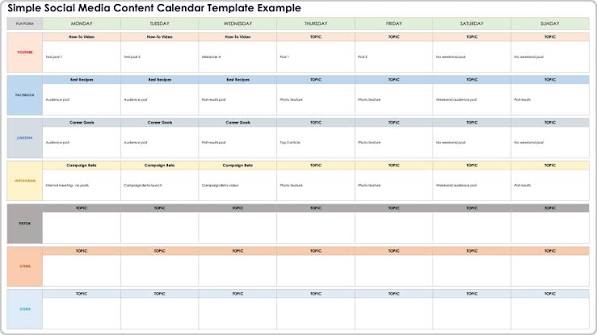
If you’re juggling multiple social media accounts, you know the chaos: last-minute posts, missed dates, and a constant scramble for content ideas. A social media content calendar is your antidote—a simple planning tool that brings order to the madness. And the best part? You don’t need expensive software to get started. Free templates—available in Google Sheets, Excel, Notion, and more—can give you all the structure you need.
But not all templates are created equal. Some are bloated with unnecessary columns, while others are too bare-bones to be useful. In this guide, we’ll break down what makes a great free content calendar, where to find them, and how to customize one that actually works for your goals. Whether you’re a solo entrepreneur, a social media manager, or a marketing team of one, you’ll walk away with a clear plan to tame your content chaos.
Why You Need a Social Media Content Calendar
A content calendar is more than just a schedule—it’s your strategic roadmap. It helps you:
- Stay consistent: Posting regularly is key to growing an audience, and a calendar ensures you never miss a slot.
- Align with business goals: By planning ahead, you can tie your posts to product launches, campaigns, or seasonal events.
- Reduce stress: No more scrambling for a post at 9 AM. Your content is ready and scheduled in advance.
- Improve quality: When you plan ahead, you have time to craft better captions, design visuals, and research hashtags.
Without a calendar, you’re essentially flying blind. You might post sporadically, miss opportunities, and burn out trying to keep up. A simple template can change all that.
What to Look for in a Free Template
Not all free templates are worth your time. Here’s what the best ones include:
- Date and time: The core of any calendar. Make sure it’s easy to sort or filter by date.
- Platform: Columns for Instagram, Facebook, X, LinkedIn, TikTok, etc., so you can see your cross-platform strategy at a glance.
- Content type: Photo, video, carousel, story, reel, live—knowing the format helps you balance your content mix.
- Topic/caption draft: Space to jot down your idea or full caption.
- Visual asset link: A place to link your image or video file (e.g., a Google Drive link or thumbnail).
- Hashtags and keywords: Keep your hashtag sets organized.
- Target audience/persona: Who is this post for? This keeps your content relevant.
- Campaign or pillar category: Tag posts as educational, promotional, entertaining, etc., to ensure a healthy mix.
- Status: Track whether a post is in draft, scheduled, published, or approved.
- Performance metrics: Ideally in a separate tab, so you can track likes, shares, comments, and clicks over time.
Avoid templates that are overly complex. If you spend more time filling out columns than actually creating content, it’s not the right fit. The best template is one you’ll actually use.
Where to Find Free Templates
You don’t have to look far. Here are the most popular sources:
- Marketing blogs: HubSpot, Buffer, Hootsuite, and Later all offer free templates as lead magnets. They’re usually well-designed and come with instructions.
- Template marketplaces: Sites like Template.net, Smartsheet, and the Monday.com gallery have a wide variety.
- Notion community: Notion’s template gallery is full of community-created calendars, often with database views (calendar, board, table).
- Google Sheets template gallery: A quick search will reveal dozens of free options.
- Canva: If you prefer a visual, presentation-style calendar, Canva has beautiful, printable templates.
Many of these require an email sign-up, so be prepared to share your address. That’s how the companies fund their free resources—by building their email list.
How to Customize a Free Template for Your Needs
Once you’ve downloaded a template, don’t just start using it. Customize it to fit your workflow:
- Remove what you don’t need. If you’re not using Pinterest, delete that column. If you don’t track personas, drop it.
- Add your content pillars. Create a dropdown list for your categories (e.g., educational, promotional, entertaining) so you can easily filter.
- Set up a status workflow. Use data validation to create a dropdown for status: Draft, Scheduled, Published, Approved.
- Create a metrics tab. If your template doesn’t have one, add a simple table to track performance by post.
- Color-code by platform or campaign. This makes your calendar visually scannable.
Remember, the goal is to make the template work for you, not the other way around.
Free vs. Paid: What’s the Catch?
Free templates are often a marketing funnel. The company gives you a useful resource, then upsells you on their paid scheduling tool or advanced features. That’s not necessarily a bad thing—you get a great template for free, and if you need more, you know where to go.
But be aware of limitations. Some “free” templates are intentionally stripped down. For example, they might lack a metrics tab or advanced filtering, nudging you toward a paid plan. Others are generic and require heavy customization to be useful.
That said, for most small businesses and solo creators, a well-structured Google Sheet is more than enough. You don’t need a $50/month tool to post consistently. Start free, and upgrade only if you hit a real limitation.
Common Mistakes to Avoid
- Treating the calendar as a to-do list. A calendar should reflect your strategy, not just random posts. Plan around campaigns and goals.
- Overcomplicating it. If you spend hours updating your calendar, you’ll abandon it. Keep it simple.
- Forgetting to review performance. A calendar isn’t just for planning—it’s for learning. Review what worked and adjust.
- Ignoring the platform specifics. Each platform has its own best practices. A template that treats them all the same won’t serve you well.
Real-World Example: How a Solo Entrepreneur Uses a Free Template
Meet Sarah, a freelance graphic designer. She uses a free Google Sheets template she found on HubSpot. She has columns for date, platform, content type, topic, caption, image link, and status. Every Sunday, she plans her week: two Instagram posts, one LinkedIn post, and three stories. She color-codes by platform and uses the status column to track drafts. She also has a second tab for metrics, where she logs engagement each month. This simple system has cut her social media time in half and doubled her consistency.
Final Thoughts
A free social media content calendar is one of the highest-ROI tools you can add to your marketing stack. It costs nothing but a little time to set up, and it pays off in consistency, clarity, and reduced stress. Start with a simple template, customize it to fit your workflow, and watch your social media game transform.
Don’t let the chaos of social media overwhelm you. A free content calendar template is your ticket to organized, strategic posting. Whether you choose a Google Sheet, Notion, or a printable PDF, the key is to start simple and adapt as you go. Download a template today, spend 30 minutes customizing it, and you’ll wonder how you ever managed without one.
Summary
- A social media content calendar is a planning tool that schedules, organizes, and tracks posts across platforms.
- Free templates are available in Google Sheets, Excel, Notion, Airtable, and Canva, often as lead magnets from marketing companies.
- Key components include date, platform, content type, caption, visual link, hashtags, status, and performance metrics.
- Customize your template to fit your workflow—remove what you don’t need, add content pillars, and set up a status dropdown.
- Avoid overcomplicating your calendar; the best one is simple enough that you’ll actually use it consistently.
FAQ
Q: What is the best free social media content calendar template?
A: The best template depends on your needs. For most people, a Google Sheets template from HubSpot or Buffer is a great start—it’s flexible, collaborative, and free. If you prefer a visual database, try Notion’s community templates. Canva offers printable options for analog planners.
Q: Do I need a paid tool to schedule posts?
A: No. A content calendar is for planning, not publishing. You can manually post at the scheduled times, or use free scheduling tools like Buffer’s free tier or Meta Business Suite to automate posting.
Q: How often should I update my content calendar?
A: Ideally, you should plan at least a week ahead, and review performance monthly. Some people plan a month at a time. The key is to make it a habit—set aside time each week to fill in and update your calendar.
Q: Can I use a free template for a team?
A: Yes, but with limitations. Google Sheets and Notion allow real-time collaboration, but free versions may lack advanced permissions. For larger teams, you might need a paid tool like Airtable or Monday.com for better access control.
Q: Are free templates really free?
A: Yes, but many require an email sign-up. Some are watermarked or have limited features. Always check the terms—some templates are free for personal use but require a license for commercial use.