You’ve committed to your fitness journey, but progress feels stalled. You’re lifting the same weights, doing the same reps, and wondering why results aren’t showing. The missing piece might be as simple as a workout log.
A workout log is more than a diary of your gym sessions—it’s the backbone of progressive overload, the principle that drives muscle growth and strength gains. Without a written record, you’re navigating your training blindfolded. The good news? You don’t need to spend a dime. Free templates in spreadsheets, PDFs, or apps can transform how you train.
In this guide, we’ll break down what makes a great workout log, explore the best free formats, and help you choose the one that fits your style—whether you’re a beginner or a seasoned lifter.
Why You Need a Workout Log (Even If You Think You Don’t)
Your brain is not a reliable storage device. You might remember last week’s bench press, but what about three weeks ago? Did you increase the weight or drop it? A workout log eliminates guesswork.
The core purpose is progressive overload—systematically increasing stress on your muscles over time. Without logging, you’re likely to repeat the same workouts, hitting a plateau. A log shows you exactly where you’ve been, so you can plan where to go next.
Beyond progress, logs help you:
– Identify weak points (e.g., your squat is stalling while your deadlift climbs)
– Prevent overtraining by tracking volume and intensity
– Stay accountable—seeing a blank day in your log is a powerful motivator
– Communicate with a coach or trainer, giving them concrete data
Key Data Fields: What to Track (and What to Skip)
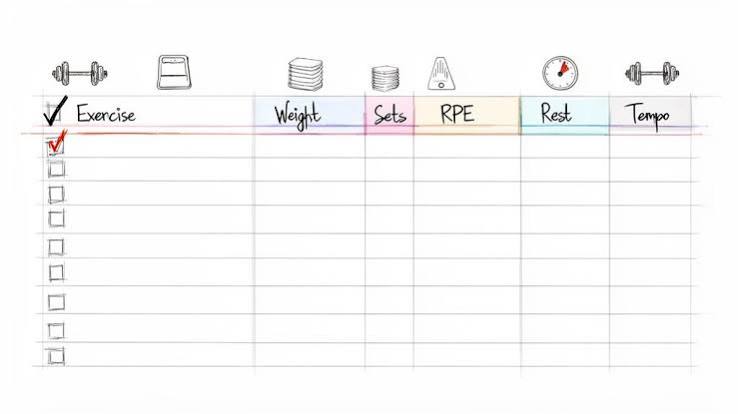
A good template balances detail with simplicity. Here are the essentials:
- Date and time – Context for your performance
- Exercise name – Be specific (e.g., “Barbell Back Squat” vs. “Squat”)
- Sets and reps – The core of your volume
- Weight – Always note the load, and be consistent with units (kg or lbs)
- Rest time – Affects intensity and performance
- Duration – Total workout time or cardio distance/pace
- Notes – How you felt, energy levels, sleep, soreness
Advanced lifters might add RPE (Rate of Perceived Exertion), RIR (Reps in Reserve), or tempo. But for most, sticking to the basics is enough. Over-logging can lead to analysis paralysis—you spend more time writing than lifting.
Free Formats Compared: PDF, Spreadsheet, Notion, and Apps
Printable PDFs
Perfect for those who prefer pen and paper. You can find free templates on fitness blogs or create your own. Pros: no screen time, tactile satisfaction. Cons: easy to lose, no automatic calculations.
Spreadsheets (Excel/Google Sheets)
The spreadsheet purist’s choice. You can build custom formulas to calculate 1-rep max, total volume, or create charts. Google Sheets is free and accessible from any device. Pros: full control, offline access, no data sharing. Cons: requires some setup and manual entry.
Notion Templates
Notion has exploded in popularity for its flexibility and aesthetics. You can create a beautiful, interactive log with dropdowns, checkboxes, and linked databases. Many free templates are available. Pros: visually appealing, customizable, can integrate with other life trackers. Cons: steeper learning curve, can be over-engineered.
Free Apps (Strong, Hevy, FitNotes)
Apps offer convenience: auto-timers, cloud sync, and pre-loaded exercise libraries. Free tiers usually have limitations—like a cap on custom routines or historical data. Pros: easy logging on the go, reminders. Cons: ads, potential data privacy concerns, less customization.
Matching Your Template to Your Training Program
Your log should mirror your program. If you’re following Starting Strength, you need a simple linear progression tracker. For 5/3/1, you’ll want percentage-based calculations. Push/Pull/Legs splits benefit from grouping exercises by day.
Many free templates are designed around popular programs—search for “Starting Strength log template” or “5/3/1 spreadsheet” and you’ll find ready-made options. Using a mismatched template creates friction and discourages consistency.
Common Pitfalls and How to Avoid Them
- Confusing a log with a program: A log records what you did; it doesn’t tell you what to do. Pair your log with a solid training plan.
- Inconsistent notation: Decide on a format (e.g., “3×10 @ 100 lbs”) and stick to it. Mixing units or omitting weight makes data useless.
- Never reviewing the data: A log is only valuable if you look back. Schedule a weekly review to spot trends and adjust.
- Choosing a template that’s too complex: If it takes 10 minutes to log a session, you’ll quit. Start simple.
- Ignoring subjective notes: The number on the bar doesn’t tell the whole story. A bad night’s sleep explains a weak session—log it.
How to Choose the Right Template for You
Ask yourself:
– What’s my experience level? Beginners need simplicity; advanced lifters need granularity.
– Where do I train? If you’re at a gym, a phone app is handy. If you train at home, a printed sheet might be enough.
– Do I care about data privacy? Spreadsheets give you full control; free apps may monetize your data.
– What’s my tech comfort? Notion is powerful but has a learning curve. Google Sheets is user-friendly.
Ultimately, the best template is the one you’ll use consistently. Test a few formats for a week and see what sticks.
Real-World Example: From Chaos to Progress
Meet Sarah, a beginner lifter. She started with a blank notebook, jotting down random workouts. After a month, she couldn’t tell if she was progressing. She switched to a simple Google Sheets template with columns for date, exercise, sets, reps, weight, and notes. Within two weeks, she noticed her squat weight was increasing every session—and she felt motivated to push harder. The log gave her a clear roadmap.
Now, imagine an advanced lifter like Mike. He uses a Notion template with RPE tracking and weekly volume charts. He reviews his log every Sunday to plan the next week’s loads. The data helps him avoid overtraining and peak for competitions.
The Bottom Line
A free workout log template is a small investment with a huge payoff. It’s the difference between guessing and knowing. Whether you choose a printable PDF, a spreadsheet, or an app, the key is consistency. Start logging today, and your future self will thank you.
Your training deserves better than memory. A free workout log template is the simplest tool to ensure you’re progressing, not just going through the motions. Pick a format that fits your lifestyle, keep it simple, and review your data regularly. The result? Smarter training, fewer plateaus, and a clear path to your goals.
Summary
- A workout log is essential for progressive overload—tracking sets, reps, and weights to ensure consistent improvement.
- Free templates come in many formats: printable PDFs, spreadsheets (Excel/Google Sheets), Notion, and apps with free tiers.
- Key data fields include date, exercise, sets, reps, weight, rest, duration, and notes—avoid over-logging.
- Match your template to your training program (e.g., Starting Strength, 5/3/1) for best results.
- Avoid common pitfalls: inconsistent notation, never reviewing data, and confusing a log with a program.
FAQ
Q: What is the best free workout log template?
A: The best template is the one you’ll use consistently. For simplicity, a Google Sheets template is versatile and free. For aesthetics, Notion offers beautiful designs. For convenience, apps like Hevy or FitNotes have free tiers. Test a few to see what fits your routine.
Q: How many data fields should I track?
A: Start with the essentials: date, exercise, sets, reps, weight, and notes. Add advanced metrics like RPE only if you find them useful. Over-tracking can lead to burnout.
Q: Can a workout log help me build muscle?
A: Yes, indirectly. By tracking your lifts, you can ensure you’re progressively overloading—increasing weight, reps, or sets over time—which is key for muscle growth.
Q: Are free workout apps really free?
A: Most free apps have limitations, such as capping custom routines or historical data. They may also show ads. Spreadsheets and PDFs are truly free with no strings attached.
Q: How often should I review my workout log?
A: Aim for a weekly review. Look for trends in your performance, note any plateaus, and plan the next week’s training accordingly. This turns data into actionable insights.