In our fast-paced world, staying organized can feel like a superpower. Yet, with countless apps and digital tools vying for our attention, sometimes the simplest solution is the most effective: a daily planner. And thanks to the internet, you can get one for free, in a format that works on any device: the PDF.
But what exactly is a free daily planner PDF? Is it just a piece of paper you print, or can you type on it? And are there hidden costs or strings attached? This guide will walk you through everything you need to know about free daily planner PDFs, from their humble origins to modern digital uses, and help you find the perfect one for your needs.
What Is a Daily Planner PDF?
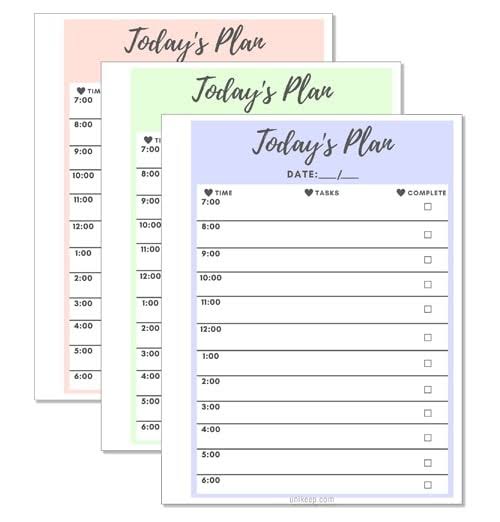
A daily planner PDF is a pre-designed document that helps you organize your day. It typically includes sections for your top priorities, a schedule broken into hourly slots, a to-do list, and space for notes or reflections. The PDF format ensures that the layout stays exactly the same on any device or printer, so what you see is what you get.
There are two main types: print-and-write and fillable. Print-and-write PDFs are static—you print them out and fill them in with a pen. Fillable PDFs have interactive form fields (like text boxes and checkboxes) that let you type directly into the document using free software like Adobe Acrobat Reader. This makes them perfect for digital planning on your computer or tablet.
Why Use a Daily Planner PDF?
You might wonder: why not just use a digital app? Well, there are several reasons why a PDF planner might be your best bet:
- Cost: It’s free. No subscriptions, no in-app purchases.
- Simplicity: No learning curve. Open, print or type, and you’re done.
- Flexibility: You can use it on paper, on your tablet, or on your computer—whichever suits your mood.
- Focus: Writing things down by hand has been shown to improve memory and commitment. A printed planner gives you that tactile experience without the cost of a fancy paper planner.
- Privacy: Your data stays with you. No cloud sync, no tracking.
Common Elements of a Daily Planner PDF
While designs vary, most daily planners include these core sections:
- Date: To note the day.
- Top 3 Priorities: A focused list of the most important tasks.
- Hourly Schedule: Time slots, often from 6 AM to 9 PM, for time-blocking.
- To-Do List: A simple checklist for tasks.
- Habit Tracker: Small boxes to check off habits like drinking water, exercising, or reading.
- Meals/Water Tracker: For those who like to monitor nutrition.
- Notes: Space for jotting down ideas or reminders.
- Gratitude/Reflection: A prompt to end the day on a positive note.
Some planners also include a weekly overview or a meal planning section, so it’s worth checking the layout before you download.
Where to Find Free Daily Planner PDFs
You can find free daily planner PDFs in many places online:
- Productivity blogs: Many bloggers offer free templates as a way to build their email list. A quick search like “free daily planner PDF” will bring up countless options.
- Template sites: Websites like TemplateLab, Vertex42, and OnPlanners have extensive collections.
- Design platforms: Canva offers free templates that you can customize and download as PDFs.
- Pinterest: A visual search engine where you can discover planners linked to blogs or Etsy shops.
- Etsy: Many sellers offer free low-resolution versions as samples, with paid upgrades for high-resolution or editable files.
How to Use a Daily Planner PDF
Printing Your Planner
If you prefer pen and paper, simply download the PDF and print it. Here are a few tips:
- Check the paper size: Templates are often designed for A4 or US Letter. Make sure your printer settings match, or use “Fit to Page” to avoid cut-offs.
- Adjust margins: If content is getting cut off, try reducing margins in your printer settings.
- Print a test page: Before printing a whole month, print one page to check the layout.
Filling It Digitally
If you want to type on your planner, you’ll need a fillable PDF. Here’s how:
- Download a fillable PDF (look for “fillable” or “interactive” in the description).
- Open it in a free PDF editor like Adobe Acrobat Reader, Foxit Reader, or a browser-based editor like Smallpdf.
- Click on the form fields and type your text. Checkboxes can be ticked with a click.
- Save your file and you’re done.
Using on a Tablet
Many people now use PDF planners on tablets like the iPad with apps like GoodNotes, Notability, or Xodo. You can import the PDF and write on it with a stylus, combining the benefits of digital storage with the feel of handwriting.
Common Pitfalls and Misconceptions
“Free” Doesn’t Always Mean No Strings
Some free templates require you to sign up for an email list before downloading. That’s often the price of “free.” Others may be watermarked or low-resolution previews of a paid product. Always read the fine print.
PDFs Aren’t Editable by Default
A standard PDF is like a printed page—you can’t type on it unless it has form fields. If you try to type on a static PDF and fail, it’s not broken; it’s just not fillable. Look for “fillable” or “interactive” in the description.
Print Scaling Issues
If a template designed for A4 paper is printed on US Letter (or vice versa), it may be cut off or have weird margins. Use “Fit to Page” in your printer settings to fix this.
Fillable PDFs Need the Right Software
Not all PDF viewers support form fields. Mobile browsers often struggle. For the best experience, use Adobe Acrobat Reader (free) on your computer or a dedicated PDF editor app.
“Daily” vs. “Weekly” Confusion
Some templates labeled “daily” actually contain weekly overviews or multiple days per page. Always check the layout before downloading to make sure it matches your needs.
Copyright Restrictions
Most free templates are for personal use only. Redistributing or selling them, even if you modify them, may violate the creator’s license. Respect the creator’s terms.
How to Choose the Right Planner for You
With so many options, how do you pick? Consider your needs:
- If you’re a student: Look for planners with space for class schedules and assignment deadlines.
- If you’re a busy professional: You might want a fillable PDF that you can type into quickly, with sections for meetings and appointments.
- If you’re a parent: Meal planning and habit trackers could be useful.
- If you’re aesthetic-driven: Search for designs that match your style—boho, minimal, floral, etc.
- If you’re a digital planner user: Look for hyperlinked PDFs with ample writing space and dark-mode-friendly designs.
Conclusion
Free daily planner PDFs are a versatile, cost-effective tool for boosting productivity and staying organized. Whether you prefer the tactile feel of paper or the convenience of digital typing, there’s a template out there for you. By understanding the different types, where to find them, and how to use them effectively, you can harness the power of a daily planner without spending a dime. So why not give it a try? Your future self will thank you.
A free daily planner PDF is more than just a piece of paper—it’s a simple, flexible, and powerful way to take control of your day. With the tips in this guide, you can find the perfect template, avoid common pitfalls, and start planning like a pro. So go ahead, download one today, and experience the difference a little structure can make.
Summary
- What: A daily planner PDF is a pre-designed document for organizing your day, available in print-and-write or fillable formats.
- Why: They are free, simple, flexible, and can improve focus and memory through handwriting.
- Where: Find them on productivity blogs, template sites, Canva, Pinterest, and Etsy.
- How: Print them for pen-and-paper use, or fill them digitally with free software like Adobe Acrobat Reader.
- Watch out: “Free” may require email sign-up, not all PDFs are editable, and print scaling can be an issue—check before you commit.
FAQ
Q: Are free daily planner PDFs really free?
A: Yes, they are free to download and use, but some sites may require you to sign up for an email list or provide attribution. Always check the terms.
Q: Can I type on a daily planner PDF?
A: Only if it’s a fillable PDF with form fields. Look for “fillable” or “interactive” in the description. You’ll need software like Adobe Acrobat Reader to type.
Q: Why is my printed planner cut off?
A: This is likely a paper size mismatch. If the template is A4 and you’re printing on US Letter (or vice versa), use “Fit to Page” in your printer settings.
Q: Can I use a daily planner PDF on my tablet?
A: Yes, you can import it into apps like GoodNotes, Notability, or Xodo and write on it with a stylus.
Q: Can I sell or share a free planner PDF I downloaded?
A: Most free templates are for personal use only. Redistributing or selling them, even modified, may violate the creator’s license. Always read the terms.