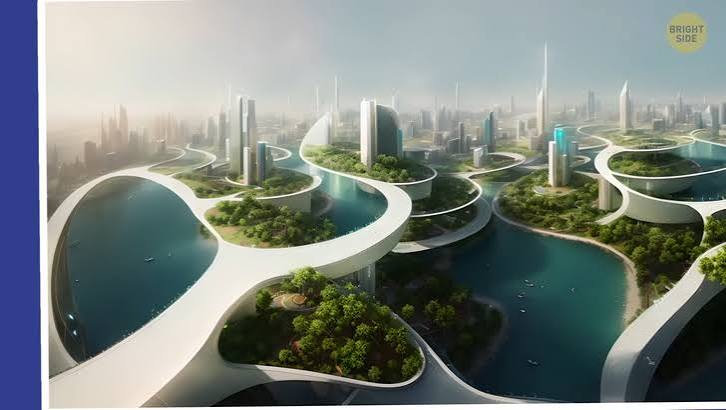
Prompt Midjourney for a “utopian megacity” and you’ll get scenes of impossible grandeur: towers shaped like coral, boulevards glowing with bioluminescent light, not a single piece of litter in sight. The images are stunning magazine-cover material. But stare a little longer, and unease creeps in. Where are the fire escapes? The laundry lines? The messy, human clutter that makes a city livable?
What happens when generative AI is let loose on one of humanity’s oldest dreams the perfect city is a collision of aesthetic genius and functional nightmare. The results are both mesmerizing and deeply unsettling, a crystal-clear mirror of our own biases and blind spots about how we want to live. This isn’t about whether these cities can be built; it’s about what they reveal when we ask an algorithm to design our future.
The Prompt: A Doorway to Extremes
The “perfect city” is a classic thought experiment. We’ve been sketching utopias since Plato’s Republic, but modern AI tools like Midjourney, DALL-E, and Stable Diffusion compress that sketching process into seconds. Type “a perfect sustainable city, futuristic, dense, vertical gardens, aerial view, golden hour” and the machine returns a dozen hyper-detailed images that blend architectural grandeur with unsettling logic.
The trick is that AI doesn’t actually know what a city is. It has no concept of zoning laws, plumbing, or the social dynamics of a neighborhood. It’s a pattern-matching engine, trained on hundreds of millions of images scraped from the internet—including decades of sci-fi concept art and glossy architectural renders. When you ask it to design a utopia, it combines these visual tropes to create something that looks like a city, but is actually a hallucination of one.
From Radiant City to Fungal Towers: A Visual History
This isn’t the first time we’ve imagined the perfect city. Le Corbusier’s “Radiant City” (1930s) proposed identical skyscrapers in a park, a plan criticized for being sterile and anti-human. Buckminster Fuller’s “Domed City” (1960s) envisioned climate-controlled geodesic domes. Archigram’s “Walking City” (1964) was a sentient, mobile metropolis on mechanical legs. The Garden City Movement (1898) favored low-density, green-ringed towns.
AI’s outputs are the latest in this lineage, but with a twist. Where human planners had to grapple with physics, cost, and human sociology, AI is unconstrained. It optimizes for visual coherence, not functional viability. The result is often a weird hybrid of neo-futurism and brutalism: gleaming glass towers that morph into raw concrete bunkers, or structures that grow like fungal colonies, with no visible entrance or exit.
The “Terrifyingly Beautiful” Dichotomy
The images are beautiful in the way a perfectly composed painting is beautiful—harmonious colors, dramatic lighting, flawless composition. But they’re terrifying because they’re empty. No people, or unnaturally uniform crowds. No street-level detail. No mess. No infrastructure for waste, transport, or even food.
One famous series of AI-generated images shows a “sustainable” city with massive vertical farms, but the farms have no visible irrigation systems. Another depicts a “walkable” neighborhood with skybridges connecting towers, but the bridges fold into impossible geometries that would violate every building code on Earth. The AI is not designing for humans; it’s designing for an abstract idea of a human—one that doesn’t need to breathe, sleep, or throw away trash.
Why Does It Look Like a Video Game?
If these cities feel familiar, it’s because they’re derivative of the sci-fi aesthetics that dominate AI’s training data. The internet is saturated with images from Blade Runner, Cyberpunk 2077, and Star Wars. AI is a “stochastic parrot,” as linguist Emily Bender puts it—it regurgitates patterns without understanding them. So when you ask for a “utopian city,” it doesn’t invent something new; it blends the most common visual clichés from its dataset.
This is also why the results often lack the messiness of real urban life. Real cities are made of third places—the corner bodega, the park bench, the mundane spaces where we accidentally run into neighbors. AI doesn’t see these as “perfect,” so it omits them. Its cities are clean, ordered, and surveilled, a totalitarian fantasy dressed in eco-friendly jargon.
The Architect’s Nightmare: Render Bait
Ask an architect about AI-generated cityscapes, and you’ll get a heavy sigh. “They’re render bait,” says one urban designer. “They look great on Instagram but are structurally impossible. They ignore load-bearing walls, plumbing, and human scale.” The “terror” here is professional: clients see these images, fall in love, and demand impossible outcomes. Architects are left to explain that a building shaped like a DNA helix is not actually buildable with current materials, or that a city block without a single car entrance would collapse into a logistics nightmare.
The gap between concept and buildability is the core tension. AI excels at producing beautiful, novel forms that push the boundaries of architectural imagination. But it has no understanding of constraints. It’s a brainstorming tool, not a planner.
The Sociologist’s View: Space Without Place
The most unsettling aspect of AI cities is their emptiness. A city is a social organism. It’s the graffiti on a wall, the laundry line between buildings, the street vendor’s cart. AI designs space but not place. It sees humanity as a uniform, static mass, not as individuals with conflicting needs and desires.
Sociologist Sharon Zukin famously argued that cities need “mess” to be livable. AI cities are the opposite of mess. They are sanitized, sterile, and overwhelmingly quiet. The “terror” is the realization that, to an AI, perfection means eliminating the very things that make us human. No informal economies, no spontaneous gatherings, no chance encounters. Just pristine architecture and empty streets.
The Environmentalist’s Catch: Greenwashing Facades
Some AI designs propose “green” cities—vertical forests, algae-covered facades, wind-turbine towers. But as environmentalists point out, these images often ignore the carbon cost of the materials required to build them. Concrete and steel are responsible for a significant share of global CO2 emissions. A city of vertical forests might look sustainable, but its ecological footprint could be larger than a conventional one.
The “beauty” of these eco-cities is a facade. AI doesn’t account for the embodied carbon or the lifecycle of materials. It just knows that “green” should look like leaves and trees. The result is a form of greenwashing, where aesthetic sustainability masks a lack of actual sustainability.
What AI Cities Teach Us
Despite their flaws, AI-generated cities are valuable—not as blueprints, but as mirrors. They reflect our collective anxieties and desires about urban life. The obsession with density and verticality speaks to our fear of sprawl. The empty streets reveal our discomfort with the chaos of real cities. The impossible geometry shows our hunger for novelty, even at the expense of practicality.
AI’s “perfect city” is not a future we should build, but a thought experiment that forces us to ask: What do we actually want from a city? How do we balance beauty and function? How do we design for humans, not just for images?
As the tools improve, we’ll see more sophisticated AI urbanism. But the core challenge remains. AI can generate infinite variations in minutes, but it cannot understand what makes a city a home. That’s still our job.
The next time you see an AI-generated cityscape, admire its beauty, but don’t be fooled. These images are not plans; they’re projections of our dreams and nightmares. They show us what we think we want—clean, dense, spectacular—but also what we fear: sterility, surveillance, and the loss of human mess. The terrifying beauty of AI cities is a call to engage, not to submit. We must keep the mess, the chaos, and the imperfection that make a city truly alive.
Summary
- AI image generators like Midjourney, DALL-E, and Stable Diffusion produce stunning but conceptually flawed “perfect cities.”
- They often feature biophilic forms, impossible geometry, and empty streets, revealing a lack of understanding of human sociology and infrastructure.
- The outputs are derivative of sci-fi and architecture trends from training data, not original designs.
- Architects see them as “render bait” that ignores structural and functional constraints.
- Sociologists point out that AI cities are “space without place,” lacking the messy, informal elements that make cities livable.
- Environmentalists warn that AI’s “green” cities may be greenwashing, ignoring material carbon costs.
- These images are not blueprints but thought experiments that challenge us to define what we truly want from urban life.
FAQ
Q: Can AI actually design a city that could be built?
A: No, not yet. AI image generators create visually coherent images but lack understanding of physics, cost, and human needs. They predict pixel patterns based on prompts, not architectural blueprints. Any buildable city would require significant human engineering and planning.
Q: Why do AI cities look so similar?
A: AI models are trained on large datasets scraped from the internet, which are saturated with sci-fi concept art and architectural renders. When prompted for a “utopian city,” the AI blends these common visual tropes, leading to repetitive aesthetics like neo-futurism or biophilic forms.
Q: Is AI replacing urban planners?
A: Not in the near term. AI is a useful brainstorming tool that can generate novel forms quickly, but it cannot understand social dynamics, infrastructure, or regulatory constraints. It complements human planners rather than replacing them.
Q: What is the “terrifying” part of AI cities?
A: The terror comes from the uncanny emptiness and sterility. AI designs cities without human mess—no graffiti, laundry lines, or street vendors. This reveals an alien view of humanity as a uniform mass, leading to visions that feel totalitarian and anti-human.
Q: Are there any benefits to AI-generated city designs?
A: Yes. They can inspire architects to think outside the box, propose novel density solutions, and visualize “what if” scenarios. The key is to treat them as speculative art, not feasible plans, and to use them to prompt deeper discussions about livability and values.