Tag: meal prep

  • 10 Meal Prep Hacks to Save 10 Hours a Week (Without Losing Your Mind)

    How Meal Prep Delivery Can Save You 10+ Hours Every Week From Cooking – Mi BOWL MEAL

    We’ve all been there: it’s 6 PM, you’re starving, and the only thing in the fridge is a sad, wilting cucumber. You order takeout for the third time this week, and the cycle of decision fatigue and wasted money continues. Meal prep promises a way out—a Sunday afternoon of cooking that saves you hours every week. But does it really work? And can you actually reclaim 10 hours without turning your kitchen into a war zone?

    In this guide, we’ll break down the math behind the 10-hour claim, explore the most effective meal prep strategies, and share 10 practical hacks that go beyond the basics. Whether you’re a busy professional, a parent juggling a family, or someone who just wants to eat better without the daily stress, these tips will help you save time, money, and sanity—without sacrificing flavor or variety.

    The 10-Hour Math: Is It Real?

    Before we dive into the hacks, let’s talk about the elephant in the room: can meal prep really save you 10 hours a week? The claim assumes you currently spend about 1.5 hours per day on cooking, cleaning, and deciding what to eat. That’s not unreasonable—between chopping, stirring, washing dishes, and staring into the fridge hoping for inspiration, the minutes add up. Meal prep condenses that into a 2-3 hour block on Sunday, leaving you with just 20-30 minutes of daily prep (like reheating or assembling). That’s roughly 10 hours saved weekly.

    But here’s the catch: that math is optimistic. It doesn’t account for the time you spend grocery shopping, washing containers, or cleaning up after your big cook. A 2021 study in the Journal of Nutrition Education and Behavior found that enthusiasts often underestimate their prep time by about 30%. So, while 10 hours is possible for some, it’s not a guarantee. The real win is reducing daily decision fatigue and making weeknight dinners effortless—even if you only save 5-7 hours, that’s still a game-changer.

    Hack #1: Batch Cook Your Proteins

    Proteins are the most time-consuming part of any meal. Instead of cooking chicken, beef, or tofu every night, cook 2-3 pounds of protein in one go. Grill, bake, or slow-cook a large batch, then portion it into containers. You can use it in salads, wraps, stir-fries, or pasta throughout the week. For variety, season different portions differently—one with taco seasoning, one with Italian herbs, one with teriyaki. This way, you get three different cuisines from one cooking session.

    Pro tip: Invest in a meat thermometer to ensure everything reaches a safe internal temperature (165°F for poultry, 145°F for beef). Properly stored, cooked meat lasts 3-4 days in the fridge or 3-6 months in the freezer.

    Hack #2: The “Mise en Place” Method

    Chefs use mise en place—French for “everything in its place”—to prep ingredients before cooking. You can do the same for your week. Spend 30 minutes chopping onions, peppers, carrots, and other veggies, then store them in airtight containers. Pre-measure grains like rice or quinoa into bags. Marinate proteins in zip-lock bags. When it’s time to cook, you just grab and go. This cuts cooking time in half and makes weeknight meals feel effortless.

    Why it works: It eliminates the most tedious part of cooking—prep work—when you’re tired and hungry. Plus, having pre-chopped veggies makes it easier to snack healthily or throw together a quick salad.

    Hack #3: Freezer Meals for the Win

    Freezer meals are a lifesaver for busy weeks. Spend a few hours assembling raw or fully cooked meals in freezer-safe bags or containers. Think lasagna, chili, soups, or marinated chicken breasts. Label each with the date and contents, then freeze. On a busy day, just thaw in the fridge overnight and cook or reheat. This is perfect for those weeks when you know you’ll have zero time to cook.

    Food safety note: The USDA recommends freezing meals within 3-4 days of cooking for best quality. Most frozen meals last 3-6 months. Always reheat to 165°F to kill any bacteria.

    Hack #4: Component-Style Prep (The Variety Saver)

    Eating the same meal five days in a row gets boring fast—and boredom is the #1 reason people abandon meal prep. Instead of prepping full meals, prep versatile components: a big batch of roasted veggies, a pot of quinoa or brown rice, and a container of shredded chicken. Then, mix and match throughout the week. One night, make a chicken burrito bowl; the next, a Mediterranean salad; the next, a stir-fry. You get variety without extra cooking time.

    The key: Choose components that work across cuisines. Roasted vegetables go with everything, and a simple vinaigrette can transform them into a side dish or salad topping.

    Hack #5: Use Your Slow Cooker or Instant Pot

    These gadgets are meal prep superheroes. A slow cooker lets you throw in ingredients in the morning and come home to a fully cooked meal. An Instant Pot can cook dried beans, tough cuts of meat, or hard-boiled eggs in a fraction of the time. Use them to batch cook proteins, soups, or stews. You can even make a week’s worth of hard-boiled eggs for breakfast in minutes.

    Time-saving tip: While the Instant Pot is cooking, you can prep other ingredients or clean up. It’s a multitasker’s dream.

    Hack #6: Invest in the Right Tools

    You don’t need a fancy kitchen, but a few tools can save you hours. A food processor makes chopping, shredding, and pureeing a breeze. A mandoline slices vegetables uniformly in seconds. A vacuum sealer extends the life of frozen meals and prevents freezer burn. And a good set of glass containers with tight lids is essential for storing and reheating.

    Budget-friendly alternative: If you don’t want to splurge, a sharp chef’s knife and a cutting board are the most important tools. Learn to use them efficiently, and you’ll save time without extra gadgets.

    Hack #7: Plan Your Menu Around Sales and Seasons

    Meal prep isn’t just about cooking; it’s about planning. Before you shop, check your grocery store’s weekly ads and plan meals around what’s on sale. Buy seasonal produce—it’s cheaper and tastier. This not only saves money but also reduces the time you spend wandering the aisles. Create a shopping list based on your menu, and stick to it to avoid impulse buys.

    The economic angle: The average American spends $3,000-$4,500 a year on food away from home. Meal prep can cut that by 30-50%, even if your grocery bill feels higher upfront.

    Hack #8: Prep Snacks and Breakfasts Too

    Meal prep isn’t just for dinner. Prepping snacks and breakfasts saves time and prevents unhealthy choices. Hard-boil a dozen eggs, portion out nuts and fruit into grab-and-go bags, or make overnight oats in jars. For breakfast, you can make a batch of egg muffins or smoothie packs (frozen fruit + spinach + protein powder in a bag) that you just blend in the morning.

    Why it matters: Breakfast is the most rushed meal of the day. Having something ready means you’re less likely to skip it or grab a sugary pastry.

    Hack #9: The “One Big Cook” Sunday

    This is the classic method: dedicate 2-3 hours on Sunday to cooking 2-3 proteins, 2 starches, and 3 vegetable sides. Then, portion everything into containers for the week. This works best for singles or couples who don’t mind eating similar meals. To avoid boredom, use different sauces or seasonings each day. For example, have grilled chicken with rice and broccoli on Monday, then turn the leftovers into a chicken Caesar wrap on Tuesday.

    The pitfall: If you have a family with picky eaters, this might not work. In that case, focus on prepping components that everyone can customize.

    Hack #10: Embrace “Flexible Prep”

    Flexible prep is a modern twist that leaves room for spontaneity. Instead of prepping every meal, prep just the base ingredients—cooked grains, roasted veggies, shredded protein—and keep them in the fridge. Then, each night, you can assemble a meal in 15 minutes. This gives you the convenience of meal prep without the monotony. It also allows you to use up leftovers creatively, reducing food waste.

    The psychological benefit: You still have choices, which reduces the feeling of being restricted. This makes it easier to stick with the habit long-term.

    Common Pitfalls to Avoid

    • Overestimating fridge life: Cooked food is safe for only 3-4 days in the fridge. If you’re prepping for 5+ days, freeze portions.
    • Ignoring storage space: You’ll need 15-20 containers for a full week. Make sure you have the space in your fridge and freezer before you start.
    • Buying gadgets you won’t use: Start with what you have. You can always add tools later.
    • Forgetting to label: Always label containers with the date and contents. You’ll thank yourself later.
    • Not accounting for cleanup: The Sunday cook creates a mess. Factor in 30 minutes for washing dishes and wiping down counters.

    The Bottom Line

    Meal prep is a powerful tool, but it’s not magic. The 10-hour savings claim is plausible for some, but the real benefit is reducing daily stress and decision fatigue. Start small—prep just lunches or a few dinners—and build from there. Find a method that fits your lifestyle, whether that’s batch cooking, component prep, or freezer meals. The goal isn’t perfection; it’s making your life easier. So, grab your containers, pick a hack, and give it a try. Your future self (and your wallet) will thank you.

    Meal prep isn’t about becoming a gourmet chef or spending your entire Sunday in the kitchen. It’s about working smarter, not harder. By adopting even a few of these hacks, you can reclaim hours each week, reduce stress, and eat healthier without the daily grind. Start with one or two strategies that resonate with you, and remember: the best meal prep plan is the one you’ll actually stick with. Happy prepping!

    Summary

    • Meal prep can save up to 10 hours a week by condensing daily cooking into a 2-3 hour block, but actual savings vary by household and habits.
    • Batch cooking proteins and prepping ingredients (mise en place) are the most effective time-savers.
    • Freezer meals and component-style prep offer flexibility and variety, preventing boredom and abandonment.
    • Invest in key tools like a slow cooker, food processor, and good containers to streamline the process.
    • Avoid common pitfalls like overestimating fridge life (3-4 days max) and underestimating cleanup time.

    FAQ

    Q: Can I really save 10 hours a week with meal prep?
    A: It’s possible if you currently spend about 1.5 hours daily on food tasks. Meal prep can reduce that to 20-30 minutes a day, but the actual savings depend on your cooking habits, household size, and how much you prep. Even saving 5-7 hours is a win.

    Q: How long does cooked food last in the fridge?
    A: According to the USDA, cooked food is safe for 3-4 days in the refrigerator. If you’re prepping for more than 4 days, freeze portions to maintain quality and safety.

    Q: What’s the best meal prep method for variety?
    A: Component-style prep—cooking versatile bases like grains, roasted veggies, and shredded protein—allows you to mix and match into different meals throughout the week, preventing boredom.

    Q: Do I need special containers?
    A: Not necessarily, but airtight, microwave-safe containers are ideal. Glass containers are durable and don’t stain, but plastic is lighter and cheaper. You’ll need about 15-20 for a full week of meals.

    Q: Is meal prep cost-effective?
    A: Yes, it can cut food spending by 30-50% by reducing takeout and food waste. However, the upfront grocery bill may feel higher because you’re buying in bulk.
  • 15 Time-Saving Kitchen Hacks for Busy Parents (That Actually Work)

    Top 10 Time-Saving Kitchen Hacks for Working Moms

    If you’re a parent, you know the drill: the clock is ticking, the kids are hungry, and you still have to figure out what’s for dinner. Between school runs, work, and endless laundry, the kitchen can feel like just another chore. But what if you could shave 30 to 60 minutes off your daily kitchen time without sacrificing home-cooked meals? That’s the promise of the best time-saving kitchen hacks—and they’re not about fancy gadgets or complicated systems. They’re about working smarter, not harder.

    In this guide, we’ve gathered 15 practical, parent-tested hacks that cut down on prep, cleanup, and decision-making. From batch cooking to one-pan wonders, these tips are designed to fit real life with kids—whether you have a toddler on your hip or a teenager who eats everything in sight. Let’s dive in and reclaim some precious minutes for what matters most.

    1. Cook Once, Eat Twice (or Three Times)

    The most powerful time-saver is also the simplest: double your recipes. When you’re making spaghetti sauce, chili, or roasted chicken, make a double batch and freeze half. This “cook once, eat twice” approach means you’ll have a homemade meal ready on nights when you’re too exhausted to cook. Label containers with the date and contents, and you’ll always have a backup plan.

    2. Embrace Sheet Pan Dinners

    Sheet pan meals are the ultimate one-pan solution. Toss protein (like chicken thighs or salmon) and chopped veggies (broccoli, bell peppers, potatoes) with olive oil and seasonings, then roast everything on one pan. Dinner is ready in 30 minutes, and you only have one pan to wash. Bonus: let the kids choose their own veggie combos to get them excited about eating.

    3. Master the Freezer: Make-Ahead Breakfasts

    Mornings are chaos, but you can prep breakfasts in advance. Freeze homemade breakfast burritos, muffins, or overnight oats in individual portions. In the morning, just grab, reheat, and go. This hack saves time and ensures your kids start the day with a nutritious meal instead of a sugary cereal bar.

    4. Invest in a Slow Cooker or Instant Pot

    These appliances are game-changers for busy parents. A slow cooker lets you throw in ingredients in the morning and come home to a hot meal. An Instant Pot can cook dried beans, rice, or even a whole chicken in a fraction of the time. Both reduce active cooking time and cleanup, making them worth the counter space.

    5. Use a Garlic Press (and Other Small Shortcuts)

    Mincing garlic by hand takes time and leaves your hands smelling. A garlic press does it in seconds. Similarly, use a food processor to chop onions, carrots, or nuts in bulk. These small tools might seem trivial, but they add up to minutes saved every day.

    6. Set Up a “Mise en Place” Station for Kids

    Mise en place means “everything in its place.” Create a low shelf in the fridge or a drawer in the pantry where kids can grab their own snacks or lunch items. Pre-portion snacks into small containers or bags, and let kids assemble their own lunches. It takes a little time upfront, but it builds independence and saves you from being a short-order cook.

    7. Label Everything (Containers, Freezer Bags, Leftovers)

    How many times have you found a mystery container in the back of the fridge? Labeling containers with the contents and date saves time and reduces food waste. Use masking tape and a marker, or invest in reusable labels. This simple organizational hack prevents “what is this?” moments and helps you plan meals around what’s already cooked.

    8. Shop Smarter: Use Grocery Delivery or Pickup

    If you’re constantly running out of staples, consider grocery delivery or curbside pickup. You can shop from your phone while the kids nap or after they’re in bed, and you’ll avoid the time sink of wandering the aisles. Many services let you save favorite items for even faster reordering. It might cost a small fee, but the time saved is often worth it.

    9. Pre-Cut Vegetables (or Do It Yourself in Bulk)

    Pre-cut veggies from the store are a huge time-saver, but they can be pricey. If you’re on a budget, spend 20 minutes on Sunday washing and chopping carrots, celery, bell peppers, and onions. Store them in airtight containers in the fridge. They’ll be ready for snacks, stir-fries, or soups all week.

    10. Repurpose Leftovers Creatively

    Leftovers don’t have to be boring. Turn last night’s roasted chicken into chicken salad for lunch, or add leftover veggies to an omelet or quesadilla. This hack saves time and reduces food waste. Keep a “leftover night” once a week where everyone builds their own plate from the fridge’s contents.

    11. Use the “Assembly Line” Method for Lunches

    If you pack school lunches, set up an assembly line on Sunday: lay out all containers, fill them with fruits, veggies, sandwiches, and snacks, then stack them in the fridge. In the morning, just grab and go. This method takes 15 minutes once a week and saves you from scrambling every day.

    12. Keep a Well-Stocked Pantry

    A pantry stocked with staples like pasta, rice, canned tomatoes, beans, and spices means you can throw together a meal without a last-minute store run. Keep a list of go-to recipes that use these staples, and you’ll never be stuck at 6 PM wondering what to cook.

    13. Clean as You Go

    It sounds counterintuitive, but cleaning as you cook actually saves time. While something simmers or bakes, wash the cutting board, put away ingredients, and load the dishwasher. You’ll avoid a mountain of dishes after dinner, and your kitchen stays manageable. This habit also reduces the overwhelm of facing a messy kitchen at the end of the day.

    14. Double-Duty Cooking: Use the Oven Wisely

    When the oven is on, use it to its full capacity. If you’re roasting vegetables for dinner, throw in a tray of potatoes or a batch of muffins for breakfast at the same time. This “double-duty” cooking maximizes your energy use and gives you extra meals with no extra time.

    15. Involve Kids in Simple Tasks

    It might take more time initially, but involving kids in simple tasks—like washing veggies, stirring, or setting the table—builds their skills and confidence. Over time, they’ll be able to help more, and you’ll have a built-in sous chef. Plus, kids are more likely to eat what they helped make, reducing mealtime battles.

    The Skeptic’s Note: Not All Hacks Are Equal

    Before you buy a new gadget or adopt a complex system, ask yourself: Does this actually save time, or does it just add clutter? Some “hacks” are gimmicks. The best time-savers are often the simplest: learning a few core cooking skills, planning ahead, and embracing leftovers. And remember, what works for one family might not work for another. Toddlers, dietary restrictions, and kitchen equipment all matter. Start with a few hacks that resonate, and adjust as you go.

    Time-saving kitchen hacks aren’t about perfection—they’re about finding small efficiencies that add up. Whether you batch-cook on Sundays, invest in a slow cooker, or simply label your leftovers, every minute saved is a minute you can spend with your kids. Start with one or two hacks from this list, and see what sticks. You might be surprised at how much time you can reclaim, and how much calmer your kitchen feels.

    Summary

    • Cook once, eat twice: Double recipes and freeze half for future meals.
    • Use sheet pan dinners: One pan, minimal cleanup, and endless variations.
    • Prep breakfasts in advance: Freeze burritos, muffins, or overnight oats for grab-and-go mornings.
    • Invest in a slow cooker or Instant Pot: Set it and forget it for easy, hands-off meals.
    • Organize with labels and assembly lines: Reduce decision fatigue and speed up lunch packing.

    FAQ

    Q: How much time can these hacks actually save?
    A: Anecdotal reports suggest 30–60 minutes per day when combining multiple hacks, but the exact amount varies by family. Even saving 15 minutes a day adds up to nearly 2 hours a week.

    Q: Are pre-cut vegetables worth the extra cost?
    A: If time is your priority, yes. But if you’re on a budget, spend 20 minutes on Sunday chopping your own—it’s a good compromise.

    Q: Is batch cooking safe?
    A: Yes, if you follow food safety rules: cool food quickly before freezing, label containers with dates, and use within 3–4 months for best quality.

    Q: What if my kids are picky eaters?
    A: Involve them in choosing and preparing meals. Hacks that let them customize (like a taco bar or build-your-own pizza) can reduce waste and mealtime battles.

    Q: Do I need to buy special gadgets?
    A: No. The best hacks use tools you already have. A slow cooker or Instant Pot is a worthwhile investment, but you can start with simple techniques like sheet pan dinners and leftovers.

  • Free Meal Plan Templates: Your Blueprint to Stress-Free Weekly Eating

    Meal Planners: Printable Weekly Menu Templates (PDF) – Free Printables, Lettering, SVG Files, Tools & Apps

    Ever stared into your fridge at 6 PM with no idea what to cook? You’re not alone. The daily ‘what’s for dinner?’ dilemma is a major source of stress for many households. Enter the humble meal plan template—a simple, free tool that can transform your chaotic week into a streamlined, delicious routine.

    Meal planning has exploded in popularity, fueled by fitness culture, meal-prep influencers, and a collective desire to eat better without the mental gymnastics. A free meal plan template isn’t just a piece of paper or a digital grid; it’s a decision-making shortcut that saves time, money, and sanity. Whether you’re a busy professional, a budget-conscious parent, or a fitness enthusiast, a template can be your secret weapon.

    In this guide, we’ll break down what these templates are, how to choose the right one, and how to avoid common pitfalls. By the end, you’ll be ready to download a template and plan your week with confidence.

    What Exactly Is a Free Meal Plan Template?

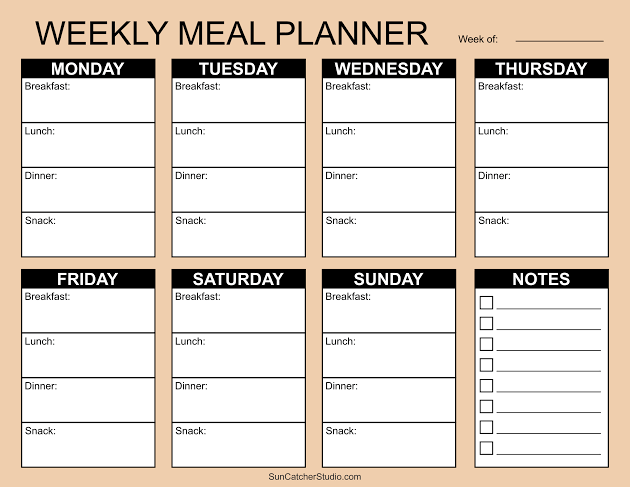
    At its core, a free meal plan template is a pre-structured document—digital or printable—that helps you organize your meals. Typically, it includes slots for breakfast, lunch, dinner, and snacks across the days of the week. Some templates go further, adding space for grocery lists, portion sizes, calorie counts, or even water intake.

    You’ll find these templates in various formats: PDFs you can print, Google Sheets or Excel files with auto-calculating formulas, Notion pages, or Canva designs. Many are genuinely free to download from blogs, nutrition sites, or template libraries like Template.net or Vertex42. Some apps, like Eat This Much, offer limited free versions.

    The Anatomy of a Good Template

    A well-designed template usually includes:
    Day-of-week columns (Mon–Sun) for a weekly view
    Meal slots (breakfast, lunch, dinner, snacks)
    A grocery list section to jot down ingredients as you plan
    Optional extras like calorie/macro tracking, water intake, or notes

    Some templates are minimalist—just lines and boxes. Others are colorful and detailed, with checkboxes and motivational quotes. The best one for you depends on your style and needs.

    Why Use a Meal Plan Template?

    The benefits go beyond just knowing what to eat. Here’s why templates have become a staple for so many:

    1. Beat Decision Fatigue

    Every decision you make—including what to cook—drains a little mental energy. By planning your meals in advance, you free up brainpower for more important things. A template gives you a clear roadmap, so you never have to scramble at 5 PM.

    2. Save Money and Reduce Waste

    When you plan meals, you buy only what you need. That means fewer impulse purchases and less food rotting in the crisper drawer. Many templates include a grocery list section, helping you stick to your list and your budget.

    3. Support Your Health Goals

    Whether you’re managing diabetes, trying to lose weight, or just want to eat more veggies, a template helps you stay on track. You can plan balanced meals ahead of time, rather than grabbing whatever’s convenient. Some templates even have columns for calories or macros, making it easier to hit your targets.

    4. Simplify Family Life

    For busy parents, a meal plan template is a lifesaver. You can involve the kids in choosing meals, accommodate picky eaters, and avoid the nightly ‘I don’t want that’ battle. Some templates even have a ‘family favorites’ section.

    Choosing the Right Template: A Buyer’s Guide

    With thousands of free templates online, how do you pick? Here are key factors to consider:

    Format: Digital vs. Printable

    • Printable PDFs are great for those who love writing by hand and sticking notes on the fridge. They’re simple and require no tech skills. Just download, print, and go.
    • Digital templates (Google Sheets, Excel) allow for auto-calculation of calories, easy editing, and sharing with family or a dietitian. They’re perfect if you’re comfortable with spreadsheets.
    • Notion or Canva templates offer more visual appeal and customization, but may have a steeper learning curve.

    Features: What Do You Need?

    • Basic – just meal slots and a grocery list. Ideal for beginners.
    • Macro/calorie tracking – useful for fitness enthusiasts or those on specific diets.
    • Recipe integration – some digital templates let you import recipes and auto-generate grocery lists (though these are often in paid apps).
    • Water tracking – a nice extra for health-focused planners.

    The ‘Free’ Catch

    Remember, ‘free’ often means you’re trading your email address. Many templates are lead magnets for newsletters or paid services. That’s not necessarily bad—you might get useful content—but be aware that your inbox may fill up. Also, some free templates are watermarked or low-resolution, so check the quality before committing.

    How to Use a Meal Plan Template Effectively

    Getting the template is just the first step. Here’s how to make it work for you:

    Step 1: Start Simple

    Don’t try to plan every single meal in detail from day one. Start with dinners only, or plan just five days a week. As you get comfortable, expand.

    Step 2: Check Your Pantry and Fridge

    Before you plan, see what you already have. This reduces waste and saves money. Your template should include a ‘pantry staples’ list so you can incorporate what’s on hand.

    Step 3: Choose Recipes That Fit Your Life

    If you’re busy, pick meals with minimal ingredients or that can be batch-cooked. If you’re on a budget, focus on seasonal produce and pantry staples. The template is a tool, not a boss—adapt it to your reality.

    Step 4: Make a Grocery List

    As you fill in your meals, jot down the ingredients you need. This is where the template’s grocery list section shines. Stick to the list at the store to avoid impulse buys.

    Step 5: Review and Adjust

    At the end of the week, look back. What worked? What didn’t? Maybe you had leftovers you forgot to use, or a recipe took longer than expected. Adjust your next plan accordingly.

    Common Mistakes and How to Avoid Them

    Even with a great template, pitfalls exist. Here’s what to watch out for:

    Mistake 1: Treating the Template as a Personalized Plan

    A blank template is just a structure—it doesn’t know your calorie needs, allergies, or cultural preferences. You have to fill it with foods that work for you. If you need guidance, consult a dietitian or use reputable nutrition resources.

    Mistake 2: Confusing Meal Planning with Meal Prepping

    Planning is deciding what to eat; prepping is cooking in advance. You can plan without prepping, and vice versa. A template helps with the planning part—you still have to do the cooking (or order takeout).

    Mistake 3: Assuming Calorie Columns Are Accurate

    Unless your template has built-in formulas (rare in free versions), calorie/macro columns are just blank spaces. You’ll need to calculate manually, which can lead to errors. If accuracy matters, use a separate app or a template with auto-calculation.

    Mistake 4: Choosing a Template That’s Not Editable

    Some PDFs are image-based, meaning you can’t type into them. If you want to fill it out on your computer, look for ‘editable PDF’ or choose a Google Sheets/Excel version.

    Mistake 5: Falling for the One-Size-Fits-All Fallacy

    A template designed for a 2,000-calorie diet or a specific cuisine may not suit you. Don’t be afraid to modify it—add rows, change categories, or use it as inspiration to create your own.

    Beyond the Template: Alternatives and Enhancements

    If a rigid template feels too constraining, consider these alternatives:

    • Theme Nights: Assign a theme to each day (e.g., Taco Tuesday, Stir-Fry Friday). This provides structure without the detail.
    • Flexible Frameworks: Instead of specific meals, plan categories like ‘protein + veggie + carb’ and mix and match.
    • Meal Planning Apps: Apps like Mealime or Plan to Eat offer dynamic features like recipe import and grocery list generation, but often require a subscription.

    For tech-savvy users, you can link your digital template to grocery delivery services like Instacart or Amazon Fresh, making the leap from plan to pantry even smoother.

    The Bottom Line

    A free meal plan template is a powerful, zero-cost tool to bring order to your eating habits. It saves time, money, and mental energy, and it can support your health goals. The key is to choose a template that fits your lifestyle, use it flexibly, and avoid the common pitfalls. Start simple, and soon you’ll wonder how you ever managed without one.

    So, are you ready to ditch the daily dinner scramble? Grab a free meal plan template today—whether it’s a printable PDF for your fridge or a Google Sheet on your phone—and take the first step toward a more organized, less stressful week. Your future self (and your taste buds) will thank you.

    Summary

    • A free meal plan template is a pre-structured document (digital or printable) that organizes meals by day and meal type, often including grocery lists and optional calorie tracking.
    • Benefits include reduced decision fatigue, cost savings, less food waste, and better alignment with health goals.
    • Choose a template based on format (print vs. digital), features (basic vs. macro tracking), and be aware that ‘free’ often requires email sign-up.
    • Avoid common mistakes: don’t treat a template as a personalized plan, don’t confuse planning with prepping, and verify calorie columns if accuracy matters.
    • Alternatives like theme nights or flexible frameworks can work if rigid templates feel too restrictive.

    FAQ

    Q: Are free meal plan templates really free?
    A: Yes, they cost no money, but many require an email sign-up, which may lead to marketing emails. Some are watermarked or low-resolution, so check the quality before downloading.

    Q: Can I use a meal plan template if I have dietary restrictions?
    A: Absolutely. A template is just a structure—you fill it with foods that meet your needs. You may need to adapt it to include allergy notes or specific dietary guidelines.

    Q: What’s the difference between meal planning and meal prepping?
    A: Meal planning is deciding what to eat ahead of time; meal prepping is cooking those meals in advance. A template helps with planning, but you still need to do the cooking.

    Q: Do I need to track calories with a template?
    A: No, calorie tracking is optional. Many templates have blank columns for calories, but unless they have built-in formulas, you’ll need to calculate manually. If you don’t need that, choose a simpler template.

    Q: Can I edit a printable PDF template?
    A: It depends. Some PDFs are editable, but many are image-based and can only be printed and filled in by hand. Look for ‘editable PDF’ or choose a digital format like Google Sheets if you want to type.

  • The Ultimate Guide to Digital Meal Prep Tools: Apps, Smart Gadgets, and Strategies

    These are the meal prepping tools you need to stay organized - Reviewed

    Meal prepping has become a cornerstone of modern healthy living, but the sheer number of digital tools claiming to simplify the process can be overwhelming. From AI-powered recipe apps to smart ovens that cook your dinner while you’re at work, the technology landscape for meal prep has exploded in recent years. This guide cuts through the noise, offering a clear-eyed look at the best apps, devices, and strategies to fit your lifestyle—whether you’re a busy parent, a fitness enthusiast, or a tech skeptic.

    We’ll explore the core categories of digital meal prep tools, break down the top players with their pros and cons, and help you decide which ones are worth your time and money. By the end, you’ll have a personalized roadmap to streamline your meal prep routine, save time, and reduce food waste—all without getting lost in a sea of subscriptions and gadgets.

    Why Digital Meal Prep Tools Matter

    Meal prep isn’t just about cooking in bulk; it’s about planning, organizing, and tracking. Digital tools excel at these tasks, offering features that pen-and-paper simply can’t match. For instance, apps can auto-generate grocery lists based on your meal plan, sync across devices, and even integrate with grocery delivery services to save you a trip to the store. Smart appliances can cook meals to perfection with minimal supervision, and nutrition trackers can log your macros with a simple barcode scan.

    The rise of these tools is driven by real-world needs: time poverty, health consciousness, and a desire to reduce food waste. According to recent surveys, about 40% of U.S. adults meal prep at least occasionally, and the meal prep app market is growing at a steady 8-10% annually. The COVID-19 pandemic accelerated this trend, pushing many home cooks to seek digital solutions for their newfound cooking habits.

    The Main Categories of Meal Prep Tools

    To make sense of the landscape, it helps to categorize the tools. Here are the primary types you’ll encounter:

    • Meal Planning Apps: These are the backbone of digital meal prep. They help you decide what to cook, generate shopping lists, and often include recipe databases. Examples: Mealime, Paprika, Plan to Eat.
    • Smart Kitchen Appliances: These are physical devices that connect to apps for automated cooking or tracking. Examples: Tovala smart oven, smart scales, smart containers.
    • Grocery Delivery Integrations: Many apps now connect directly to services like Instacart or Amazon Fresh, allowing you to order ingredients with one click.
    • Nutrition Tracking Software: These apps log your food intake, often with barcode scanning and macro tracking. Examples: MyFitnessPal, Cronometer.

    Top Meal Planning Apps Compared

    Let’s dive into the most popular meal planning apps, highlighting what makes each unique.

    Mealime: Best for Beginners

    Mealime is designed to take the guesswork out of meal prep. You answer a few questions about your dietary preferences (e.g., vegetarian, gluten-free) and how many people you’re cooking for, and it generates a personalized meal plan for the week. Each recipe comes with step-by-step instructions and a grocery list that’s auto-generated and can be sent directly to a delivery service.

    Pros: Extremely user-friendly; great for those new to meal prep; free version available.
    Cons: Limited recipe variety compared to some competitors; some features require a subscription.

    Paprika: The Power User’s Choice

    Paprika is a recipe manager that also includes a meal planner and grocery list. It’s known for its robust recipe import feature—you can save recipes from any website with a single click. The app also has a pantry tracker, so you can see what ingredients you have on hand and avoid buying duplicates. Cloud sync keeps your data across all devices.

    Pros: Excellent for building a personal recipe library; powerful organizational features; one-time purchase (no subscription).
    Cons: Steeper learning curve; interface feels dated to some.

    Plan to Eat: The Family-Friendly Planner

    Plan to Eat offers a drag-and-drop meal planner that lets you schedule meals for any day of the week. It automatically generates a grocery list organized by aisle, which is a huge time-saver. You can also track your pantry and scale recipes for larger families.

    Pros: Intuitive drag-and-drop interface; grocery list by aisle; budget tracking features.
    Cons: Requires a subscription; some users find the recipe import less reliable than Paprika.

    Samsung Food (formerly Whisk): The AI-Powered Option

    Samsung Food uses AI to recommend recipes based on your preferences and what’s in your fridge. You can import recipes from anywhere, and it integrates with grocery delivery services for seamless ordering. It’s also part of the Samsung ecosystem, so it works well with other Samsung devices.

    Pros: AI recommendations get smarter over time; strong grocery integration; free to use.
    Cons: Some features require a Samsung account; AI can sometimes suggest odd pairings.

    Smart Kitchen Appliances: The Next Frontier

    Smart appliances are taking meal prep to a new level. Here are two standout examples.

    Tovala Smart Oven: Scan-to-Cook Convenience

    The Tovala is a countertop steam oven that pairs with an app. You can scan a barcode on a Tovala meal kit, and the oven automatically sets the cooking time and temperature. It also works with your own recipes—you can send cooking instructions from the app to the oven. This is perfect for busy weeknights when you want a home-cooked meal without the effort.

    Pros: Extremely convenient; consistent results; meal kits are tasty and healthy.
    Cons: The oven is pricey; meal kits are an ongoing cost; limited to Tovala’s meal ecosystem.

    Smart Containers and Scales: Precision Tracking

    For those focused on portion control, smart containers like Prepd Pack and SmartPlate can track what you eat. These containers have built-in scales that log weight and nutrition data to a companion app. While not essential, they’re great for fitness enthusiasts who want precise macro tracking.

    Pros: Accurate portion control; syncs with fitness apps; reduces guesswork.
    Cons: Expensive; requires charging; may be overkill for casual users.

    Nutrition Tracking: The Missing Link

    Meal prep and nutrition tracking often go hand in hand. Apps like MyFitnessPal and Cronometer allow you to log your meals and see your daily macro and calorie intake. Many meal planning apps can export nutrition data directly to these trackers, creating a seamless workflow.

    MyFitnessPal is the most popular, with a massive food database and barcode scanning. Cronometer is favored by those who want more detailed micronutrient data. Both are free with premium tiers.

    How to Choose the Right Tool for You

    With so many options, it’s easy to feel paralyzed. Here’s a simple framework based on your profile:

    • If you’re a beginner: Start with Mealime. It’s the most guided experience and will get you into a routine without overwhelming you.
    • If you’re a fitness enthusiast: Pair MealPrepPro or Cronometer with a smart scale. Focus on apps that offer detailed nutrition data and recipe scaling.
    • If you’re a family cook: Plan to Eat or Paprika are excellent for managing multiple meals and grocery lists. Look for budget tracking features.
    • If you’re a tech enthusiast: Tovala and Samsung Food will satisfy your craving for automation. Just be prepared for the learning curve and potential subscription costs.
    • If you’re a skeptic: You can still benefit from a simple recipe app like Paprika (one-time purchase) or even a free Google Sheets template. The key is to find a tool that reduces friction, not adds to it.

    Common Pitfalls to Avoid

    1. Over-subscribing: Many apps require monthly fees. Start with free versions and upgrade only if you find real value.
    2. App Overload: Using too many apps can create more work. Aim for one meal planner and one nutrition tracker at most.
    3. Ignoring Pantry Management: Tools like Paprika and Plan to Eat help you track what you have, preventing waste and duplicate purchases.
    4. Forgetting Integration: Check if your chosen apps sync with your fitness tracker or smart home devices. A fragmented ecosystem can be frustrating.

    The Future of Meal Prep Tech

    As AI and IoT continue to evolve, we can expect even more personalized and automated solutions. Imagine an app that scans your fridge and suggests recipes based on expiring ingredients, or a smart oven that adjusts cooking times based on the weight of your food. These are already in development, and the next few years will bring them to the mainstream.

    Digital meal prep tools are not just a passing trend—they’re a practical response to modern life’s demands. Whether you’re looking to save time, eat healthier, or reduce waste, there’s a tool out there that can help. The key is to start simple, choose tools that align with your goals, and avoid the trap of overcomplicating your routine. With the right app or device, meal prep can go from a chore to a streamlined, even enjoyable, part of your week.

    Summary

    • Meal prep apps like Mealime and Paprika simplify planning and grocery shopping, with features like auto-generated lists and recipe import.
    • Smart appliances such as the Tovala oven offer scan-to-cook convenience, but come with a higher price tag.
    • Nutrition trackers like MyFitnessPal and Cronometer help you log macros and calories, often integrating with meal planning apps.
    • Choose tools based on your needs: beginners should start with Mealime, fitness enthusiasts might prefer MealPrepPro, and families may benefit from Plan to Eat’s drag-and-drop planner.
    • Avoid common pitfalls like over-subscribing and app overload; start with free versions and integrate tools for a seamless workflow.

    FAQ

    Q: What is the best meal prep app for beginners?
    A: Mealime is widely recommended for beginners due to its guided planning and simple interface. It asks about your dietary preferences and generates a personalized meal plan with a grocery list, making it easy to get started.

    Q: Are smart kitchen appliances worth the investment?
    A: It depends on your lifestyle. If you value convenience and have the budget, a smart oven like Tovala can save significant time and ensure consistent results. However, for casual cooks, a good meal planning app might be sufficient.

    Q: Can I use meal prep apps without a subscription?
    A: Yes, many apps offer free versions with limited features. For example, Mealime has a free tier, and Paprika is a one-time purchase. You can often start free and upgrade if you find the premium features valuable.

    Q: How do I track nutrition with meal prep?
    A: Use a nutrition tracking app like MyFitnessPal or Cronometer. Many meal planning apps can export recipe nutrition data directly to these trackers, so you can log your prepped meals with minimal effort.

    Q: What’s the best way to avoid food waste with meal prep?
    A: Use apps with pantry tracking, like Paprika or Plan to Eat. They help you keep track of what you have, so you can plan meals around existing ingredients and avoid buying duplicates.