Ever stared into your fridge at 6 PM with no idea what to cook? You’re not alone. The daily ‘what’s for dinner?’ dilemma is a major source of stress for many households. Enter the humble meal plan template—a simple, free tool that can transform your chaotic week into a streamlined, delicious routine.
Meal planning has exploded in popularity, fueled by fitness culture, meal-prep influencers, and a collective desire to eat better without the mental gymnastics. A free meal plan template isn’t just a piece of paper or a digital grid; it’s a decision-making shortcut that saves time, money, and sanity. Whether you’re a busy professional, a budget-conscious parent, or a fitness enthusiast, a template can be your secret weapon.
In this guide, we’ll break down what these templates are, how to choose the right one, and how to avoid common pitfalls. By the end, you’ll be ready to download a template and plan your week with confidence.
What Exactly Is a Free Meal Plan Template?
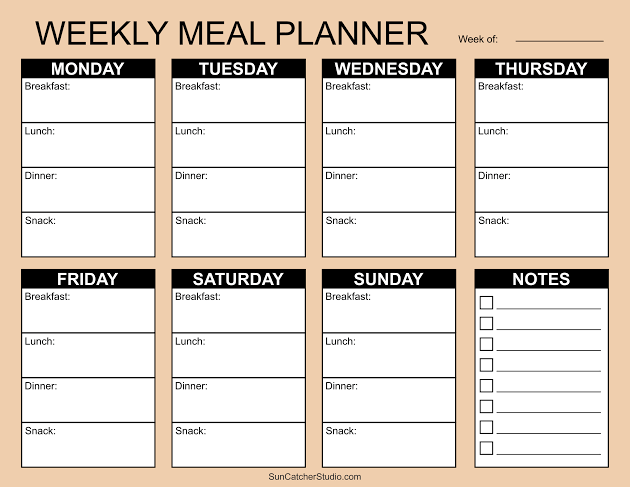
At its core, a free meal plan template is a pre-structured document—digital or printable—that helps you organize your meals. Typically, it includes slots for breakfast, lunch, dinner, and snacks across the days of the week. Some templates go further, adding space for grocery lists, portion sizes, calorie counts, or even water intake.
You’ll find these templates in various formats: PDFs you can print, Google Sheets or Excel files with auto-calculating formulas, Notion pages, or Canva designs. Many are genuinely free to download from blogs, nutrition sites, or template libraries like Template.net or Vertex42. Some apps, like Eat This Much, offer limited free versions.
The Anatomy of a Good Template
A well-designed template usually includes:
– Day-of-week columns (Mon–Sun) for a weekly view
– Meal slots (breakfast, lunch, dinner, snacks)
– A grocery list section to jot down ingredients as you plan
– Optional extras like calorie/macro tracking, water intake, or notes
Some templates are minimalist—just lines and boxes. Others are colorful and detailed, with checkboxes and motivational quotes. The best one for you depends on your style and needs.
Why Use a Meal Plan Template?
The benefits go beyond just knowing what to eat. Here’s why templates have become a staple for so many:
1. Beat Decision Fatigue
Every decision you make—including what to cook—drains a little mental energy. By planning your meals in advance, you free up brainpower for more important things. A template gives you a clear roadmap, so you never have to scramble at 5 PM.
2. Save Money and Reduce Waste
When you plan meals, you buy only what you need. That means fewer impulse purchases and less food rotting in the crisper drawer. Many templates include a grocery list section, helping you stick to your list and your budget.
3. Support Your Health Goals
Whether you’re managing diabetes, trying to lose weight, or just want to eat more veggies, a template helps you stay on track. You can plan balanced meals ahead of time, rather than grabbing whatever’s convenient. Some templates even have columns for calories or macros, making it easier to hit your targets.
4. Simplify Family Life
For busy parents, a meal plan template is a lifesaver. You can involve the kids in choosing meals, accommodate picky eaters, and avoid the nightly ‘I don’t want that’ battle. Some templates even have a ‘family favorites’ section.
Choosing the Right Template: A Buyer’s Guide
With thousands of free templates online, how do you pick? Here are key factors to consider:
Format: Digital vs. Printable
- Printable PDFs are great for those who love writing by hand and sticking notes on the fridge. They’re simple and require no tech skills. Just download, print, and go.
- Digital templates (Google Sheets, Excel) allow for auto-calculation of calories, easy editing, and sharing with family or a dietitian. They’re perfect if you’re comfortable with spreadsheets.
- Notion or Canva templates offer more visual appeal and customization, but may have a steeper learning curve.
Features: What Do You Need?
- Basic – just meal slots and a grocery list. Ideal for beginners.
- Macro/calorie tracking – useful for fitness enthusiasts or those on specific diets.
- Recipe integration – some digital templates let you import recipes and auto-generate grocery lists (though these are often in paid apps).
- Water tracking – a nice extra for health-focused planners.
The ‘Free’ Catch
Remember, ‘free’ often means you’re trading your email address. Many templates are lead magnets for newsletters or paid services. That’s not necessarily bad—you might get useful content—but be aware that your inbox may fill up. Also, some free templates are watermarked or low-resolution, so check the quality before committing.
How to Use a Meal Plan Template Effectively
Getting the template is just the first step. Here’s how to make it work for you:
Step 1: Start Simple
Don’t try to plan every single meal in detail from day one. Start with dinners only, or plan just five days a week. As you get comfortable, expand.
Step 2: Check Your Pantry and Fridge
Before you plan, see what you already have. This reduces waste and saves money. Your template should include a ‘pantry staples’ list so you can incorporate what’s on hand.
Step 3: Choose Recipes That Fit Your Life
If you’re busy, pick meals with minimal ingredients or that can be batch-cooked. If you’re on a budget, focus on seasonal produce and pantry staples. The template is a tool, not a boss—adapt it to your reality.
Step 4: Make a Grocery List
As you fill in your meals, jot down the ingredients you need. This is where the template’s grocery list section shines. Stick to the list at the store to avoid impulse buys.
Step 5: Review and Adjust
At the end of the week, look back. What worked? What didn’t? Maybe you had leftovers you forgot to use, or a recipe took longer than expected. Adjust your next plan accordingly.
Common Mistakes and How to Avoid Them
Even with a great template, pitfalls exist. Here’s what to watch out for:
Mistake 1: Treating the Template as a Personalized Plan
A blank template is just a structure—it doesn’t know your calorie needs, allergies, or cultural preferences. You have to fill it with foods that work for you. If you need guidance, consult a dietitian or use reputable nutrition resources.
Mistake 2: Confusing Meal Planning with Meal Prepping
Planning is deciding what to eat; prepping is cooking in advance. You can plan without prepping, and vice versa. A template helps with the planning part—you still have to do the cooking (or order takeout).
Mistake 3: Assuming Calorie Columns Are Accurate
Unless your template has built-in formulas (rare in free versions), calorie/macro columns are just blank spaces. You’ll need to calculate manually, which can lead to errors. If accuracy matters, use a separate app or a template with auto-calculation.
Mistake 4: Choosing a Template That’s Not Editable
Some PDFs are image-based, meaning you can’t type into them. If you want to fill it out on your computer, look for ‘editable PDF’ or choose a Google Sheets/Excel version.
Mistake 5: Falling for the One-Size-Fits-All Fallacy
A template designed for a 2,000-calorie diet or a specific cuisine may not suit you. Don’t be afraid to modify it—add rows, change categories, or use it as inspiration to create your own.
Beyond the Template: Alternatives and Enhancements
If a rigid template feels too constraining, consider these alternatives:
- Theme Nights: Assign a theme to each day (e.g., Taco Tuesday, Stir-Fry Friday). This provides structure without the detail.
- Flexible Frameworks: Instead of specific meals, plan categories like ‘protein + veggie + carb’ and mix and match.
- Meal Planning Apps: Apps like Mealime or Plan to Eat offer dynamic features like recipe import and grocery list generation, but often require a subscription.
For tech-savvy users, you can link your digital template to grocery delivery services like Instacart or Amazon Fresh, making the leap from plan to pantry even smoother.
The Bottom Line
A free meal plan template is a powerful, zero-cost tool to bring order to your eating habits. It saves time, money, and mental energy, and it can support your health goals. The key is to choose a template that fits your lifestyle, use it flexibly, and avoid the common pitfalls. Start simple, and soon you’ll wonder how you ever managed without one.
So, are you ready to ditch the daily dinner scramble? Grab a free meal plan template today—whether it’s a printable PDF for your fridge or a Google Sheet on your phone—and take the first step toward a more organized, less stressful week. Your future self (and your taste buds) will thank you.
Summary
- A free meal plan template is a pre-structured document (digital or printable) that organizes meals by day and meal type, often including grocery lists and optional calorie tracking.
- Benefits include reduced decision fatigue, cost savings, less food waste, and better alignment with health goals.
- Choose a template based on format (print vs. digital), features (basic vs. macro tracking), and be aware that ‘free’ often requires email sign-up.
- Avoid common mistakes: don’t treat a template as a personalized plan, don’t confuse planning with prepping, and verify calorie columns if accuracy matters.
- Alternatives like theme nights or flexible frameworks can work if rigid templates feel too restrictive.
FAQ
Q: Are free meal plan templates really free?
A: Yes, they cost no money, but many require an email sign-up, which may lead to marketing emails. Some are watermarked or low-resolution, so check the quality before downloading.
Q: Can I use a meal plan template if I have dietary restrictions?
A: Absolutely. A template is just a structure—you fill it with foods that meet your needs. You may need to adapt it to include allergy notes or specific dietary guidelines.
Q: What’s the difference between meal planning and meal prepping?
A: Meal planning is deciding what to eat ahead of time; meal prepping is cooking those meals in advance. A template helps with planning, but you still need to do the cooking.
Q: Do I need to track calories with a template?
A: No, calorie tracking is optional. Many templates have blank columns for calories, but unless they have built-in formulas, you’ll need to calculate manually. If you don’t need that, choose a simpler template.
Q: Can I edit a printable PDF template?
A: It depends. Some PDFs are editable, but many are image-based and can only be printed and filled in by hand. Look for ‘editable PDF’ or choose a digital format like Google Sheets if you want to type.