Tag: free templates

  • Free Meal Plan Templates: Your Blueprint to Stress-Free Weekly Eating

    Meal Planners: Printable Weekly Menu Templates (PDF) – Free Printables, Lettering, SVG Files, Tools & Apps

    Ever stared into your fridge at 6 PM with no idea what to cook? You’re not alone. The daily ‘what’s for dinner?’ dilemma is a major source of stress for many households. Enter the humble meal plan template—a simple, free tool that can transform your chaotic week into a streamlined, delicious routine.

    Meal planning has exploded in popularity, fueled by fitness culture, meal-prep influencers, and a collective desire to eat better without the mental gymnastics. A free meal plan template isn’t just a piece of paper or a digital grid; it’s a decision-making shortcut that saves time, money, and sanity. Whether you’re a busy professional, a budget-conscious parent, or a fitness enthusiast, a template can be your secret weapon.

    In this guide, we’ll break down what these templates are, how to choose the right one, and how to avoid common pitfalls. By the end, you’ll be ready to download a template and plan your week with confidence.

    What Exactly Is a Free Meal Plan Template?

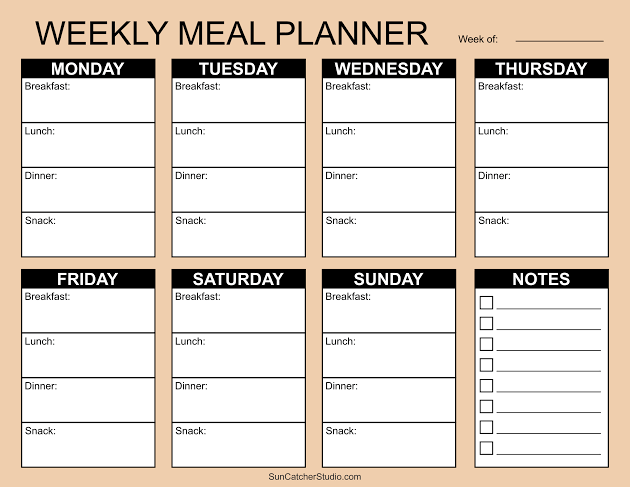
    At its core, a free meal plan template is a pre-structured document—digital or printable—that helps you organize your meals. Typically, it includes slots for breakfast, lunch, dinner, and snacks across the days of the week. Some templates go further, adding space for grocery lists, portion sizes, calorie counts, or even water intake.

    You’ll find these templates in various formats: PDFs you can print, Google Sheets or Excel files with auto-calculating formulas, Notion pages, or Canva designs. Many are genuinely free to download from blogs, nutrition sites, or template libraries like Template.net or Vertex42. Some apps, like Eat This Much, offer limited free versions.

    The Anatomy of a Good Template

    A well-designed template usually includes:
    Day-of-week columns (Mon–Sun) for a weekly view
    Meal slots (breakfast, lunch, dinner, snacks)
    A grocery list section to jot down ingredients as you plan
    Optional extras like calorie/macro tracking, water intake, or notes

    Some templates are minimalist—just lines and boxes. Others are colorful and detailed, with checkboxes and motivational quotes. The best one for you depends on your style and needs.

    Why Use a Meal Plan Template?

    The benefits go beyond just knowing what to eat. Here’s why templates have become a staple for so many:

    1. Beat Decision Fatigue

    Every decision you make—including what to cook—drains a little mental energy. By planning your meals in advance, you free up brainpower for more important things. A template gives you a clear roadmap, so you never have to scramble at 5 PM.

    2. Save Money and Reduce Waste

    When you plan meals, you buy only what you need. That means fewer impulse purchases and less food rotting in the crisper drawer. Many templates include a grocery list section, helping you stick to your list and your budget.

    3. Support Your Health Goals

    Whether you’re managing diabetes, trying to lose weight, or just want to eat more veggies, a template helps you stay on track. You can plan balanced meals ahead of time, rather than grabbing whatever’s convenient. Some templates even have columns for calories or macros, making it easier to hit your targets.

    4. Simplify Family Life

    For busy parents, a meal plan template is a lifesaver. You can involve the kids in choosing meals, accommodate picky eaters, and avoid the nightly ‘I don’t want that’ battle. Some templates even have a ‘family favorites’ section.

    Choosing the Right Template: A Buyer’s Guide

    With thousands of free templates online, how do you pick? Here are key factors to consider:

    Format: Digital vs. Printable

    • Printable PDFs are great for those who love writing by hand and sticking notes on the fridge. They’re simple and require no tech skills. Just download, print, and go.
    • Digital templates (Google Sheets, Excel) allow for auto-calculation of calories, easy editing, and sharing with family or a dietitian. They’re perfect if you’re comfortable with spreadsheets.
    • Notion or Canva templates offer more visual appeal and customization, but may have a steeper learning curve.

    Features: What Do You Need?

    • Basic – just meal slots and a grocery list. Ideal for beginners.
    • Macro/calorie tracking – useful for fitness enthusiasts or those on specific diets.
    • Recipe integration – some digital templates let you import recipes and auto-generate grocery lists (though these are often in paid apps).
    • Water tracking – a nice extra for health-focused planners.

    The ‘Free’ Catch

    Remember, ‘free’ often means you’re trading your email address. Many templates are lead magnets for newsletters or paid services. That’s not necessarily bad—you might get useful content—but be aware that your inbox may fill up. Also, some free templates are watermarked or low-resolution, so check the quality before committing.

    How to Use a Meal Plan Template Effectively

    Getting the template is just the first step. Here’s how to make it work for you:

    Step 1: Start Simple

    Don’t try to plan every single meal in detail from day one. Start with dinners only, or plan just five days a week. As you get comfortable, expand.

    Step 2: Check Your Pantry and Fridge

    Before you plan, see what you already have. This reduces waste and saves money. Your template should include a ‘pantry staples’ list so you can incorporate what’s on hand.

    Step 3: Choose Recipes That Fit Your Life

    If you’re busy, pick meals with minimal ingredients or that can be batch-cooked. If you’re on a budget, focus on seasonal produce and pantry staples. The template is a tool, not a boss—adapt it to your reality.

    Step 4: Make a Grocery List

    As you fill in your meals, jot down the ingredients you need. This is where the template’s grocery list section shines. Stick to the list at the store to avoid impulse buys.

    Step 5: Review and Adjust

    At the end of the week, look back. What worked? What didn’t? Maybe you had leftovers you forgot to use, or a recipe took longer than expected. Adjust your next plan accordingly.

    Common Mistakes and How to Avoid Them

    Even with a great template, pitfalls exist. Here’s what to watch out for:

    Mistake 1: Treating the Template as a Personalized Plan

    A blank template is just a structure—it doesn’t know your calorie needs, allergies, or cultural preferences. You have to fill it with foods that work for you. If you need guidance, consult a dietitian or use reputable nutrition resources.

    Mistake 2: Confusing Meal Planning with Meal Prepping

    Planning is deciding what to eat; prepping is cooking in advance. You can plan without prepping, and vice versa. A template helps with the planning part—you still have to do the cooking (or order takeout).

    Mistake 3: Assuming Calorie Columns Are Accurate

    Unless your template has built-in formulas (rare in free versions), calorie/macro columns are just blank spaces. You’ll need to calculate manually, which can lead to errors. If accuracy matters, use a separate app or a template with auto-calculation.

    Mistake 4: Choosing a Template That’s Not Editable

    Some PDFs are image-based, meaning you can’t type into them. If you want to fill it out on your computer, look for ‘editable PDF’ or choose a Google Sheets/Excel version.

    Mistake 5: Falling for the One-Size-Fits-All Fallacy

    A template designed for a 2,000-calorie diet or a specific cuisine may not suit you. Don’t be afraid to modify it—add rows, change categories, or use it as inspiration to create your own.

    Beyond the Template: Alternatives and Enhancements

    If a rigid template feels too constraining, consider these alternatives:

    • Theme Nights: Assign a theme to each day (e.g., Taco Tuesday, Stir-Fry Friday). This provides structure without the detail.
    • Flexible Frameworks: Instead of specific meals, plan categories like ‘protein + veggie + carb’ and mix and match.
    • Meal Planning Apps: Apps like Mealime or Plan to Eat offer dynamic features like recipe import and grocery list generation, but often require a subscription.

    For tech-savvy users, you can link your digital template to grocery delivery services like Instacart or Amazon Fresh, making the leap from plan to pantry even smoother.

    The Bottom Line

    A free meal plan template is a powerful, zero-cost tool to bring order to your eating habits. It saves time, money, and mental energy, and it can support your health goals. The key is to choose a template that fits your lifestyle, use it flexibly, and avoid the common pitfalls. Start simple, and soon you’ll wonder how you ever managed without one.

    So, are you ready to ditch the daily dinner scramble? Grab a free meal plan template today—whether it’s a printable PDF for your fridge or a Google Sheet on your phone—and take the first step toward a more organized, less stressful week. Your future self (and your taste buds) will thank you.

    Summary

    • A free meal plan template is a pre-structured document (digital or printable) that organizes meals by day and meal type, often including grocery lists and optional calorie tracking.
    • Benefits include reduced decision fatigue, cost savings, less food waste, and better alignment with health goals.
    • Choose a template based on format (print vs. digital), features (basic vs. macro tracking), and be aware that ‘free’ often requires email sign-up.
    • Avoid common mistakes: don’t treat a template as a personalized plan, don’t confuse planning with prepping, and verify calorie columns if accuracy matters.
    • Alternatives like theme nights or flexible frameworks can work if rigid templates feel too restrictive.

    FAQ

    Q: Are free meal plan templates really free?
    A: Yes, they cost no money, but many require an email sign-up, which may lead to marketing emails. Some are watermarked or low-resolution, so check the quality before downloading.

    Q: Can I use a meal plan template if I have dietary restrictions?
    A: Absolutely. A template is just a structure—you fill it with foods that meet your needs. You may need to adapt it to include allergy notes or specific dietary guidelines.

    Q: What’s the difference between meal planning and meal prepping?
    A: Meal planning is deciding what to eat ahead of time; meal prepping is cooking those meals in advance. A template helps with planning, but you still need to do the cooking.

    Q: Do I need to track calories with a template?
    A: No, calorie tracking is optional. Many templates have blank columns for calories, but unless they have built-in formulas, you’ll need to calculate manually. If you don’t need that, choose a simpler template.

    Q: Can I edit a printable PDF template?
    A: It depends. Some PDFs are editable, but many are image-based and can only be printed and filled in by hand. Look for ‘editable PDF’ or choose a digital format like Google Sheets if you want to type.
  • The Ultimate Guide to Free Workout Log Templates: Track, Progress, and Avoid Plateaus

    Gym Workout Log: Track Progress & Maximize Gains - gym workout log

    You’ve committed to your fitness journey, but progress feels stalled. You’re lifting the same weights, doing the same reps, and wondering why results aren’t showing. The missing piece might be as simple as a workout log.

    A workout log is more than a diary of your gym sessions—it’s the backbone of progressive overload, the principle that drives muscle growth and strength gains. Without a written record, you’re navigating your training blindfolded. The good news? You don’t need to spend a dime. Free templates in spreadsheets, PDFs, or apps can transform how you train.

    In this guide, we’ll break down what makes a great workout log, explore the best free formats, and help you choose the one that fits your style—whether you’re a beginner or a seasoned lifter.

    Why You Need a Workout Log (Even If You Think You Don’t)

    Your brain is not a reliable storage device. You might remember last week’s bench press, but what about three weeks ago? Did you increase the weight or drop it? A workout log eliminates guesswork.

    The core purpose is progressive overload—systematically increasing stress on your muscles over time. Without logging, you’re likely to repeat the same workouts, hitting a plateau. A log shows you exactly where you’ve been, so you can plan where to go next.

    Beyond progress, logs help you:
    – Identify weak points (e.g., your squat is stalling while your deadlift climbs)
    – Prevent overtraining by tracking volume and intensity
    – Stay accountable—seeing a blank day in your log is a powerful motivator
    – Communicate with a coach or trainer, giving them concrete data

    Key Data Fields: What to Track (and What to Skip)

    A good template balances detail with simplicity. Here are the essentials:

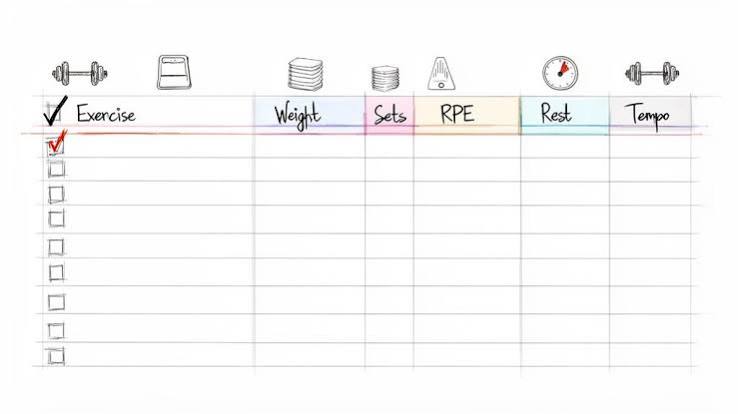
    • Date and time – Context for your performance
    • Exercise name – Be specific (e.g., “Barbell Back Squat” vs. “Squat”)
    • Sets and reps – The core of your volume
    • Weight – Always note the load, and be consistent with units (kg or lbs)
    • Rest time – Affects intensity and performance
    • Duration – Total workout time or cardio distance/pace
    • Notes – How you felt, energy levels, sleep, soreness

    Advanced lifters might add RPE (Rate of Perceived Exertion), RIR (Reps in Reserve), or tempo. But for most, sticking to the basics is enough. Over-logging can lead to analysis paralysis—you spend more time writing than lifting.

    Free Formats Compared: PDF, Spreadsheet, Notion, and Apps

    Printable PDFs

    Perfect for those who prefer pen and paper. You can find free templates on fitness blogs or create your own. Pros: no screen time, tactile satisfaction. Cons: easy to lose, no automatic calculations.

    Spreadsheets (Excel/Google Sheets)

    The spreadsheet purist’s choice. You can build custom formulas to calculate 1-rep max, total volume, or create charts. Google Sheets is free and accessible from any device. Pros: full control, offline access, no data sharing. Cons: requires some setup and manual entry.

    Notion Templates

    Notion has exploded in popularity for its flexibility and aesthetics. You can create a beautiful, interactive log with dropdowns, checkboxes, and linked databases. Many free templates are available. Pros: visually appealing, customizable, can integrate with other life trackers. Cons: steeper learning curve, can be over-engineered.

    Free Apps (Strong, Hevy, FitNotes)

    Apps offer convenience: auto-timers, cloud sync, and pre-loaded exercise libraries. Free tiers usually have limitations—like a cap on custom routines or historical data. Pros: easy logging on the go, reminders. Cons: ads, potential data privacy concerns, less customization.

    Matching Your Template to Your Training Program

    Your log should mirror your program. If you’re following Starting Strength, you need a simple linear progression tracker. For 5/3/1, you’ll want percentage-based calculations. Push/Pull/Legs splits benefit from grouping exercises by day.

    Many free templates are designed around popular programs—search for “Starting Strength log template” or “5/3/1 spreadsheet” and you’ll find ready-made options. Using a mismatched template creates friction and discourages consistency.

    Common Pitfalls and How to Avoid Them

    • Confusing a log with a program: A log records what you did; it doesn’t tell you what to do. Pair your log with a solid training plan.
    • Inconsistent notation: Decide on a format (e.g., “3×10 @ 100 lbs”) and stick to it. Mixing units or omitting weight makes data useless.
    • Never reviewing the data: A log is only valuable if you look back. Schedule a weekly review to spot trends and adjust.
    • Choosing a template that’s too complex: If it takes 10 minutes to log a session, you’ll quit. Start simple.
    • Ignoring subjective notes: The number on the bar doesn’t tell the whole story. A bad night’s sleep explains a weak session—log it.

    How to Choose the Right Template for You

    Ask yourself:
    What’s my experience level? Beginners need simplicity; advanced lifters need granularity.
    Where do I train? If you’re at a gym, a phone app is handy. If you train at home, a printed sheet might be enough.
    Do I care about data privacy? Spreadsheets give you full control; free apps may monetize your data.
    What’s my tech comfort? Notion is powerful but has a learning curve. Google Sheets is user-friendly.

    Ultimately, the best template is the one you’ll use consistently. Test a few formats for a week and see what sticks.

    Real-World Example: From Chaos to Progress

    Meet Sarah, a beginner lifter. She started with a blank notebook, jotting down random workouts. After a month, she couldn’t tell if she was progressing. She switched to a simple Google Sheets template with columns for date, exercise, sets, reps, weight, and notes. Within two weeks, she noticed her squat weight was increasing every session—and she felt motivated to push harder. The log gave her a clear roadmap.

    Now, imagine an advanced lifter like Mike. He uses a Notion template with RPE tracking and weekly volume charts. He reviews his log every Sunday to plan the next week’s loads. The data helps him avoid overtraining and peak for competitions.

    The Bottom Line

    A free workout log template is a small investment with a huge payoff. It’s the difference between guessing and knowing. Whether you choose a printable PDF, a spreadsheet, or an app, the key is consistency. Start logging today, and your future self will thank you.

    Your training deserves better than memory. A free workout log template is the simplest tool to ensure you’re progressing, not just going through the motions. Pick a format that fits your lifestyle, keep it simple, and review your data regularly. The result? Smarter training, fewer plateaus, and a clear path to your goals.

    Summary

    • A workout log is essential for progressive overload—tracking sets, reps, and weights to ensure consistent improvement.
    • Free templates come in many formats: printable PDFs, spreadsheets (Excel/Google Sheets), Notion, and apps with free tiers.
    • Key data fields include date, exercise, sets, reps, weight, rest, duration, and notes—avoid over-logging.
    • Match your template to your training program (e.g., Starting Strength, 5/3/1) for best results.
    • Avoid common pitfalls: inconsistent notation, never reviewing data, and confusing a log with a program.

    FAQ

    Q: What is the best free workout log template?
    A: The best template is the one you’ll use consistently. For simplicity, a Google Sheets template is versatile and free. For aesthetics, Notion offers beautiful designs. For convenience, apps like Hevy or FitNotes have free tiers. Test a few to see what fits your routine.

    Q: How many data fields should I track?
    A: Start with the essentials: date, exercise, sets, reps, weight, and notes. Add advanced metrics like RPE only if you find them useful. Over-tracking can lead to burnout.

    Q: Can a workout log help me build muscle?
    A: Yes, indirectly. By tracking your lifts, you can ensure you’re progressively overloading—increasing weight, reps, or sets over time—which is key for muscle growth.

    Q: Are free workout apps really free?
    A: Most free apps have limitations, such as capping custom routines or historical data. They may also show ads. Spreadsheets and PDFs are truly free with no strings attached.

    Q: How often should I review my workout log?
    A: Aim for a weekly review. Look for trends in your performance, note any plateaus, and plan the next week’s training accordingly. This turns data into actionable insights.

  • The Ultimate Guide to Free Daily Planner PDFs: What They Are, Where to Find Them, and How to Use Them

    Free Printable Daily Hourly Planner Pdf - UniKeep.com

    In our fast-paced world, staying organized can feel like a superpower. Yet, with countless apps and digital tools vying for our attention, sometimes the simplest solution is the most effective: a daily planner. And thanks to the internet, you can get one for free, in a format that works on any device: the PDF.

    But what exactly is a free daily planner PDF? Is it just a piece of paper you print, or can you type on it? And are there hidden costs or strings attached? This guide will walk you through everything you need to know about free daily planner PDFs, from their humble origins to modern digital uses, and help you find the perfect one for your needs.

    What Is a Daily Planner PDF?

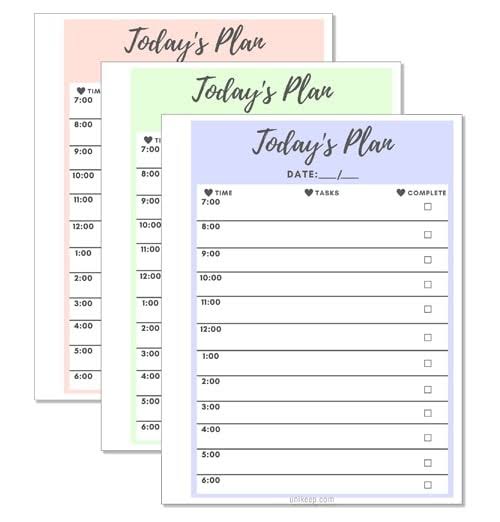
    A daily planner PDF is a pre-designed document that helps you organize your day. It typically includes sections for your top priorities, a schedule broken into hourly slots, a to-do list, and space for notes or reflections. The PDF format ensures that the layout stays exactly the same on any device or printer, so what you see is what you get.

    There are two main types: print-and-write and fillable. Print-and-write PDFs are static—you print them out and fill them in with a pen. Fillable PDFs have interactive form fields (like text boxes and checkboxes) that let you type directly into the document using free software like Adobe Acrobat Reader. This makes them perfect for digital planning on your computer or tablet.

    Why Use a Daily Planner PDF?

    You might wonder: why not just use a digital app? Well, there are several reasons why a PDF planner might be your best bet:

    • Cost: It’s free. No subscriptions, no in-app purchases.
    • Simplicity: No learning curve. Open, print or type, and you’re done.
    • Flexibility: You can use it on paper, on your tablet, or on your computer—whichever suits your mood.
    • Focus: Writing things down by hand has been shown to improve memory and commitment. A printed planner gives you that tactile experience without the cost of a fancy paper planner.
    • Privacy: Your data stays with you. No cloud sync, no tracking.

    Common Elements of a Daily Planner PDF

    While designs vary, most daily planners include these core sections:

    • Date: To note the day.
    • Top 3 Priorities: A focused list of the most important tasks.
    • Hourly Schedule: Time slots, often from 6 AM to 9 PM, for time-blocking.
    • To-Do List: A simple checklist for tasks.
    • Habit Tracker: Small boxes to check off habits like drinking water, exercising, or reading.
    • Meals/Water Tracker: For those who like to monitor nutrition.
    • Notes: Space for jotting down ideas or reminders.
    • Gratitude/Reflection: A prompt to end the day on a positive note.

    Some planners also include a weekly overview or a meal planning section, so it’s worth checking the layout before you download.

    Where to Find Free Daily Planner PDFs

    You can find free daily planner PDFs in many places online:

    • Productivity blogs: Many bloggers offer free templates as a way to build their email list. A quick search like “free daily planner PDF” will bring up countless options.
    • Template sites: Websites like TemplateLab, Vertex42, and OnPlanners have extensive collections.
    • Design platforms: Canva offers free templates that you can customize and download as PDFs.
    • Pinterest: A visual search engine where you can discover planners linked to blogs or Etsy shops.
    • Etsy: Many sellers offer free low-resolution versions as samples, with paid upgrades for high-resolution or editable files.

    How to Use a Daily Planner PDF

    Printing Your Planner

    If you prefer pen and paper, simply download the PDF and print it. Here are a few tips:

    • Check the paper size: Templates are often designed for A4 or US Letter. Make sure your printer settings match, or use “Fit to Page” to avoid cut-offs.
    • Adjust margins: If content is getting cut off, try reducing margins in your printer settings.
    • Print a test page: Before printing a whole month, print one page to check the layout.

    Filling It Digitally

    If you want to type on your planner, you’ll need a fillable PDF. Here’s how:

    1. Download a fillable PDF (look for “fillable” or “interactive” in the description).
    2. Open it in a free PDF editor like Adobe Acrobat Reader, Foxit Reader, or a browser-based editor like Smallpdf.
    3. Click on the form fields and type your text. Checkboxes can be ticked with a click.
    4. Save your file and you’re done.

    Using on a Tablet

    Many people now use PDF planners on tablets like the iPad with apps like GoodNotes, Notability, or Xodo. You can import the PDF and write on it with a stylus, combining the benefits of digital storage with the feel of handwriting.

    Common Pitfalls and Misconceptions

    “Free” Doesn’t Always Mean No Strings

    Some free templates require you to sign up for an email list before downloading. That’s often the price of “free.” Others may be watermarked or low-resolution previews of a paid product. Always read the fine print.

    PDFs Aren’t Editable by Default

    A standard PDF is like a printed page—you can’t type on it unless it has form fields. If you try to type on a static PDF and fail, it’s not broken; it’s just not fillable. Look for “fillable” or “interactive” in the description.

    Print Scaling Issues

    If a template designed for A4 paper is printed on US Letter (or vice versa), it may be cut off or have weird margins. Use “Fit to Page” in your printer settings to fix this.

    Fillable PDFs Need the Right Software

    Not all PDF viewers support form fields. Mobile browsers often struggle. For the best experience, use Adobe Acrobat Reader (free) on your computer or a dedicated PDF editor app.

    “Daily” vs. “Weekly” Confusion

    Some templates labeled “daily” actually contain weekly overviews or multiple days per page. Always check the layout before downloading to make sure it matches your needs.

    Copyright Restrictions

    Most free templates are for personal use only. Redistributing or selling them, even if you modify them, may violate the creator’s license. Respect the creator’s terms.

    How to Choose the Right Planner for You

    With so many options, how do you pick? Consider your needs:

    • If you’re a student: Look for planners with space for class schedules and assignment deadlines.
    • If you’re a busy professional: You might want a fillable PDF that you can type into quickly, with sections for meetings and appointments.
    • If you’re a parent: Meal planning and habit trackers could be useful.
    • If you’re aesthetic-driven: Search for designs that match your style—boho, minimal, floral, etc.
    • If you’re a digital planner user: Look for hyperlinked PDFs with ample writing space and dark-mode-friendly designs.

    Conclusion

    Free daily planner PDFs are a versatile, cost-effective tool for boosting productivity and staying organized. Whether you prefer the tactile feel of paper or the convenience of digital typing, there’s a template out there for you. By understanding the different types, where to find them, and how to use them effectively, you can harness the power of a daily planner without spending a dime. So why not give it a try? Your future self will thank you.

    A free daily planner PDF is more than just a piece of paper—it’s a simple, flexible, and powerful way to take control of your day. With the tips in this guide, you can find the perfect template, avoid common pitfalls, and start planning like a pro. So go ahead, download one today, and experience the difference a little structure can make.

    Summary

    • What: A daily planner PDF is a pre-designed document for organizing your day, available in print-and-write or fillable formats.
    • Why: They are free, simple, flexible, and can improve focus and memory through handwriting.
    • Where: Find them on productivity blogs, template sites, Canva, Pinterest, and Etsy.
    • How: Print them for pen-and-paper use, or fill them digitally with free software like Adobe Acrobat Reader.
    • Watch out: “Free” may require email sign-up, not all PDFs are editable, and print scaling can be an issue—check before you commit.

    FAQ

    Q: Are free daily planner PDFs really free?
    A: Yes, they are free to download and use, but some sites may require you to sign up for an email list or provide attribution. Always check the terms.

    Q: Can I type on a daily planner PDF?
    A: Only if it’s a fillable PDF with form fields. Look for “fillable” or “interactive” in the description. You’ll need software like Adobe Acrobat Reader to type.

    Q: Why is my printed planner cut off?
    A: This is likely a paper size mismatch. If the template is A4 and you’re printing on US Letter (or vice versa), use “Fit to Page” in your printer settings.

    Q: Can I use a daily planner PDF on my tablet?
    A: Yes, you can import it into apps like GoodNotes, Notability, or Xodo and write on it with a stylus.

    Q: Can I sell or share a free planner PDF I downloaded?
    A: Most free templates are for personal use only. Redistributing or selling them, even modified, may violate the creator’s license. Always read the terms.