Tag: deep learning

  • What Is AI? A Beginner’s Guide to Artificial Intelligence

    What Is Artificial Intelligence (AI)? Overview, Types, and Importance | The Motley Fool

    Artificial Intelligence, or AI, is a term that seems to be everywhere these days. From voice assistants on our phones to recommendations on streaming services, AI is quietly shaping our daily lives. But what exactly is it? For many, the concept remains fuzzy, often conjuring images of sentient robots from science fiction. This guide aims to demystify AI, explaining what it is, how it works, and why it matters—without the technical jargon.

    Think of AI as a set of tools that allow computers to perform tasks that would normally require human intelligence. These tasks include learning from experience, understanding language, recognizing patterns, and making decisions. While the idea has been around since the 1950s, recent advances have made AI more powerful and accessible than ever before. Understanding AI is no longer just for tech enthusiasts; it’s becoming essential for everyone to grasp its basics to navigate the modern world.

    What Exactly Is Artificial Intelligence?

    At its core, artificial intelligence is a branch of computer science focused on building systems that can perform tasks that typically require human intelligence. This includes things like learning, reasoning, problem-solving, perception, and understanding language. The key word here is ‘typically’—AI aims to replicate or simulate these human abilities in machines.

    To make it more concrete, consider the difference between a traditional calculator and an AI-powered tool. A calculator follows a fixed set of rules to perform arithmetic. It can’t learn or adapt. In contrast, an AI system, like a spam filter, learns from examples. It analyzes thousands of emails labeled as ‘spam’ or ‘not spam’ and figures out patterns that distinguish them. Once trained, it can apply that knowledge to new, unseen emails. This ability to learn from data is what sets AI apart from conventional software.

    Narrow AI vs. General AI: What’s the Difference?

    One of the biggest misconceptions is that AI is a single, monolithic technology. In reality, there are two broad categories: Narrow AI and General AI.

    Narrow AI (also called Weak AI) is designed for a specific task. It excels at that one thing but can’t transfer its skills to other areas. For example, a facial recognition system can identify faces but can’t play chess. All the AI we have today is Narrow AI. When you use a voice assistant like Siri or Alexa, you’re interacting with Narrow AI. It’s specialized, not general.

    General AI (also called Strong AI) would be a system with human-like cognitive abilities—it could learn and apply knowledge across a wide range of tasks, just like a person. This is the stuff of science fiction, and it doesn’t exist yet. Many experts believe it’s decades away, if it’s ever achieved. So, when people talk about AI taking over the world, they’re usually referring to General AI, which is purely hypothetical at this point.

    The Ingredients of AI: Key Subfields

    AI isn’t a single technology but a collection of related fields. Here are the main ones you’ll hear about:

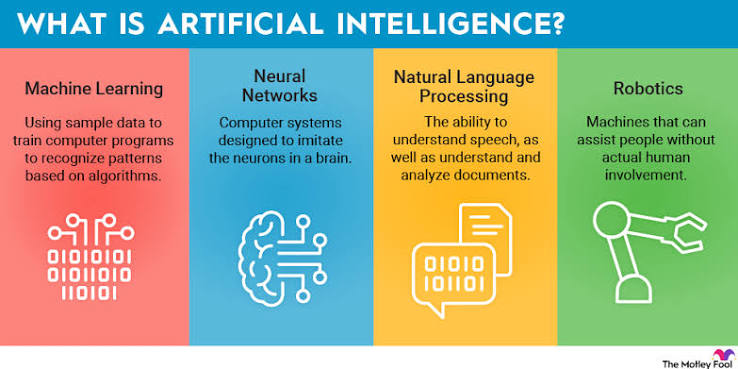
    • Machine Learning (ML): This is the engine of modern AI. Instead of being explicitly programmed for every rule, ML algorithms learn patterns from data. For instance, a machine learning model can be trained on millions of images of cats and dogs to learn the visual features that distinguish them. Once trained, it can classify new images with high accuracy.
    • Deep Learning: A subset of machine learning that uses artificial neural networks with many layers (hence ‘deep’). These networks are loosely inspired by the structure of the human brain. Deep learning powers many of the recent breakthroughs, such as image recognition, speech recognition, and natural language processing. It’s the technology behind self-driving cars and voice assistants.
    • Natural Language Processing (NLP): This field focuses on enabling machines to understand, interpret, and generate human language. Chatbots like ChatGPT, translation services like Google Translate, and even your email’s smart reply feature all rely on NLP. It’s what allows you to talk to your phone and have it understand you.
    • Computer Vision: This enables machines to interpret and process visual information from the world, such as images and videos. Applications include facial recognition, medical imaging analysis, and autonomous vehicles detecting pedestrians. Computer vision is how your phone’s camera can focus on a face or how self-driving cars ‘see’ the road.

    These subfields often work together. For example, a self-driving car uses computer vision to see the road, NLP to understand voice commands, and machine learning to make driving decisions.

    How Does AI Actually Work?

    You don’t need a degree in computer science to understand the basic idea. AI systems learn from data. Here’s a simplified version of the process:

    1. Collect Data: AI needs lots of examples to learn from. This could be images, text, audio, or any other type of data. For a spam filter, it’s emails. For a facial recognition system, it’s photos of faces.
    2. Train the Model: The AI algorithm is fed this data. During training, the model adjusts its internal parameters to minimize errors. Think of it like a student studying for an exam—the more examples they see, the better they get at recognizing patterns. For instance, a model learning to recognize cats might start by randomly guessing, but with each image, it adjusts its ‘understanding’ until it can accurately identify cats.
    3. Make Predictions: Once trained, the model can take new, unseen data and make predictions or generate outputs. For example, after training on thousands of cat photos, the model can look at a new photo and say, ‘This is a cat’ with high confidence.

    It’s important to note that AI doesn’t ‘think’ like a human. It’s essentially pattern recognition at scale. The model is finding statistical patterns in the data, not understanding the world in a conscious way.

    A Brief History of AI: From Theory to Mainstream

    AI might seem like a recent phenomenon, but its roots go back decades. Here are some key milestones:

    • 1950: Alan Turing, a British mathematician, proposes the ‘Turing Test’ to determine if a machine can exhibit intelligent behavior indistinguishable from a human. This sparks the field of AI.
    • 1956: The term ‘Artificial Intelligence’ is officially coined at a conference at Dartmouth College. This is considered the birth of AI as a field.
    • 1997: IBM’s Deep Blue defeats world chess champion Garry Kasparov. This is a major milestone, showing that machines can outperform humans in specific intellectual tasks.
    • 2012: A deep learning model called AlexNet wins an image recognition competition, sparking a revolution in AI. This is when deep learning starts to dominate the field.
    • 2022-Present: The release of ChatGPT and other generative AI tools brings AI to the mainstream. Suddenly, anyone can use AI to write essays, create art, or generate videos. This is the era of generative AI.

    Why Is AI Everywhere Now?

    You might wonder: if AI has been around since the 1950s, why is it suddenly so prominent? The answer lies in three converging factors:

    1. Massive Data: The internet, social media, and digital sensors have created an explosion of data. AI algorithms need data to learn, and now we have more than ever.
    2. Cheap, Powerful Computing: The development of Graphics Processing Units (GPUs) and cloud computing has made it affordable to train complex AI models. What used to require supercomputers can now be done on a laptop.
    3. Algorithmic Advances: Researchers have made significant breakthroughs in algorithms, particularly in deep learning and transformer architectures. These innovations have made AI more accurate and capable.

    These factors have created a perfect storm, enabling AI to move from research labs into everyday products.

    The ‘Black Box’ Problem: Why AI Can Be Mysterious

    One of the challenges with AI is that many advanced models are so complex that even their creators can’t fully explain why they make certain decisions. This is known as the ‘black box’ problem. For example, a deep learning model that predicts whether a loan applicant is creditworthy might deny a loan, but the bank might not be able to pinpoint exactly why. This raises concerns about fairness and accountability.

    Researchers are working on ‘explainable AI’ to make these systems more transparent. But for now, it’s a reminder that AI isn’t magic—it’s a powerful but sometimes opaque tool.

    Types of Machine Learning: How AI Learns

    Machine learning, the core of modern AI, comes in three main flavors:

    • Supervised Learning: The model is trained on labeled data. For example, you give it images of cats labeled ‘cat’ and images of dogs labeled ‘dog.’ The model learns to map inputs to outputs. This is like a teacher grading homework—the model gets feedback on its mistakes.
    • Unsupervised Learning: The model is given unlabeled data and must find patterns on its own. For instance, a retailer might use unsupervised learning to segment customers into groups based on purchasing behavior, without any pre-existing labels. It’s like a student exploring a topic without a syllabus.
    • Reinforcement Learning: The model learns through trial and error, receiving rewards or penalties for its actions. This is how AI learns to play games like chess or Go. It’s like training a dog with treats—good behavior is rewarded, bad behavior is discouraged.

    Each type has its uses, and many real-world AI systems combine them.

    Common Misconceptions About AI

    There are many myths about AI that can lead to confusion. Let’s clear up a few:

    • ‘AI is a single thing.’ As we’ve seen, AI is an umbrella term covering many technologies. It’s not one monolithic entity.
    • ‘AI is conscious.’ Current AI is not conscious. It doesn’t have feelings, thoughts, or self-awareness. It’s a statistical pattern matcher. When ChatGPT generates a response, it’s not thinking; it’s predicting the next word based on patterns in its training data.
    • ‘AI will take over the world.’ This is a fear based on General AI, which doesn’t exist. Narrow AI, the only kind we have, is designed for specific tasks and can’t ‘take over’ anything.
    • ‘AI is always right.’ AI systems make mistakes. They can be biased, misidentify objects, or generate incorrect information. They’re tools, not oracles.

    The Impact of AI: Opportunities and Concerns

    AI has the potential to bring tremendous benefits. It can help discover new drugs, model climate change, personalize education, and improve accessibility for people with disabilities. For example, AI-powered speech recognition can help those with mobility impairments control their environment, and AI-driven medical imaging can detect diseases earlier.

    However, there are also legitimate concerns. One is automation anxiety—the fear that AI will replace human jobs. While AI can automate routine cognitive tasks like data entry and customer service, it also creates new job categories, such as prompt engineers and AI ethicists. History shows that technology often changes the nature of work rather than eliminating it entirely.

    Another concern is bias. AI systems learn from data, and if that data reflects historical inequalities, the AI can perpetuate them. For example, a hiring algorithm trained on past resumes might favor candidates who resemble current employees, leading to discrimination. Addressing bias is a major focus in AI ethics.

    There are also privacy concerns, as AI often relies on vast amounts of personal data. And with generative AI, there’s the risk of deepfakes—realistic but fake images or videos that could be used to spread misinformation.

    The Future of AI: What’s Next?

    AI is evolving rapidly. In the near term, we can expect more sophisticated generative AI, better natural language understanding, and increased integration into everyday devices. Governments are also stepping in to regulate AI, with laws like the EU AI Act aiming to ensure safety and protect consumers.

    Long-term, the question of General AI remains open. Some experts, like Geoffrey Hinton, have warned about the risks of creating superintelligent AI that might not align with human values. Others argue these concerns are speculative and distract from more immediate issues like bias and privacy.

    Regardless of what the future holds, one thing is clear: AI is here to stay. Understanding its basics is the first step to making informed decisions about how we use it and how we let it shape our world.

    AI is a powerful and versatile technology that is already woven into the fabric of our daily lives. By understanding what AI is—and what it isn’t—you can better navigate the modern world and participate in the conversations that will shape its future. Remember, AI is a tool, not a magic wand. It has the potential to do great good, but it also comes with challenges that we must address collectively. As you encounter AI in your own life, keep asking questions, stay curious, and don’t be afraid to dig deeper.

    Summary

    • AI is a field of computer science focused on creating systems that can perform tasks requiring human intelligence, such as learning, reasoning, and language understanding.
    • All current AI is Narrow AI, designed for specific tasks like facial recognition or language translation. General AI, with human-like abilities, does not exist yet.
    • Key subfields include Machine Learning, Deep Learning, Natural Language Processing, and Computer Vision, each contributing to different AI capabilities.
    • AI works by learning patterns from data, not by being explicitly programmed for every rule. It’s pattern recognition at scale, not human-like thinking.
    • AI is not conscious or infallible; it can be biased and make mistakes. Understanding its limitations is crucial for responsible use.

    FAQ

    Q: Is AI the same as a robot?
    A: No, AI and robots are different concepts. AI is the software that enables machines to perform intelligent tasks. A robot is a physical machine that can interact with the world. Many robots use AI, but AI can also exist without a physical body, like a voice assistant on your phone.

    Q: Can AI think for itself?
    A: No, current AI does not think or have consciousness. It processes data and makes predictions based on patterns it has learned. It doesn’t have beliefs, desires, or self-awareness. It’s a sophisticated tool, not a mind.

    Q: Will AI take my job?
    A: AI can automate certain tasks, especially routine ones like data entry or basic customer service. However, it also creates new jobs and changes the nature of work. Historically, technology has shifted employment rather than eliminating it. It’s more about adapting skills than losing jobs.

    Q: How can I learn more about AI?
    A: There are many resources for beginners. You can start with online courses on platforms like Coursera or edX, read books like ‘Artificial Intelligence: A Guide for Thinking Humans’ by Melanie Mitchell, or follow reputable tech news sites. The key is to start with the basics and build from there.

    Q: Is AI dangerous?
    A: AI can be dangerous if misused, such as creating deepfakes or biased algorithms. But it’s not inherently dangerous. The risks come from how we design, use, and regulate it. Responsible development and ethical guidelines are essential to mitigate potential harms.

  • Run a 70B Language Model on a 4GB GPU: How AirLLM Makes the Impossible Possible

    airllm AirLLM — это инструмент, позволяющий выполнять вывод (inference) больших языковых моделей (LLM) с 70 миллиардами параметров на одном GPU с 4 ГБ памяти | Сетка — социальная сеть от hh.ru

    Imagine running a 70-billion-parameter language model—the kind that powers cutting-edge AI chatbots—on a modest laptop with just 4GB of graphics memory. That sounds impossible, right? After all, such models typically require hundreds of gigabytes of memory. But a clever open-source library called AirLLM is turning that impossibility into reality, and it’s not using magic or even quantization. Instead, it uses a simple but powerful trick: loading the model one layer at a time, like reading a book page by page instead of holding the whole tome in your hands.

    This article explains how AirLLM works, why it’s a game-changer for hobbyists and researchers, and what trade-offs you need to accept. Whether you’re a developer wanting to experiment with large models on a budget or just curious about the latest AI optimization techniques, this guide will help you understand the mechanics, the benefits, and the limitations of running a 70B model on a single 4GB GPU.

    The Problem: Big Models, Small Memory

    Large language models (LLMs) are measured in parameters—the numbers that define their behavior. A 70B model has 70 billion parameters. In a standard 16-bit floating-point format (FP16), each parameter takes 2 bytes, so the model alone needs about 140GB of memory. Even in a more compact 8-bit format, that’s still 70GB. Consumer GPUs typically have 8–24GB of VRAM, and a 4GB GPU is considered entry-level. So how can anyone run such a model on a 4GB card?

    Traditional solutions involve either shrinking the model (quantization) or spreading it across multiple devices. Quantization reduces precision, which can hurt accuracy. Multi-GPU setups are expensive and not available to everyone. AirLLM takes a different path: it keeps the model in full precision but avoids loading it all at once.

    The AirLLM Approach: Layer-by-Layer Loading

    Think of a transformer model as a stack of identical layers. Each layer processes the input and passes it to the next. AirLLM exploits this structure by loading only one layer onto the GPU at a time. The rest of the model stays in your computer’s system RAM (or even on disk). Here’s the step-by-step process:

    1. Initialization: The model’s weights are stored in a memory-mapped file on your hard drive or SSD. This file is not loaded into RAM all at once; instead, it’s accessed as needed.
    2. Forward pass: For each layer, AirLLM copies the layer’s weights from the memory-mapped file into the GPU’s VRAM, runs the computation, then copies the results back to CPU memory and discards the layer from the GPU.
    3. Sequential processing: This happens layer by layer, from the first to the last, until the entire forward pass is complete.

    This is analogous to reading a book one page at a time: you don’t need to hold the entire book in your hands; you just flip pages as you go. The GPU acts as a scratchpad for a single page, while the rest of the book sits on your desk (RAM) or in a drawer (disk).

    Why This Works: The Role of CPU and Disk

    AirLLM’s efficiency comes from clever use of system resources. The GPU is only used for the heavy matrix multiplications, which are fast. The bottleneck is the constant data transfer between CPU and GPU. To minimize this, AirLLM uses memory-mapped files, which allow the operating system to load data from disk into RAM on demand, without copying the entire file. This reduces memory overhead and speeds up access.

    For a 70B model in FP16, you need about 140GB of storage. If you have 32GB of RAM, the OS will swap parts of the file to disk as needed. This is slower than having everything in RAM, but it still works. The recommended setup is at least 32GB of RAM, but even 16GB can work with enough swap space, though performance will suffer.

    Performance Trade-Offs: Speed vs. Feasibility

    Let’s be clear: running a 70B model this way is slow. The constant CPU↔GPU transfers mean that generating a single token could take seconds or even minutes, depending on your hardware. In benchmarks, AirLLM is often 10–50x slower than running the same model on a high-end GPU with enough VRAM. This is not a solution for real-time applications or high-throughput serving. It’s designed for batch size 1—meaning you generate one sequence at a time—and for scenarios where you need full precision and don’t have access to better hardware.

    But for many use cases, this trade-off is acceptable. If you’re a researcher testing a hypothesis, a student learning about LLMs, or a hobbyist who wants to run a specific model locally for privacy reasons, waiting a few minutes for a response might be fine. The key is that it’s possible to run the model at all, without spending thousands of dollars on a cloud GPU.

    AirLLM vs. Quantization: A Different Trade-Off

    Most other tools that run large models on consumer hardware use quantization. For example, llama.cpp with GGUF files can run a 70B model in 4-bit precision on an 8GB GPU with much better speed than AirLLM. Quantization reduces the model’s size by approximating weights with fewer bits, which can degrade quality, especially for tasks like math or code generation.

    AirLLM’s advantage is that it preserves full FP16 precision, so you get the exact same output as you would on a data center GPU. This is crucial for applications where accuracy is paramount. However, you pay for that with speed. In practice, you might combine both approaches: use AirLLM with a quantized model to get even lower memory usage, but that’s not the default.

    Practical Considerations: What You Need

    To run AirLLM with a 70B model, you’ll need:

    • A GPU with at least 4GB VRAM: This is the minimum, but more VRAM (e.g., 8GB) will allow larger batch sizes or faster processing.
    • Sufficient system RAM: 32GB is recommended, but 16GB might work with swap. The more RAM you have, the less disk I/O is needed.
    • A fast SSD: Since the model is stored on disk, a fast NVMe SSD will significantly reduce loading times.
    • Python and PyTorch: AirLLM is a Python library that integrates with Hugging Face Transformers.

    Setting it up is straightforward: you install the library, load your model with a special wrapper, and run inference as usual. The library handles the layer-wise loading automatically.

    Real-World Use Cases

    Who would actually use AirLLM? Here are a few scenarios:

    • Privacy-conscious users: You can run a powerful model locally without sending data to a cloud provider.
    • Educators and students: You can demonstrate how large models work on affordable hardware.
    • Developers testing new architectures: You can prototype with a 70B model without renting expensive GPUs.
    • Offline environments: If you’re in a location with no internet, you can still use a state-of-the-art model.

    Limitations and Risks

    AirLLM is not a silver bullet. It has several limitations:

    • Speed: As mentioned, it’s slow. For interactive use, you might wait minutes for a single response.
    • Model compatibility: It works with standard Hugging Face transformer models, but custom architectures may not be supported.
    • Maintenance: The project is maintained by a single developer (lyogavin), so there’s a risk of stagnation. However, as of early 2025, it’s actively updated.
    • Batch size: It’s designed for single-sequence generation. Trying to process multiple requests simultaneously will likely exhaust memory or become impractically slow.

    Conclusion

    AirLLM is a remarkable piece of engineering that democratizes access to large language models. By cleverly offloading layers to CPU and disk, it allows anyone with a modest GPU to run a 70B model in full precision. While the speed is a significant drawback, the ability to run such models locally opens up new possibilities for research, education, and privacy-sensitive applications. If you’re willing to trade speed for feasibility, AirLLM is a tool worth exploring.

    AirLLM proves that you don’t need a data center to experiment with frontier-scale AI. By streaming layers through a 4GB GPU, it makes the impossible possible—albeit slowly. Whether you’re a tinkerer, a researcher, or just curious, this library is a fascinating example of how software can overcome hardware limitations. So, if you have a spare laptop and a bit of patience, why not give it a try?

    Summary

    • AirLLM enables running 70B-parameter LLMs on a single 4GB GPU by loading one transformer layer at a time onto the GPU, keeping the rest in CPU RAM or disk.
    • It preserves full FP16 precision, avoiding the quality loss of quantization, but is 10–50x slower than full-GPU inference.
    • Designed for batch size 1, single-sequence generation, not high-throughput serving.
    • Requires a 4GB GPU, 32GB+ system RAM (or swap), and a fast SSD for reasonable performance.
    • Ideal for hobbyists, researchers, and privacy-conscious users who need to run large models locally without expensive hardware.

    FAQ

    Q: Can AirLLM really run a 70B model on a 4GB GPU?
    A: Yes, but only with CPU offloading. The GPU holds just one layer at a time, while the rest of the model resides in system RAM or on disk. You need sufficient RAM (32GB recommended) and disk space (about 140GB for FP16).

    Q: How fast is inference with AirLLM?
    A: It’s significantly slower than normal GPU inference—often 10–50x slower. Generating a single token can take seconds to minutes, depending on your CPU and RAM speed. It’s for feasibility, not performance.

    Q: Is AirLLM better than quantization?
    A: It depends. AirLLM preserves full precision, which is better for accuracy-sensitive tasks. Quantization (e.g., GGUF Q4) is faster and uses less memory but may degrade quality. You can also combine both.

    Q: Does AirLLM work with any model?
    A: It works with models that follow the standard Hugging Face transformer layer structure, such as Llama, Mistral, and Qwen. Custom architectures may not be supported.

    Q: Can I use AirLLM for batch inference?
    A: Technically yes, but batch size >1 will likely exhaust memory or become impractically slow. The design is optimized for single-sequence generation.