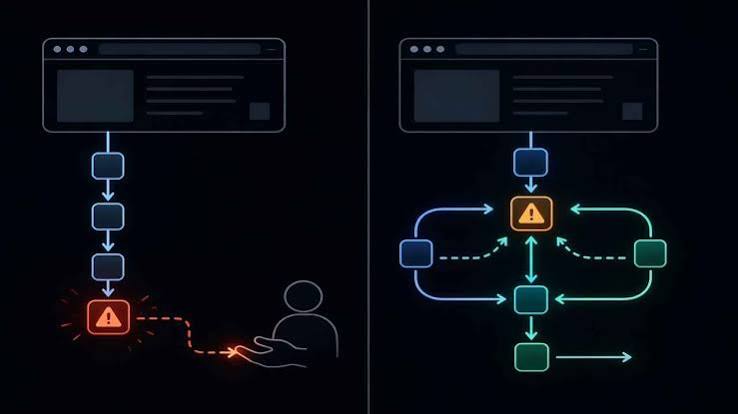
Imagine asking your browser to plan a three-day trip to Lisbon on a budget of $800, and then watching it open tabs, compare flights, check hotel reviews, and even draft an itinerary all without you touching the keyboard. That’s the promise of ‘agentic browsers,’ a new class of web software that uses AI to act on your behalf. Traditional browsers the Chrome, Safari, and Firefox you know are passive tools: they show you the web, but you do all the work. Agentic browsers aim to flip that script.
This shift isn’t just a new feature; it’s a change in how we interact with the web. Instead of a human driving every click and keystroke, an AI agent can take the wheel for multi-step tasks. Understanding the difference between these two models helps you see where the web is heading and what it means for your online life. Here’s a clear breakdown of what sets them apart, how they work, and what to watch for.
The Traditional Browser: Your Digital Window
A traditional browser is a software application that retrieves and displays web pages. Chrome, Safari, Firefox, and Edge are the familiar faces. Their core jobs are straightforward: you type a URL, click a link, or enter a search query, and the browser fetches the page, renders it with HTML, CSS, and JavaScript, and shows it to you. You handle the rest—reading, deciding where to go next, filling out forms, and fixing problems when something breaks.
The architecture is built for this human-driven interaction. A rendering engine (like Blink or WebKit) draws the page, a JavaScript engine (such as V8 or SpiderMonkey) runs code, and a networking stack fetches data. You have tabs, bookmarks, history, extensions, and password managers—all tools to help you navigate, but none that act autonomously.
Think of a traditional browser as a powerful car: it can go fast, but you are always in the driver’s seat, steering, braking, and deciding the route.
The Agentic Browser: Your Digital Assistant
An agentic browser, by contrast, is designed to perform tasks on your behalf. It doesn’t just display the web; it interacts with it. Using large language models (LLMs) and other AI, it can break down a high-level goal into smaller steps, navigate websites, click buttons, fill forms, and adapt when things go wrong—all without step-by-step human input.
For example, if you ask an agentic browser to “find a good used bike under $500,” it might search classified sites, filter results, compare prices, and even contact sellers via messaging forms, all while you supervise. It can maintain memory across sessions, remembering your preferences and past actions.
Early examples include OpenAI’s Operator (a research preview from January 2025), Perplexity’s Comet, and startups like Dia. Even traditional browsers are dabbling: Chrome has added AI features like “Help me write,” and Microsoft is integrating Copilot into Edge. Developer frameworks like Browser-use and Playwright MCP allow programmers to build agentic control into existing browsers.
The Core Differences: A Side-by-Side Look
Here’s a quick comparison to highlight the key shifts:
| Feature | Traditional Browser | Agentic Browser |
|—|—|—|
| Primary user | Human | Human + AI agent (or agent alone) |
| Interaction model | Direct manipulation | Delegation + supervision |
| Task execution | User performs steps | Agent performs steps autonomously |
| Error handling | User troubleshoots | Agent self-corrects (or escalates) |
| State/memory | Session-based, local | Persistent, cross-session, cloud-synced |
| Trust model | User sees every action | Agent acts on user’s behalf (requires new trust mechanisms) |
The most significant change is the interaction model. With a traditional browser, you are the sole actor. With an agentic browser, you become a supervisor, setting goals and approving actions. This shift introduces new challenges around trust, privacy, and control.
Why Now? The Tech Behind the Shift
The jump from traditional to agentic browsers didn’t happen overnight. It’s the result of several technological advances converging in the mid-2020s.
First, LLMs got much better at understanding and generating text, which lets them parse web page content and decide what actions to take. Models like GPT-4 can look at a page’s HTML or accessibility tree and figure out which button to click or which field to fill.
Second, “computer-use” models emerged. OpenAI’s GPT-4o and Anthropic’s Claude 3.5 Sonnet demonstrated they could operate a computer screen by processing screenshots and sending mouse and keyboard commands. This ability is a stepping stone to full browser control.
Third, the Model Context Protocol (MCP), an open standard from Anthropic introduced in November 2024, standardizes how agents connect to tools and data. It makes it easier for browsers to integrate with external services, so an agent can check your calendar, email, or payment systems securely.
Finally, web accessibility improvements, like better DOM accessibility trees and ARIA roles, give agents a clearer picture of page structure, much like a screen reader does for visually impaired users.
The Upsides: What Agentic Browsers Offer
For power users, the appeal is productivity. Agents can handle repetitive tasks—like filling out forms, comparing prices, or compiling research—in parallel, saving hours. Imagine a browser that, while you work on one thing, is also booking your flights, reserving a table, and sending an email to confirm.
Accessibility is another win. People with motor or visual impairments can delegate complex navigation to an agent, bypassing the need for precise mouse movements or constant visual scanning.
“The browser as a copilot” is a common vision: the agent doesn’t replace you; it augments your abilities. You stay in control, approving critical actions, but the tedious legwork is automated.
The Downsides and Risks: What to Watch For
Agentic browsers aren’t without flaws. Autonomy introduces risk. An agent might misinterpret a page, click the wrong link, or share data in ways you didn’t intend. The trust model is fundamentally different—you can’t see every action, so you need new mechanisms for transparency and consent.
Privacy is a major concern. An agent that remembers your preferences and past actions across sessions is storing a lot of personal data. Where is that stored? Who has access? Cloud-based agents like OpenAI’s Operator add another layer: your actions are processed on remote servers.
Security is another issue. Malicious websites might exploit agents, tricking them into harmful actions, just as they trick humans with phishing. We need new safety protocols for agent-based browsing.
Finally, there’s the question of control. Some people may feel uncomfortable ceding decision-making to an AI, even for minor tasks. The balance between autonomy and oversight is a design challenge.
The Bottom Line: A Spectrum, Not a Binary
It’s important to note that the line between traditional and agentic isn’t sharp. Most agentic browsers are built on top of traditional browser engines, and traditional browsers are adding agent-like features. Chrome’s AI tab organizer, for instance, is a small step toward agentic behavior. The future likely holds a spectrum, where you can choose how much autonomy to grant your browser.
As a user, you’ll need to weigh the convenience gains against the risks. For some tasks, you’ll want full control; for others, you’ll happily delegate. The key is to understand what your browser is doing and to stay informed about the trust and safety mechanisms in place.
In short, the shift from traditional to agentic browsers is not about replacing the browser; it’s about changing the relationship between you and the web. Whether that’s a leap forward or a step into the unknown depends on how well we manage the trade-offs.
The arrival of agentic browsers marks a turning point in how we use the web. Traditional browsers put the human at the center of every interaction; agentic browsers introduce an AI partner that can act on your behalf. The technology is promising, but it brings real questions about trust, privacy, and control. As these tools evolve, you’ll have more choices—and more responsibility—in deciding how much autonomy to grant your browser.
Summary
- Traditional browsers (Chrome, Safari, Firefox) are human-driven: you type, click, and decide every step.
- Agentic browsers (like OpenAI’s Operator, Perplexity’s Comet) use AI to perform multi-step tasks autonomously, such as planning a trip or comparing products.
- Key differences include interaction model (direct vs. delegated), error handling (user vs. AI), and memory (session-based vs. persistent).
- Why now? Advances in LLMs, computer-use models, MCP, and web accessibility have made autonomous browsing feasible.
- Benefits include productivity gains and improved accessibility; risks include privacy issues, security vulnerabilities, and loss of user control.
FAQ
Q: What is an agentic browser?
A: An agentic browser is a web browser that uses AI agents to perform tasks autonomously on your behalf, such as booking a trip or filling out forms, without step-by-step human input.
Q: How is it different from a traditional browser?
A: A traditional browser requires you to manually navigate and perform every action. An agentic browser can understand goals, break them into steps, and execute them, while you supervise.
Q: Are agentic browsers safe?
A: They are new, so safety is still evolving. Risks include privacy (data storage and sharing), security (malicious sites targeting agents), and errors (misinterpretation). Look for transparency and control features.
Q: Do I need to be tech-savvy to use an agentic browser?
A: No, the goal is to make complex tasks easier. You interact with the agent in plain language, but you should still understand what it does and how to approve actions.
Q: Will agentic browsers replace traditional browsers?
A: Not immediately. They will likely coexist, with traditional browsers incorporating agent-like features and agentic browsers relying on traditional engines. You’ll have options for how much autonomy to grant.