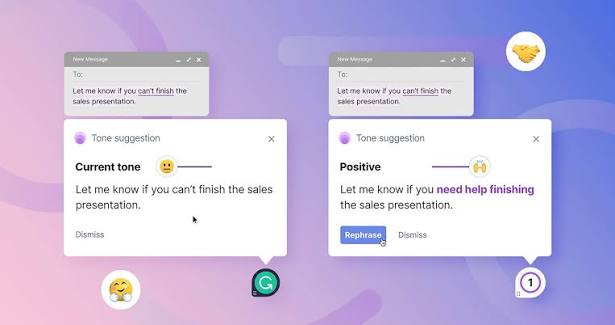
You’ve felt it. You write an email, run it through Grammarly, hit send and then silence. Or worse, a polite brush-off. It’s not your ideas. It’s your voice. Grammarly, used by 30 million people daily, has a hidden side effect: it flattens your writing into a generic, instantly recognizable ‘AI tone.’ Readers have developed a sixth sense for this style, and they tune it out.
A new breed of tool promises to spot this tone and help you sound human again. But which tool actually works? And is ‘AI tone’ a real problem or just a marketing bogeyman? Let’s dig into the research.
The Grammarly Problem: When ‘Correct’ Becomes ‘Forgettable’
Grammarly isn’t a villain. It’s a brilliant grammar checker that has saved millions from embarrassing typos. But its suggestions often push you toward the most probable phrasing, not the most distinctive. The result is text that’s perfectly correct and utterly colorless.
Linguists call this ‘statistical averaging.’ Large language models and grammar tools optimize for what most people would say, which means your writing starts to sound like everyone else’s. Add in a safety bias—models trained to avoid offense—and you get hedged, non-committal language that saps your authority.
Recruiters have caught on. Surveys from ResumeBuilder and Canva in 2023–2024 found that a majority of hiring managers say they can spot AI-written cover letters and often discard them instantly. The tell isn’t grammar—it’s the rhythm. The overuse of ‘delve,’ ‘landscape,’ and ‘it’s important to note.’ The perfectly balanced sentences that feel like they were assembled, not written.
The Rise of the ‘AI Tone’ Detector-Humanizer
In response, a cottage industry of tools has emerged. Some, like GPTZero and Originality.ai, focus on detection—telling you if a text was AI-written. Others, like StealthGPT, HIX Bypass, and Humanize AI, claim to rewrite AI text so it sounds more natural and bypasses detectors.
But here’s the catch: many of these tools are low-quality, SEO-driven products with dubious efficacy. They often swap one set of clichés for another. Blind tests have shown that readers can’t reliably distinguish ‘humanized’ AI text from regular AI text. The tools may fool a detector, but they won’t fool a discerning human reader.
What Actually Makes Writing Sound ‘AI’?
Before you ditch Grammarly, it’s worth understanding what we mean by ‘AI tone.’ Researchers and editors point to several markers:
- Overused transition words: ‘Moreover,’ ‘furthermore,’ ‘in addition’—these appear far more often in AI text than in human writing.
- Hedging: ‘It’s worth noting,’ ‘arguably,’ ‘in some cases’—language that covers the author’s bases but sounds indecisive.
- Formulaic structure: Every paragraph starts with a topic sentence, followed by two supporting sentences, and ends with a transition. Humans vary their rhythm; AI often doesn’t.
- Neutral vocabulary: AI avoids strong words like ‘terrible’ or ‘amazing,’ favoring safe adjectives like ‘important’ and ‘significant.’
The root cause is statistical averaging. When you accept Grammarly’s suggestion to replace ‘a lot of’ with ‘numerous,’ you’re not just fixing grammar—you’re conforming to the most common phrasing in the model’s training data.
The New Tool: What to Look For
So, should you stop using Grammarly entirely? Not necessarily. Grammarly’s core grammar checking is still valuable. The problem is uncritically accepting its style suggestions.
The better approach is to use a tool that flags AI tone without forcing you into a new template. Look for tools that:
- Identify specific AI markers: Not just a vague ‘tone score’ but a detailed breakdown of which phrases sound robotic.
- Offer human alternatives: Instead of swapping ‘delve’ for ‘explore,’ they suggest more natural, context-specific phrasing.
- Preserve your voice: The best tools learn your style and make suggestions that fit, rather than pushing you toward a generic ‘professional’ register.
One tool that has gained traction is the Hemingway Editor, which predates the AI boom but focuses on concision and readability. It highlights passive voice, adverbs, and complex sentences—all of which can contribute to an AI-like feel. While it doesn’t specifically target AI tells, it pushes you toward a more direct, human style.
The Ethics of ‘Humanizing’ AI Text
Before you run your resume through a humanizer, consider the ethical dimension. In 2024–2025, universities updated honor codes to ban AI-humanization tools, treating them as a form of academic dishonesty. In journalism, passing off AI-generated text as human-written is a breach of trust. If you need to hide that AI wrote it, maybe you shouldn’t use AI in the first place.
That doesn’t mean AI tools are useless. They’re excellent for brainstorming, outlining, and overcoming writer’s block. But the final product should have your fingerprints on it—your word choices, your rhythm, your quirks.
A Practical Strategy: Use Grammarly, Then Edit for Voice
Here’s a workflow that works:
- Write a rough draft yourself. Don’t start with AI; start with your own thoughts, even if they’re messy.
- Use Grammarly for mechanics only. Turn off style suggestions or ignore them. Focus on fixing typos and grammar errors.
- Read your text aloud. If you stumble over a sentence, rewrite it. AI text often reads too smoothly—real human writing has natural hiccups.
- Check for AI tells manually. Look for ‘delve,’ ‘landscape,’ ‘it’s important to note,’ and other buzzwords. Replace them with your own words.
- If you use an AI detector, take it with a grain of salt. Studies show that detectors are unreliable, especially for non-native English speakers. They’re a starting point, not a verdict.
The Bottom Line
The ‘AI tone’ is real, but it’s not a virus you catch from Grammarly. It’s a symptom of lazy editing. Tools can help, but they can’t replace your judgment. The best way to avoid sounding like a robot is to write like a human: vary your sentence length, commit to your ideas, and don’t be afraid to sound like yourself.
Grammarly isn’t the enemy, but it’s not your voice coach either. The new wave of ‘AI tone’ tools—some helpful, many hype—reflect a broader truth: readers are hungry for authenticity. The fix isn’t a magic tool; it’s a habit of editing for voice, not just correctness. Write like you talk, read your work aloud, and let your personality leak through. That’s the one thing no AI can replicate.
Summary
- Grammarly’s style suggestions often flatten your voice into a generic ‘AI tone’ that readers ignore.
- The ‘AI tone’ is real, marked by overused transitions, hedging, and formulaic structure.
- New tools claim to detect or ‘humanize’ AI text, but many are unreliable or swap one cliché for another.
- The best approach: use Grammarly for grammar only, then edit for voice manually.
- Consider the ethics: humanizing AI text may be dishonest in academic or journalistic contexts.
FAQ
Q: Is Grammarly bad for my writing?
A: No. Grammarly is excellent for catching grammar and spelling errors. The problem is when you blindly accept its style suggestions, which can make your writing sound generic. Use it as a proofreader, not a ghostwriter.
Q: What tools can detect AI tone?
A: Tools like GPTZero, Originality.ai, and Writer.com’s AI detector can flag AI-written text, but they’re unreliable. For improving your own writing, Hemingway Editor highlights complexity and passive voice, which can help you sound more human.
Q: How can I avoid sounding like AI?
A: Vary your sentence length, avoid overused transition words, and use concrete specifics instead of vague generalizations. Read your writing aloud—if it sounds too smooth, it might sound robotic.
Q: Are AI humanizer tools ethical?
A: It depends on the context. In academic or journalistic settings, passing off AI-generated text as human-written is often considered dishonest. In casual business emails, it’s less clear-cut, but transparency is always a safe bet.
Q: Do AI detectors actually work?
A: No, not reliably. Studies show they have high error rates, especially with non-native English speakers. They can be a useful starting point, but don’t treat their verdict as final.