Tag: 2026

  • Airbnb vs. Hotel in 2026: Which Actually Delivers Better Value?

    Airbnb vs. hotel: 2025 comparison | Pacaso

    The age-old debate of Airbnb versus hotels has a new twist in 2026. Prices are converging, fees are ballooning, and both sides are upgrading their offerings. If you’re planning a trip, the ‘cheaper’ option isn’t always obvious anymore. This breakdown looks at the real numbers, hidden costs, and what you get for your money across different travel styles.

    The Price Reality Check

    For years, the conventional wisdom was simple: Airbnb is cheaper than a hotel. But that’s no longer a safe assumption. In 2025, the global average nightly rate for an Airbnb was around $160–$180, while hotels averaged $150–$170 for midscale to upscale properties. The gap has essentially closed.

    The real difference lies in the fees. Airbnb charges a guest service fee of 10–14% and often adds a cleaning fee that can range from $50 to $150 per stay. A listing that looks like a $100 bargain can easily jump to $150 or more once you add those extras. Hotels, on the other hand, are increasingly tacking on resort fees of $20–$60 per night, plus taxes that can reach 10–18% in major cities. Parking and Wi-Fi might be extra at many properties. By the time you check out, the total can be surprisingly close to an Airbnb.

    In cities like New York, London, Paris, and Tokyo, price parity is now the norm. A comparable hotel room and a private Airbnb apartment often end up within $10–$20 of each other per night. The days of Airbnb being the automatic budget winner are over.

    Space vs. Service: What Your Money Buys

    The real value equation goes beyond the nightly rate. It’s about what you get for that price.

    Airbnb shines when you need space. A two-bedroom apartment can comfortably sleep a family of four or a group of friends, often for less than booking two hotel rooms. You get a full kitchen, which means you can cook meals and save on dining out. Laundry facilities are a huge plus for longer trips. And you’re staying in a residential neighborhood, which can feel more authentic and local.

    Hotels excel at convenience and consistency. You know exactly what you’re getting with a branded hotel. There’s a front desk, daily housekeeping, and usually an on-site restaurant or bar. Amenities like a pool, gym, and business center are standard. If something goes wrong, there’s someone to fix it immediately. For many travelers, that peace of mind is worth a premium.

    Who Wins for Different Travelers?

    The Budget Traveler

    For groups and families, Airbnb can still win on price per person. Splitting a $250/night three-bedroom apartment among five people is often cheaper than booking two or three hotel rooms. Cleaning fees are spread across the group, and the kitchen reduces food costs.

    But for solo travelers and couples, hotels are increasingly the better deal. No cleaning fees, no minimum stays, and predictable total pricing make budgeting easier. A single traveler might find a hotel room for $120/night all-in, while a comparable Airbnb could cost $150 after fees.

    The Business Traveler

    Hotels dominate corporate travel. They offer consistency across locations, dedicated meeting rooms, business centers, and loyalty programs that reward frequent stays. Expense reports are straightforward, with itemized invoices.

    Airbnb has tried to crack this market with “Stays for Work,” offering business-ready listings with fast Wi-Fi and workspaces. But if your company is paying, hotels generally provide better service and convenience. If you’re self-funded, an Airbnb with a kitchen can save you money on meals.

    The Long-Stay Traveler

    For stays of a week or more, Airbnb has historically been the winner. Monthly discounts of 20–40% off the nightly rate, plus access to laundry and cooking facilities, make it attractive for remote workers and extended trips.

    Hotels have fought back with extended-stay brands like Residence Inn and Homewood Suites, which offer kitchenettes, free breakfast, and weekly housekeeping at competitive rates. In 2026, many Airbnb hosts have reduced their long-term discounts due to high demand, so the price difference has narrowed. It’s worth comparing both options for your specific dates.

    The Experience Seeker

    If you want a treehouse in Costa Rica, a houseboat in Amsterdam, or a castle in Scotland, Airbnb has no equal. These unique stays are part of the appeal of the platform. You also get to live like a local in neighborhoods far from tourist crowds.

    Hotels win for luxury and service. A five-star property offers concierge, room service, spas, and predictable quality. A $300/night boutique hotel might feel like better value than a $200/night Airbnb that lacks basic amenities or has an unreliable host.

    The Hidden Costs and Benefits

    Airbnb’s hidden costs: cleaning fees, service fees, and sometimes the need to buy your own toiletries and coffee. You may also face variable check-in times and stricter cancellation policies.

    Hotels’ hidden costs: resort fees, parking charges, and expensive mini-bars. But you often get free breakfast, daily housekeeping, and access to facilities like pools and gyms.

    Time is also a factor. With a hotel, you show up and your room is ready. With an Airbnb, you need to coordinate check-in with the host, which can be inconvenient after a long flight.

    The Regulatory Factor

    Cities like New York, Barcelona, Amsterdam, and Tokyo have cracked down on short-term rentals, reducing Airbnb supply and driving up prices in those markets. This has made hotels more competitive in many urban destinations. If you’re traveling to a major city, a hotel might be the more sensible choice.

    The Verdict for 2026

    There’s no one-size-fits-all answer. The best choice depends on your travel style, group size, and priorities.

    • Choose Airbnb if you’re traveling with a group or family, staying a week or more, or seeking a unique experience.
    • Choose a hotel if you’re a solo traveler, on business, or value consistency and service over space.

    Before you book, do the math. Compare the total price of both options for your specific dates, including all fees and taxes. And consider what you’ll actually use—a kitchen you’ll never cook in isn’t worth paying for.

    In 2026, the battle between Airbnb and hotels is closer than ever. Price parity and fee creep mean the cheap option isn’t obvious. The real value lies in matching the accommodation to your needs. Do your homework, crunch the numbers, and you’ll find the right fit for your trip.

    Summary

    • Prices have converged: Airbnb averages $160–$180/night, hotels $150–$170/night.
    • Fees are the hidden differentiator: Airbnb’s cleaning and service fees vs. hotel resort fees and taxes.
    • Airbnb wins for groups, families, and long stays; hotels win for solo travelers and business.
    • Unique stays are Airbnb’s strength; consistency and service are hotels’ edge.
    • Always compare total costs for your specific dates before booking.

    FAQ

    Q: Is Airbnb cheaper than a hotel in 2026?
    A: It depends. For solo travelers and couples, hotels often match or beat Airbnb on price. For groups and longer stays, Airbnb can still be cheaper per person.

    Q: What are the hidden fees I should watch out for?
    A: Airbnb charges a guest service fee (10–14%) and often a cleaning fee ($50–$150). Hotels may add resort fees ($20–$60/night) and taxes (10–18%).

    Q: Which is better for a family of four?
    A: Airbnb is usually better for families, as you can rent a multi-bedroom apartment with a kitchen, which can be more comfortable and cost-effective than multiple hotel rooms.

    Q: Do hotels offer loyalty perks that make them better value?
    A: Yes, hotel loyalty programs offer points, upgrades, and free nights, which can add significant value for frequent travelers. Airbnb has no equivalent program.

    Q: How do long-term stays compare?
    A: Airbnb historically offers monthly discounts (20–40%), but hotels’ extended-stay brands now compete with kitchenettes and weekly rates. Compare both for your specific dates.
  • 7 Smart Money-Saving Hacks That Actually Work in 2026

    7 Smart Money-Saving Hacks That Actually Work in 2026

    In 2026, the financial landscape is a mixed bag. Inflation has cooled from its 2022–2023 peaks, but prices are still climbing at a rate that outpaces wage growth for many. The Federal Reserve is holding interest rates in the 3.5–4.5% range, which means borrowing is expensive, but saving can be rewarding if you know where to look. Meanwhile, consumer debt has hit a record $1.2 trillion, and the average American is bleeding $219 a month on subscriptions they barely use. The old advice—clip coupons, use cash envelopes, manually track every penny—feels outdated and exhausting. The good news? Technology has evolved to do the heavy lifting for you. In 2026, the smartest money-saving strategies aren’t about willpower; they’re about setting up automated systems that work in the background. From AI-powered budgeting apps to smart home devices that cut your energy bills, here are seven hacks that actually work in the current economic climate.

    1. Automate Your Savings with AI-Powered Budgeting Apps

    Gone are the days of manually logging every coffee purchase. In 2026, budgeting apps like Cleo, Monarch, and YNAB have integrated AI and open banking APIs to give you real-time tracking and personalized insights. These apps can automatically categorize your spending, identify wasteful subscriptions, and even transfer spare change to a savings account. For example, Cleo uses AI to chat with you about your finances, flagging unusual charges and suggesting a weekly savings goal. The key is to set up ‘set-and-forget’ rules: auto-round-up purchases to the nearest dollar, auto-transfer a fixed amount to savings on payday, and let the app negotiate your bills. The result? You save without thinking about it. Just be sure to monitor your account to avoid overdrafts—automation isn’t a substitute for occasional check-ins.

    2. Kill the Subscription Trap with Virtual Cards and Audits

    The average American spends $219 a month on subscriptions—a 143% increase since 2020. Free trials auto-renew, forgotten memberships pile up, and bundled services seem like a deal until you realize you’re paying for 10 channels you never watch. The hack? Do a quarterly subscription audit. List every recurring charge, then cancel what you don’t use. To prevent future slip-ups, use virtual card numbers from services like Privacy.com or your Apple Card. These generate unique card numbers for each merchant, so you can set spending limits or block charges entirely. The FTC’s new ‘click-to-cancel’ rule (effective 2025) makes it easier to cancel online, so there’s no excuse to keep paying for that gym you never visit. Remember, not all subscriptions are bad—bundles like Disney+/Hulu/ESPN can save money if you actually use them. The goal is intentionality, not elimination.

    3. Let Smart Home Tech Cut Your Energy Bills

    Smart thermostats like the EcoBee or Nest have been around for a while, but in 2026 they’re cheaper and more effective than ever. On average, they save 10–15% on heating and cooling costs by learning your schedule and adjusting temperatures automatically. Pair them with smart plugs for your electronics—these can turn off standby power vampires (think TVs, game consoles, and chargers) that waste energy even when off. The upfront cost is $100–$250 per device, but utility rebates and IRA tax credits (still active in 2026) can offset that. For example, many utilities offer $50–$100 rebates for smart thermostats, and the federal tax credit covers up to 30% of the cost for energy-efficient upgrades. The payback period varies by climate, but in most regions, you’ll break even within a year or two, then enjoy pure savings.

    4. Buy Refurbished Electronics and Save 30–50%

    The refurbished electronics market has exploded, and major brands now sell certified refurbished directly. Apple, Samsung, and Dell offer ‘renewed’ products with warranties that match new items—AppleCare even covers refurbished iPhones. You can save 30–50% off retail prices, and the quality is often indistinguishable from new. The key is to buy from reputable sources: the manufacturer’s own store, or certified sellers on Amazon or Best Buy. Check the warranty and return policy, and look for ‘grade A’ or ‘like new’ condition. Battery health and cosmetic condition vary, so read the fine print. For example, a refurbished iPhone 14 might cost $600 instead of $800, and you get the same performance. This hack is a win for your wallet and the planet.

    5. Use Flash-Food Apps to Slash Grocery Bills

    Food waste is a huge expense—the average family throws away $1,500 of food a year. Apps like Too Good To Go and Flashfood are changing that by connecting you with restaurants and grocery stores that sell surplus food at deep discounts. You can get a ‘surprise bag’ of groceries for $5–$10 that would normally cost $20–$30. The catch? You don’t know exactly what you’ll get, and you need to pick it up during a specific time window. It’s a fun way to try new foods and cut your grocery bill by up to 50%. Pair this with AI meal-planning apps that suggest recipes based on what’s in your fridge, and you’ll waste less and save more. For example, the app ‘SuperCook’ scans your pantry and gives you recipes you can make with what you have, reducing impulse buys.

    6. Optimize Your Credit Card Rewards (If You Pay in Full)

    Credit card rewards are a double-edged sword. If you carry a balance, the interest (average APR of 22–24%) will wipe out any rewards. But if you pay your balance in full every month, you can earn serious cash back. In 2026, the best strategy is to use a card with 5% rotating categories (like the Chase Freedom Flex) and pair it with card-linked offers from Amex Offers or Chase Offers. These give you statement credits for spending at specific merchants—for example, $10 back on a $50 purchase at a restaurant. Sign-up bonuses are also lucrative; you can earn $200–$500 in cash back by meeting a minimum spend. Just be disciplined: set up autopay for the full balance, and never spend more than you normally would just to earn rewards. This hack is about optimization, not spending more.

    7. Slash Your Phone and Internet Bills with MVNOs and Negotiation

    The telecom industry is more competitive than ever. Mobile Virtual Network Operators (MVNOs) like Mint, Visible, and US Mobile offer plans on the same networks as the big carriers (Verizon, T-Mobile, AT&T) for under $25 a month. For example, Mint’s 15GB plan is $15 a month if you pay annually. The catch? You may get deprioritized during peak times, but for most users, the difference is negligible. For internet, use the FCC’s broadband map to see all available providers in your area, then call your current provider and threaten to switch—retention offers are common. You can also check if you qualify for the Affordable Connectivity Program (if it’s still funded) or local fiber deals. The key is to renegotiate every year; loyalty doesn’t pay in 2026.

    Saving money in 2026 isn’t about deprivation or coupon-clipping—it’s about leveraging technology to make saving automatic. From AI budgeting apps that do the math for you, to smart home devices that cut your energy bills, to refurbished electronics that save you hundreds, these hacks are designed to work with your lifestyle, not against it. Start with one or two that resonate with you, and you’ll see the difference in your bank account within months. The future of personal finance is smart, automated, and—best of all—painless.

    Summary

    • Automate savings with AI budgeting apps that round up purchases and auto-transfer to savings.
    • Audit and cancel unused subscriptions using virtual card numbers to block future charges.
    • Install smart thermostats and plugs to save 10–15% on energy, with rebates offsetting upfront costs.
    • Buy certified refurbished electronics to save 30–50% with warranties that match new.
    • Use flash-food apps like Too Good To Go to cut grocery bills by up to 50% and reduce waste.
    • Optimize credit card rewards only if you pay in full—avoid interest that erases gains.
    • Switch to MVNOs and negotiate internet bills to save on phone and broadband costs.

    FAQ

    Q: Are AI budgeting apps safe to use with my bank accounts?nA: Yes, reputable apps use bank-level encryption and read-only access via open banking APIs. They can’t move money without your permission, but always enable two-factor authentication and review permissions regularly.nnQ: How do I know if a refurbished product is worth it?nA: Look for ‘certified refurbished’ from the manufacturer or a reputable seller, check the warranty (should be at least 1 year), and read reviews on battery health and condition. If the price is 30–50% off new, it’s usually a good deal.nnQ: Will smart home devices really save me money?nA: On average, smart thermostats save 10–15% on heating and cooling, and smart plugs can cut standby power usage by up to 10% of your electricity bill. The payback period is typically 1–2 years, after which you’re saving money.nnQ: What’s the best way to cancel a subscription that’s hard to cancel?nA: The FTC’s ‘click-to-cancel’ rule requires companies to make it as easy to cancel as it was to sign up. If you’re still having trouble, use a virtual card number to block future charges, or contact your bank to stop the payment.nnQ: Can I really get a phone plan for under $25 a month?nA: Yes, MVNOs like Mint and Visible offer plans for $15–$25 a month on major networks. You may experience slower data during peak times, but for most people, it’s a great trade-off for the savings.

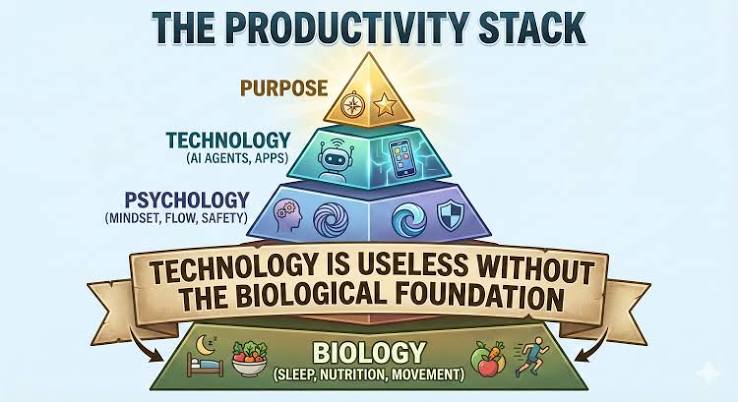
  • The 2026 Productivity Stack: How AI Agents, Local-First Tools, and Consolidation Are Rewriting the Rules

    The 2026 Productivity Stack: How AI Agents, Local-First Tools, and Consolidation Are Rewriting the Rules

    If you feel like your productivity toolkit is bursting at the seams, you’re not alone. The average knowledge worker juggles seven to ten different apps daily, and the cost of switching between them eats up as much as 30% of your focused time. But 2026 is shaping up to be the year we finally stop collecting tools and start delegating to them.

    The big shift? AI is no longer a shiny add-on bolted onto your favorite app. It’s now the engine underneath, with ‘agents’ that can draft your emails, reschedule your meetings, and even plan your entire week. At the same time, a quiet rebellion against cloud-everything is gaining steam, pushing local-first tools that keep your data on your device. The result is a productivity landscape that’s more powerful, more personal, and more fragmented than ever—but also more promising for those who know what to look for.

    The 2026 Productivity Landscape: What’s Changed

    The global productivity software market has ballooned to roughly $60–70 billion, growing at a double-digit clip. But the real story isn’t the money—it’s how the tools themselves have evolved. Remote and hybrid work is now the default for over 70% of knowledge workers, which has made async-first tools the norm. And AI, once a differentiator, is now table stakes: if a tool doesn’t have native AI, it’s already behind.

    But here’s the catch: with so many options, the question isn’t ‘Which tool is best?’ anymore. It’s ‘Which tool can replace three others?’ Consolidation is the name of the game, driven by subscription fatigue and the sheer cognitive load of hopping between apps.

    The Best-in-Class Tools of 2026

    Let’s break down the consensus leaders across categories, based on what’s actually shipping and winning users this year.

    All-in-One Workspaces: Notion, Coda, ClickUp

    These are the Swiss Army knives of productivity. In 2026, they’ve all integrated AI agents that don’t just suggest—they execute. Need a weekly report drafted from your project data? Your workspace agent can do it. Want to automate a recurring workflow? Set it once, and the agent handles the rest. Offline mode has also improved dramatically, addressing one of the biggest complaints from users who don’t live on Wi-Fi.

    Task and Project Management: Linear, Asana, Todoist

    Linear remains the darling of dev teams for its speed and keyboard-first design. Asana has doubled down on AI prioritization, using natural-language input to create tasks and auto-schedule them based on your workload. Todoist, meanwhile, has become a surprisingly powerful AI assistant for individuals, learning your habits and suggesting the right tasks at the right time.

    Calendar and Time Management: Reclaim.ai, Motion, Cron/Notion Calendar

    This is where agentic AI shines. Reclaim.ai and Motion act as autonomous scheduling agents—they can negotiate meeting times with colleagues, protect your deep work blocks, and even reschedule conflicts automatically. Cron, now part of Notion, offers a sleek, keyboard-friendly interface that syncs seamlessly with your workspace.

    Note-Taking and Knowledge: Obsidian, Logseq, Mem

    The local-first movement is strongest here. Obsidian and Logseq keep your notes as plain text files on your device, with graph-based retrieval that makes connections you didn’t even know existed. Mem takes a different approach, using AI to surface relevant notes contextually—perfect for those who want the power of AI without giving up control.

    Communication: Slack, Microsoft Teams, Twist

    Slack and Teams have both baked in AI meeting summaries and channel summarization, so you can catch up on what you missed in seconds. Twist, the async-first option, remains a favorite for teams that want to escape the tyranny of real-time chat.

    Deep Work and Focus: Sunsama, Akiflow, Forest

    Sunsama and Akiflow are time-blocking tools that now use AI to reschedule your day when things slip. Forest, the gamified focus app, has added distraction analytics—showing you exactly where your attention goes and helping you build better habits.

    Email: Superhuman, Shortwave, Gmail with Gemini

    Superhuman still leads for speed, with AI triage that sorts your inbox by importance. Shortwave, built on Gmail, offers AI auto-reply drafting that sounds like you. And Gmail’s Gemini integration brings AI summarization and action items straight to your inbox.

    The Trends That Matter

    Agentic AI: From Suggestion to Execution

    The biggest shift is that AI now does, not just suggests. Instead of telling you ‘You have a conflict on Tuesday,’ your calendar agent reschedules the meeting and notifies everyone. This is a fundamental change in how we interact with tools—from ‘tool you use’ to ‘agent you delegate to.’

    Local-First: The Privacy Backlash

    Not everyone is thrilled about AI processing their data in the cloud. The local-first movement, led by Obsidian and Anytype, offers offline-first, privacy-preserving alternatives. For privacy advocates, ‘best’ means the tool that respects your data—AI features are a liability, not a benefit.

    Interoperability: The Glue That Holds It Together

    No single tool does everything. The best tools are the ones that play well with others via APIs and platforms like Zapier and Make. If your project manager can’t talk to your calendar, you’re back to manual copying and pasting.

    Price Sensitivity: The Great Consolidation

    Subscription fatigue is real. Users are cutting back from five tools to two or three, and they’re choosing the ones that offer the most integrated experience. This is why all-in-one workspaces like Notion and ClickUp are thriving—they’re becoming the hub that everything else plugs into.

    Different Users, Different ‘Best’

    There’s no one-size-fits-all answer. Here’s how different personas approach the 2026 tool landscape:

    The Power User

    You live in your tools. You want maximum control, keyboard shortcuts, and the ability to customize everything. Your stack might be Obsidian for notes, Linear for tasks, Superhuman for email, and Raycast as your launcher. The learning curve is steep, but the payoff is minimal friction.

    The Team Lead

    You need visibility and reporting. You want a dashboard you trust and less time in status meetings. Asana, ClickUp, or Monday.com give you workload balancing and cross-team coordination at a glance.

    The Solo Founder

    You wear every hat. You need one or two tools that do it all without breaking the bank. Notion (or Coda) as your command center, plus Reclaim.ai to manage your calendar, can eliminate most administrative work.

    The Privacy Advocate

    You’re not comfortable with cloud AI. You choose Obsidian for notes, Anytype for docs, Standard Notes for secure notes, and Proton Calendar for privacy-first scheduling. Your data stays yours, period.

    The Enterprise IT Decision-Maker

    You care about security, compliance, and not retraining 5,000 employees. Microsoft 365 Copilot, Salesforce, and ServiceNow are your safe bets—they integrate with your existing stack and meet SOC 2 and GDPR requirements.

    The Skeptic

    You’re not convinced AI is the answer. You’ve seen too many tools promise magic and deliver mediocrity. You’re right to be cautious—about 40% of workers distrust AI-generated task prioritization. The tools that win your trust are the ones that show their work, explaining why they made a decision.

    How to Choose Your 2026 Stack

    Start by auditing your current tools. List every app you use in a week and ask: ‘What does this do that my other tools can’t?’ Then, look for consolidation opportunities. Can your project management tool replace your note-taking app? Can your calendar agent handle your scheduling conflicts?

    Next, consider your data. Are you comfortable with cloud AI, or do you need local-first? There’s no right answer—just what fits your workflow and values.

    Finally, embrace the agentic shift. The tools that will save you the most time are the ones that can act on your behalf. But don’t trust them blindly—look for transparency features that show you the ‘why’ behind their decisions.

    The Future Is Fewer, Smarter Tools

    The 2026 productivity landscape is about quality over quantity. You don’t need ten tools; you need three that work together seamlessly. AI agents are the new power users, handling the busywork so you can focus on the work that matters. And whether you choose cloud or local, all-in-one or best-of-breed, the goal is the same: reclaim your time.

    The best productivity tool in 2026 isn’t the one with the most features—it’s the one that fits your workflow, respects your data, and saves you the most time. With AI agents now native to the tools we use daily, the opportunity to cut through the noise has never been greater. Take a hard look at your stack, consolidate where you can, and choose tools that work for you—not the other way around.

    Summary

    • The productivity software market is now $60–70 billion, with AI as a native feature, not an add-on.
    • Top tools in 2026: Notion/ClickUp for all-in-one, Linear/Asana for tasks, Reclaim.ai/Motion for calendars, Obsidian for notes, and Superhuman for email.
    • Key trends: agentic AI (tools that execute tasks), local-first privacy, API interoperability, and consolidation due to subscription fatigue.
    • Different users need different stacks: power users favor control, team leads need dashboards, solo founders want cost-effective all-in-ones, and privacy advocates choose local-first.
    • Choose tools that replace three others, and look for transparency in AI decisions to build trust.

    FAQ

    Q: What is the biggest change in productivity tools for 2026?
    A: AI has shifted from being a suggestion engine to an agent that can execute multi-step tasks, like rescheduling meetings or drafting reports, without your constant input.

    Q: Are local-first tools like Obsidian really better than cloud-based ones?
    A: It depends on your priorities. Local-first tools offer privacy and offline access, but cloud tools often have better collaboration and AI features. Choose based on whether you value data ownership or convenience.

    Q: How do I decide between an all-in-one workspace like Notion and a stack of specialized tools?
    A: If you’re tired of context-switching and want a single hub, go all-in-one. If you need specialized features (like Linear’s dev-focused workflow), a best-of-breed stack with strong integrations might be better.

    Q: Can AI really prioritize my tasks better than I can?
    A: AI can analyze your workload and deadlines to suggest priorities, but it’s not perfect. Look for tools that explain their reasoning, and use AI as a starting point, not the final word.

    Q: What’s the best way to reduce subscription costs?
    A: Audit your tools and cut duplicates. Many users find they can replace three or four apps with one powerful tool like Notion or ClickUp, saving money and reducing cognitive load.

  • Lollapalooza 2026 Livestream: How to Watch Every Set on Disney+ and Hulu

    Lollapalooza 2026 Livestream: How to Watch Every Set on Disney+ and Hulu

    For the first time, Lollapalooza will stream live on both Disney+ and Hulu, bringing four days of music from Chicago’s Grant Park to screens worldwide. The festival, running July 30 through August 2, 2026, features a diverse lineup including Lorde, Charli XCX, Jennie of BLACKPINK, and The Smashing Pumpkins. This marks a significant expansion for Disney’s streaming platforms into live music events, competing with Amazon Prime’s Coachella coverage and YouTube’s festival streams.

    With the full schedule yet to be announced, fans are eager to know how to tune in, which artists will be featured, and whether replays will be available. This guide breaks down everything we know so far, from streaming logistics to potential pitfalls like time zone confusion and set time changes.

    Streaming Platforms and Coverage

    Lollapalooza 2026 will be streamed live on Disney+ and Hulu, marking the first time the festival is available on both platforms simultaneously. The coverage will be split across two channels or streams, though the exact allocation of artists to each stream has not been confirmed. Historically, Lollapalooza has been streamed on Hulu (2017–2019) and YouTube/Amazon Prime in other years, but this is the first time Disney+ is involved.

    Viewers will need an active subscription to either Disney+ or Hulu to access the livestream. It’s important to note that not all plans may include live content—Hulu’s ad-supported tier and Disney+ with ads should both carry the stream, but users should verify their specific plan. A bundle of Disney+, Hulu, and ESPN+ may offer the most straightforward access.

    Confirmed Artists and Schedule

    As of now, the following artists have been confirmed for the festival and are expected to have their sets streamed: Lorde, Charli XCX, Jennie (BLACKPINK), Tate McRae, The Smashing Pumpkins, John Summit, Olivia Dean, and The xx. This list is not exhaustive, and more artists will likely be added as the full lineup is released.

    Exact set times have not yet been announced; they typically come out one to two weeks before the festival. The schedule is subject to change due to weather, illness, or technical issues, so fans should check official Lollapalooza channels for updates. The festival runs from Thursday, July 30 through Sunday, August 2, with gates opening around 11 AM CDT and music continuing until 10 PM CDT each day.

    How to Watch: Time Zones and Devices

    All times are in Central Daylight Time (CDT), which is UTC-5. For viewers on the East Coast, add one hour; for the West Coast, subtract two hours. International viewers will need to convert accordingly, and availability may be restricted in some countries due to licensing agreements.

    The livestream will be accessible on a wide range of devices, including smart TVs, smartphones, tablets, and gaming consoles, via the Disney+ and Hulu apps. A stable internet connection is recommended, as high-definition streams can consume significant bandwidth.

    Replays and On-Demand Availability

    Whether sets will be available on-demand after the live broadcast is currently unclear. Disney+ and Hulu have not announced replay plans. In previous years, some festivals have offered replays for a limited time, but nothing is confirmed for Lollapalooza 2026. Fans who cannot watch live should keep an eye on official announcements for potential on-demand options.

    Potential Pitfalls and Misconceptions

    One common misconception is that “every set” will be streamed. In reality, not all artists are included in the livestream due to licensing, artist preference, or scheduling conflicts. The confirmed list above represents only a portion of the full lineup.

    Another pitfall is time zone confusion. The festival operates on Central Time, so a set scheduled for 8 PM CDT is 9 PM EDT and 6 PM PDT. International viewers must calculate carefully to avoid missing performances.

    Additionally, while this is the first time Lollapalooza is on Disney+ and Hulu together, it is not the first time the festival has been streamed overall. Avoid overstating the novelty.

    Finally, the status of The xx is noteworthy. The band has been on hiatus, and their performance at Lollapalooza may be a reunion or a one-off show. Do not assume a full tour is planned.

    Industry Implications

    Disney’s entry into live music streaming signals a shift in the streaming wars. By adding Lollapalooza to its platforms, Disney+ is competing directly with Amazon Prime Video, which has streamed Coachella, and YouTube, which has hosted various festival livestreams. This move could lead to more exclusive deals between festivals and streaming services, potentially affecting how fans access live music online.

    For artists, livestreaming offers additional revenue and exposure, but compensation structures vary. Some artists receive a flat fee, while others may earn a share of advertising revenue or subscription bumps. The details of Lollapalooza’s agreements have not been disclosed.

    Production and Technical Considerations

    Producing a multi-day, multi-stage livestream is a complex operation. Camera crews, audio engineers, and broadcast directors work together to capture performances from multiple stages simultaneously. The two-channel split likely corresponds to different stages or time slots, allowing viewers to choose which performances to watch.

    Technical challenges include potential Wi-Fi congestion at Grant Park, which can affect the quality of the stream, and weather interruptions. Chicago summer storms are common, and the festival has protocols for lightning delays, which could disrupt the broadcast.

    Cultural Significance

    This year’s lineup highlights a generational shift in music. The Smashing Pumpkins, Chicago natives, represent the legacy of 90s alternative rock, while Charli XCX and Tate McRae embody the current pop and electronic scene. Jennie’s set is expected to draw a massive international online audience, reflecting the global reach of K-pop. The festival’s location in Grant Park also carries historical weight, as the park was the site of the 1968 Democratic National Convention protests, adding a layer of cultural context to the event.

    Lollapalooza 2026 promises to be a landmark event for live music streaming, with Disney+ and Hulu bringing the festival to a global audience. While the full schedule and channel allocations are still pending, fans can prepare by ensuring their subscriptions are active and marking their calendars for July 30 through August 2. Stay tuned for official announcements on set times and replay availability, and remember that the livestream may not include every performance. Whether you’re tuning in for Lorde, Jennie, or The Smashing Pumpkins, this is a historic moment for festival accessibility.

    Summary

    • Lollapalooza 2026 streams live on Disney+ and Hulu from July 30 to August 2, 2026, in Chicago’s Grant Park.
    • Confirmed streamed artists include Lorde, Charli XCX, Jennie, Tate McRae, The Smashing Pumpkins, John Summit, Olivia Dean, and The xx.
    • Exact set times and channel allocations are TBA; the schedule is subject to change.
    • Not all festival acts will be streamed; only a selection is confirmed.
    • Replay availability is unconfirmed; check official channels for updates.

    FAQ

    Q: How can I watch Lollapalooza 2026 livestream?
    A: You need an active subscription to Disney+ or Hulu. The stream will be available on both platforms, but check that your plan includes live content.

    Q: What time does the festival start and end?
    A: The festival runs from July 30 to August 2, with music typically from 11 AM to 10 PM CDT each day. Exact set times will be announced closer to the event.

    Q: Will all artists be streamed?
    A: No, not all artists are guaranteed to be streamed. Only a selection of acts is confirmed, and others may be excluded due to licensing or scheduling.

    Q: Can I watch replays if I miss a live set?
    A: Replay availability has not been announced. Keep an eye on official Lollapalooza and Disney+/Hulu announcements for on-demand options.

    Q: Is the livestream available internationally?
    A: Disney+ and Hulu are not available in all countries, so international availability may be limited. Check local platforms or official announcements for alternative viewing options.